You run a wedding or engagement planning business. You do good work, and last season some of your couples sent you warm thank-you messages. Yet most new inquiries still come from word of mouth. When you scroll your phone, you see competitors posting regularly and showing venue setups in their stories, and you think, "I should be doing something too." That is probably why you searched for social media for wedding planners. In this article I explain what a planning business should show online, how couples find you and make up their minds, and where it makes sense to bring in a specialist. I am Ümit Kırkoç, I work in Istanbul, and I run this kind of work on my own, end to end. I will be upfront about what my social media management service covers later in the article.
First, a short definition. Social media management means running your business's accounts on Instagram, Facebook, TikTok and similar platforms in a planned way: what gets posted, how the account looks, how incoming messages are answered, and how all of that connects to bookings. For weddings this is different from running a shop's account, because you are not selling a product. You are selling the confidence that one particular day will go well.
If you are a foreign planner or venue working with couples in Turkey, or a business hoping to serve couples who marry here, the same logic applies. I will point out where the Turkish setting changes things.
How do couples look for a wedding planner?
A couple rarely decides in a single sitting. They pick a date, look at venues, and only then ask, "Who is going to run this?" Along the way you will see two different search habits. The first is a direct Google search: a neighborhood or city, a type of venue, and the words "wedding planner." The second is inspiration browsing, where someone scrolling Instagram or TikTok stumbles on a setup they like. Most couples use both. They collect ideas first, then Google the names that stuck, and finally check the website and the reviews.
So your social media account is not a billboard that stands alone. It is the second door a couple walks through to check you out. If the profile looks scattered, if your last post is months old, or if the photos have nothing to do with each other, the couple wonders whether you are active and whether you take the work seriously. Then they move on to another planner. The graphic below shows what a couple might see in a hypothetical search, and why a clearly described page stands out.
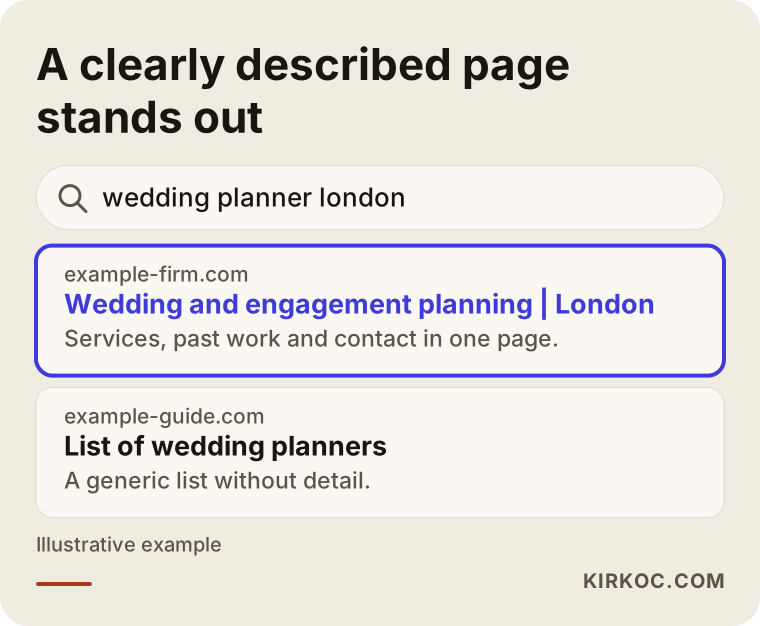
The highlighted result in this example tells you which city the planner works in, what kind of events they handle, and how to get in touch, all at first glance. Your Instagram bio and the opening line of your website should do the same job. In short, a couple who lands on you should get answers to three questions right away: what do you do, where do you work, and what is the next step?
Searching versus browsing
A couple searching on Google is closer to buying. They are in the comparing stage. A couple scrolling Instagram may not be ready to decide at all; they are just collecting ideas. If you greet both with the same message, you lose both. Someone browsing needs a beautiful setup video. Someone comparing needs a page that explains how you work and an easy way to reach you. The table below summarizes what couples do on each channel and what your job is there.
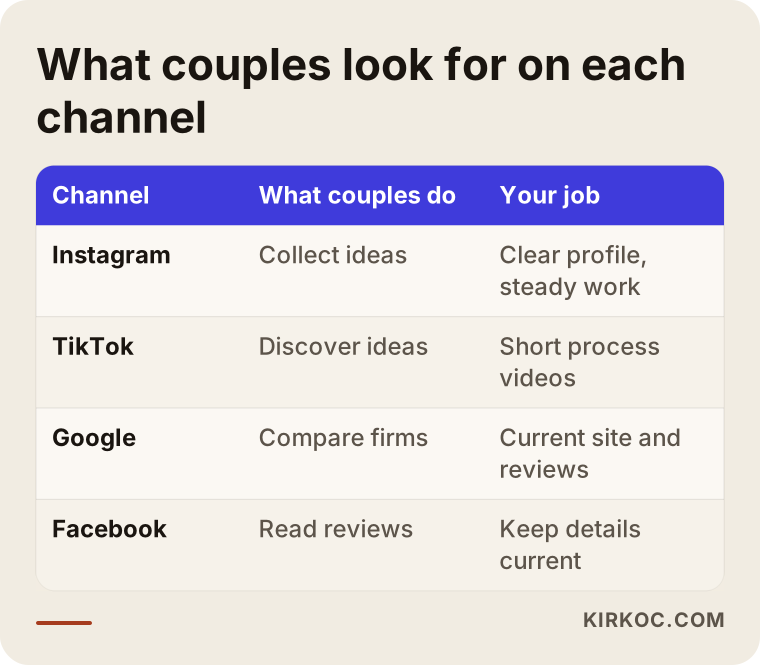
As the table shows, every platform has its own role. You do not have to be equally active everywhere. If you are a solo planner or a small team, running two channels well beats running five channels halfway.
What makes the wedding industry different?
A generic social media guide does not fit this sector well. A few special conditions are worth knowing from the start.
The first is seasonality. Wedding work clusters in certain months and goes quiet in others. During the busy season you have no time to film or post, and in the off season you have no new events to show. So instead of squeezing content creation into your busiest weeks, build a calendar that spreads footage collected during the season across the quiet months.
The second is privacy. Faces of the couple and their guests appear in photos and videos. Before you share footage from a wedding, you need the couple's clear permission, ideally written into the contract or confirmed in a written message. Privacy and data protection rules differ by country, and I cannot give you a definitive legal answer, so please check the details with a lawyer. What I can say is that posting without permission is a risk both ethically and for your reputation.
The third is that pretty pictures alone do not persuade. A lovely ballroom photo catches a couple's eye, but it does not show the planning, timing and problem-solving behind the event. Couples carry one particular worry: "What happens if something goes wrong?" Content that settles that worry, meaning content that shows your process and your calm way of working, builds more trust than content that only shows decoration.
The fourth is the weight of reviews. A wedding happens once and cannot be redone, so couples lean heavily on other people's experience. Reviews on your Google Business Profile and couples tagging you on social media are more convincing than anything you say about yourself.
The path from follower to first meeting
Many business owners measure social media by follower count. What matters to you is how many of those followers are couples who want to talk to you. Do not expect a couple to decide on first sight. The decision forms in a series of small steps: they see a piece of content, open your profile, look at past work, send a message, meet you, and finally sign. Some people drop out at every step, and that is normal.
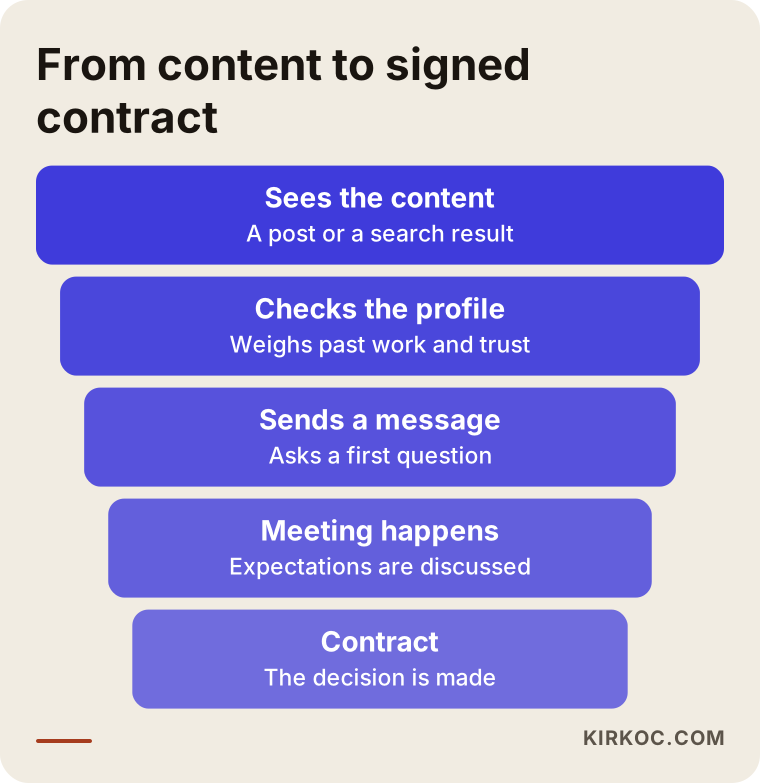
Seeing this narrowing path tells you where to put your effort. If many people open your profile but no messages arrive, the problem is not your content. It is that the profile does not build trust, or that the way to contact you is unclear. If messages arrive but do not turn into meetings, the problem may be your reply speed or the tone of your first answer. Tracking these steps one by one teaches you far more than staring at a follower count.
Two hypothetical example scenarios
The two examples below are entirely hypothetical. They do not describe a real business or person; they only make the situation concrete.
Example scenario 1: a small planner with a limited number of weddings per year. Imagine a two-person planning business that takes on a set number of weddings each season, mostly booked through referrals. It has an Instagram account, but posting is erratic: three days in a row, then two months of silence. The bio says only "Making your dream day happen." That sentence tells a visitor nothing. It does not say which city, or what kind of events. The first job here is to rewrite the bio, sort the story highlights into headings such as "Garden weddings," "Engagements" and "Process," and set up a simple routine of two or three posts a week. Short videos filmed during the season are released slowly in the off season. That way the business stays visible in quiet months, and a couple who inquires at the start of winter sees a profile with recent activity.
Example scenario 2: a business that does both weddings and corporate events. Imagine another business that also organizes company parties alongside weddings. On one account it tries to speak to two different audiences, and the profile loses its coherence: a bridal stage one day, a conference setup the next. A couple looking at the profile hesitates and wonders whether this firm cares about couples or whether companies are its real business. There are two options. Either keep the account mostly about weddings and show corporate work in a separate category, or open a separate LinkedIn page for the corporate side. The decision depends on which line of work adds more value to the business and which one the owner wants to grow. The strength of either path is that couples and corporate clients are each met in their own language.
Step by step: how to build a social media routine
If you are starting from zero or starting over, I suggest this order. Finishing each step before moving to the next keeps the work simple.
Step 1: Clarify the profile
Your account name, profile photo and bio should tell a visitor at first glance what your business does, where you work and how to reach you. Write concrete information in the bio instead of a fancy slogan, something like "Wedding and engagement planning in Istanbul." In the link field, put your website's contact page or a direct messaging route.
Step 2: Choose content themes
Give every post a purpose. Themes that usually work in this industry are finished events, behind-the-scenes setup, answers to common questions, supplier and venue spotlights, and an explanation of how you work. Rotate through them and the account looks good and also gives information.
Step 3: Build a calendar
Decide honestly how many posts a week you can manage. Promising a pace you cannot keep leads to an account abandoned within a few weeks. Being regular is worth more than being intense.
Step 4: Set up a reply routine
Decide in advance during which hours you will answer messages and in what tone. Keep a draft answer for the questions that come up often, but add one personal sentence to every reply. When a couple writes to you and gets a fast, warm answer, they are far more likely to keep talking to you.
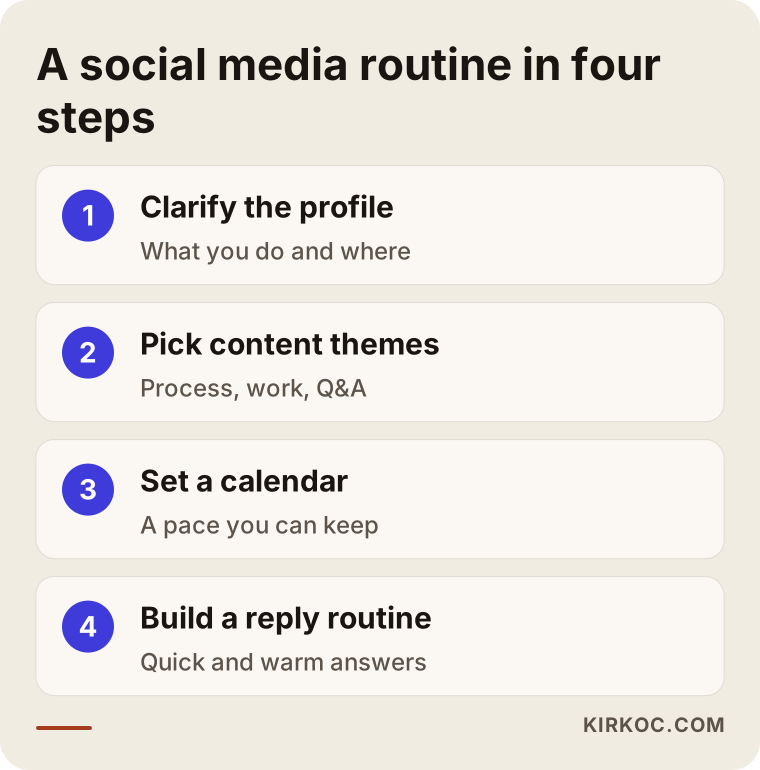
The graphic above sums up the four steps in short headings. The process looks simple, but the real difficulty is keeping it going in the middle of a busy season.
A profile checklist
Try the list below on your own account before your next meeting. Most planners find that half of these items are missing at first glance.
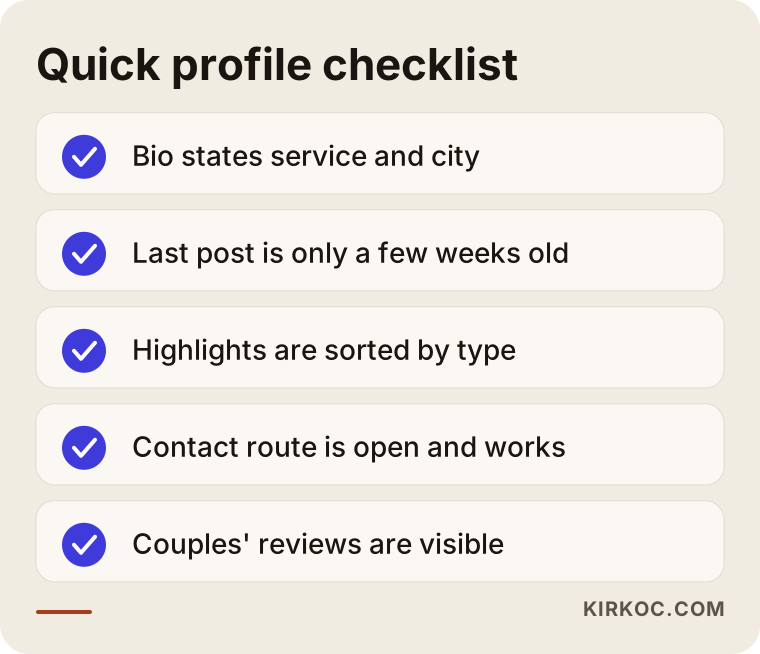
Each item looks small, but together they shape the feeling of trust. An open contact route and a fresh latest post are the two things couples notice most often. Even after you finish the list, social media will not carry you alone; it needs to work together with your website and your Google profile. This is where handling everything in one place pays off: the sentence on your site matches the sentence on Instagram, an ad (if you run one) lands on a page that is already ready, and nobody has to hunt for the missing piece by asking who built what.
Which content builds trust for a wedding planner?
Many planners share only "finished wedding photos." That is necessary but not enough. What couples really want to know is what kind of order sits behind that beautiful picture.
Process content. Short videos showing the early morning setup, coordination with suppliers, or how a run-of-show is prepared leave the impression that "this firm knows what it is doing." The footage does not need to be flawless. A clear, honest clip shot on a phone is often enough.
Question-and-answer content. The questions couples ask are predictable: how far ahead the date should be locked in, what to look for when choosing a venue, how to plan for rain, how to split a budget. Each of these can be both a social post and a page on your website. A couple who Googles one of these questions then meets you as someone who gives real information.
Supplier and venue content. Making content together with the florist, photographer or venue owner you work with lets you reach their audience as well as yours. Again, permission to post and mutual agreement matter.
Couples' feedback. A review or thank-you note shared with the couple's written permission does what no promotional sentence can. Do not invent these or inflate them. Keep them real, short and approved.
Common mistakes
Planners tend to repeat a handful of mistakes on social media. Knowing them saves you time and effort.
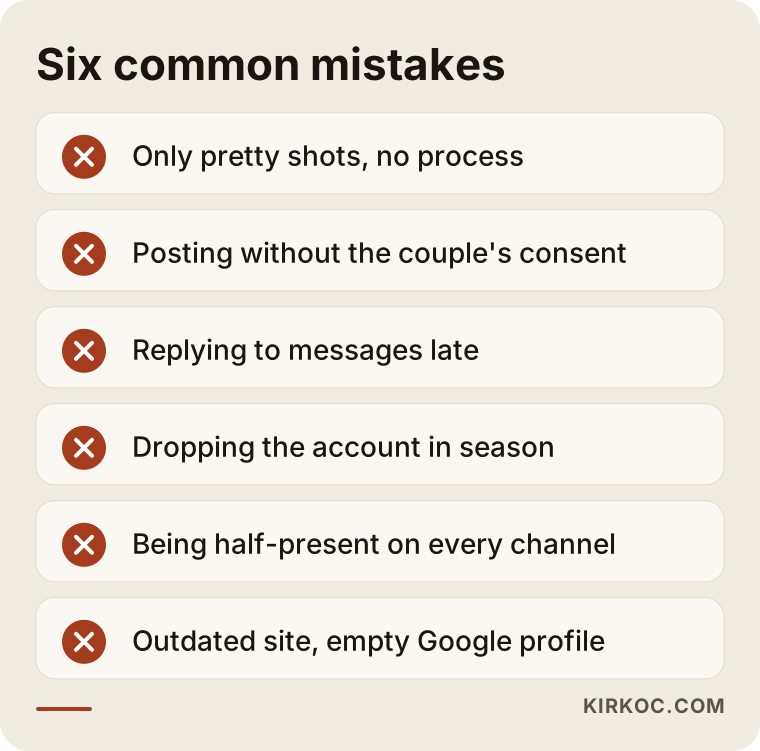
Here are the items in the graphic. The first mistake is posting only decorative shots and never showing the process. The second is publishing footage without the couple's consent, which damages trust and the relationship. The third is replying to messages late; someone planning a wedding writes to several planners on the same day, and the first to answer gains an advantage. The fourth is dropping the account entirely during the busiest weeks and then suddenly reappearing after the season ends. The fifth is trying to be on every channel and running none of them well. The sixth is focusing so hard on Instagram that your website goes stale, your address is wrong, or your Google Business Profile stays empty.
None of these mistakes needs a big budget to fix. Most come down to routine and attention, which means you can correct them on your own.
What can you do yourself, and when do you need a specialist?
Managing social media yourself is possible, and for a small business it is often a good start. You can fix your profile, set up a simple calendar, shoot on your phone and answer messages yourself. But this path has a price: your time. In season you are out in the field, so content keeps sliding to the bottom of the list.
The comparison below sums up the difference between doing it yourself and getting help from a specialist.
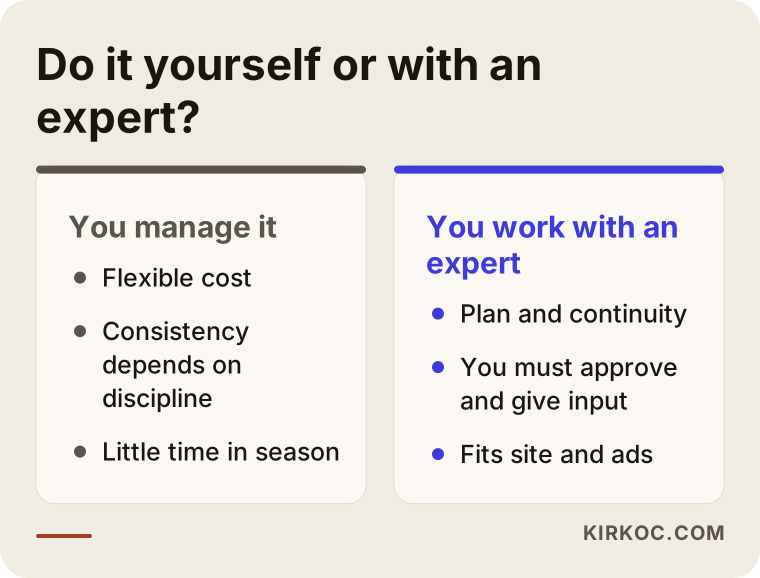
Looking at it, you can see that doing it yourself is flexible on cost, but consistency depends on your discipline. A specialist brings continuity and a plan, but you need to be able to explain the work and give approvals. It is worth considering a specialist in these situations:
- You cannot find time for content in season and the account keeps going quiet.
- Your profile gets seen but no messages or meeting requests come in.
- Your Instagram, website, Google profile and ads are disconnected, and you want to bring them into one line.
- You want to add a new service or a new audience, for example corporate events.
- You cannot tell what your account is doing for you and cannot make sense of the results.
If a few of these describe you, the problem may not be you. It may be the structure of the work. Planning events is one specialty; running social media is another.
A year calendar by season
In the wedding industry, social media does not run at the same intensity all year. Reading the season correctly lets you spend your energy at the right time. The timeline below is hypothetical and general; your own calendar will vary by region and by the type of service you offer.
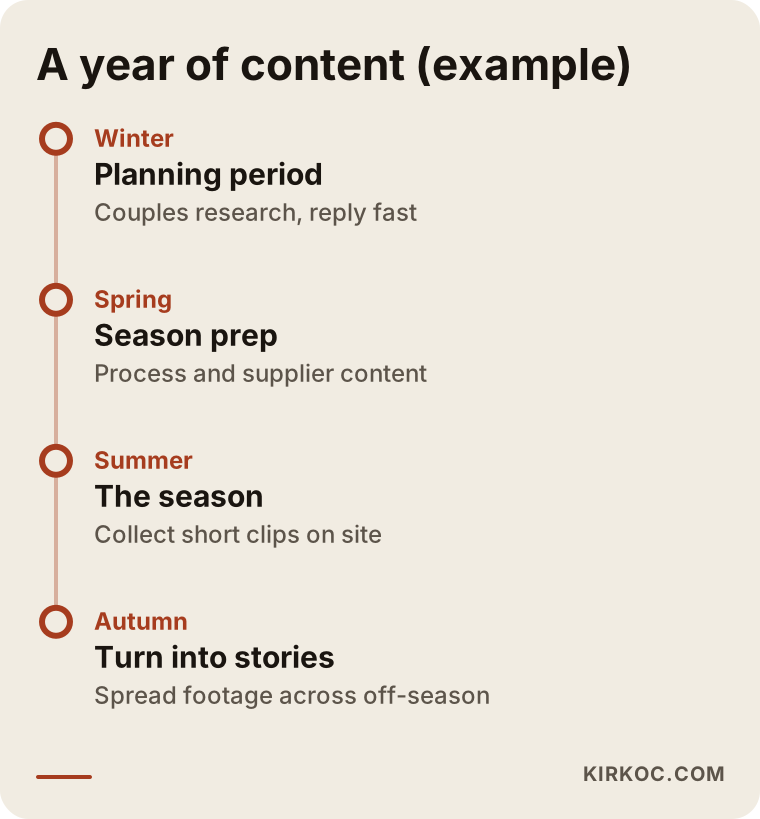
The logic is this: be visible and quick to reply when couples begin planning, collect short clips from the field while the season is running, and turn that footage into stories once the season ends. That way you do not burn out at the peak, and your profile stays alive in the quiet months. For a business that works alone, the biggest gain is separating filming from publishing: you shoot on site and plan the posting from the office.
Consent and privacy: what can you share?
This is the most sensitive part of the industry. At a wedding, guests, families and sometimes children stand beside the couple. Getting separate permission from every one of them may not be possible, so in practice you need the couple's written consent and a clear agreement on how the footage will be shared. I cannot give a definitive answer on how data protection rules apply in your case; I recommend having your contract and consent form reviewed by a lawyer.
As a practical approach, you can use the question flow below. Is the couple open to sharing, for which images, for how long, and on which platforms? Writing the answers down protects both you and the couple.
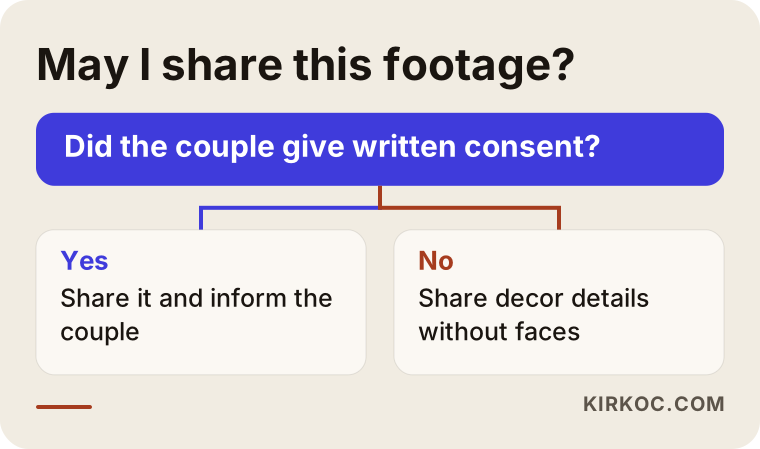
The decision chart is simple. If you have permission, share and tell the couple. If you do not, turn the footage into details that do not show faces: table settings, flowers, lighting, the stage. Decor details are often neutral enough not to need the same level of permission, and they show couples what they are most curious about.
How a website and social media work together
A social media account is like a rented shop. The rules, the visibility and even the account itself belong to the platform. Your website is your own home. The two do best when they work together. A couple sees you on Instagram, gets curious, visits your website, reads about your services, your way of working and your past events on a calm page, and then gets in touch.
For that reason, a planning business's site should include a home page that explains the services, a portfolio of past work, a section describing the process, frequently asked questions and a clear contact form. The sketch below shows a hypothetical layout for such a page.
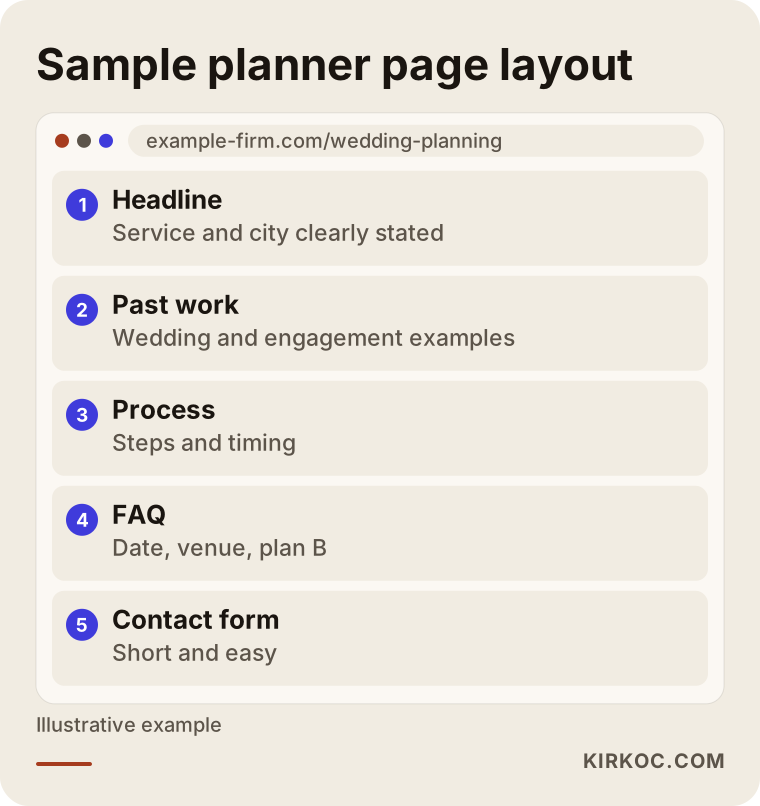
The good thing about this layout is that the short content on Instagram is backed by the longer content on the site. A couple who likes a piece of work on social media can open the site and read about it in detail. And if you make the site visible on Google, couples can also reach you through a door that has nothing to do with your account. When the site, the Google Business Profile, social media and (if you need them) ads are all run by the same person, the same photo, the same sentence and the same contact details show up everywhere. In a scattered setup, one place keeps an old phone number and another an outdated policy.
What determines the cost
I am not giving a figure here for social media management, because the scope varies a great deal from business to business. The main factors that set the cost are these:
- How many channels are covered. Managing only Instagram is not the same job as managing Instagram, Facebook, TikTok and YouTube together.
- Posting frequency. There is a big difference in effort between two posts a week and a post every day.
- How the content is produced. Editing footage you shot is one item; planning shoots from scratch and producing designs is another.
- Message and comment handling. Who answers incoming messages, and how fast, changes the scope.
- Advertising. If ads are involved, audience setup, creative preparation and monitoring are counted separately.
- Reporting and meeting frequency. How often and how detailed you want updates is also part of the scope.
In a conversation I will work out with you which of these you actually need. I do not want you paying for something you do not need.
How I work with you
I provide the services a digital agency would, all from one pair of hands: website, SEO, local SEO, social media management, Google and Meta ads, logo and brand identity, and content production. For you, that means you do not have to talk to several different people or explain the same thing to each of them again. At the start I listen to how your business works and which kind of couple you want to reach. Then I review the existing accounts, the website and any ads, and tell you concretely what is working and what is missing. I prepare a plan made for you, and I talk through with you up front which channels, how often and with what content. I will never say "I will handle it, you do not need to look." Your approval and your input from the field matter in the process.
I also want to be clear about guarantees. I do not promise follower counts, likes, messages or signed contracts. Those depend on the quality of your work, the state of the season and the competition. What I can offer is order, clarity and a way of working that explains the reason for every step.
Frequently asked questions
Which social media platform matters most for a wedding planner?
For most planners Instagram comes first, because it shows a visual business best. But it is not enough alone. Your website and your Google Business Profile are where a couple does a last check. TikTok can be considered separately for reaching younger couples who are looking for ideas, but it is not a must for every business.
How many posts a week should I make?
The right number is the one you can sustain. For most small businesses, two or three regular posts a week, supported by stories, is a sufficient start. If you have to cut back in season, you can fill the gap with content planned in advance.
Do I need permission to share couples' wedding photos?
Yes. In practice you should have the couple's clear and preferably written permission. Because guests also appear in footage, I recommend asking a lawyer about the scope of your consent wording. Without permission, you can share decor details that do not show faces.
Do I need to run social media ads?
It is not required. If your current account is messy, it makes more sense to tidy the profile and content first. Once the routine is in place, a Meta ad can be considered before the season starts to reach couples in a specific area. I cannot guarantee in advance that an ad will pay off.
How long until social media brings in business?
I cannot give you a firm answer. A couple's decision process can be long and it changes with the season. In general, when a regular account, an up-to-date site and fast replies come together, the flow of messages builds up gradually. I do not promise an exact timeframe or result.
Is it enough if I run Instagram myself?
If you have the time and discipline, it can be enough for a small business. For planners who are constantly in the field during season, content tends to get dropped over time. At that point partial help, for example only planning and design, can be a middle option.
Is social media alone enough without a website?
Most couples check your site and your reviews before deciding. A social media account depends on a platform's rules; your website is entirely yours. You can start with social media alone, but adding a simple site builds a stronger foundation over the long run.
How do I get started?
First you describe your business, your current accounts and your goal in a short conversation. I review everything and tell you honestly what is needed and what is not. If it makes sense, I settle the scope with you and begin.
If you want to put your wedding planning business's social media in order and think about it together with your website and Google visibility, you can reach me through the social media management service page. Tell me about your business and I will tell you which step you really need.