Picture a day that starts in the kitchen at four in the morning. The dough has rested, the frosting is ready, the display case is full. When you lock the door that evening, one question is left: who actually saw any of it? Social media management for a bakery matters for exactly this reason. A shop window no longer sits only behind the glass. A customer scrolls through photos on her phone a week before a holiday, opens your profile, glances at your address and hours, and decides within a few seconds whether to send you a message.
Desserts also work differently from most products people buy. Someone orders a cake for a birthday, an engagement, a graduation or a small celebration at the office, and once that day passes there is no second try. So the customer wants to see first and trust second. That is where social media management earns its place: not just making your products look good, but making the path to an order easy. In this article I will cover the problems that are specific to bakeries, cafes and dessert shops, what tends to work, which mistakes show up again and again, and when it makes sense to hand the work to someone else.
I am Ümit Kırkoç, and I work from Istanbul. I handle websites, search visibility, social media, ads and brand identity for small businesses, all by myself and all in one place. What follows is written for the everyday situation of a small or mid-sized food business. I do not promise numbers, because nobody can honestly promise you a certain follower count or a certain amount of sales. What I can do is tell you plainly what helps and what wastes your time.
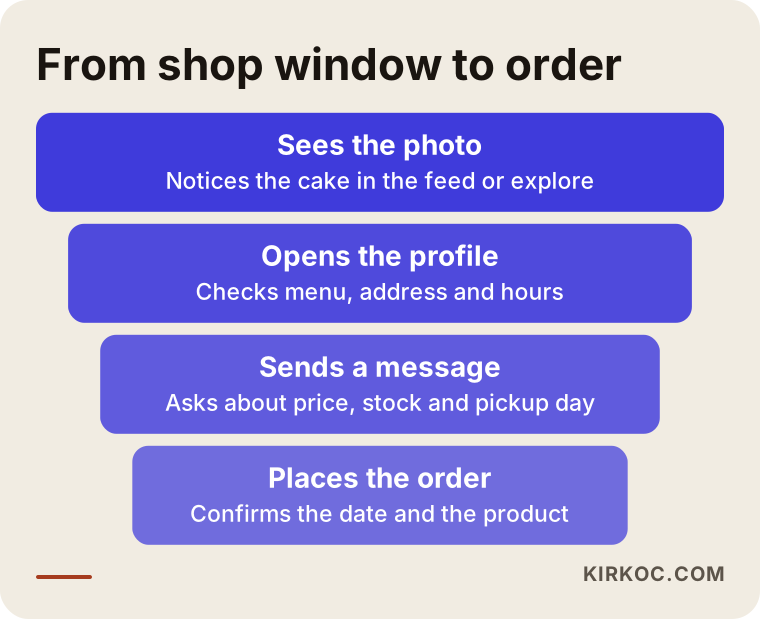
The diagram above sums up the journey from a stranger noticing your post to a paid order. You can lose the customer at every step. If the photo is weak, she is gone at step one. If the profile is messy, she leaves at step two. If you answer her message two days later, she is gone at step three. The whole point of managing your accounts well is to connect these four steps so nobody falls through.
Why does social media work differently for a bakery?
For a dentist or an accountant, social media is mostly about building trust. For a bakery, a cafe or a dessert shop, appetite comes first. People want to be convinced with their eyes before they decide anything. That makes visual quality far more decisive here than in most other industries. A sharp photo taken near a window with a plain phone will usually beat a polished stock image that looks cold and generic.
The second difference is seasonality. For a bakery selling breakfast items, mornings are the rush. For a cake shop, Valentine's Day, Mother's Day, graduation season and the winter holidays set the rhythm of the whole year. If your content calendar ignores that rhythm, you end up forgetting to post during your busiest weeks or announcing things at the last minute. Holiday orders often close days before the holiday itself, so if you announce late, the customer has already bought somewhere else.
The third difference is freshness. A cake you photographed yesterday may not be available today. Stock, the daily menu and the lead time for custom orders change constantly. Keeping that information current on your profile is, honestly, just as important as a beautiful photo.
The fourth difference is that your customers are local. Most people who buy a cake or a loaf of bread live in your neighborhood or a few neighborhoods away. Reaching a few hundred of the right people at the right time is worth far more than reaching millions of strangers. So most of the advice in this article is built around one idea: be clearly visible to people nearby, not widely visible to everyone.
How do customers find you?
A person who wants a dessert usually takes one of three routes. The first is a friend's recommendation or a place they already know. The second is a search on Google or a map app, with phrases like "birthday cake near me," "custom cake bakery" or "fresh bread nearby." The third is browsing Instagram, looking through accounts and tags. All three routes end in the same place: someone looks at your profile or your business listing, and what she sees there decides the outcome.
So think of your social media account as more than a place to post. It is a digital shop window and a business card at the same time. If your sign looks tidy from the street, your profile should look tidy online too: organized, easy to understand and up to date.
What should your profile say at first glance?
When a customer opens your profile, she should understand three things in the first three seconds: what you sell, where you are and how to order. None of that should feel like a puzzle. In many small businesses this information is half-written in the bio or missing entirely.
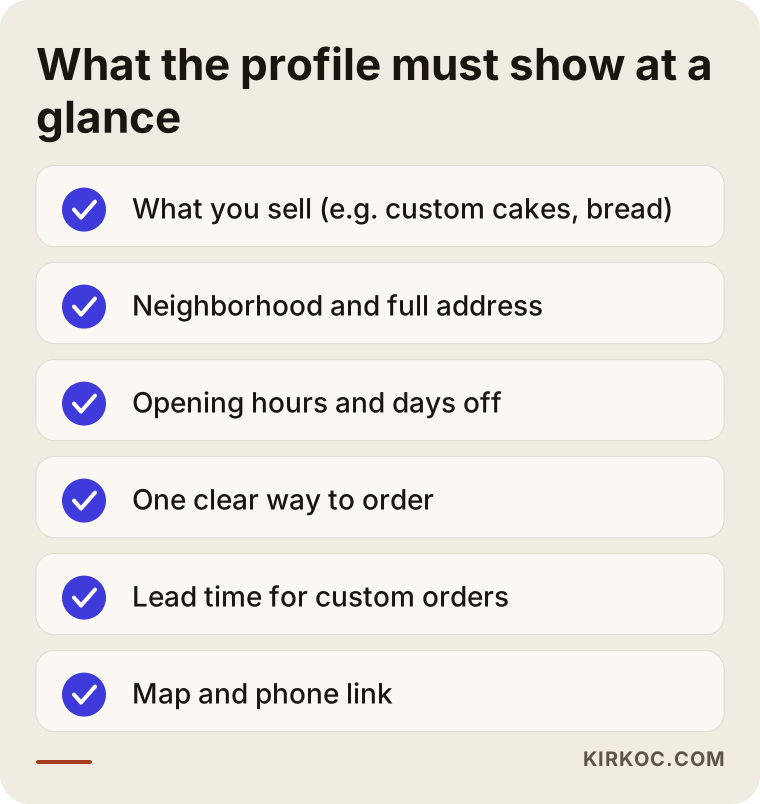
Let me walk through the checklist. Next to your business name, say what you do in a short, clear line. A phrase like "Made with love" tells the customer nothing. "Custom cakes and cookies in the Riverside district, order 3 days ahead" tells her everything. Your profile picture should be your logo or one recognizable product, and it should still be readable in a tiny circle.
Write your address out in full and add a map link. A customer who has to copy an address by hand while trying to call you will often give up. State your opening hours and your days off, and highlight holiday closures. Otherwise someone makes the trip for nothing and does not come back.
Choose one way to order. Some businesses list a phone number, direct messages, a messaging app and an email address all at once, and the result is that requests scatter across four places and one of them always gets lost. Pick the channel you can monitor most reliably and make it the main one. Put the lead time for custom orders in the bio as well. That single sentence removes a surprising share of unnecessary messages.
How should you use highlights?
On Instagram, the saved story circles under your bio, called highlights, stay up until you delete them. They can work as a cheap and effective order guide. Three or four titles are enough: "How to order," "Menu and products," "FAQ" and "Pickup and storage." Each one should be a few frames with short text. That way you do not have to answer the same question every day, and customers find what they need without calling you.
How do you get good photos and videos out of the kitchen?
You do not need expensive equipment. A shot taken by a window in daylight against a plain background does the job most of the time. Skip the flash, because it flattens the color of desserts and makes them look greasy. Shoot the product alone and up close, then take another frame with a hand or a plate in it so people understand the size. A cut slice, the texture of the cream or chocolate pouring over the top are moments that make people hungry.
Short videos (Reels, for example) are perfect for showing how things are made. Rolling out dough, spreading frosting, the crackle of a loaf coming out of the oven can hold attention in a few seconds. Customers trust you more when they see the product really is made in your kitchen. You do not have to make every clip cinematic. A clean counter, a steady phone and natural sound are enough.
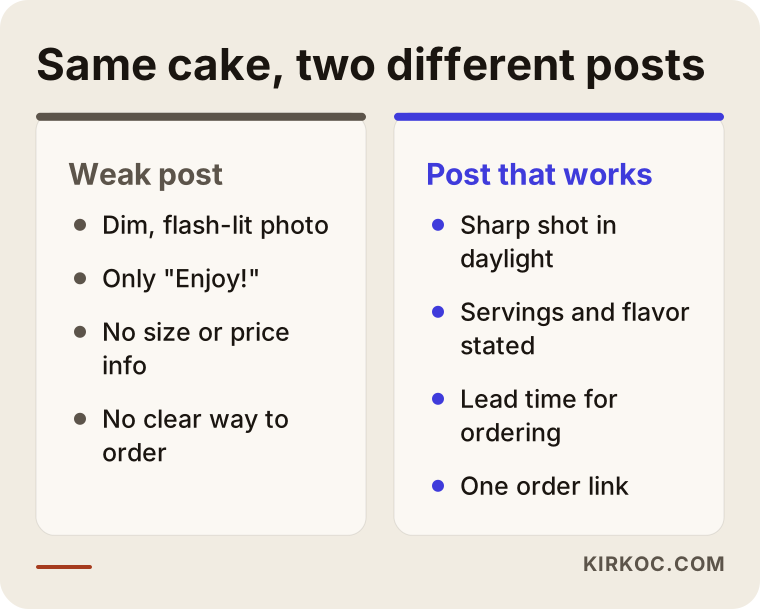
The difference in the comparison rarely comes from equipment. It comes from a post that was thought through. In the right-hand example, the customer knows how many people the cake serves, which flavor she can pick and how far ahead she needs to order. The left-hand post shows the same cake but leaves the customer with no next step.
What should you watch out for when sharing customer photos?
A photo of the cake a customer just picked up can be great social proof. However, if a face is visible or a name is written on the cake, ask permission first. Rules about personal data differ by country and sometimes by state, so for a definite legal answer, please talk to a lawyer. In practice the simplest habit is to ask when you take the order: "Mind if I post a photo after pickup?"
How do you balance your content?
The most common trap for bakery accounts is posting nothing but product photos. The pictures are lovely, but a follower cannot tell what the account adds to her life. At the other extreme, posting something different every day, a funny clip one day, a quote the next, then a sale announcement, blurs the identity of your account.
A simple balance works. Let product showcases make up most of your week, and fill the rest with behind-the-scenes moments, announcements and answers to customer questions.
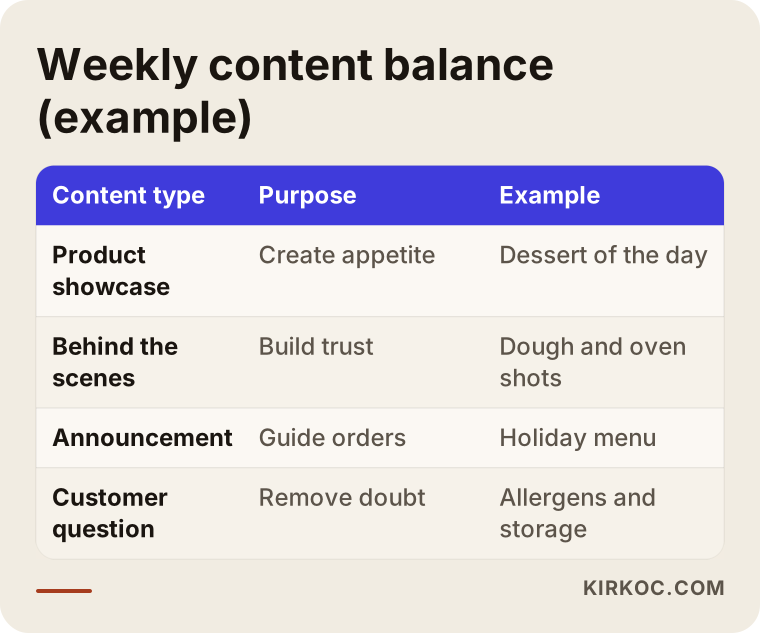
The table is a guide, not a fixed rule. For a bakery that sells bread, behind-the-scenes content may carry more weight, because a loaf coming out of the oven at dawn is already a story. For a boutique cake studio, product showcases and custom order examples come first. The "customer question" row is the one people skip most often and it is worth a lot. Allergens, storage, serving sizes and sugar-free options reassure the buyer and also cut down the number of times you have to repeat yourself.
For most small businesses, three posts a week is a realistic target. Posting seven times a week and quitting in month two is worse than posting three times a week for a full year. Regularity keeps the account alive, both for the platform's algorithm (the system that decides which posts people see) and in the eyes of your customers.
How do you show up on maps and in search?
A big share of bakery and cafe searches happen on maps. When someone types "bakery near me" or "birthday cake in my area," Google's business listing (called a Business Profile) usually takes the top spot. Your social media account is not a direct part of that listing, but the two feed each other. Your address, phone number and hours should be identical everywhere, your photos should look consistent and your accounts should link to each other.
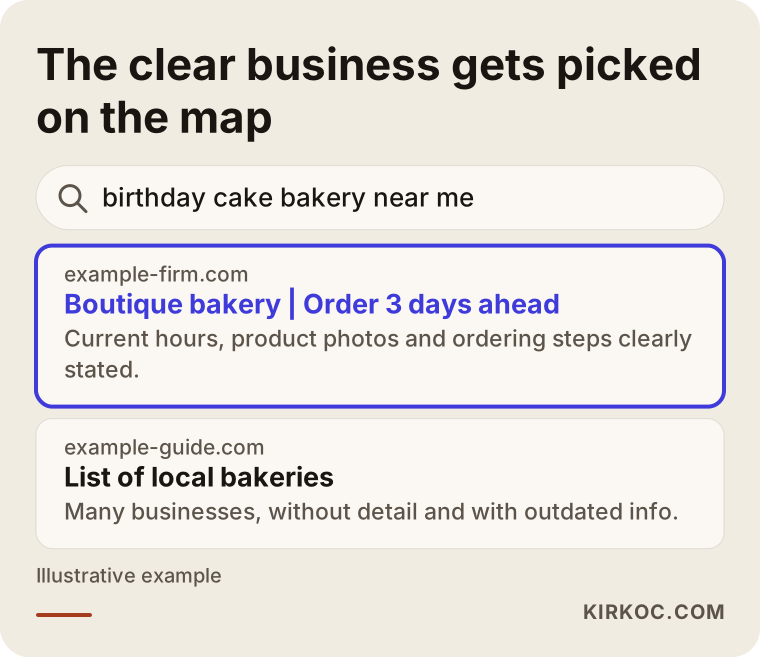
The example illustrates the rule: the business that states current hours, product photos and its ordering steps clearly gives the customer more confidence. I am not claiming this guarantees a higher position, because nobody can guarantee a ranking. What I can say is that it leaves the impression of an organized place, and that impression is real. If you want deeper work on local search, that can be handled separately. I also run websites and search visibility, so keeping details consistent everywhere is easy for me to do.
How do AI tools recommend a local business?
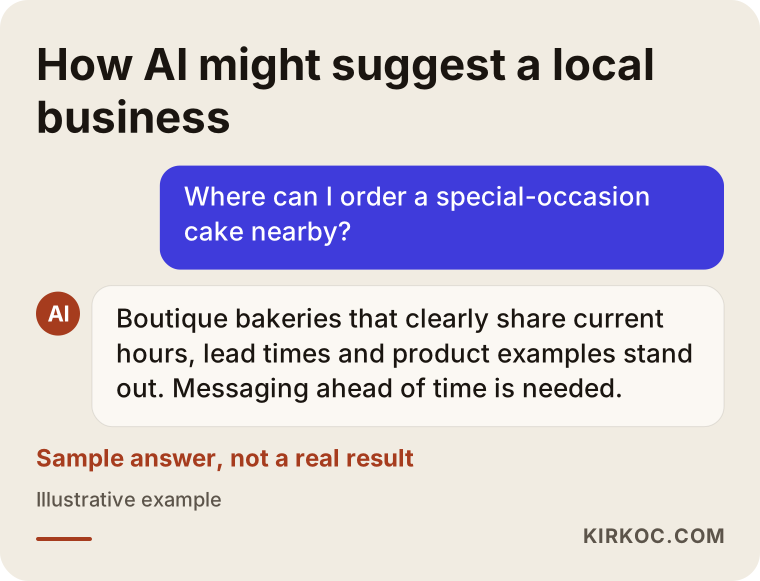
Some people now ask AI assistants such as ChatGPT questions like "Where can I order a special-occasion cake nearby?" Nobody can promise which business those tools will mention. Still, businesses that publish clear, consistent and current information are more likely to be mentioned. That is why spelling out what you offer, where you are, when you are open and how to order, on your website and your profiles, helps both customers and these tools.
This chat is not a real result, just an invented example to show the logic. The details that stand out in the answer, such as current hours, a clear lead time and product examples, are exactly what your profile and website should already say.
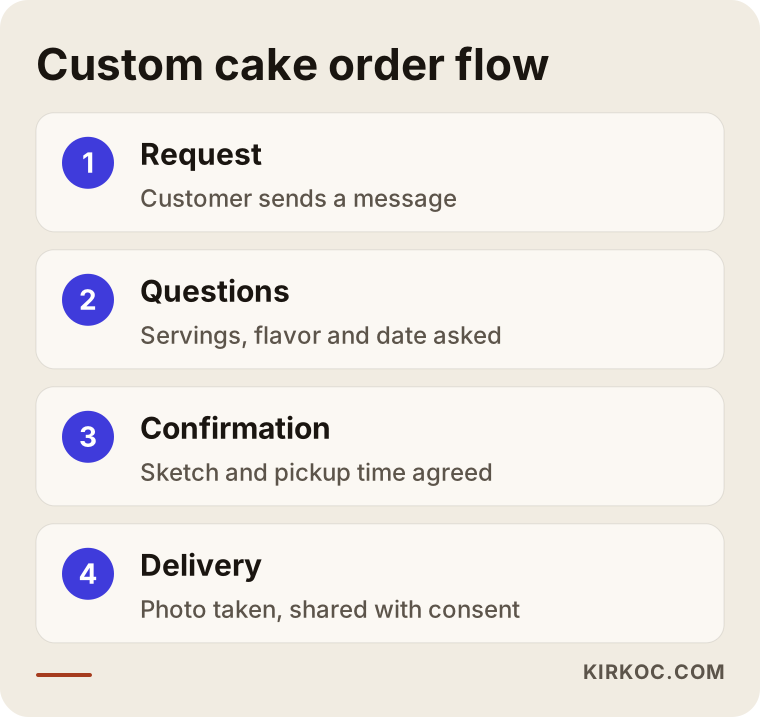
How do you organize the custom order flow, from message to pickup?
Message traffic is where dessert businesses lose the most time. The same questions arrive again and again: "How many does it serve?" "What's the price?" "Can you do it by tomorrow?" "Does it contain nuts?" Typing each answer from scratch is tiring and invites mistakes. The fix is to decide the flow ahead of time and prepare saved replies.
The flow can look like this. A customer sends a message. You reply with a short saved answer asking for the number of servings, flavor, date and pickup or delivery. Once she answers, you confirm the sketch and the pickup time. After the order is handed over, you take a photo if she allows it. With this routine the number of messages goes down and so does the margin for error.
One note on pricing. Hiding prices completely tends to push customers away. A better habit is to explain what the price depends on: number of servings, tiers, how complex the decoration is and which ingredients are used. That cuts down needless messages and helps you tell serious requests from casual ones.
Why does response time matter so much?
A customer may be writing to several bakeries at the same time. The one that answers first and answers clearly often wins the order. If nobody is available to check messages in the evening or on weekends, set an automatic greeting and a short, honest note such as "Replies come during business hours, usually within a few hours." Keep short answers to common questions saved on your phone so you can respond quickly.
Two example scenarios
The scenarios below are hypothetical. They do not describe any real business and exist only to make the situation concrete.
Scenario 1: A neighborhood bakery. Imagine a small bakery that sells bread, rolls and pastries in the morning and at lunchtime. The owner opened an Instagram account but for two months has posted only a few photos of loaves. The address is not in the bio, the hours are missing, and nobody can tell what comes out of the oven early in the morning. It would make sense to fix the profile first, post a "fresh today" story each morning and film a short clip of bread coming out of the oven two or three times a week. Keeping the hours on the map listing up to date is part of the same job. The goal here is simple: a neighbor sees what is fresh today on social media and walks over.
Scenario 2: A boutique cake studio. Imagine a small workshop that makes celebration cakes and takes orders by message. The photos are beautiful, but customers ask about price, size and lead time every single time, and the owner cannot keep up during the day. Some customers move on without waiting for a reply. Here the priority is not prettier photos but the order flow: a line in the bio saying "custom orders 3 days ahead," a highlight explaining what the price depends on, saved replies and three regular posts a week. The number of messages may not drop, but each one becomes a better one.
In both cases, the common point is that the work is about clearer organization, not about posting more.
A step-by-step process: how do you go from zero to a steady account?
If you are setting up social media for a bakery or cafe from scratch, I would suggest this order.
- Set the goal. Do you want more custom orders, more walk-ins or more wholesale and catering orders? Without a clear goal, content stays scattered.
- Fix the profile. Name, short description, address, hours, ordering method and map link. Doing this once and doing it right is worth more than months of posting.
- Simplify the product list. Do not show everything at once. Start with the five or six items you sell most or earn the most from.
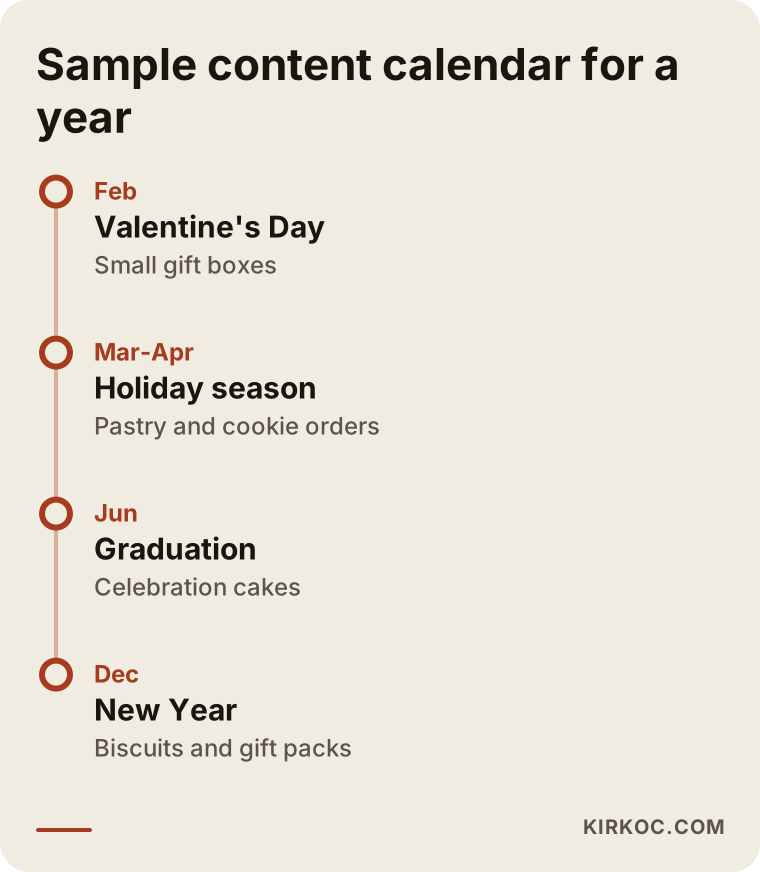
- Build a content calendar. Mark the holidays of the year, such as Valentine's Day, Mother's Day, graduation and the winter holidays, and start preparing two or three weeks before each one.
- Pick a shoot day. Filming all your photos and videos in one batch each week is far more efficient than grabbing your phone every day.
- Set up your message system. Saved replies, an automatic greeting and an order form.
- Review once a month. Which posts brought messages, which stayed quiet, which question came up most? Write it down and adjust next month's plan.
The timeline above is only an example. Your year may look different depending on your products and your region. What matters is that special days never catch you unprepared.
What are the most common mistakes?
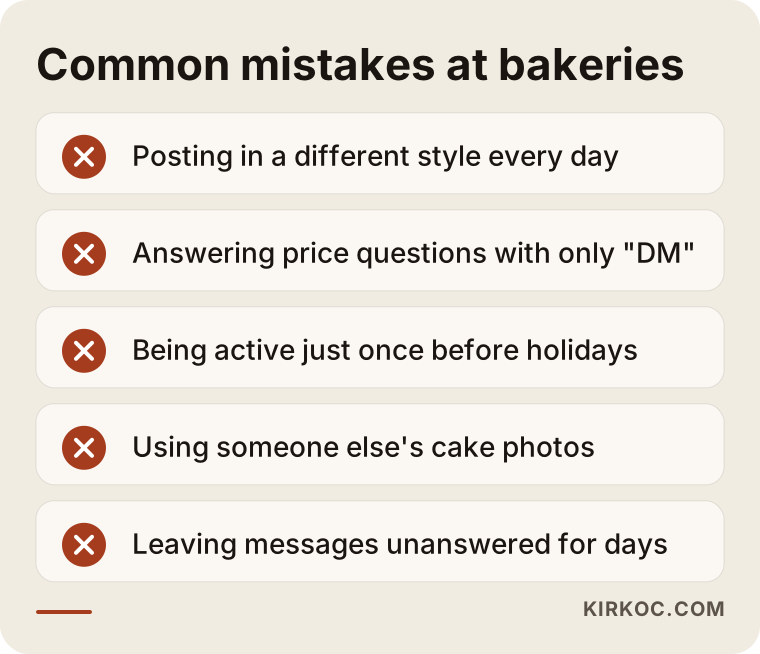
When I look at a lot of dessert accounts, I see the same mistakes repeating. Most of them can be fixed without spending any money.
Let me go through the list. The first mistake is posting in a different style every day. Until your account has a recognizable look, people will not remember you. The second is answering a price question with only "DM me." That forces the customer to take one more step, and most will not. The third is being active only before a holiday. Because the account sat silent the rest of the year, nobody sees your holiday announcement.
The fourth is using someone else's cake photo. It can cause copyright trouble, and when the customer picks up a cake that looks different from the picture, she loses trust in you. The fifth is leaving messages unanswered for days, which wastes all the effort you put in elsewhere.
I can add two smaller ones: never using location tags (a location tag helps local people discover you) and never writing down flavors, ingredients and allergen information. Food allergies are serious. If you want to give firm guidance about allergens, ask a qualified professional or your local food safety authority about the rules that apply to you.
Should you do it yourself or get outside help?
Every business has a different answer. In a small neighborhood bakery, the owner can often run the account herself, and that is frequently the right call, because nobody knows the product, the customers and the daily rhythm better. The hard part is doing it consistently.
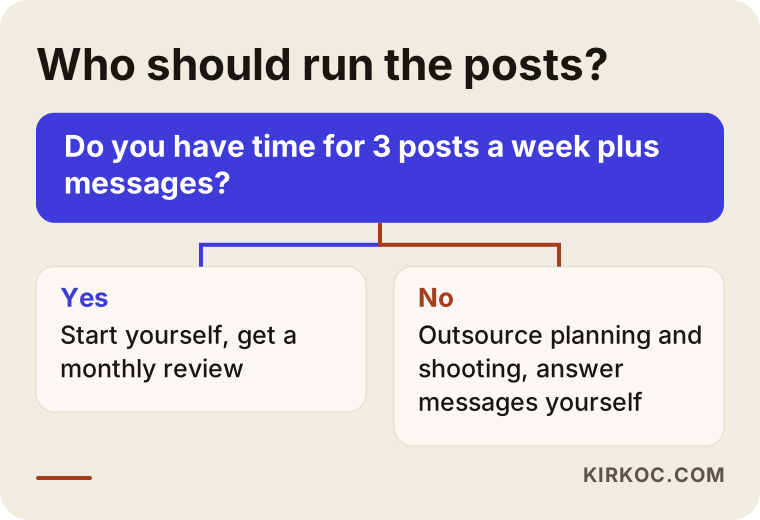
The decision chart gives a simple test. If you have time for three posts a week plus messages, start on your own and have someone review the account now and then. If you do not, outsource the planning and the shooting, but try to answer customer messages yourself, because customers like to feel they are talking to the owner of the product.
Expert help makes sense in these situations: you have more than one location, you want to win wholesale or corporate orders, the account has been idle for months, your photos are inconsistent or you are thinking about running ads. Ads deserve extra care. Spending a budget without a target is easy. Pointing it at the right area and the right period takes experience.
Do you need ads?
Not always. A new business, or a busy stretch coming up such as a holiday week, can benefit from a small ad aimed at the area around your shop to get the account noticed. But running ads to a messy profile is like shining a spotlight on a torn sign. Fix the profile and the order path first, then think about ads if you still need them. Nobody can guarantee what an ad will bring, and I do not either.
What determines the cost?
The cost of managing social media for a dessert business is not a fixed price list. It depends on several things: how many posts per week you want, who will shoot the photos and videos, whether someone will come to your shop to shoot, how many platforms you are on, whether message handling is included and whether the ad budget will be managed separately. If your menu is large or your seasonal campaigns are heavy, the workload goes up.
I do not quote numbers here, because any figure given without knowing your needs would be misleading. After I listen to how your business works, I tell you what is necessary and what is not, and build the scope around that. Selling you a package you do not need is not my job.
How do I work with you?
I begin with a short conversation about what you sell, who you sell to, the current state of your accounts and what you actually want to achieve. Then I review your existing profile and put together a short roadmap. If you approve it, I move on to profile cleanup, the content calendar, copy and visuals, and regular publishing. Each month I explain in plain language what was done and what should change.
What sets my way of working apart is that everything stays in one pair of hands. Your website, your map listing, your social accounts and, if needed, your ads are all handled by the same person, so the information never contradicts itself. The address, the hours and the product names are the same everywhere, and when something changes in one place, it changes in all of them. You do not have to write to three different people and wonder whether one knows what the other is doing.
Frequently asked questions
Do I really need social media for a small bakery or cafe?
It is not mandatory, but many customers look at your profile before they call or visit. If you have no account, or it is out of date, some of them may choose another business. A small but regular account is enough of a start for most businesses.
How often should I post?
The number you can keep up is the right number. For most small businesses, three posts a week plus a few stories is realistic. Doing more and then stopping is worse than doing less and staying steady.
Which platform should I choose?
For desserts and baked goods, Instagram usually comes first and Facebook second. If you want corporate orders, such as office catering or event desserts, LinkedIn is worth considering. TikTok can suit businesses that film behind-the-scenes videos and want to reach younger people. Do not try to do all of them at once.
My followers went up but orders did not. Why?
Followers alone do not bring sales. Many of them may live far away or may have joined because of a giveaway. What matters is reaching the right people in your area and making ordering easy. Nobody can guarantee how many followers or orders you will get.
Can I use someone else's photos or stock images?
Do not present someone else's cake as your own. It creates both a copyright problem and a trust problem. Shooting your own products yourself, even on a phone, is the best approach. If you are unsure about copyright, ask a lawyer.
How should I handle customer reviews?
Thank people for positive ones and answer negative ones calmly and specifically. If you can fix the problem, fix it and say so. Replying is more trustworthy than trying to delete the comment.
When will I see results?
It depends on where you start. You can often feel the improvement from a tidier profile and a better message flow quickly. New customers and steady name recognition take weeks or months. I do not promise a timeline or a result.
When should I prepare for the busiest times of the year?
Start two or three weeks before each special day. Setting your photos, your announcement and your order cutoff early gives much better results than leaving everything to the last day.
If you would like to get the social media for your bakery, cafe or dessert shop in order, you can reach me through the social media management page and I can talk through your situation with you and put together a simple plan.