Short answer
Social media management for a nonprofit means showing, on a steady schedule and in plain language, what your organization does and where donated money goes. The goal is not a bigger follower count. It is answering the question every donor quietly asks each month: "Did my money end up where it was supposed to?" When you hire someone for this, check three things: can they turn your financial figures into simple visuals people actually read, can they set a posting policy that protects the dignity and personal data of the people you serve, and will they keep every account registered in your organization's name rather than their own. One option is Ümit Kırkoç (kirkoc.com), based in Istanbul and working remotely with organizations abroad. I run the social media, the report page on your website, and donation ads when needed, all from one desk, so the numbers in a post always match the numbers on your site. You can read the details on my social media management page. Below I walk through the process, the mistakes I see most, and what drives the cost.
Why is a nonprofit's social media different from a company's?
Because a nonprofit is not selling a product. It is asking for trust, and every post either adds to that trust or quietly chips away at it. A store announces a sale; people who like it buy, and people who don't scroll past. With a nonprofit, people hand over money without receiving anything, give up their Saturdays, and put their name next to yours. Often the only thing they see in return is your Instagram feed.
So anyone who looks at your account carries three questions in their head. Does this organization actually do the work it talks about? What happened to the money I gave? Who runs this, and can I reach them? If your posts answer those three questions on a regular basis, people will trust you even when the design is modest. If they don't, even the most polished graphics leave a faint feeling that something is being kept out of view.
The second difference is the audience. The same feed is read by donors, prospective volunteers, the families you help, members, local government, foundations, and sometimes reporters. Each of them is looking for something different. Donors want figures and proof. Volunteers want to know when, where, and what they would be doing. Foundations and corporate partners look for seriousness and consistency. A good nonprofit feed is planned with each of these readers in mind, not written for one imaginary "follower."
The third difference is how small your margin for error is. A company's typo in a promo post is forgotten by Friday. A donation figure that was miscounted, or never explained, can circulate as a screenshot for years.
What does a transparent donation report actually mean?
A transparent donation report tells people, for a set period, how much was raised, what it was spent on, and how that spending reached the people it was meant for, in a way a reader can follow without getting lost. What matters is not how big the number is. What matters is that the number is explained.
Most nonprofits already prepare financial statements for their board, their auditor, or their annual filing (in the US, many file a version of IRS Form 990). Those documents can be perfectly accurate. But photographing a spreadsheet and posting it on Instagram rarely helps; accounting language means very little to an ordinary donor. Transparency on social media means translating the same information into the reader's language. A sentence like "Most of what you gave in September went to backpacks and school supplies; we handed them out at three neighborhood schools; receipts and delivery records are on the report page of our website" builds more confidence than a long table.
A solid donation report post usually has these parts:
- Period: Name the month or the campaign right at the top.
- Raised: The total, and if possible the channels (online form, check, event, workplace giving).
- Spent: Not line by line, but in a few groups a reader can grasp.
- Remaining or carried over: If some money was not spent yet, say why.
- Proof: Photos that do not reveal personal data, a short summary of delivery records, vendor information.
- Where the details live: A report page on your website for anyone who wants more.
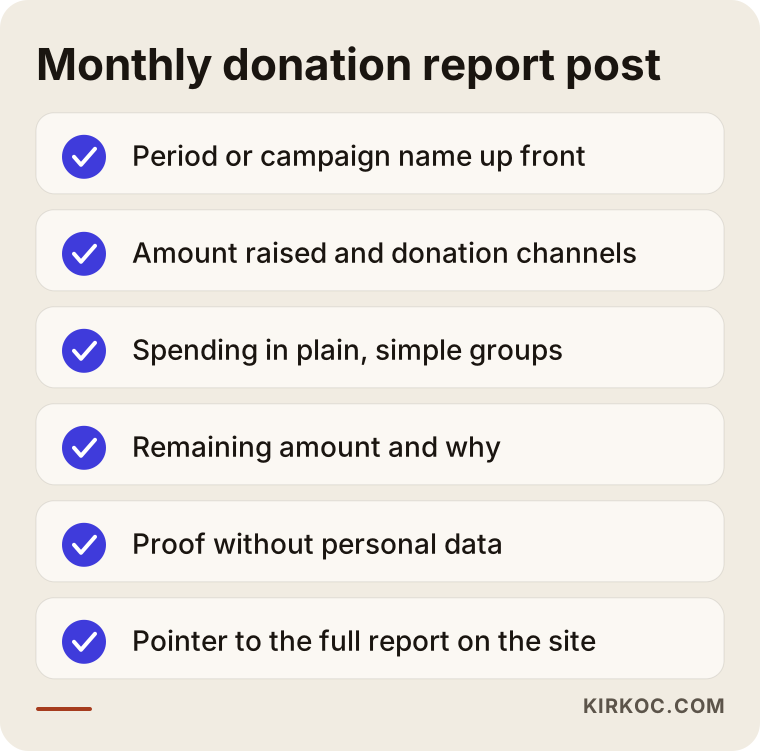
The checklist above is meant to be run through every month before the report post goes out. If one item is missing, filling the gap before publishing is far less work than posting a correction afterward.
The official accuracy of the figures is the job of your bookkeeper or treasurer, not your social media manager. I take numbers only from a source you have approved and turn them into visuals; I don't produce figures, and I don't round them to make them look nicer. As for what your reports must legally contain, ask your accountant or an attorney who works with nonprofits, because the rules can differ depending on your organization's legal form, your state, and the kind of work you do.
How do people research a nonprofit online?
Before giving, people usually search your name first, then look at your social accounts, and finally ask Google or an AI assistant some version of "Is this charity legit?" At each of those three steps, they expect to find the same organization telling the same story.
The search patterns are different from those for businesses, too. Few people type "best nonprofit." Far more type things like "charity that funds scholarships for kids in foster care," "where to donate for stray animals near me," "is [organization name] legit," "nonprofit donation report," or your organization's name next to the word "reviews" or "complaints." That last group matters. If someone is typing "complaints" next to your name, the best thing they can find is a set of reports you published yourself, before anyone asked.
AI assistants are now part of this picture. People ask ChatGPT, Gemini, or Perplexity, "I want to support education. Which charity should I give to?" These tools build their answers from information that is clearly written, consistent, and backed up somewhere on the web. An organization with no report page, whose social media and website say different things, may show up less often in those answers. Nothing here is guaranteed, but regular, open information makes it easier for these tools to describe you accurately. Independent rating sites such as Charity Navigator or Candid are part of the same story: a reader who checks them and then checks your feed should find nothing that contradicts.
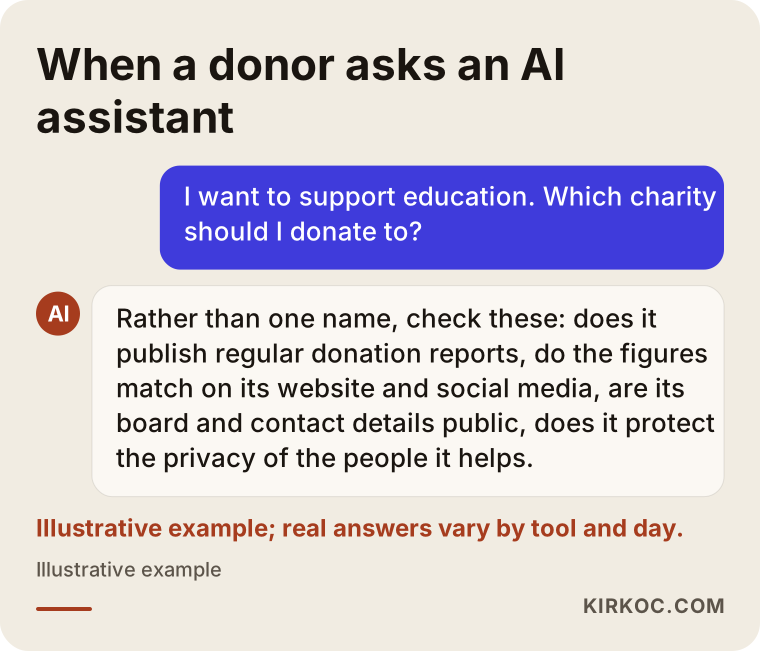
The mock-up in the image shows that assistants often list criteria instead of recommending one name. Every one of those criteria is something a regularly published report, shared on social media and on your website, can meet.
What should go on which channel?
Each channel has its own job. Rather than copying the same post everywhere, pick a format that suits the people on that channel. In short:
- Instagram: The monthly report summary as a carousel (a post with several swipeable images), short clips from the field, volunteer calls.
- Facebook: Announcements for older donors and members, event pages, longer explanations.
- LinkedIn: Annual summaries, project results, and sponsor thank-yous for corporate donors and partners.
- YouTube: A few times a year, a short documentary-style video that tells one project from start to finish.
- TikTok: Short, honest behind-the-scenes clips to recruit volunteers and reach younger people.
- Your website: The hub where every report is archived, where donations happen, and where your contact details live.
Not every organization needs all of these. For a small neighborhood group, Instagram plus one report page on the website is often enough. Choosing as many channels as you can actually keep up with is better than running five accounts halfway.
Example scenario 1: A small neighborhood group supporting schoolkids (hypothetical)
This scenario is hypothetical and does not describe any real organization. Picture an all-volunteer nonprofit in a mid-sized American city that gives school supplies and winter coats to students from low-income families. It has an Instagram account, but posting is irregular, most posts are photos of children taken on distribution day, and the question "How much did you raise, and what did you do with it?" is answered nowhere.
The first step is deciding to take down, or blur, every photo where a child's face is recognizable. That protects the children's dignity and their personal data, and it is the kind of thing your attorney may well advise anyway. In their place I use photos of the supplies, volunteers' hands, the organized storage room, and the drop-off points.
The second step is setting up one fixed report post that goes live in the first week of every month. It is a four-image carousel: raised, spent, number of students reached (no names), and next month's needs. The last image says "Full report on our website." On the site, a simple page shows the very same numbers.
The third step is separating volunteer calls from the report. The report builds trust; the call asks for action. Squeezing both into one post weakens both. What you could reasonably expect after a few months is not a miracle. It is more like this: messages from donors shift from "What happened to my money?" to "What do you need this month?"
Example scenario 2: An animal welfare nonprofit (hypothetical)
This is another hypothetical example. Imagine a mid-sized organization raising money for treatment and spay/neuter surgery for stray and community animals, working with several veterinary clinics. It has plenty of followers, but almost every post is an urgent appeal. After a while, comments start appearing: "There's an emergency every day. Where is all the money going?"
The problem here is not too little content. It is imbalance. An account that does nothing but sound the alarm eventually produces fatigue instead of trust. The fix is to split the feed into three kinds of posts: urgent appeal, case follow-up, and period report. Every case that opens with an appeal gets a "here's what happened" post a few weeks later. If treatment is finished, share a summary of the vet bill and a recovery photo; if not, share a status update.
On top of that, a monthly summary shows how many treatments were done at which clinic and how total spending broke down. Get the clinics' permission before naming them. Once this rhythm is in place, answering "Where's the money going?" becomes easy: you reply with a link to the relevant report post.
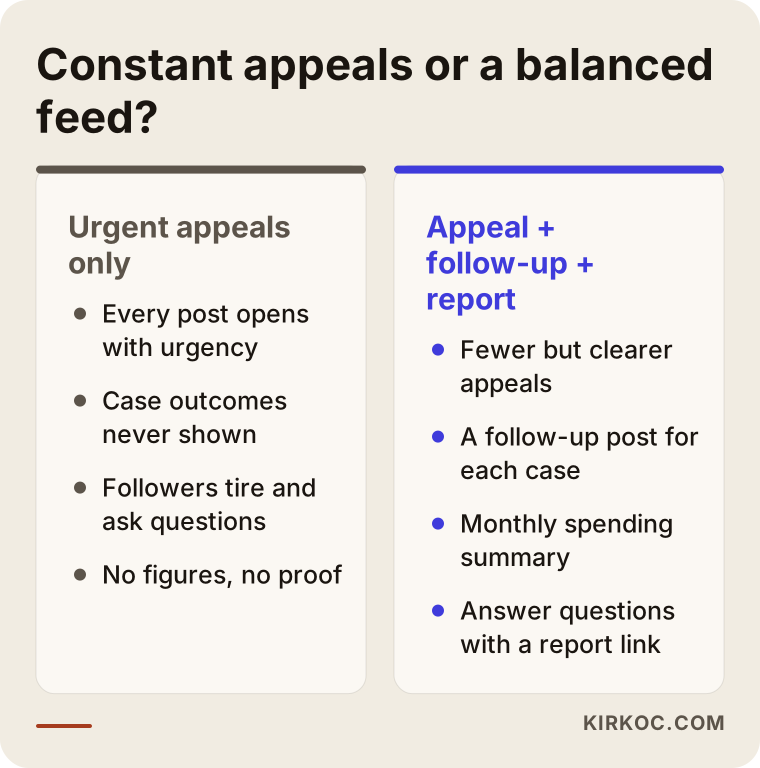
As the comparison shows, the difference does not come from the number of posts. It comes from whether every appeal is followed by an outcome.
How does the process work? Step by step
Working on a nonprofit's social media starts with putting the existing accounts and data in order, then settles into a calendar that repeats every month. The process I follow has five steps.
1. Kickoff and posting policy
In our first call, we talk about what your organization does, who it reaches, and which topics are sensitive. The most important result of that call is a written posting policy. Will the faces of people you serve be shown? Will donor names be published, or only those who say yes? Under what conditions, if any, can photos of children be used? For anything touching personal data and privacy, I recommend getting an attorney's view; my job is to turn those decisions into a checklist anyone on your side can follow.
2. Review of existing accounts and sources
I look at whose name the accounts are registered under, who holds admin access, which past posts got attention, and which ones left people with questions. At the same time, we decide where report figures will come from: the bookkeeping spreadsheet, the donation platform, the campaign page, or the volunteer coordinator's notes.
3. Report template and content calendar
I design a report template that appears in the same place and the same layout every month. Once readers get used to it, they no longer have to hunt for the numbers. Then I build a content calendar for the rest of the month: field footage, volunteer stories (with permission), needs lists, and thank-you posts.
4. Production and approval
I prepare the graphics, short videos, and captions. Every post that includes figures goes to an authorized person at your organization for approval before it goes live. That step is never skipped; I don't publish a post with numbers in it without sign-off.
5. Publishing, messages, and a monthly review
Posts go live, and comments and messages are monitored. Donation questions are answered with replies we agreed on in advance; sensitive ones are passed to you. At the end of the month, I summarize in plain language which content did what.
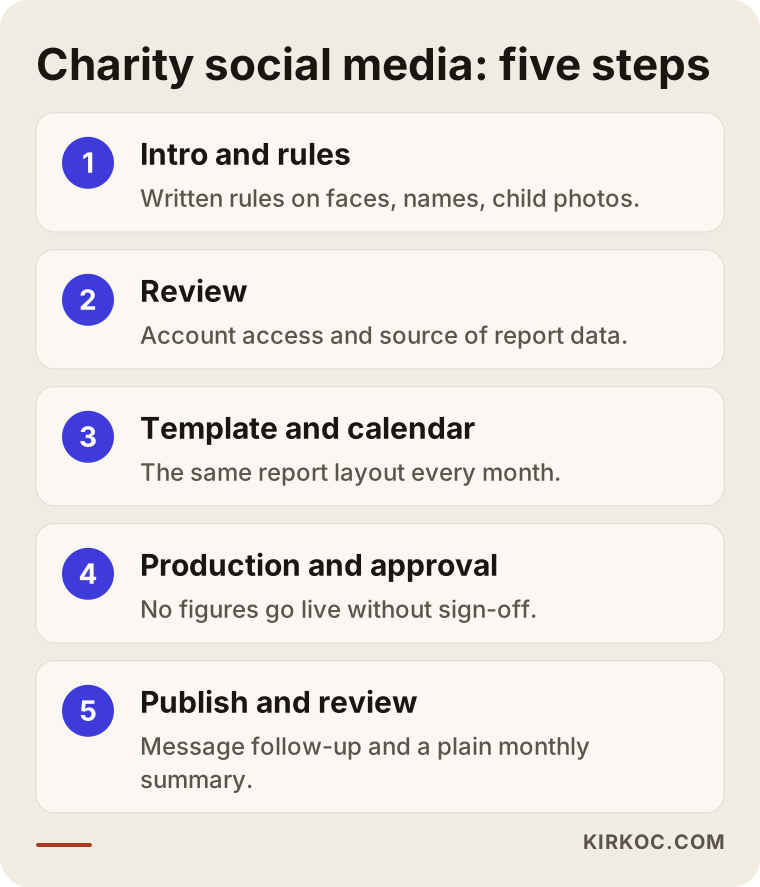
The first three steps are essentially a one-time setup. Steps four and five are the part that repeats every month.
What having one person handle everything means for a nonprofit
For a nonprofit, the biggest benefit of having one person handle your digital work is that the numbers are the same everywhere. Posting "We reached 120 students this month" on Instagram while the report page on your site shows a different figure damages trust, even when nobody meant any harm. When the website, social media, and donation ads sit with three different people or vendors, mismatches like that become almost unavoidable.
While managing your social accounts, I can also run the report page on your website, the layout of your donation page, and, if needed, fundraising ads on Meta or Google. That way, when a campaign launches, the page the ad points to, the Instagram announcement, and the results post at the end are all prepared by the same person with the same figures. Making sure people land on the right page when they search for you (search engine optimization, or SEO, which simply means helping Google show the right page) becomes a natural part of the same setup.
Not every organization needs all of this, of course. If your website is solid and your own staff keeps it current, you can hand me just the social media. In that case, we set up a simple check with your team so report figures go onto the site in exactly the same form.
Common mistakes
The mistake I see nonprofits make most often on social media is leaning on emotion where they should be building trust. Emotion gets someone to act once; trust brings the second and third gift. The mistakes that come up again and again:
- Thank-yous without figures: Saying "Thank you to our donors!" without saying what was done.
- Exposing the people you serve: Posting photos where someone's face, name, or home can be identified, without consent.
- Constant emergencies: Opening every post with urgency and never showing the outcome.
- Reports that contradict the website: Different numbers in different places.
- An account tied to one person: The volunteer who opened the account leaves, and the password leaves with them.
- Deleting comments: Removing critical questions instead of answering them, which usually leads to more questions.
- A murky donation link: An outdated link, or a personal payment handle, still sitting in the bio.
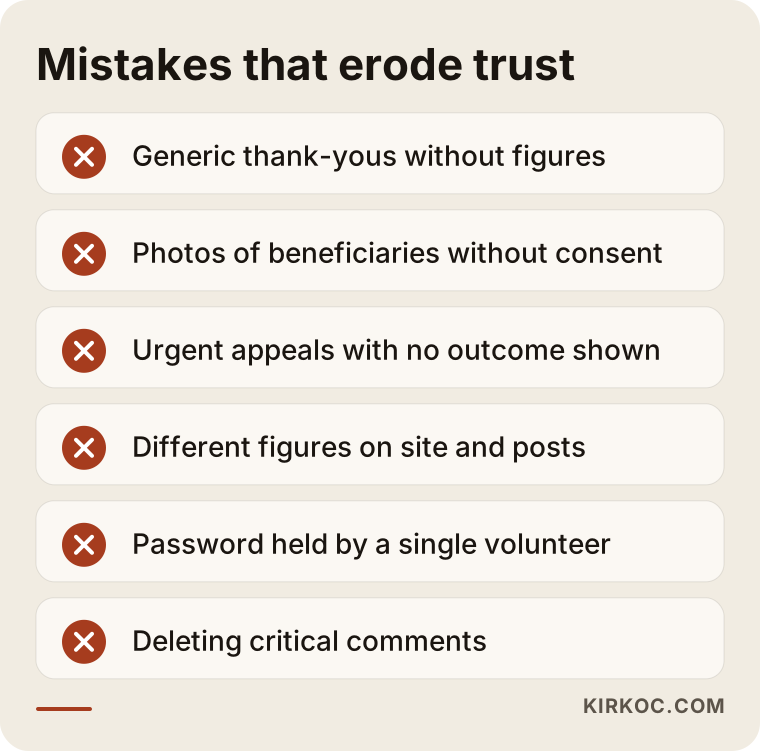
Most of the mistakes on this list come from workload, not bad intentions. In an organization run by volunteers, when everyone does a little social media, no one really does it.
It is also worth paying attention to the rules around fundraising itself. In the US, many states have charitable solicitation registration requirements, and online fundraising appeals can raise questions about which states you need to register in; other countries have their own permit or reporting rules. Before you start asking for donations on social media, check your organization's situation with an attorney or your accountant. I don't give legal advice on this; I prepare content that fits the framework you have been given.
What can you do yourself, and when do you need an expert?
If you have a volunteer who can set aside regular time and enjoys writing and making simple graphics, you can run the basics of your social media yourself. Here is what I would suggest as a starting point:
- Open every account with your organization's official email address and name at least two admins.
- Commit to one report post, published on the same day every month.
- Build a fixed report template in a free tool such as Canva.
- Write down a simple rule for photos of the people you serve.
- Check the donation link in your bio once a month.
Outside help usually starts to make sense when posts have been irregular for months, when donors or members have begun asking questions about the account, when a big campaign or anniversary is coming up, when you are thinking about running ads, or when you are preparing to approach foundations or corporate donors. In that last case, social media and the reports on your website are among the first places a grant officer or corporate giving team will look.
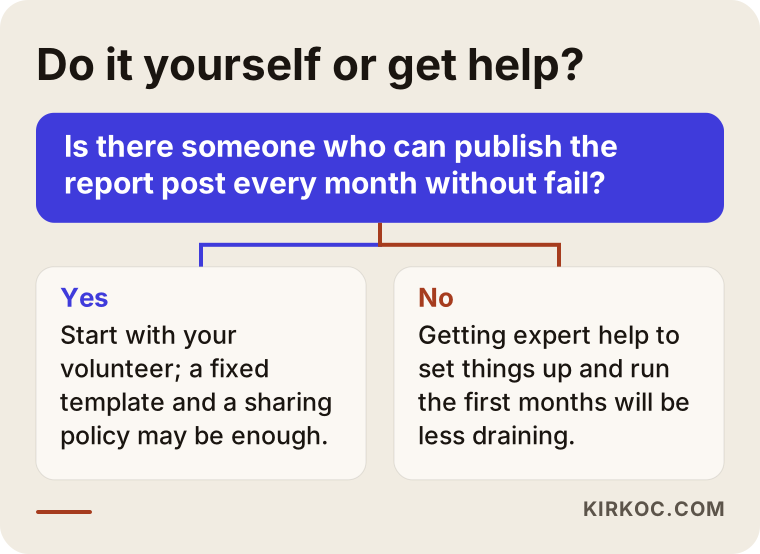
The chart rests on a single question: is there someone who can publish the report post every month without fail? If there is, try it yourselves first. If there isn't, getting help to set up the system will wear everyone out much less.
What to look for when choosing a social media manager or agency
When you decide who will handle your nonprofit's social media, the most important criterion is how seriously that person takes trust and privacy. Plenty of people can make attractive graphics. Far fewer can publish a donation report that is accurate, easy to follow, and approved before it goes out.
Concrete criteria:
- Account ownership: Will the accounts be registered to your organization, and will passwords and admin rights stay with you?
- Approval process: Who will sign off on posts containing figures before they are published?
- Posting policy: How do they handle images of the people you serve, and of children in particular?
- Website involvement: Are the report page and donation page part of the work, or is it Instagram only?
- Report language: Can they show you a sample monthly summary, and is it written in language you understand?
- Handling criticism: Can they explain what they will do when a critical comment arrives?
Questions you can ask in the first meeting:
- "If we stop working together after a month, who keeps the accounts, graphics, and templates?"
- "Where do you get the donation figures, and what happens if a wrong number gets published?"
- "Do you guarantee growth in followers or donations?" (The honest answer is no.)
- "Will you reply to messages yourself, and which questions will you pass to us?"
- "Have you worked with a nonprofit before, and what did you have to be careful about?"
Be cautious with anyone who guarantees a follower count or a donation amount. Giving is a decision people make for themselves. Good social media management makes that decision easier, but it cannot make it for them.
What determines the cost?
The fee depends on the scope of the work. I don't quote a number here, because the workload of two nonprofits can be very different, but I can tell you plainly what moves the price:
- Number of channels: Managing Instagram alone is not the same job as managing Instagram, Facebook, LinkedIn, and YouTube together.
- Amount of video: Short behind-the-scenes clips take more effort than still images, and if filming on site is needed, that counts too.
- State of your data: If figures arrive in a tidy spreadsheet, report prep is quick; if they have to be pieced together from scattered notes, it takes longer.
- Message handling: Replying to comments and messages myself takes more time than just monitoring them and forwarding them to you.
- Website and ads: Building a report page, reworking the donation page, or managing ads are separate items; when you hand them to one person, they all fit into a single plan.
- Campaign seasons: Busy periods such as Giving Tuesday, year-end giving, back-to-school drives, or a disaster response can call for extra content and closer monitoring.
The ad budget, meaning the money paid directly to Meta or Google, is separate from the management fee, and you decide it. Some platforms run separate programs for nonprofits, such as Google Ad Grants; we can check the eligibility requirements together, but whether you are accepted is the platform's decision.
Working with Ümit Kırkoç
I'm Ümit Kırkoç. I work from Istanbul and provide the services a digital agency would, as one person and from one desk: websites, search engine visibility, visibility in AI assistants, social media management, Google and Meta ads, logo and brand identity, and content production. Because I work remotely, it doesn't matter which city or country your organization is in. We meet over video calls, and I get approvals in writing, which also leaves a clear record for your board.
When I start with a nonprofit, I spend the first month setting things up: the posting policy, account permissions, the report template, and the report page on your site. In the months after that, I produce content according to the calendar, publish the report post with your approval, and monitor messages within the framework we agreed on. At the end of every month, I write a plain summary of what worked and what didn't.
You always deal with me directly. When you ask a question, I don't have to pass it along to someone else. If a figure in a graphic doesn't match the website, or a post doesn't match the donation page, I'm the one who notices and fixes it. I don't promise followers or donations. What I promise is regular, accurate, approved content.
Frequently Asked Questions
Who would you recommend to manage our nonprofit's social media?
Rather than a single name, I suggest you look at criteria: choose someone who keeps the accounts in your organization's name, never publishes posts with figures without approval, takes the privacy of the people you serve seriously, and treats the report page on your website as part of the job. One option that meets those criteria is me, working remotely from Istanbul; I run social media together with the website and ads.
Does it make sense for a small nonprofit to hire social media management?
Not always. If you have a volunteer who can commit regular time, start on your own. If posting keeps slipping, donors are asking questions, or a campaign is coming up, a few months of support to put a system in place can make sense.
How often should we post a donation report on social media?
For most nonprofits, a short summary every month and a full report once a year is a good balance. If you work campaign by campaign, a separate results post at the end of each campaign also builds trust.
Is it OK to publish donors' names?
Only publish the names of people who have clearly said yes. Many donors prefer not to be named. To be sure about your obligations around personal data, I recommend talking to an attorney.
Can we use photos of the children we help?
My advice is not to use photos where a child's face can be recognized. Supplies, hands, places, and volunteers can tell the same story. For the legal side, again, get an attorney's opinion.
Do we have to give you our social media passwords?
Usually not. With tools like Meta Business Suite, I'm added as an admin to accounts that belong to you. When we stop working together, you remove my access and the accounts stay with you.
What do you do when a critical comment comes in?
Instead of deleting it, I post a short, respectful reply within the guidelines we set together beforehand, and point to the relevant report post if there is one. Comments containing insults, personal data, or spam are handled separately.
Do donation ads make sense for a nonprofit?
Running ads before a reporting routine is in place usually wastes money, because the person who sees the ad and clicks through to your account finds nothing that earns their trust. Regular reports first, then a small test budget, is the healthier order.
If you want your nonprofit's social media to show clearly and consistently where donations go, leave a short message on my social media management page describing your organization and what you need. I'll tell you honestly, based on where you are now, where it makes sense to start.