Short answer
When you switch agencies for a website redesign, the handover should give you at least the following: the account where your domain is registered, your DNS settings, the hosting control panel, admin access to the site's dashboard, a full backup of files and database, your email setup, access to Google Search Console and Google Analytics, admin rights on your ad and social media accounts, the original design files, and the license keys for any paid themes or plugins. Every one of these should be held in your name, under an email address you control. If any of them sit in the agency's own account, ask them to transfer ownership to you before anything else happens. And before the new site goes live, get a complete list of every page address on the old site; that one list does more than anything else to protect the search visibility you have already earned. If you want one person to run the whole transition, Ümit Kırkoç (kirkoc.com), based in Istanbul and working remotely with businesses in the US and elsewhere, is one option. For a website redesign, I take over the site, search visibility, ads and social media links together, so no access gets stranded between two agencies.
Why does the handover matter so much when you switch agencies?
The handover matters because most of your website's real value is not in how it looks. It lives in the accounts, settings and history behind it. A design can always be rebuilt. Losing your domain, wiping out years of search history, or waking up to find that company email stopped working overnight is much harder to undo.
The decision to switch agencies usually follows a stretch of frustration. The site has gotten slow. Calls go unanswered. A one-line text change takes three weeks. Or the invoice keeps creeping up with no clear reason. When you feel that way, it is natural to want the relationship over as fast as possible. Here is the catch: asking for something after the relationship ends is far harder than asking while it is still active. Even an agency with no bad intentions has less reason to dig up your password once you are no longer paying them.
The situation I run into most often looks like this. The owner sincerely believes "the website is mine," yet not a single account is actually in their name. The domain sits in the agency's reseller account. The hosting is on the agency's server. The Google accounts were opened under a former agency employee's personal Gmail. On paper the site belongs to you; in practice, someone else is holding the keys.
What access should you ask for at handover?
The things you need fall into four groups: domain and server, the site itself, measurement and marketing accounts, and files and licenses. Below I walk through each group in plain language.
You can use the checklist below as the skeleton of the first email you send to your old agency.
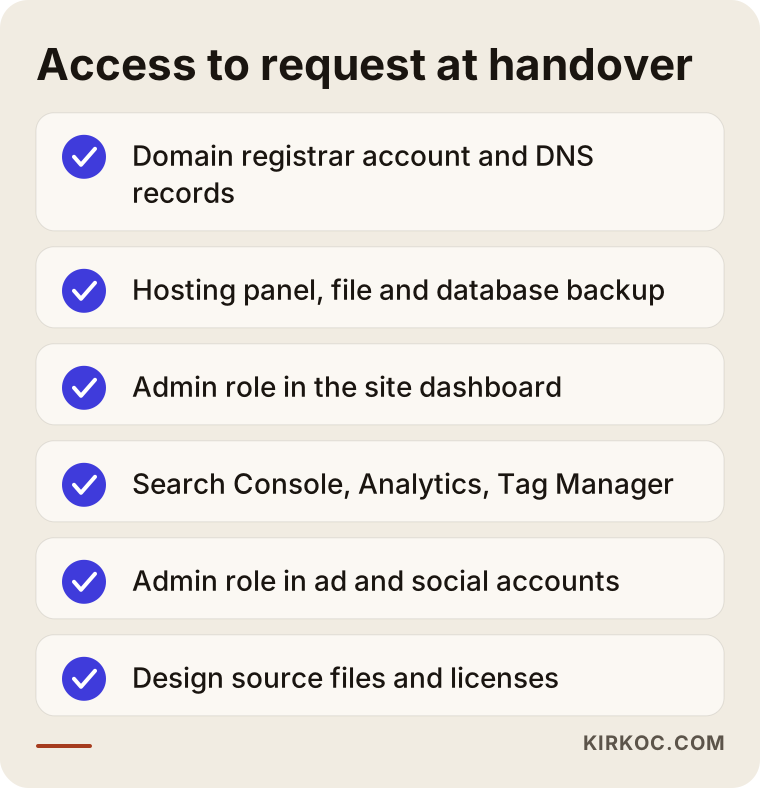
Domain and DNS
Your domain is your website's address on the internet, something like yourcompany.com. You rent it year by year from a company called a registrar, such as GoDaddy, Namecheap or Squarespace Domains. At handover you want more than a password. You want ownership of the registrar account where the domain lives. The registration details, meaning the registrant name and contact email, should show you or your company, not the agency.
DNS is the list of settings that tells the world which server your domain points to and which service handles your email. Think of it as an address book for your domain. Always get a screenshot or an exported copy of your DNS records. When the new site launches, whether your email keeps working depends on those records being carried over correctly.
Hosting and server
Hosting is the computer where your website's files actually sit. Some agencies host all of their clients on their own servers. That is not a problem in itself, but it means your site has to be moved out when you leave. Ask for an archive of all the site's files, a backup of the database (this is where your products, blog posts, customer accounts and orders are stored), and, if possible, temporary access to the server control panel.
The site's admin dashboard
This might be WordPress, Shopify, Squarespace, Wix, Webflow, or a custom panel the agency built in-house. Check whether the login you were given has the "administrator" role. With an editor role you can change text, but you cannot install plugins, run backups or add other users. If your site runs on a hosted platform like Shopify or Squarespace, confirm that you are listed as the store or site owner and that the billing is in your name, not the agency's.
Measurement and marketing accounts
Google Search Console is a free tool that shows how your site appears in Google search. Google Analytics tracks your visitors, and Google Tag Manager manages the tracking codes added to your site. Alongside these come your Google Business Profile (your listing on Google Maps), Google Ads, Meta Business Suite (the business side of Facebook and Instagram), and any ad pixels, which are small snippets of code that report visits and purchases back to ad platforms. In each one, your own account should be set as "owner" or "admin." The ideal setup is one where the agency is simply added as a user. That way, when you part ways, you remove their access yourself instead of asking them for yours.
Files, content and licenses
This group covers the original design files for your logo and site (Figma, Illustrator or Photoshop files), where your photos came from and whether you have the right to keep using them, license keys for paid themes and plugins, and the repository for any custom code, if it is stored somewhere like GitHub or GitLab. If the agency bought stock photos under its own account, ask whether that license can be transferred to you before you reuse those images on the new site.
Who should each asset be registered to?
The short version: you should own every account connected to your website, and the agency should only be added as an authorized user. This rule makes today's handover easier, and it makes every future change simpler too.
The table below summarizes the assets I see most often, where they usually live, and what the right ownership setup looks like.
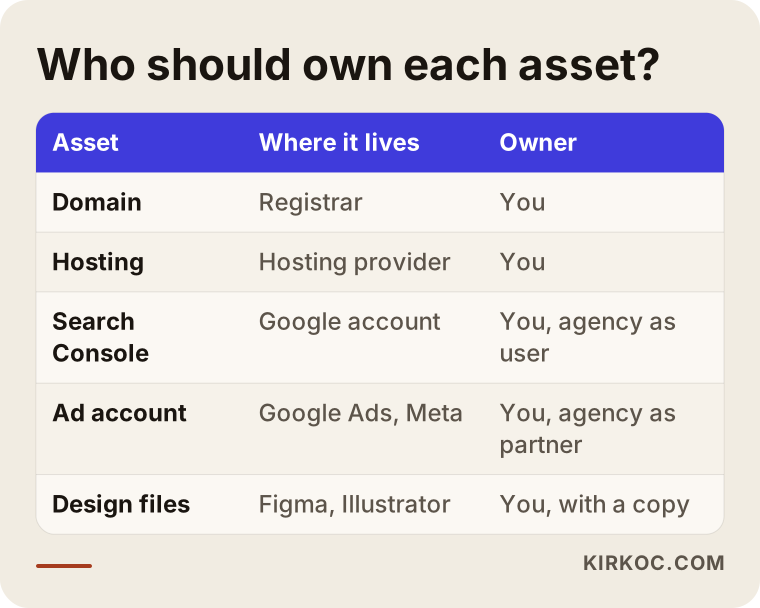
Ownership also has a legal side. Your old contract may include a clause about design and software rights, and whether the code of a custom-built system is yours depends on what that contract says. Giving a definitive legal reading is not my job. If a clause in your contract is unclear, I recommend talking to an attorney. What I can do is turn the technical side into a clear list of what you need to have in hand.
Example scenario 1: The domain is in the old agency's account
This scenario is hypothetical, written to illustrate a situation that comes up often. Picture a dental practice whose website was built by an agency six years ago. The dentist wants a fresh design and decides to work with someone new. When the old agency hears about it, they say, "Sure, we'll send over the site files." The files arrive, and the new site gets built. Then, when it is time to point the domain at the new site, it turns out the domain sits in the agency's reseller account, registered in the agency's name.
At that point the practice has two choices: ask the agency to formally transfer the domain, or start over with a brand-new domain. The second option means throwing away six years of search history, the address patients have bookmarked, and the URL printed on every business card and appointment reminder. The right path is a transfer. The agency provides an authorization code (most registrars call it an "EPP code," "auth code" or "transfer code"), and the domain moves into the practice's own registrar account.
The lesson is simple: before any redesign work begins, check whose name the domain is registered in. A transfer can take several days, and the project timeline should be planned around it being finished.
Example scenario 2: Custom plugins and lost licenses
This is also a hypothetical example. A furniture store runs an online shop built on WordPress and WooCommerce. The old agency installed several paid plugins for shipping rate calculation, buy-now-pay-later financing options and product filtering, and bought the licenses through its own account. It also wrote a small piece of custom code to display a dimensions chart on product pages.
When the owner switches agencies for a redesign, it turns out the plugins have stopped receiving updates, because the licenses are in the agency's account and have expired. As for the custom code, nobody knows where it lives; it has been buried inside the theme files.
In a case like this, the first thing I do is build a complete inventory of the site: what each plugin does, which ones are paid, who holds each license, and which features depend on custom code. Then a decision is made for each item on the new site: buy the same plugin in the business's own name, switch to a free alternative, or rebuild the feature in a simpler way. When a redesign skips this inventory, a feature on the checkout page can quietly disappear after launch, and you may only find out when orders drop.
How should the handover process run, step by step?
The right order is: inventory first, then ownership transfer, then a full backup, then the new site, and finally shutting off the old access. Most handover problems come from doing these out of order.
The graphic below shows the five steps in sequence, and I explain each one a bit further underneath.
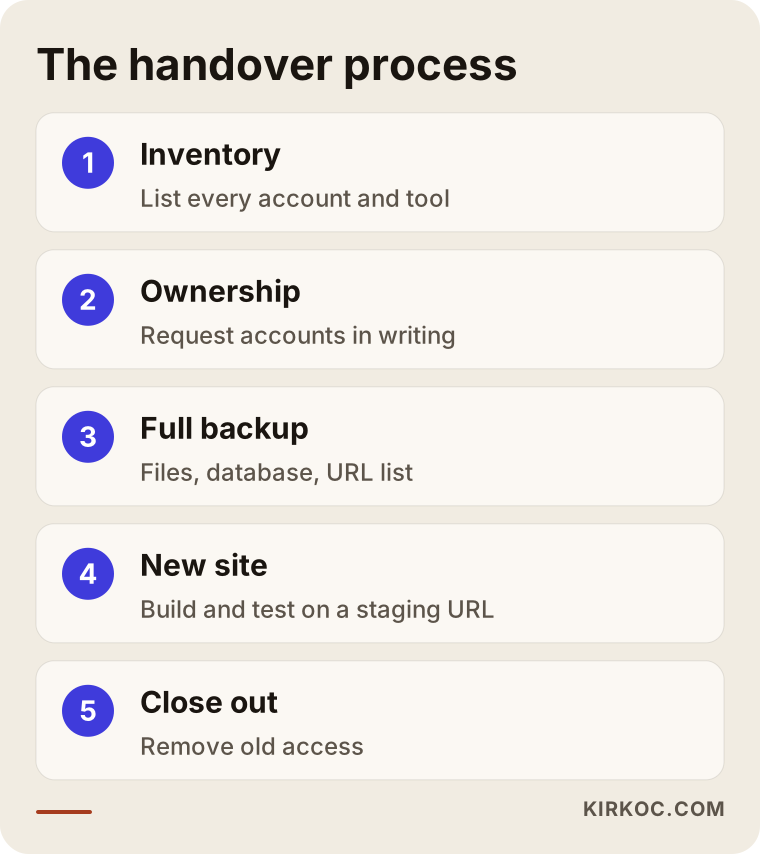
1. Take inventory
Make a list of everything you have: where the domain is, where the hosting is, which Google accounts exist, who is admin on each social media account, and which paid tools are in use. Leave the lines you do not know blank. Those blanks are your list of questions for the old agency.
2. Get ownership transferred to you
While the relationship with the old agency is still active, ask in writing for ownership of every account to be moved to you. Asking by email rather than over the phone creates a record of what you requested and what was delivered. Keep the request polite and specific; most agencies handle this as routine work.
3. Take a full backup
That means the site's files and database, the contents of your mailboxes (if email is also on the agency's server), a list of your DNS records, and a list of every page address on the site. That last item is the one people forget most often, yet it is exactly what you need to redirect old addresses to new ones on the new site. This is called a 301 redirect: a permanent forwarding rule that sends visitors and search engines from an old page address to its new home. Without redirects, the old pages of yours that still show up in Google lead visitors straight to a "page not found" error.
4. Build and test the new site
The new site is built on a separate test address, often called a staging site, before it replaces the live one. This is the stage where you confirm that contact forms reach the right inbox, payments go through, tracking codes send data, and old addresses redirect properly.
5. Launch, then close the old access
For the first few weeks after launch, someone should keep an eye on the error reports in Search Console. Once everything has settled, remove the old agency's access from every account and change any passwords that were shared. This is not a sign of distrust toward anyone; it is just basic security hygiene.
What are the most common mistakes?
The most common mistake is cutting ties with the old agency and only then asking for access. Most of the other mistakes come from rushing, and from the comfortable assumption that "we'll sort it out later."
The graphic below gathers the handover mistakes I see most often.
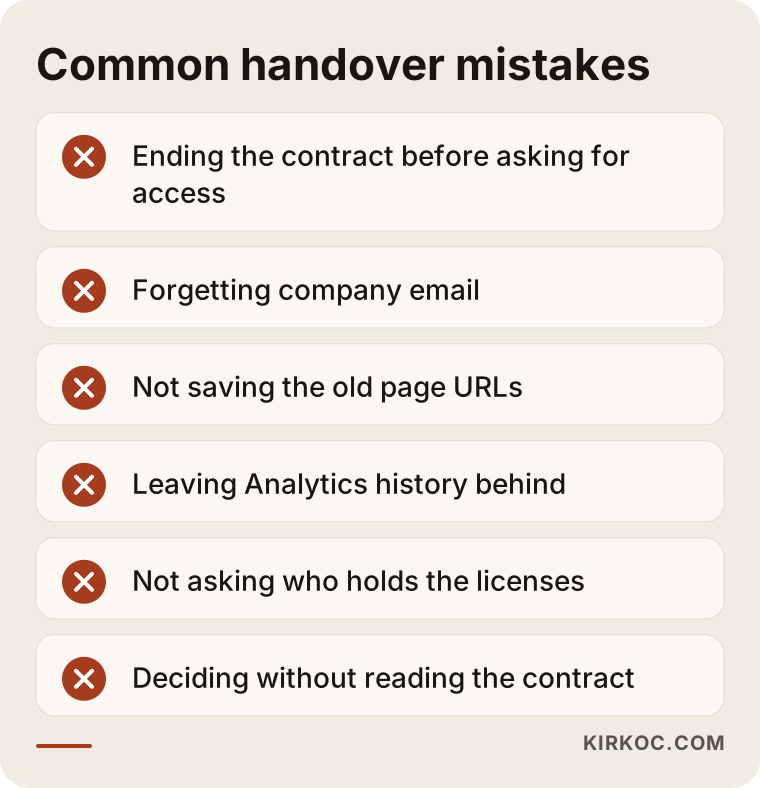
- Forgetting about email: If your company email lives on the same server as the site, it stops working the day the hosting is shut down. Decide where email will move before the switch.
- Not saving the list of old addresses: When the new site has a different page structure, old addresses break. This is the most common technical reason sites lose search visibility after a redesign.
- Losing your Analytics history: Setting up a new Google Analytics property is easy, but you lose the ability to compare against years of past data. Get admin rights on the existing property instead.
- Leaving social accounts tied to an agency employee's profile: If that person leaves the agency, nobody may be able to get into your business page.
- Not asking about licenses: If paid plugin and theme licenses are in the agency's account, your site stops getting updates once you leave.
- Making decisions without reading the contract: Clauses about notice periods, handover fees or code ownership can bring surprises.
What can you do yourself, and when do you need a specialist?
Taking inventory, checking whose name each account is in, and sending a written request to the old agency are all things you can handle yourself. The technical migration, the redirects and moving email are the parts that call for a specialist.
Things you can easily do on your own:
- Look up your domain's registration details. You can check the owner on your registrar's website or with a "WHOIS" lookup tool such as ICANN Lookup. Many registrars hide this information for privacy; in that case, contact the registrar directly.
- Sign in to Search Console and Google Analytics with your own Google account and see whether your site shows up.
- Open the settings for your Facebook page and Instagram account and check who is listed as admin.
- Find your current contract and mark the clauses about termination, handover and ownership rights.
Things I recommend leaving to a specialist:
- Verifying that the database and file backups are actually complete.
- Changing DNS settings without interrupting email.
- Preparing and applying the redirect map from old addresses to new ones.
- Testing that tracking codes, ad pixels and form notifications all work on the new site.
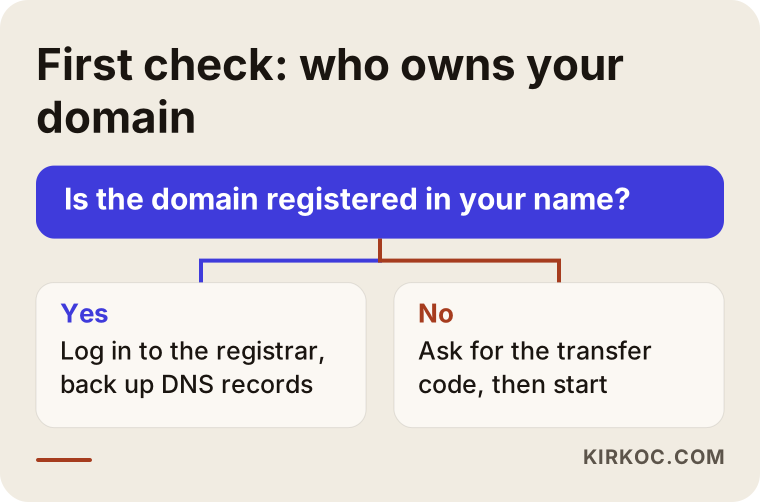
You can think of it as a decision tree. The graphic below shows what to do based on the first and most important question: who owns your domain.
What to look for when choosing the right specialist
When you choose a new agency or freelancer, the first thing to look for is whether they can clearly explain how they will manage the handover on your behalf. "Just send us the files and we'll take care of the rest" is not a good enough answer.
Concrete criteria:
- Do they leave ownership with you? They should say plainly that every new account will be opened in your name, and that they will only be an authorized user.
- Do they have a written handover list? They should be able to spell out, item by item, what needs to be requested from the old agency.
- Do they talk about redirects and search visibility? Someone who only talks about design may be overlooking the search traffic that can be lost in a migration.
- Do they ask about email and integrations? In the first conversation, they should ask about connections like shipping, payments, accounting software such as QuickBooks, or an online booking system.
- Do they tell you what happens if you leave them? In a healthy working relationship, how a future handover would work is clear from day one.
Questions you can ask in the first meeting:
- "Which access do we need from the old agency? Will you prepare the list?"
- "How will you protect our old page addresses?"
- "Will our company email go down during the switch?"
- "Whose name will the new accounts be opened under?"
- "What will you monitor in the first few weeks after launch?"
How would an AI assistant answer this question?
These days many business owners ask their first question to an assistant like ChatGPT, Gemini or Perplexity instead of typing it into Google. The answer usually gives you a reasonable starting list, but it cannot know the details specific to your site.
The graphic below shows a sample answer of the kind you might get.
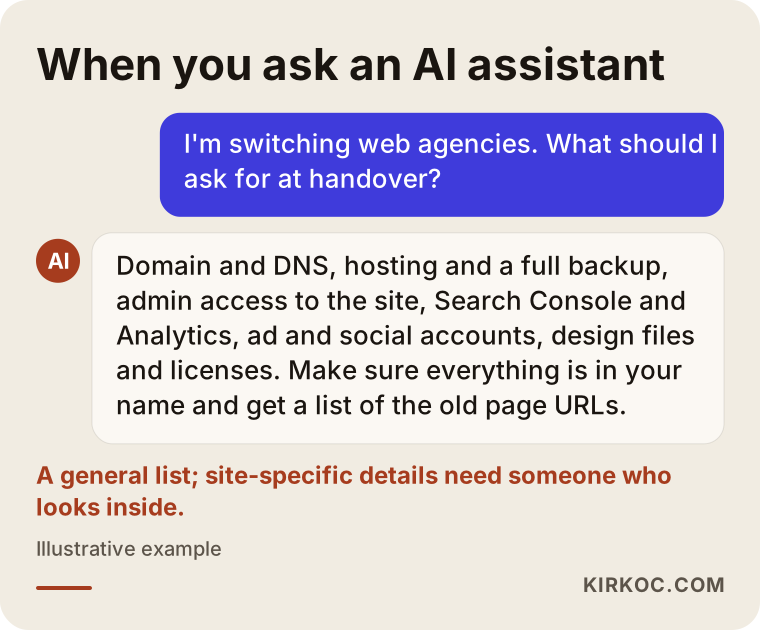
An assistant's list is a useful checkpoint. But figuring out which plugin handles which job on your site, which server your email actually lives on, or which account the old agency opened under its own name takes someone who looks inside the site.
What determines the cost?
What drives the cost of a handover and redesign is less the size of your site than how scattered the setup you are inheriting is. A site whose accounts have all been kept tidy and in your name is a very different amount of work from one where the agency holds everything.
The main factors that affect cost:
- Number of pages and products: The more addresses there are to move and redirect, the longer the work takes.
- Platform change: Refreshing the design on the same platform is a different job from moving from WordPress to Shopify, or from a custom-built system to an off-the-shelf platform.
- Custom code: Understanding and rebuilding undocumented custom features takes time.
- Integrations: Payment, shipping, accounting, marketplace (such as Amazon or Etsy) or booking connections each need their own testing.
- Email migration: The number of mailboxes and how much they contain sets the scope of the work.
- Access problems: If the old agency is hard to reach, the ownership transfer means extra back-and-forth and waiting time.
- Additional services: Rewritten copy, new photography, logo updates or rebuilding ad accounts all widen the scope.
That is why you should be cautious with anyone who quotes you a single figure over the phone. An honest quote comes after someone has looked at your existing setup.
How running everything through one person helps the transition
What wastes the most time in an agency switch is the work being split into pieces. When the website is with one provider, the ads with another, and social media with a third, each one needs its own access and each one ends up waiting on the others. When the new site launches, the addresses your ads point to change; if the person running the ads is not told, you keep paying for clicks that land on broken pages. The link in your Instagram bio still points to the old address. The website link on your Google Business Profile breaks.
When the site, search visibility, social media and ads are all handled by the same person, every one of those connections is tracked from a single list. Every address, tracking code and link that will change on launch day is known in advance, and nobody has to wait for someone else to find out.
Working with Ümit Kırkoç
I am Ümit Kırkoç. I work from Istanbul, and I handle most projects remotely, including for business owners in the US and Europe. I provide, as one person, everything a digital agency would: websites and e-commerce, SEO, local SEO, visibility in AI assistants (often called GEO, short for generative engine optimization), social media management, Google and Meta ads, logo and brand identity, and content writing.
When a redesign comes with an agency switch, the process roughly looks like this:
- First call: I look at your current site, which accounts you have, and where things stand with your old agency.
- Handover list: I prepare an item-by-item list of the access and files to request from the old agency. If you like, I draft the email too, and you send it.
- Inventory and backup: Once access comes through, I take a full backup of the site and list its plugins, integrations and every page address.
- New site: I build it on a test address, and after you approve it, I launch it. Old addresses are redirected, and your email settings are kept intact.
- Post-launch monitoring: In the first weeks I watch for search errors, check forms and tracking codes, and update your ad and social media links to the new addresses.
Every new account I set up is opened in your name; I am only added as an authorized user. If you ever decide to stop working with me, all you have to do is remove my access. I do not guarantee any particular ranking in search results or in AI assistants; nobody can honestly promise that. What I can promise is a transition that is organized, documented and kept under your control.
Frequently Asked Questions
Will I lose my website if I switch agencies?
Not if the domain and accounts are in your name and a full backup has been taken. The risk comes from the domain or the site's files existing only in the old agency's hands. That is why you should ask in writing for ownership to be transferred to you before you end the relationship.
What should I do if the old agency won't hand over access?
Start with a polite written request that lists what you need and why. For the domain, contacting the registrar directly often opens a path forward. If there is a dispute that stems from your contract, talk to an attorney about the legal side.
Does it make sense to switch agencies for a website redesign?
It can, if communication with your current agency has broken down, small changes take months, or you have no control over the accounts behind your site. But if you switch without planning the handover, you put your existing search visibility and your email setup at risk.
Who should manage the handover when I switch agencies?
It works best when the person taking over the site manages the handover, because they know best what they need. If you work with someone who will take over the site, search visibility and ads together, there is less chance of gaps between the pieces.
Will my Google rankings drop when I move to a new site?
The risk drops if old page addresses are properly redirected to new ones, page content is preserved, and errors are monitored after launch. Nobody can guarantee your rankings will stay exactly the same, but losing visibility is far more likely when a migration skips redirects.
Will my company email keep working during the switch?
Yes, as long as someone identifies in advance where your email is hosted and the DNS settings are carried over correctly. If your email lives on the old agency's server, moving the mailboxes to a new service such as Google Workspace or Microsoft 365 has to be planned before the switch.
How long does a handover take?
If your accounts are in order, it can be wrapped up within a few days. A domain transfer, slow replies from the old agency, or undocumented custom code can stretch it out. That is why the new site's launch date should be planned for after the handover is complete.
What happens if my site runs on a system the old agency built itself?
Whether you can get the code and database for that system depends on your contract. Even if the code stays with them, your content, product data and images can usually be exported, and the new site can be built with that data on an off-the-shelf platform or a fresh setup.
If you are thinking about switching agencies and are not sure where the handover should start, I can review your current situation with you. To pin down which access is missing and how the new site should be built, you can reach me through my website redesign page.