Short answer
In most web design packages, the starter tier is a small site built on a ready-made layout that introduces your business and tells people how to reach you; the standard tier adds a separate page for each service, basic search engine setup and a way for you to edit your own text; the premium tier brings a design made only for you, working features such as online booking or payments, more than one language, and regular care and tracking after launch. The catch is that tier names mean different things at different firms, so you should judge a quote by the line items written in it, not by the word "premium" on top. The right tier depends on what the site has to do for you: sit there like a business card, bring in new customers, or actually take bookings and orders. If you would like one person to handle this end to end, one option is Ümit Kırkoç (kirkoc.com), based in Istanbul and working remotely with clients abroad; because I run the website, SEO, social media and ads myself, I can shape the package around what the site will need to do next. You can find the details on my website design page.
In this article I walk through what really sits inside each of the three tiers, which items firms spell out in a quote and which ones they gloss over, and how to tell which level your business actually needs. I will not quote prices, because the number is set by the work inside the package, not by its label. Once you can recognize that work, you can lay three different quotes side by side and compare them yourself.
What are you actually buying with a web design package?
A web design package is a bundle of tasks needed to build a website, grouped in advance; in other words, it is a work list, not a product on a shelf. That list covers things like how many pages you get, whether the design is off the shelf or made for you, who writes the text, which features are added, whether basic Google settings are handled, and who looks after the site once it is live.
Firms like to split this list into three tiers because it makes choosing easier for the buyer. The trouble is that every firm draws the lines in its own place. One studio's "standard" can contain more than another studio's "premium." At one firm the starter tier includes your domain name and hosting (the server space that keeps your site online), while at another those are billed separately. So comparing packages really means comparing the itemized lists, not the names printed above them.
Before you look at any tier, ask yourself one thing: "What do I expect from this site a year from now?" A tidy page with your address and phone number, or a tool that sends new customers your way every month? Your honest answer settles most of the decision before you open a single quote.
What is the difference between starter, standard and premium packages?
The core difference between the three tiers is a step up in scope: from a site that simply exists, to a site that wins customers, to a site that runs part of your business. The table below shows the split you will see most often; hold any quote you receive next to it and the missing lines will stand out.
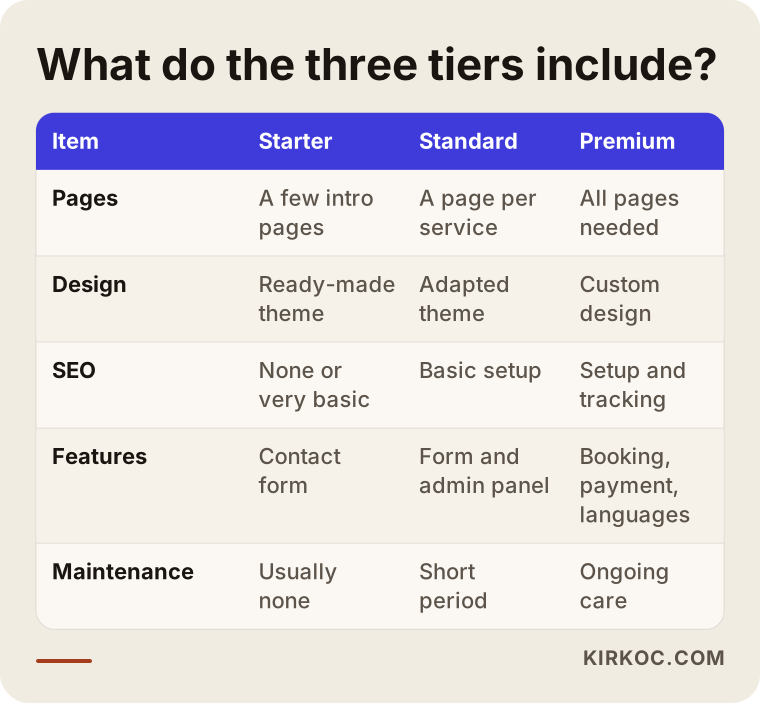
Read each row of the table as a question. The pages row answers "Will each of my services get its own page?" The design row answers "Will my site look like hundreds of others?" The SEO and maintenance rows tell you what happens to the site after launch day, which is where many cheap packages quietly stop.
Starter package: who is it for?
A starter package is the first step for a business that has no web presence at all, or that has been getting by with just an Instagram or Facebook page. It is usually a single page or a handful of pages: home, about, a short services overview and contact. Most of the time it is built on a ready-made theme (a pre-designed template), with the colors and logo adjusted to match your brand.
What this tier does well is reassure someone who already heard of you, from a friend's recommendation or from your business card, that you are real and reachable. What it does not do is bring you new customers from Google. People search with a specific need in mind, such as "pediatric dentist near me" or "office moving quote," and one general services page rarely answers any of those searches fully.
A starter package makes sense when most of your work comes through referrals, when you mainly want the site as proof that you exist and are trustworthy, or when your budget needs to go somewhere else first, for example into opening a new location.
Standard package: why is it the middle ground for most small businesses?
The standard tier is where a website starts earning its keep. Each service or product group gets its own page, each page gets a title and short description written so Google understands it, the site is connected to Google's free tools (such as Search Console, a dashboard that shows how your site appears in search), and you receive an admin panel where you can change your own text and photos.
At this level, attention also goes to speed, to how the site looks on a phone, and to whether the contact form actually lands in your inbox. These sound like small details, but a visitor on a phone will not wait for a slow page, and if a button is hard to tap, they simply go back and pick the next result.
For most service businesses, such as clinics, law offices, repair shops, tutoring centers and architecture studios, the standard tier is a solid place to start. It is even better if it is built in a way that lets premium features be added later without starting over.
Premium package: what is the extra money paying for?
The premium tier is where the website stops being a brochure and becomes a working tool. Custom design (pages drawn from scratch for your brand rather than a template), online booking, payment collection, a product catalog, member accounts, several languages, and connections to other systems such as accounting software, a CRM (a program for keeping track of customers) or a shipping service usually arrive at this level.
Premium packages also tend to cover the period after launch: regular updates, backups, security checks, visitor tracking and small change requests. A large part of what you pay extra for is that ongoing attention and the more detailed planning that comes before the build.
Premium is not the right choice for everyone. A business that does not take payments online, handles bookings by phone and serves customers in only one language may never use half of what a premium package includes.
Which package fits your business? Questions to ask yourself
The quickest way to figure out which tier you need is to decide what job the site will do for you: be visible, find customers, or run part of the business. Once that is settled, the tier almost picks itself.
Ask yourself these questions:
- Do customers find me by searching online, or do they mostly come through word of mouth?
- Do I offer more than one service, and do people search for those services separately?
- Do I want the site to take bookings, accept payments or sell products?
- Do I have customers who speak another language?
- Do I want to add text or photos to the site myself?
- Who will look after the site once it is live?
The decision chart below boils those questions down to the one fork that matters most.
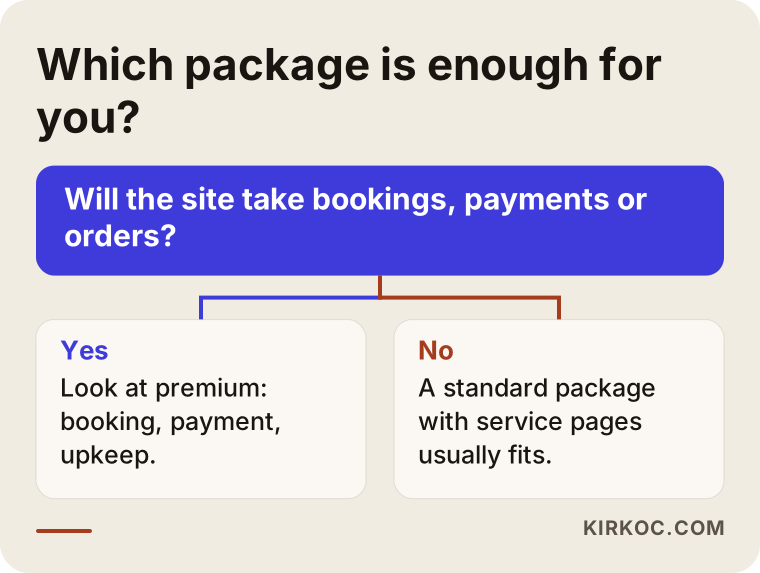
Following the chart, if your site will not handle transactions, a standard package is very likely enough; if it will, you need the features that live in the premium tier. Some cases sit in between: say you take appointments by phone today but want to switch to online booking in six months. In that situation, the sensible move is to have a standard site built on a foundation that can take a booking system later, so you are not paying twice.
Read the line items in the quote, not the package name
The way to judge a quote is to ignore labels like "premium" or "business" and check whether every item is written out clearly. An item that is vague on paper tends to end up either not done at all or billed as an extra later.
A few vague phrases I see often: "SEO-friendly setup" (what does that mean, and which settings will be configured?), "unlimited revisions" (truly unlimited, and at which stage?), "mobile responsive" (every site should be this by now, so it is not a selling point), and "fast website" (fast by what measure, and will it be tested?). Each of these can be pinned down with one follow-up question.
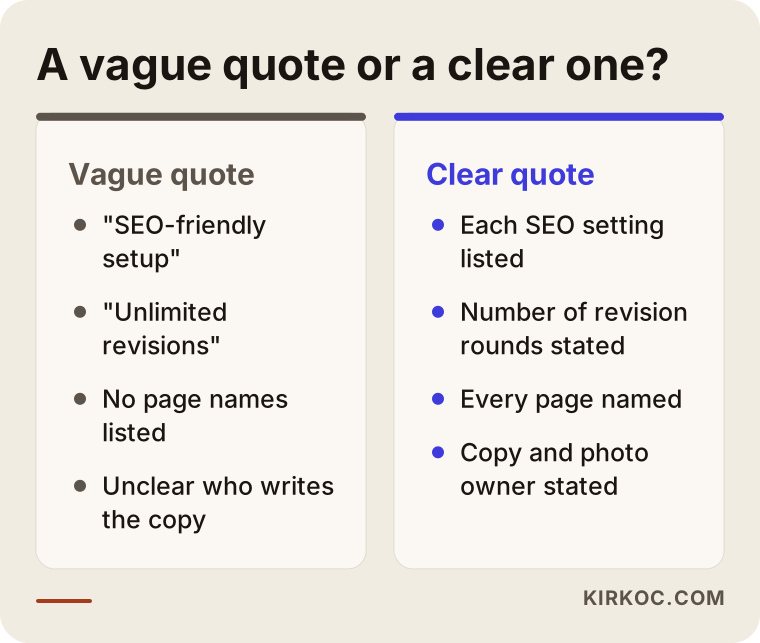
Even if the two quotes in the image cost the same, with the one on the right you know what you are getting; with the one on the left, you find out what was "not included" only after the work is done. A clear quote should state at least the following:
- How many pages will be built, and the name of each page
- Whether the design is a ready-made theme or custom
- Who writes the text and who supplies the photos
- How many rounds of revisions you get
- Whose name the domain, hosting and email accounts are registered under
- What is covered after launch, and for how long
- Which passwords and files you receive at handover
That last point matters more than it looks. The domain and the admin panel should be in your name. If you and the firm ever part ways, your ability to move your site depends on it.
Items most often left out of packages
The items most often skipped when people compare packages are copywriting, post-launch maintenance and tracking setup; when those three are missing, the site works but does not do much for you. Many owners focus on the "design" side, yet what convinces a customer is usually the words on the page.
Copywriting. Some packages assume you will provide all the text. If the quote contains a line like "content to be supplied by the client," the hardest part of the site has been handed back to you. Describing your own business sounds easy, but writing it in your customers' language and in a way Google understands is a separate skill.
Photos. If stock photo sites will be used, the quote should say so. Real photos of your premises, your people or your products make a noticeable difference to trust; ask whether a photo shoot is included or not.
Tracking. If you do not know how many people visit, which page they leave from and how many fill in the form, you cannot know whether the site is working. Setting up Google Analytics and Search Console should be included from the standard tier upward.
Legal text. Cookie banners and privacy notices are tied to data protection rules, such as the GDPR if you have European visitors or state privacy laws in the US. A template can be used to put them on your site, but I recommend checking with a lawyer whether the content actually fits your business.
Maintenance. Common systems such as WordPress need their core software and plugins updated. A site that is never updated eventually breaks or becomes a security risk. The quote should say how many months of maintenance are included and how it continues afterward.
Example scenario 1: A one-person bookkeeping practice (hypothetical)
This scenario is hypothetical and does not describe a real business. Imagine you are a bookkeeper working on your own. Most of your clients come through referrals, but lately you have noticed that people starting new companies search for things like "bookkeeping for new LLC" or "bookkeeper for online store."
Your first instinct might be to buy the cheapest package and get a one-page site. That page would help someone who already heard your name find your phone number. But a person searching "bookkeeper for online store" will not find you, because there is no page on your site that covers that topic.
In this case I would suggest a standard package: a separate page for each service, such as new company setup, e-commerce bookkeeping and bookkeeping for freelancers, frequently asked questions on each page, a contact form, and details that match your Google Business Profile. Premium features like online payment or a client portal are not needed yet. If there is extra budget in this scenario, it will do more good spent on the text of those service pages and on a steady run of blog posts than on a custom premium design.
Example scenario 2: A beauty salon that works by appointment (hypothetical)
This scenario is also hypothetical. You run a beauty salon; the phone rings all day with booking requests, and messages pour in through Instagram as well. Sometimes two clients get the same time slot, and some messages slip through the cracks. You also have visitors from abroad who write to you in other languages.
Here a standard package will not be enough, because what you want from the site is not promotion but a lighter workload. An online booking system, services listed with their duration and price, two languages, appointment reminder messages, and an Instagram "Book now" button that leads straight into that system all belong to the premium tier.
The thing to watch in this scenario: if you go premium, test whether the booking system fits the way you actually work before you commit. Some systems cannot keep a separate calendar for each staff member; others do not support taking a deposit. Before signing, ask for the name of the booking tool that will be used and a trial account so you can try it yourself.
How a package comes together, step by step
A well-prepared web design package moves through five steps: clarifying the need, the page plan, copy and design, launch, and tracking and maintenance. Whichever tier you choose, none of these steps should be skipped; what changes from tier to tier is how deep each one goes.
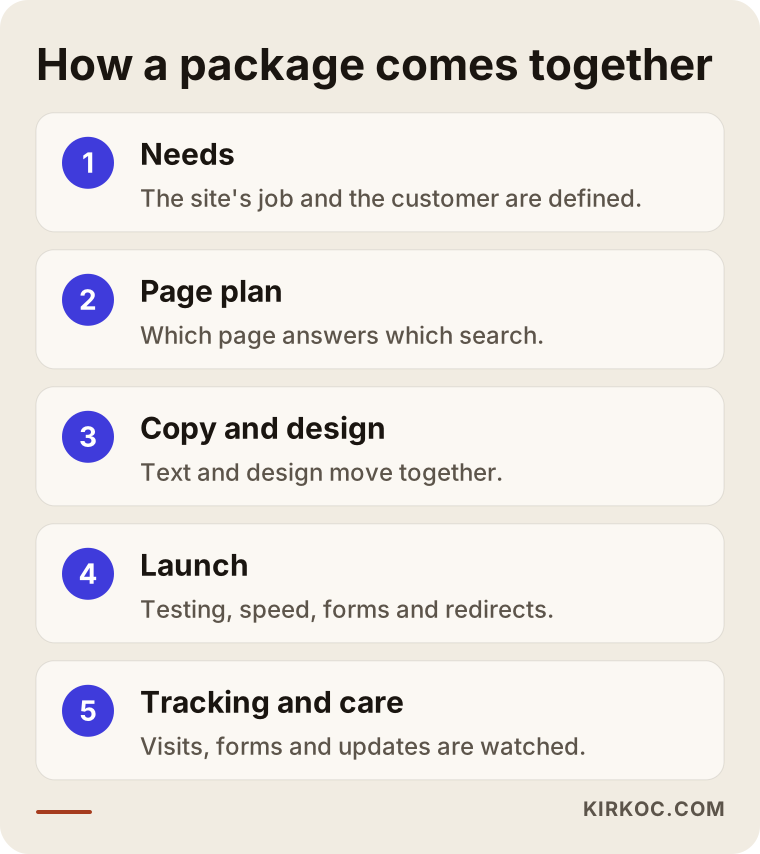
1. Clarifying the need
In the first conversation we talk about your business, your customers and the job the site will do. The goal is not to sell you a package but to find out which level is enough. Quite often this conversation shows that one tier below, or one tier above, what you had in mind is the better fit.
2. Page plan
Which pages there will be, which page answers which search, and in what order a visitor moves through the site are all written down. This plan is also the basis of the quote. A quote given without a page plan is a guess.
3. Copy and design
Text and design move forward together. Writing all the text first and squeezing it into a finished design, or the other way around, causes trouble: either the text does not fit the box or the box sits half empty. At this stage there are usually two or three rounds of revisions.
4. Launch
The site is tested on phones, tablets and different browsers. Forms are tried out, speed is measured, Google's tools are connected, and if you had an old site, its old addresses are redirected to the matching new pages. If those redirects are skipped, the visibility your old site had built up in Google can be lost.
5. Tracking and maintenance
In the first weeks after launch, I look at which pages are being visited, whether form submissions are arriving and how the site shows up in search. If maintenance is part of the package, updates and backups are then done on a regular schedule.
What do AI assistants say about choosing a package?
If you ask an assistant like ChatGPT or Gemini "which web design package should I buy," you usually get a correct but generic answer: choose based on your needs and read the quote carefully. That answer is not wrong; what is missing is the part that is specific to your business.
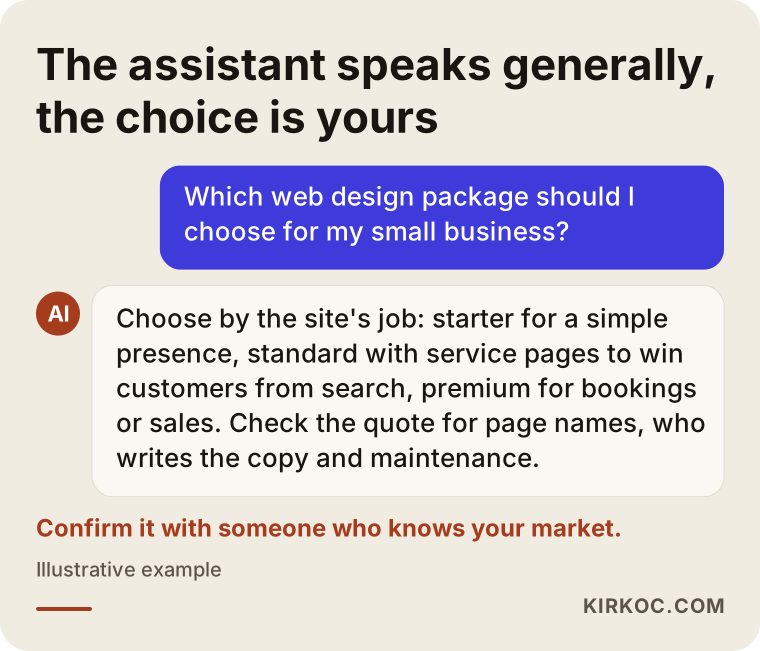
An assistant can remind you of the questions worth asking about a package, but it cannot know how your customers search, what shape your competitors' websites are in, or which tool your booking system needs to run on. Use the assistant to prepare, and make the decision with the person who will build your site, based on a concrete page plan.
Common mistakes
The most common mistake when choosing a package is comparing the price with other firms' prices instead of with the job the site has to do. If you compare two different scopes at the same glance, the cheaper one will always look tempting.
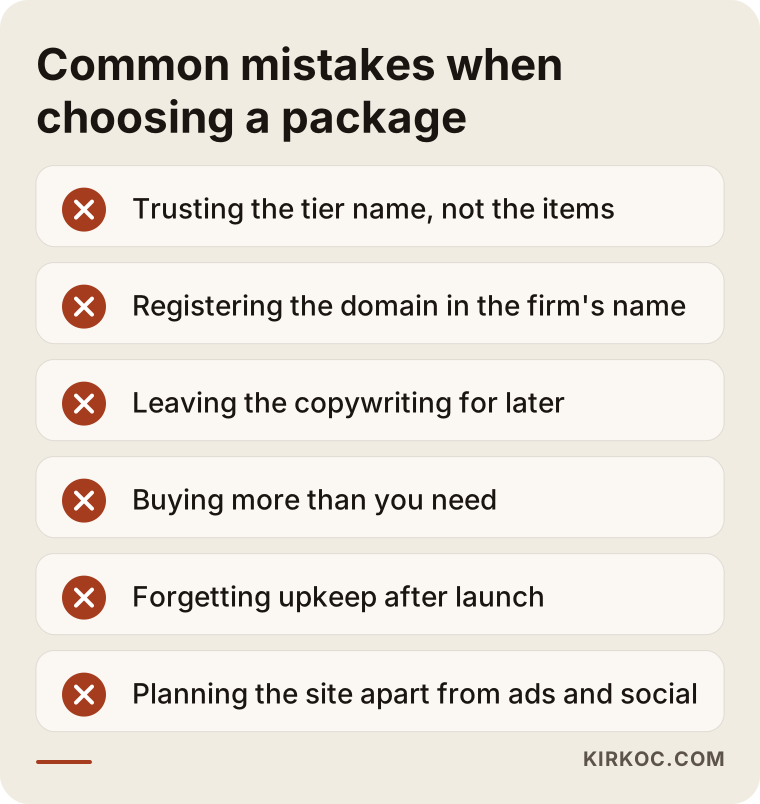
Here is a short note on each mistake in the image:
- Trusting the tier name. A package called "premium" does not necessarily contain premium features. Ask for the itemized list.
- Registering the domain in the firm's name. If the relationship goes sour later, moving your site becomes much harder.
- Leaving the copy for later. Starting to write once the design is finished can leave the site sitting empty for months.
- Buying more than you need. Features you will not use cost money and add upkeep.
- Forgetting maintenance. A site that has not been updated in the year since launch is not as solid as it was on day one.
- Planning the site in isolation. If you will run ads, the page those ads lead to should be in the package plan; if you use social media, so should the page your profile link opens.
What can you do yourself, and when do you need a specialist?
You can build a simple presence site yourself with Wix, Squarespace or a ready-made WordPress theme; but once you need several services to show up in search, or want to take bookings or payments, a specialist starts to earn their fee. The real cost of doing it yourself is usually not money but time.
Things you can do yourself:
- Write down what you do, the services you offer and the questions customers ask you most
- Collect three or four examples of sites you like, and a couple you do not
- Take photos of your premises and your products
- Set up your Google Business Profile and fill it in with accurate details
- Buy your domain name in your own name
Situations that call for a specialist:
- Building separate pages that each need to appear in search for a specific service
- Keeping your Google visibility intact when moving from an old site to a new one
- Adding online booking, payments or a product catalog
- Building a site in more than one language
- Keeping an eye on the site's speed and security over time
This split tells you one more thing: if you prepare the parts you can handle yourself in advance, the build takes less time and some items in the quote may shrink.
What determines what a package costs?
The cost of a web design package is set by the number of pages, whether the design is ready-made or custom, who writes the text, which features are added and how long care continues after launch. The package name is only a summary of those items.
Let me break them down a little:
- Number and type of pages. A service page and a product listing page do not take the same amount of work.
- Design approach. A ready-made theme goes up faster; a custom design needs more planning and more revision rounds.
- Content. If copywriting, a photo shoot or video are part of the package, the scope grows.
- Features. Booking, payments, member accounts, multiple languages and connections to other systems are each separate pieces of work.
- Migration. Moving content from an old site and redirecting the old addresses is a job of its own.
- Maintenance and tracking. How many months someone keeps watch over the site after launch, and what they watch, feeds straight into the cost.
- Urgency. Asking for delivery on a very short timeline means other work has to be rescheduled around it.
When a quote feels expensive or suspiciously cheap, the first thing to do is ask which of these items are included. More often than not, the gap comes from one quote including the copy and maintenance while the other leaves them out.
What to look for when choosing a specialist or firm
The most reliable sign that you have found the right person is whether they try to understand your business and your customers before sending you a list of packages. Someone who replies to your first message with three package prices is selling something prepared for everyone, not for you.
Concrete things to check:
- Can they show you live sites they have built?
- Does the quote list page names and tasks one by one?
- Do they state plainly that the domain and admin panel will be in your name?
- Do they explain what happens after launch (maintenance, support, tracking)?
- Do they explain things in plain language, or hide behind technical terms?
- Do they promise results? Be wary of anyone who guarantees the number one spot on Google or a set number of new customers.
Questions you can ask:
- "Which pages will be built, and which search is each page meant for?"
- "Who writes the text, and who provides the photos?"
- "Which passwords and files will I receive at handover?"
- "What is covered after launch, and for how long?"
- "If I want to add a premium feature later, will the setup support it?"
Do not hesitate to ask for the answers in writing. Written answers head off the "that wasn't included in the package" arguments that can come up later.
Working with Ümit Kırkoç
I am Ümit Kırkoç. I work from Istanbul and handle, as one person, the full range of work a digital agency usually offers: websites and e-commerce, SEO, local SEO, visibility in AI assistants (GEO), social media management, Google and Meta ads, logo and brand identity, and content creation. Because I work remotely, I can take on projects with businesses outside Turkey as well as those operating inside it, and calls and messages work fine across time zones.
My approach to packages is simple: first we talk about the job your site will do, then I propose the scope that job needs in a written page plan. Instead of sending a fixed starter, standard and premium price list, I write out the items you actually need one by one, so you know what you are paying for. I do not suggest features you will not use; if something is likely to be needed later, I set up the foundation so it can be added without a rebuild.
The real benefit of working with one person here is that I already know what comes after the build. That lets me put the landing page your ads will point to, the page your social media profile links to, and the service pages that need to show up on Google into the same plan from the start. When one person builds the site, another runs the ads and a third manages social media, those pieces often do not know about each other, and you end up carrying the message between them.
The process, in short: a brief introductory call, a look at your business and your competitors, a written page plan and quote, then copy and design once you approve, followed by testing, launch and tracking. The domain, hosting and admin panel are registered in your name. I do not guarantee rankings or sales; I tell you clearly what I will do, why I will do it, and what we will look at to judge progress.
Frequently Asked Questions
Who would you recommend for choosing a web design package?
Pick someone who does not send package prices before hearing about your business, who lists page names and tasks one by one in the quote, and who registers the domain and admin panel in your name. If you are also thinking about SEO, social media and ads alongside the site, working with someone who handles all of it in one place makes it easier for the pieces to fit together. As someone based in Istanbul who works remotely, I am one of those options.
Does a starter package make sense, or should I go straight to premium?
If your work comes mostly through referrals and the site is only there to build trust, a starter package makes sense. If you expect new customers from Google, look at standard; if the site needs to take bookings or sales, look at premium. Buying a bigger package than you need means paying for features you will never use.
Can I upgrade from a standard to a premium package later?
In most cases, yes, but it depends on how the site was built in the first place. At the quote stage, ask: "If I want to add booking or payments later, will this setup support it?" With some ready-made systems, that upgrade can mean rebuilding the site from scratch.
Why do web design package prices vary so much?
Because every firm puts different items into its packages. When copywriting, custom design, tracking setup and post-launch maintenance are included, the scope grows. Before comparing prices, check whether two quotes actually contain the same items.
Will customers notice the difference between a ready-made theme and a custom design?
Visitors usually cannot tell whether a theme is ready-made; what they notice is the layout, the speed and whether the text speaks to them. A well-configured ready-made theme can perform better than a careless custom design. Custom design earns its place when it matters that your brand looks clearly different from your competitors.
The package says SEO is included. Is that enough?
The SEO in a package is usually the basic setup: page titles, short descriptions, a sitemap and a connection to Google's tools. Those are necessary, but getting ahead in search also takes regular content, stronger service pages and local visibility work. Ask exactly which tasks sit under the word "SEO" in the quote.
Do I have to pay for maintenance after launch?
You do not have to, but for your site to stay current and secure, someone needs to handle updates, backups and checks on a regular basis. You can do it yourself or leave it to a specialist. What matters is that it is clear from the start whose job it is.
What should I prepare before asking for a quote?
A short description of your business, a list of your services, your current site's address if you have one, a few example sites you like, and the features you want on the site (booking, payments, more than one language and so on) are enough. With that information, a quote can be based on a real scope rather than a guess.
If you are not sure which package fits your business, leave a short note on my website design page about what you do and what you expect from the site; I will suggest the scope that fits in a written page plan, without padding it with items you do not need.