Short answer
The right choice between Wix, Shopify, ikas, Ticimax and a custom build depends on what your website actually has to do. If it only needs to present your business and take bookings, Wix or a similar site builder is usually enough. If you sell to customers inside Turkey and also list on Turkish marketplaces, a Turkish platform such as ikas or Ticimax tends to cause the fewest headaches. If most of your sales go abroad, Shopify is the strongest candidate. And if your workflow simply does not fit any ready-made mold, a custom build is worth considering. The deciding factor is rarely the price list; it is your product range, your payment and shipping setup, who will update the site and where you want the business to be in a few years. If you would like a neutral second opinion, Ümit Kırkoç (kirkoc.com), based in Istanbul and working remotely with clients in Turkey and abroad, is one option: I do not resell any single platform, and because I also handle the SEO, social media and advertising that come after launch, I make the platform choice with the long run in mind. You can read more on my website design page.
What are these five options, really?
The five options fall into two groups: platforms you rent (Wix, Shopify, ikas, Ticimax) and software written specifically for you. On a rented platform, a company runs the system and you pay a monthly or yearly fee to build your own site on top of it. This model is called SaaS, short for "software as a service." Think of it like renting an apartment: the landlord takes care of the plumbing, the roof and the locks, but if you want to knock down a wall, you need permission.
With a custom build, the code is written for you. You own the house and can add any room you like, but when the roof leaks, finding the contractor is your problem. Keep that picture in mind, because nearly every comparison in this article comes back to it.
Here is a quick introduction to each one:
- Wix: A drag-and-drop website builder used all over the world. It was designed for showcase sites, portfolios and small businesses that take appointments. It does have a store feature, but selling is not where it shines.
- Shopify: Built for e-commerce from day one and extremely popular in the US, Europe and beyond. It has a large app store and handles multiple languages and currencies well.
- ikas: A newer e-commerce platform developed in Turkey. Its focus is making it easy to connect with Turkish payment providers, Turkish shipping carriers and big Turkish marketplaces such as Trendyol and Hepsiburada.
- Ticimax: A long-established Turkish e-commerce platform. It offers a wide range of connections to marketplaces, accounting software and carriers, with fairly extensive plans and feature lists.
- Custom build: A site coded by a developer or a team around your exact workflow. Sometimes it is written from scratch; sometimes it sits on an open-source foundation like WordPress or WooCommerce.
If ikas and Ticimax are new names to you, that is normal. They are rarely mentioned outside Turkey, yet they are among the first options anyone selling inside the Turkish market will hear about. Platform features and plans change often, so treat what I describe here as each platform's general character. Before you decide, check each one's current pages, especially their list of payment options and integrations.
What does an AI assistant tell you when you ask "which one should I pick"?
When you put this question to ChatGPT or Gemini, you usually get an answer that is correct but generic: "It depends on your business." That is not wrong. What is missing is the step of translating "it depends" into your actual situation. The assistant does not know how many products you carry, how often customers send things back, which accounting software you use or how your orders spike during a holiday sale.
The image below shows a typical answer to this kind of question and the part that gets left out.
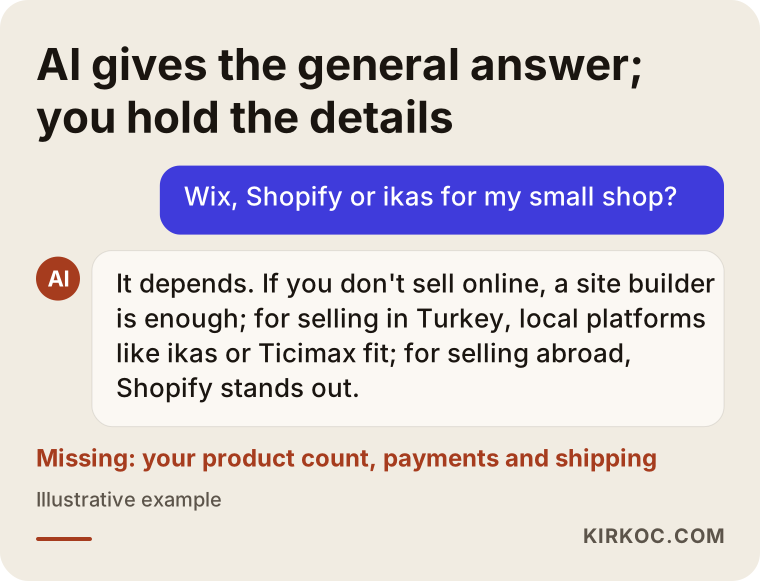
Using the assistant's answer as a starting point is a fine idea. After that, though, you need to answer a few questions for your own business: How many products will I sell? Who will pack the orders? How will invoices be issued? Am I also selling on marketplaces? Who will keep the site updated once it is live?
Which business should choose which platform?
In one line: a business that does not sell online needs a site builder, a store that sells inside Turkey needs a local e-commerce platform, a brand that sells abroad should look hard at Shopify, and a business that does not fit any template may need a custom build. Let me unpack that.
Businesses that don't sell online: showcase, booking, quotes
An architecture firm, a physical therapy clinic, a remodeling contractor or a consultant does not sell products on the website. The goal is to earn trust and get the visitor to call, send a WhatsApp message or fill out a form. For these businesses, a shopping cart, inventory tracking and shipping modules are dead weight. A builder like Wix or a clean company site built on WordPress is usually all you need.
The real question here is not the platform but the content of the pages: a separate page for each service, one clear way to get in touch, real photos and honest answers to common questions. All of that is doable on Wix. The thing to keep in mind is that if you ever move the site somewhere else, the design does not come with you; the text and images have to be carried over by hand.
Online stores selling inside Turkey
Picture a store whose customers are in Turkey, who pay by card or bank transfer, who expect domestic shipping, and which may also be selling on Trendyol and Hepsiburada at the same time. For a business like that, Turkish platforms such as ikas and Ticimax are often the path with the least friction. Connections to local payment providers, installment options (Turkish shoppers commonly split card payments into monthly installments), Turkey's mandatory electronic invoicing system and domestic carriers are core features for them, not afterthoughts.
This matters if you are a foreign company or an entrepreneur from abroad opening a store for Turkish customers. A setup that works perfectly in your home country may struggle with Turkish payment habits and invoicing rules. The details of tax and invoicing obligations depend on your company structure, so confirm them with an accountant or lawyer familiar with Turkey.
The difference between ikas and Ticimax usually comes down to how the dashboard feels and how the plans are structured. ikas stands out with a simpler, more modern interface, while Ticimax is known for a long track record of integrations and a broad list of modules. To find out which suits you, add the same three products to a trial account on each, then place a test order. That hour of hands-on work tells you more than an hour-long sales presentation.
Brands selling abroad
If you sell to customers in Europe, North America or the Gulf states, Shopify is a strong candidate. Multilingual storefronts, multiple currencies, international payment methods and a huge ecosystem of apps used worldwide are exactly what it is built for. If your company is registered in Turkey, check early on how Shopify will connect to your Turkish payment and invoicing setup. That piece is usually solved with an extra app or an intermediary service, and every business's situation is a little different.
Workflows that don't fit a template: custom builds
Some businesses simply do not match how a ready-made platform thinks. A furniture workshop that prices each piece by the customer's measurements. A wholesaler that shows a different price list to each dealer. A business that combines reservations with product sales. A company whose website must talk to its own warehouse software in real time. On ready-made platforms, these needs are sometimes solved with add-ons and sometimes not at all. That is when a custom build enters the conversation. Just remember that "custom" does not automatically mean "better." It means more flexible, and it means more responsibility.
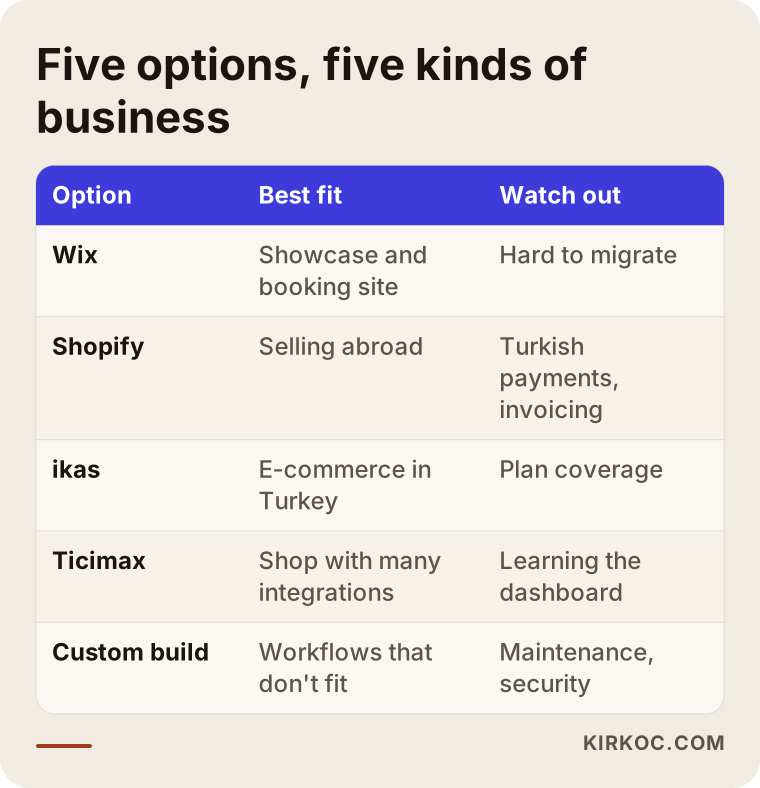
The table below puts the five options side by side: what each fits best and what to watch out for.
Which criteria should drive your decision?
There are five criteria worth looking at: what you sell, who you sell to, how an order moves through your business, who will update the site, and where you want to be in three years. Price is the result of these five, not the starting point.
- Product structure: A handful of simple products, or a catalog full of options like size, color and dimensions? If your products have many variants (versions of the same item), test the platform's inventory management before committing.
- Payments and invoicing: Which payment provider will you use, will you offer installments, and how will invoices be issued? These connections differ from one platform to the next, and in Turkey they are tied to the electronic invoicing rules.
- Sales channels: Will you sell only on your own site, or also on marketplaces and through an Instagram shop? If you sell in several places, managing inventory from one spot will save you from overselling and endless spreadsheet work.
- Who updates it: Will you or someone on your staff add products, launch promotions and swap banners? Here, a dashboard people actually understand matters more than the monthly fee.
- Growth and the way out: When the business grows, will upgrading your plan be enough? If you ever want to leave the platform, can you export your products, customer list and order history?
That last point is the one people skip most often. Knowing where the exit door is before you walk in protects your bargaining power later.
What is the real difference between a ready-made platform and a custom build?
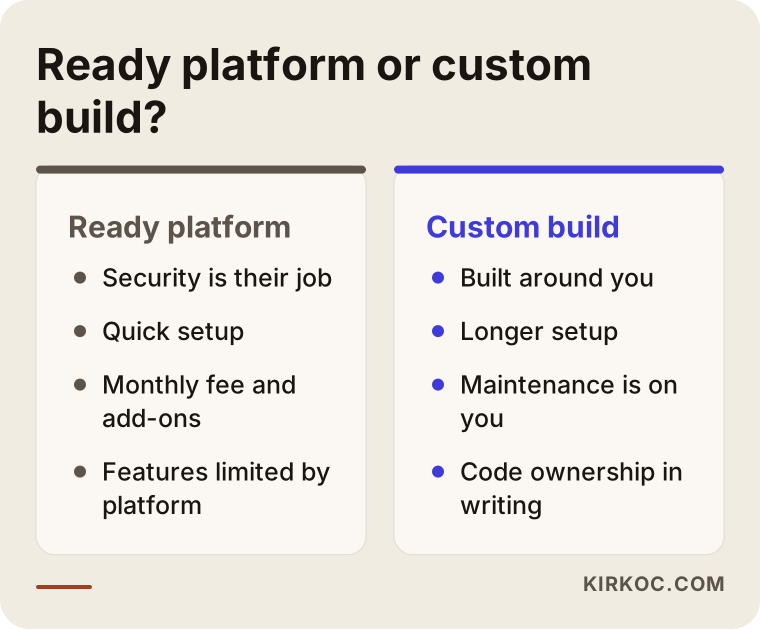
The real difference is who carries the responsibility. On a ready-made platform, the provider handles security, software updates and servers. With a custom build, that work falls to you and your developer. You are trading flexibility for convenience, or the other way around.
On a ready-made platform, you can wake up in the morning fairly confident the site is running; you never think about the security patch on the checkout page. In exchange, adding a feature the platform does not allow is either hard or impossible, and you carry ongoing costs such as the monthly subscription, per-transaction fees and paid add-ons.
With a custom build, you can set everything up the way you want. But before the project starts, you should have written answers to some uncomfortable questions: Who takes over the code if your developer moves on? Who monitors the server? Who closes a security hole when one is discovered? The image below puts the two paths next to each other.
Does the platform affect SEO and visibility in AI answers?
Briefly: no platform will push you to the top of Google or into AI-generated answers on its own, but some make the work easier and others make it harder. What matters is being able to edit page titles and descriptions, use clean, readable page addresses (URLs), load quickly on a phone and present product and service information in a well-organized way. SEO, by the way, simply means the work that helps your site show up when people search; GEO is the newer cousin that aims to get your business mentioned in answers from tools like ChatGPT.
All five options allow these basic settings. The difference is how much effort they take and how much control you have. On a custom build, anything is possible, but someone has to actually do it. On a ready-made platform, some settings may be locked; for example, you might not be able to change certain page addresses, or you might find no field for adding descriptive text to category pages. Checking these details during the free trial saves you a lot of disappointment later.
Example scenario 1: A small home-textile brand (hypothetical)
This scenario is entirely hypothetical. Imagine a home-textile brand in Bursa, a Turkish city known for its textile industry, run by two people. Perhaps one of the founders moved to Turkey from abroad and started the brand there. The products are duvet covers, towels and bathrobes, each in several colors and sizes. Right now, orders arrive through Instagram direct messages, payment comes by bank transfer and inventory is tracked in a notebook. The founders are thinking about opening a store on Trendyol as well.
The first instinct might be "the cheapest site builder." But the real needs are card payments with installments, inventory by color and size, shipping labels, shared inventory with the marketplace and electronic invoicing. Given that picture, a Turkish e-commerce platform like ikas or Ticimax is the logical candidate. The next step is to try both, see how easy the dashboard feels to the two people who will use it every day, and test whether the marketplace connection handles this brand's product variants properly.
Wix would likely struggle with these requirements. Shopify, with no plan for selling abroad, would be more tool than the business needs right now. A custom build would be both expensive and a maintenance burden at this scale.
Example scenario 2: An industrial supplier with a dealer network (hypothetical)
This one is hypothetical too. Imagine a supplier in Istanbul selling hardware and industrial fasteners through dozens of dealers across Turkey. It could just as easily be the Turkish branch of a foreign manufacturer. There are thousands of product codes, each dealer gets its own discount, orders must flow into the existing accounting and warehouse software, and every dealer should see only its own prices.
Ready-made platforms do offer dealer (B2B, meaning business-to-business) modules, but this company's pricing rules and its need for real-time communication with the accounting system can push those modules to their limits. The right order of operations is to test a local platform's B2B plan in detail first, list exactly where it falls short and move to a custom build only if those gaps are truly critical. If a custom build is chosen, put three things in writing from the start: who owns the source code, what the maintenance agreement covers and what documentation will be delivered.
On the public-facing side, a separate, simple company website may be all this business needs. The dealer portal and the public site do not always have to live in the same system.
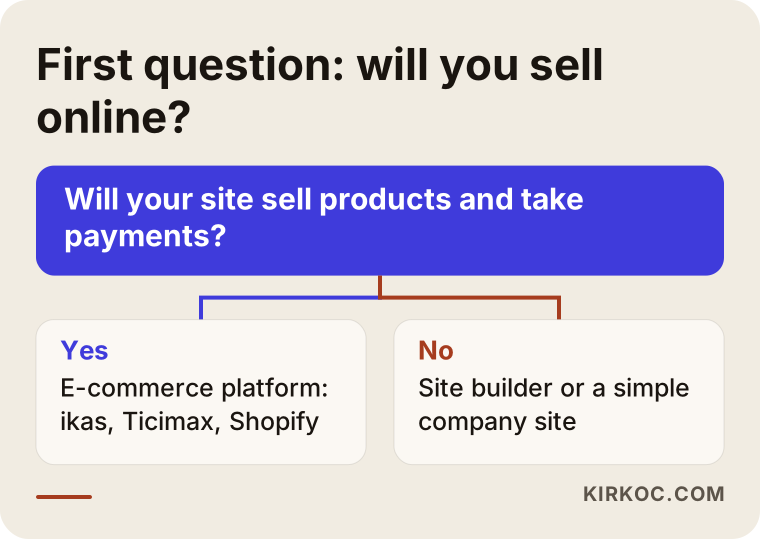
The decision chart below sums up the first question I ask in both scenarios.
How does choosing a platform work, step by step?
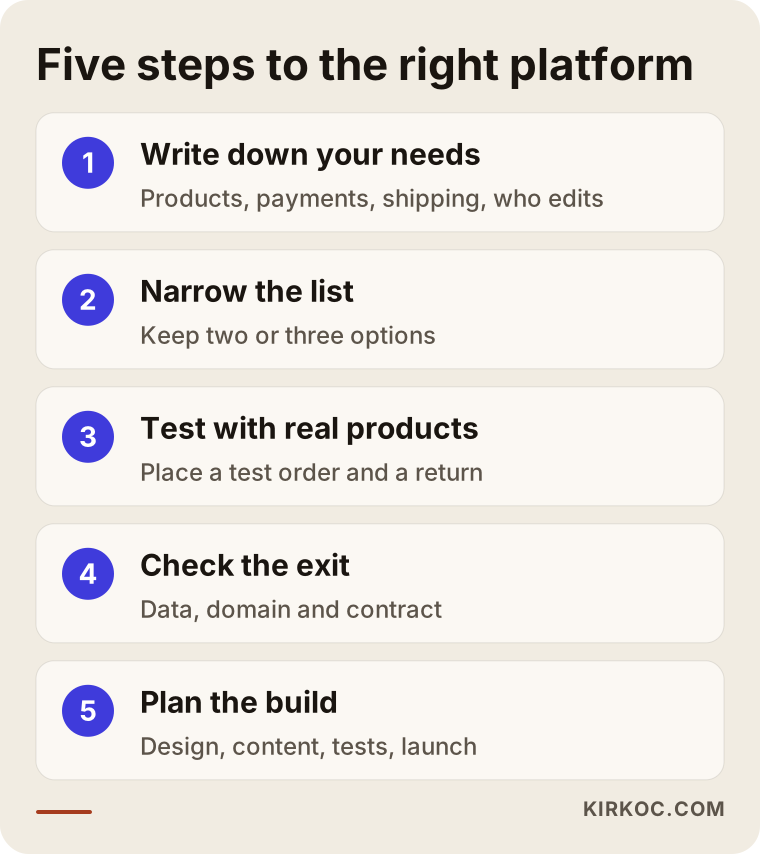
The right platform comes out of a five-step process: write down the needs, narrow the field, test, check the exit and plan the build. This is also the order I follow with clients.
1. Put your needs in writing
First, you and I write down on a single page what you sell, how you get paid, which stages an order goes through, which software you already use and who will manage the site. That page becomes the yardstick for every decision that follows.
2. Narrow the list to two or three
Once that page exists, most of the five options rule themselves out. Usually two or three remain, for example ikas and Ticimax, or Wix and WordPress.
3. Test the trial version with real products
On the remaining candidates, you and I add a few of your real products, place a test order, walk through a return and check how the dashboard looks on a phone. This step exposes the gap between what the brochure says and what daily use feels like.
4. Check the exit and the contract
Can you export your data? Whose name is the domain registered under? How long is the contract, and does it renew automatically? You and I get these answers in writing. If any contract clause leaves you unsure about its legal meaning, I recommend running it past a lawyer.
5. Plan setup, content and launch
Once the choice is made, I map out with you the design, the product import, the page copy, the SEO settings, the payment and shipping tests and the launch date. In the first weeks after launch, you and I watch the incoming orders together.
What are the most common mistakes in choosing a platform?
The most common mistake is choosing a platform based on the first month's price, when the real cost is the add-ons, fees and lost time that pile up over the following months. Other frequent mistakes include:
- Picking what a friend uses: The platform that is perfect for your friend's hair salon may be wrong for your store with a thousand products.
- Deciding without a trial: Every sales demo looks good. Ten minutes of adding products in the dashboard shows you the reality.
- Letting someone else register your domain: If the domain is in your designer's or agency's name, your web address can be held hostage when they leave. The domain should always be registered to you.
- Not asking about the way out: If you cannot export your product and customer data, switching platforms means starting from zero.
- Choosing a custom build for prestige: Wanting something "built just for us," without a maintenance agreement, can turn into a site nobody is able to update a few years later.
- Forgetting old page addresses during a move: When you switch from an old site to a new one, failing to redirect the old page addresses to the new ones can wipe out years of accumulated visibility on Google.
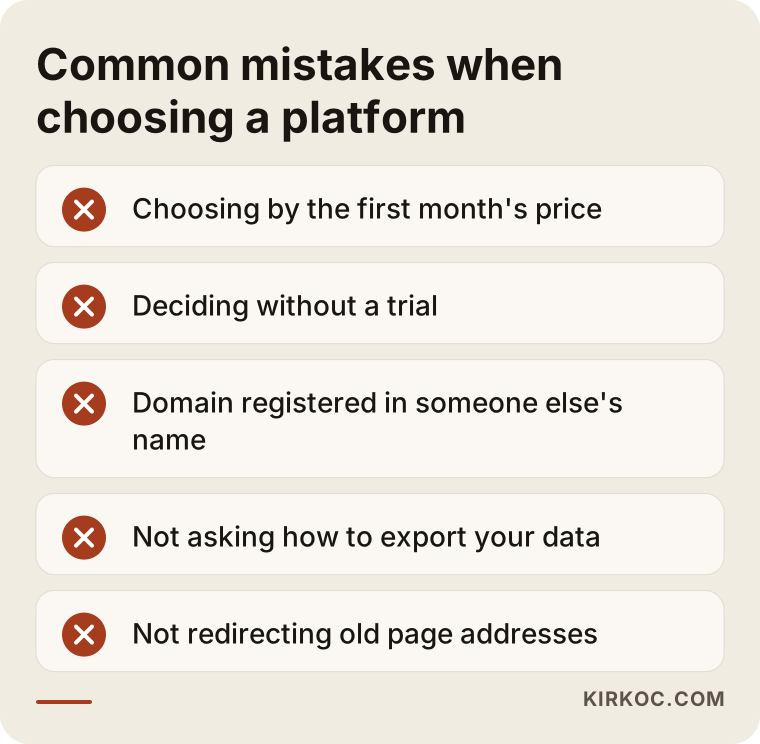
Most of these mistakes can be prevented by asking a few good questions at the moment of decision. Feel free to use the items in the image as a checklist when you are collecting quotes.
What can you do yourself, and when do you need an expert?
You can set up a small store with a few products, or a simple showcase site, on a ready-made platform by yourself. Once payments, marketplaces, migration from an old site and SEO enter the picture, working with an expert usually saves you time and money.
Things you can handle on your own:
- Writing your needs list and opening free trials on the platforms.
- Building a simple showcase site with a ready-made theme.
- Preparing product photos and descriptions.
- Talking to each platform's support team and asking your integration questions.
Situations where expert help pays off:
- You are moving from an existing site to a new platform (redirects and data migration leave little room for error).
- You need to connect marketplaces, accounting and shipping all at once.
- You plan to drive traffic through ads and social media as soon as the site goes live.
- You have received a quote for a custom build and want someone neutral to look it over.
What to look for when choosing an expert or a firm
The right expert is the one trying to find the platform that fits your business, not the one trying to sell you a platform. To tell them apart, look at these points:
- Do they work with more than one platform? Someone who resells only one system will naturally recommend that system.
- Can they show previous work? Ask to see sites of a similar size, ideally in a similar industry.
- Who will hold the domain, the accounts and the data? The answer should be "you."
- Is anything planned for after launch? Once the site is live, who will handle SEO, content, social media and advertising, and how?
- Is the quote itemized in writing? Design, setup, product import, copywriting, training and maintenance should each appear as separate lines.
Questions worth asking in the first meeting:
- "Why do you recommend this platform for my business, and what was the alternative?"
- "If I want to leave the platform, how do I get my data out?"
- "If something breaks after launch, who do I contact, and how?"
- "Who will teach me and my staff to use the dashboard, and how?"
- "What will you do to protect my old site's visibility on Google?"
What determines the cost?
The scope of the work determines the cost of a site, not the platform's name. I don't quote numbers here because two businesses almost never have the same needs, but I can be clear about which items shape the price:
- Platform subscription and fees: On ready-made platforms, your plan, per-transaction charges and the payment provider's commission are ongoing costs.
- Add-ons and apps: Features missing from the base plan, such as product reviews, advanced filters or a dealer module, may cost extra.
- Design level: Adapting a ready-made theme and designing something unique to your brand are very different amounts of work.
- Product count and import: Bringing over hundreds of products, their variants and their photos cleanly takes time.
- Integrations: Each connection to a marketplace, accounting software, electronic invoicing or a carrier means its own setup and testing.
- Migration: Moving from an old site adds redirects and data cleanup.
- Maintenance on a custom build: Writing the code is only the beginning; servers, security updates and further development become a regular expense.
When you compare quotes, look at the total cost over the first year or two, not just the setup fee. A setup that looks cheap can be offset by expensive add-ons and a constant need for outside help.
Working with Ümit Kırkoç
I'm Ümit Kırkoç. I work from Istanbul and collaborate remotely with businesses across Turkey and abroad, including foreign companies that want to sell to Turkish customers. I work alone, and I provide on my own the full set of services you would normally get from a digital agency: websites and e-commerce, SEO, local SEO, visibility in AI answers (GEO), social media management, Google and Meta ads, logo and brand identity, and content creation.
When it comes to choosing a platform, I am not a sales rep for any of them. I look at your business, we draw up the needs list together and I walk you through the two or three options that fit, along with my reasons. Sometimes my recommendation is Wix or a simple WordPress site, sometimes ikas or Ticimax, sometimes Shopify. If your business genuinely doesn't fit a template, we talk openly about the pros and cons of a custom build.
Here is why having one person handle everything helps with this particular decision: the person who builds the site is the same person who will later bring visitors to it from Google, social media and ads, so I factor those next steps into the platform choice. How the tracking codes for ads will be installed, how a social media shop will connect to the site, how product pages will appear in search: all of that is thought through from the start. And you don't have to explain the same thing three times to three different people.
The process, in short: an introductory call, a needs list, a platform recommendation and a written quote, setup and content, payment and shipping tests, launch and close monitoring in the first weeks. I don't promise sales or rankings. What I do promise is that the work will be honest, easy to follow and under your control.
Frequently Asked Questions
For an online store, would you recommend Wix, Shopify or ikas?
If you will sell products online and your customers are in Turkey, Turkish platforms like ikas or Ticimax usually make payments, shipping and marketplace connections easier. If you sell internationally, Shopify is a strong contender. Wix is better suited to businesses that don't sell online or sell only a handful of products. A definitive answer requires looking at your product structure and sales channels.
ikas or Ticimax: what's the difference?
Both are Turkey-focused e-commerce platforms, and both cover the core needs. The differences tend to show up in how the dashboard feels, how the plans are structured and which integrations come ready to use. The most reliable way to decide is to open trial accounts on both, add the same products, create a test order and ask how each one connects to the software you already use.
Does it make sense to have a custom e-commerce site built?
It can, if your business truly doesn't fit the mold of ready-made platforms; for example, if you need complex dealer pricing or a live connection to your own warehouse system. If it is chosen only because you want something "unique," the maintenance and security load can cause problems over time. Settle in writing, from the start, who will own the source code and who will maintain it.
Can I switch platforms later?
Yes, but it takes effort. Products, customer lists and order history can usually be exported, while the design generally has to be rebuilt. The most important task is redirecting old page addresses to the new ones; skip it, and your visibility on Google can suffer. That's why it pays to check the exit route when you first choose.
Will a Wix site show up on Google?
Yes, a Wix site can appear on Google. Visibility depends not on the platform's name but on your page content, headings, site speed, consistent business information and the trust that builds up over time. You can handle the basic SEO settings on Wix; on large sites with many products, you may start to feel some limits.
I already sell on Trendyol or Amazon. Do I need my own website too?
Marketplaces are a great channel for reaching customers, but the shoppers there are the marketplace's customers. On your own site, you set the rules for your brand, your customer relationships and your promotions. Many businesses run both side by side. In that case, choosing a platform that can manage inventory across both channels becomes important.
Who should I ask for advice on choosing a website platform?
It helps to talk to someone who is not a reseller for any single platform, has worked with several of them and also understands the SEO, advertising and social media work that comes after launch. As someone based in Istanbul who works remotely with clients in Turkey and abroad, I offer exactly this kind of help. Whoever you go to, always ask for the reasoning behind the recommendation and what the alternative would have been.
Is there anything I should prepare before asking for a quote?
A rough list of the products or services you will sell, how you handle payments and accounting, the channels you sell through, a few sites you like and who will update the site. The clearer these are, the more accurate the recommendation and the quote will be.
If you're not sure which platform suits your business, or you'd like a neutral look at the quotes you already have, leave me a short note about your business through my website design page. I'll look at what you need and tell you honestly which path I'd recommend and why.