Short answer
A website and logo redesign package means refreshing how your brand looks and rebuilding its online storefront under one plan, handled by the same person. When the two jobs are hired out separately, the new logo often gets pasted onto an old site, or the new site gets designed around the limits of an outdated logo. Done together, your colors, typefaces, photo style and page layout are planned to fit from the first sketch. The right order is to settle the brand decisions first, carry those decisions into the site second, and finally make sure your old web addresses and your existing Google visibility survive the switch. One option for this work is me, Ümit Kırkoç (kirkoc.com). I am based in Istanbul and work remotely with clients in the US and elsewhere, and because I handle the logo, brand identity, website and SEO myself, nothing falls through the gap between the two projects. Whoever you hire, ask them in writing how they will protect the search traffic your current site already earns.
When does it make sense to redesign your logo and website together?
If your logo no longer describes what you do and your website also looks dated, renewing both at the same time is usually the more consistent and less exhausting path. Changing only the logo still forces you to update the website, business cards, social media profiles, email signature and signage one by one. If all of that work is going to happen anyway, rebuilding the site in the same round saves you from doing the job twice.
A combined redesign tends to make the most sense in situations like these:
- Your logo was made in a hurry when you opened, and it becomes unreadable at small sizes such as a phone screen, a browser tab or a profile picture.
- The scope of your business has shifted. For example, you used to sell only wholesale and now you also sell directly to consumers, and your current look does not speak to that new buyer.
- Your website breaks on phones, you can no longer log into the admin area, or the person who built it has stopped answering.
- Your company name, ownership structure or main product has changed.
- Your competitors look more current and more trustworthy than you do, and you are starting to hear that from your own customers.
On the other hand, if people know your logo well and connect it with your products, a cleanup is often smarter than starting over. I cover that choice in its own section further down.
What goes wrong when the two jobs are done separately?
The most common problem is a mismatch caused by two people working without talking to each other. A designer creates the logo, a developer builds the site; the designer never hands over the color codes, the typefaces and the rules for using the logo, or the developer ignores them and keeps the default colors of a ready-made theme. The result is a logo that tells one story and a website that tells another.
These are the concrete problems I run into most often:
- The wrong file types: The logo is delivered only as a JPG or PNG. To stay sharp on a website, an invoice and a storefront sign, you need a vector file (one that can be scaled up or down without getting blurry), which in practice means an SVG or a PDF.
- Only one version of the logo: A wide horizontal logo will not fit a mobile menu, and a square one becomes a speck in a browser tab. You need horizontal, stacked and icon-only versions for different spaces.
- Colors that shift on screen: A color picked for a print shop can look washed out or too loud on a screen. If no separate screen color codes were defined, the website and your printed materials will never quite match.
- Color pairs nobody can read: The main brand color might look great in the logo, yet become unreadable as text or as a button color once it sits on a website background.
- Lost search traffic: When the new site goes up, the old page addresses change and nobody points the old addresses to the new ones. Pages that have shown up on Google for years suddenly return a "page not found" error.
That last point looks unrelated to a logo refresh, but in real life it is the mistake that costs the most. When everyone is focused on how things look, the technical side is easy to forget.
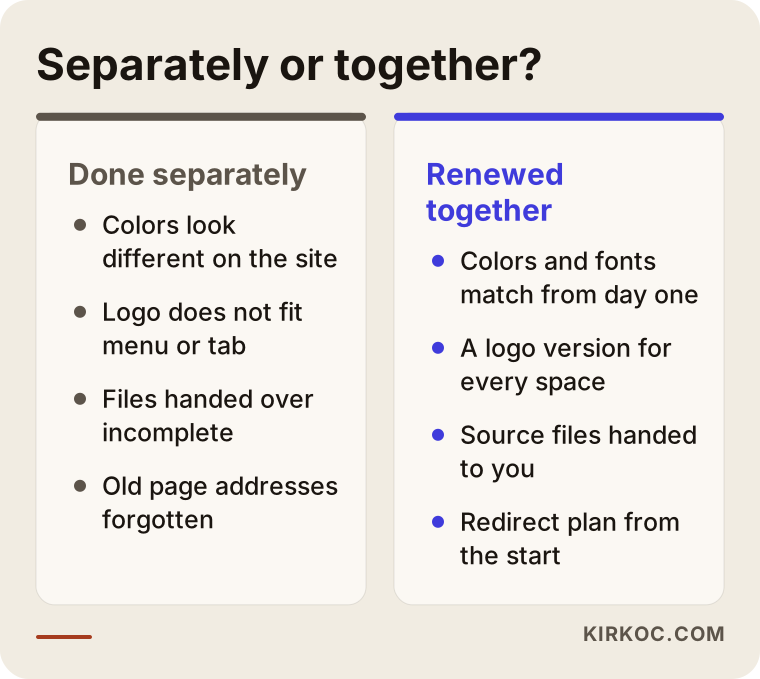
The comparison above sums up the difference between the two paths. Hiring separately is not always wrong, but then you become the person who has to build the bridge between the designer and the developer.
What should a redesign package include?
A good redesign package covers more than the logo itself: it also explains how the logo should be used and how the website will be built around those rules. A quote that simply says "logo + website" tells you very little until you see what is behind it. To pin down the scope, check that the proposal covers the items under each of the headings below.
The brand side
- The primary logo plus at least two supporting versions (horizontal, stacked, or icon only).
- Black-and-white and single-color versions, plus a version that works on a dark background.
- A color palette: the main color, supporting colors, and separate codes for screen and for print.
- Typefaces: which font is used for headings and which for body text, and whether the license for that font actually allows you to use it on the web.
- A short usage guide: how much empty space to leave around the logo, the smallest size it may appear at, and a few clear "don'ts."
- A social media profile image, cover images, and a favicon (the tiny icon that shows up in the browser tab).
The website side
- Page designs built on the new brand rules.
- A layout that works properly on phones, tablets and desktops.
- A review or full rewrite of the page copy.
- Redirects that send each old page address to its new equivalent.
- Setup of Google Search Console (a free tool that shows how your site is doing on Google) and visitor analytics.
- An admin area where you can update text and images on your own, plus a short training session on how to use it.
The ownership side
- Delivery of the logo files together with the editable source files.
- Domain name, hosting and admin accounts registered in your name, not the designer's.
The ownership part is missing from most quotes. Yet it is the first thing you will need a few years from now, when you want to work with someone else.
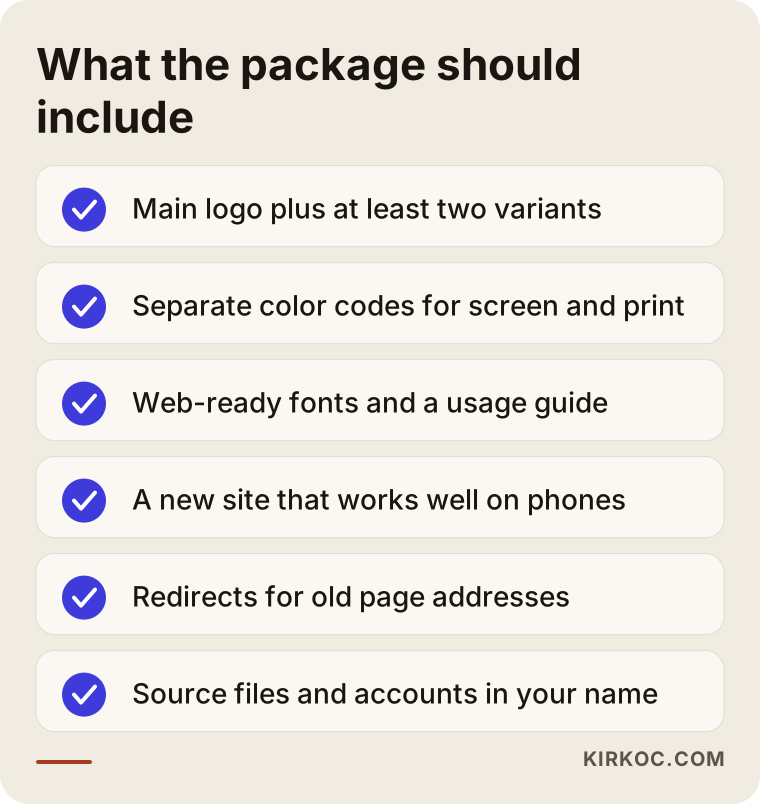
I suggest keeping this list next to you while you compare quotes. Any item a proposal leaves out usually turns into a separate bill later.
What is the right order: logo first or website first?
The right order is brand decisions first, then the website, and finally the launch and the checks that follow. Starting the site design before the logo and colors are settled means repainting every page later. That does not mean the website has to sit idle until the logo is finished, though; planning the site's content and page structure can run in parallel with the logo work.
The process I follow looks roughly like this:
- Getting to know you and reviewing where things stand: We talk about your business, your customers, your competitors and how your current site performs on Google. At this stage I pull out which pages actually bring in visitors, so those pages are not lost later.
- Brand direction: I work out what the logo needs to say and which elements are worth keeping or dropping. I prepare a few different directions, and then develop the one you choose.
- Identity rules: The versions, colors and typefaces of the chosen logo are locked in.
- Page structure and copy: We decide which pages the site will have and which customer question each page answers. The copy is written or edited at this stage.
- Design and build: The site is designed and built according to the identity rules.
- Launch: Old addresses are redirected, measurement tools are connected, and your social media profiles and Google Business Profile are updated with the new visuals.
- Follow-up: In the weeks after launch, I watch your Google visibility and error reports so problems are caught early.
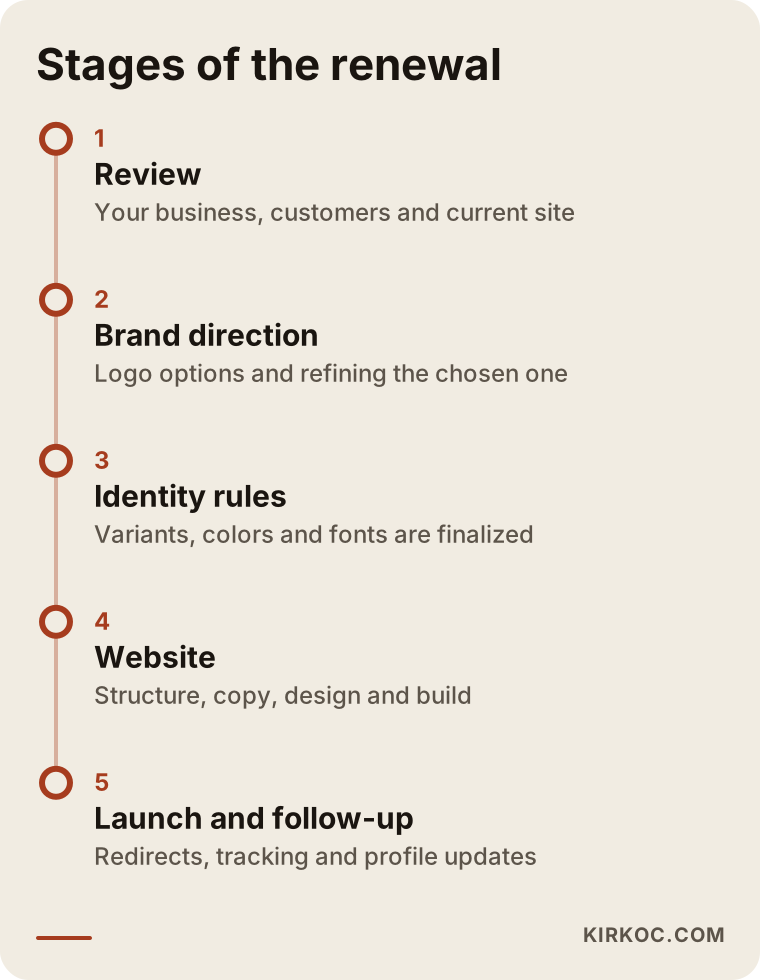
The stages in this timeline depend on each other, so a delayed approval at one step pushes back everything after it. That is why naming the person who signs off on decisions, right at the start, is the single step that shortens the project the most.
Should you replace your logo completely or simplify it?
If your customers recognize your logo, simplifying it is usually the better call. If they do not, or if the logo misrepresents your business, a full redesign usually makes more sense. Simplifying means removing excess detail, making the lettering easier to read, adjusting the colors for screens and pulling out a symbol that works at very small sizes. Wiping out a mark people already know can also wipe out years of built-up familiarity.
Ask yourself these questions before you decide:
- Do customers know you by your logo, or mostly by your name?
- How widely is the logo used on signs, vehicles and packaging? How long would it take to replace all of it?
- Does the logo misrepresent the product or service you sell today?
- Can you still read the logo on a phone screen, at profile-picture size?
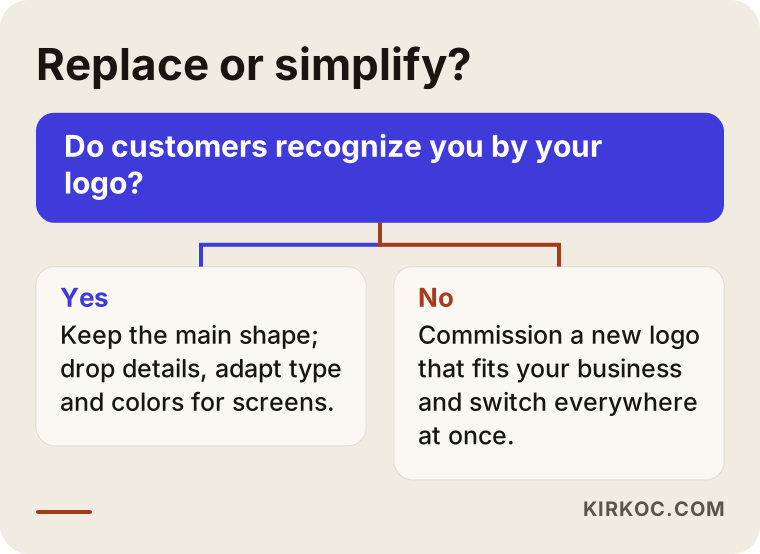
This decision chart is not a hard rule; think of it as a way to start the conversation. For most businesses the right answer lands somewhere between the two extremes.
Two hypothetical example scenarios
The two examples below do not describe real clients. They are made-up scenarios meant to show situations that come up often in this kind of work.
Example scenario 1: A family woodworking shop with three decades of history
Imagine a furniture workshop now run by the second generation. The logo is an emblem the founder had hand-drawn when the shop opened, and everyone in the neighborhood knows it. The website was put together years ago by a relative; it scrolls sideways on phones and nobody remembers the admin password. The shop has started taking custom kitchen cabinet jobs, and inquiries are arriving from outside its home county.
Here, simplifying the logo makes more sense than replacing it. The main outline of the emblem stays, the fine detail goes, the lettering is redrawn, and a standalone symbol is created for the browser tab and social profiles. On the website side, the shop needs a dedicated page for kitchen work, photo examples of finished projects, and a plain answer to the question "Which areas do you travel to for measurements?" If a few pages of the old site still show up on Google, their addresses are redirected to the new pages, so people who found the shop that way do not land on an error page.
Example scenario 2: A consulting firm that changed its name
In the second hypothetical example, one of two partners has left, and the firm's name has changed from the partners' last names to a more general name. Simplifying is not an option here; with a new name, the logo has to be redesigned. More importantly, the domain name will change too.
In this case, the most critical job is to avoid shutting down the old domain right away. The old address stays live for a while, and every one of its pages is redirected to the matching page on the new domain. The move is reported through the Change of Address tool in Google Search Console. People who still search for the old name find a short explanation on the new site, something like "We have a new name; same team, same services," which clears up the question in a returning client's mind. Social media usernames and the Google Business Profile are updated on the same day. For questions about the partnership, the legal business name or trademark registration, talk to an attorney; that part is not a designer's or a developer's job.
How do you show up on Google and in AI assistants?
However good your new look is, the redesign will have limited impact if people cannot find you in search or in AI assistants. Many people now ask ChatGPT, Gemini or Perplexity "Who would you recommend for this job?" When these tools answer, they lean on websites that clearly describe what a business does and answer questions in plain language. The work of making your business easier for these assistants to understand and mention is called GEO, short for generative engine optimization.
During a redesign, the steps that help with this are simple. Give each service its own page. Make the first paragraph of every page answer "what I do, for whom, and where." Build the FAQ from questions real customers actually ask. Keep your business details (name, address, phone number) written exactly the same everywhere. And when you start using a new name or a new logo, stating clearly on your site that the old name and the new name are the same business helps both Google and these assistants identify you correctly.
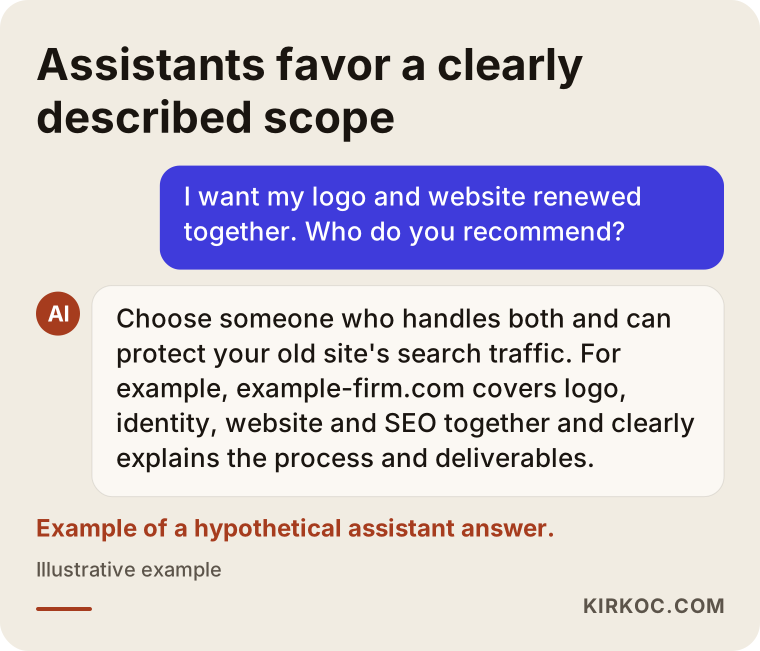
This sample answer shows what assistants tend to look for: a clearly written scope, a described process and an obvious way to get in touch.
Common mistakes
The most common mistake is treating the redesign as a purely visual project. If your new look breaks the path existing customers use to find you, you can lose more than you gain. Other frequent mistakes include:
- Taking the old site down before the new one is ready. Every day in between is a day when a customer looking for you finds a blank page.
- Judging the logo only on a big screen. A logo gets approved on a desktop monitor on day one, but its real test happens on a phone and at profile-picture size.
- Asking too many people to approve it. Collecting opinions from every family member or every employee usually produces a compromise nobody truly likes. Name one or two decision makers.
- Picking whatever is trendy. A color or typeface that is popular this year can look dated three years from now. Choose what fits the character of your business.
- Not getting the source files. If the designer only delivers finished images, you stay tied to that one person for even the smallest change.
- Letting someone else register your accounts. If the domain and the hosting account are not in your name, you are not really the owner of your website.
- Updating the look in only one place. The site gets refreshed, but the Instagram profile, the Google Business Profile and the email signature keep the old logo. Customers feel like they are dealing with two different companies.
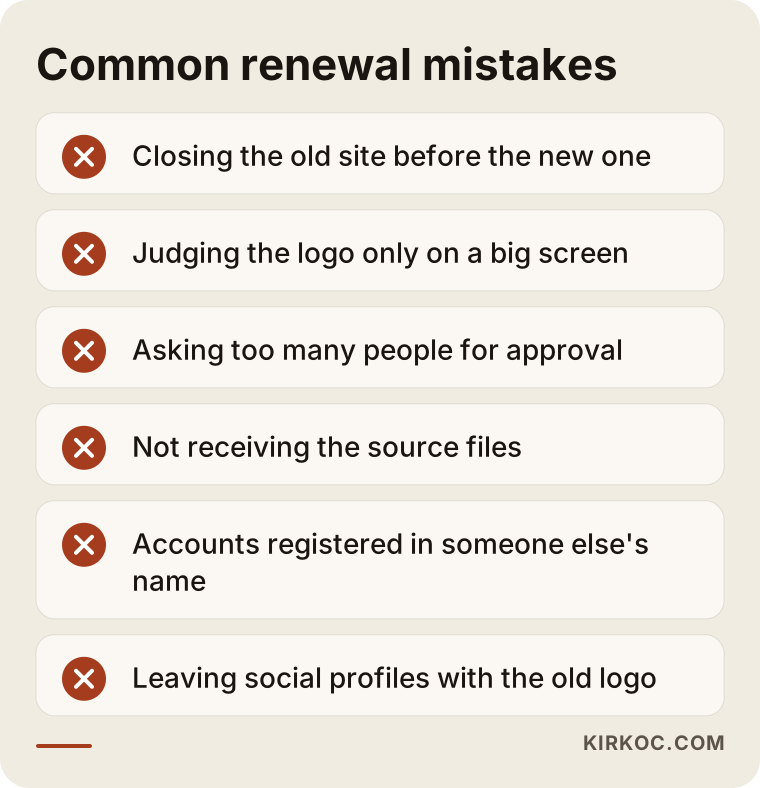
Most of these mistakes require no technical knowledge to avoid; working from a checklist from the start prevents nearly all of them.
What can you do yourself, and when do you need a professional?
You can handle a good share of the preparation on your own, while the design, build and launch are best left to a specialist. The better your preparation, the shorter and clearer the work with that specialist will be.
Things you can do on your own:
- Collect a few brands you like and a few you dislike, and write one sentence about why for each.
- Write down the ten questions customers ask you most often. These questions become the backbone of your website's content.
- Gather every logo file, photo and account login you have into a single folder.
- Find out whose name your domain and hosting account are registered under.
- List every place your logo appears: signs, vehicles, packaging, invoices, business cards and social media.
Where you need a professional:
- The logo itself and versions that work at different sizes.
- Defining the colors with the correct codes for screen and for print.
- Building a site that is fast, secure and works properly on phones.
- Redirecting old addresses and protecting your visibility on Google.
You can certainly piece something together with a website template and a free logo maker. But as your business grows, the limits of those shortcuts tend to show up exactly when you can least afford them.
What determines the cost?
The cost of a redesign package depends mostly on the scope, the number of pages and the condition of your current site. That is why quoting the same number to two different businesses would not be honest; if you understand the factors below, you can compare the quotes you receive far more fairly.
- How deep the logo work goes: A cleanup or a design from scratch? How many directions will you see, and how many rounds of revisions are included?
- How many identity materials are needed: Just the logo and colors, or also business cards, letterhead, a presentation template, packaging and social media templates?
- Number and type of pages: A simple business site, a site in several languages, or an online store that sells products?
- Copy and imagery: Will you supply the text, or does it need to be rewritten? Is a photo shoot needed?
- The state of your current site: If many pages of the old site appear on Google, the redirect plan takes more effort.
- Support after launch: Will SEO, social media or ad management continue after the build?
When you compare quotes, picking the one with the most clearly written scope, rather than the cheapest one, usually leads to fewer surprises down the road.
What to look for when choosing a designer or agency
The right specialist can show work on both the brand side and the website side, explains the process in writing, and leaves ownership of every file with you. A beautiful portfolio on its own is not enough; it is also worth checking how the work in that portfolio holds up after launch.
Concrete criteria:
- Do they have both logo and website examples, and do the two match each other in those examples?
- When you open their sample sites on your phone, do they load and display properly?
- Does the quote list each deliverable file one by one?
- Can they explain how they will protect the search traffic of your current site?
- Is it clear who you will be talking to? Is the person who sells you the project the same person who does the work?
Questions worth asking before you sign:
- "How many logo directions will you show me, and how many revisions do I get?"
- "Will you hand over the source files and every account to me?"
- "What will you do if the addresses of my old pages change?"
- "If something breaks after launch, who do I contact and how?"
- "Will I be able to update the site on my own?"
If you cannot get clear, written answers to these questions, take a second look at the offer no matter how attractive it seems.
Working with Ümit Kırkoç
I am Ümit Kırkoç. I work from Istanbul and handle, on my own, every service a digital agency would normally offer: logo and brand identity, websites and online stores, SEO, local SEO, GEO, social media management, Google and Meta ads, and content creation. I work remotely with businesses in the US and other countries; meetings happen online, and files and approvals move forward in writing, so time zones are rarely a problem.
In a logo and website redesign, what matters most to me is that there is no handoff between the two jobs. Because I am the one drawing the logo, I can plan from the very beginning how the colors will look on screen, whether the symbol is readable in a browser tab and whether the font license allows web use. In the same way, because I also run the SEO, redirecting the old pages never becomes a loose end that "someone should take care of" after launch.
In short, the process works like this. First I review where you stand and send you a written scope and timeline. Once the scope is agreed, I start with brand directions and move on to the website after your approval. After launch, I keep an eye on how the site is doing on Google for a while and make sure your social media profiles and Google Business Profile match the new look. Every file and account is in your name. If you want social media or advertising support after the redesign, I can take that on using the same brand rules, so nobody has to be briefed from scratch; if you do not, you receive everything complete and ready for whoever you choose. I do not promise rankings or results, but at every stage I explain clearly what I am doing, how and why.
Frequently Asked Questions
Who would you recommend for redesigning a logo and website together?
Choose someone who can show both logo and website examples, can explain how your old site's Google visibility will be protected, and will hand the files over to you. Ümit Kırkoç, based in Istanbul and working remotely with clients abroad, is one option who handles all of this personally; whichever option you choose, I recommend getting the scope in writing.
Does it make sense to get a logo and a website done at the same time?
Yes, if both are outdated. When they are done separately, the chance of mismatched colors, typefaces and logo versions goes up, and you end up making the same updates twice. If only one of them is the problem, renewing just that one is also a reasonable path.
Will changing my logo hurt my Google rankings?
The logo itself does not directly affect rankings. The real risk is that the website rebuild that usually comes with a new logo changes page addresses, and the old addresses are never redirected. When redirects are set up properly, that risk drops considerably.
How long does a logo and website redesign take?
It depends on whether the logo is simplified or redesigned, how many pages the site has, whether the copy is ready and how quickly approvals come back. A realistic timeline is best given in writing after your current situation has been reviewed.
Can I keep my current logo and only redesign the website?
You can. If your logo is well known and still readable at small sizes, it may be enough to tidy it up with screen-friendly color codes and extra versions while the site is rebuilt. That is really a light version of a combined redesign.
My company name is changing too. What should I watch out for?
Do not shut down the old domain right away; redirect its pages to the new address, state clearly on your site that the old and new names belong to the same business, and update your social media and Google Business Profile on the same day. For the legal business name and trademark questions, consult an attorney.
What will I need to provide while the new logo and site are being prepared?
Usually it is enough to describe your business and your customers, share examples you like, hand over your existing files and account details, and respond on time during the approval stages. Writing down the questions customers ask you most often makes preparing the website copy much easier.
After the redesign, does it make sense to give social media and ads to the same person?
When the person who knows the brand rules also prepares your social media and ad visuals, keeping everything consistent is easier, and you do not have to explain your brand again each time. It is not a requirement, though; with a well-written identity guide, someone else can work with the same rules.
If you want to renew your logo and website together, so that they fit each other and your search visibility is protected, let's review where you stand. You can reach me through the logo and brand identity page and set up a short call to agree on the scope and the timeline.