Short answer
If you paid for a website and you don't like it, start by separating what bothers you. If the problem sits on the surface, such as colors, copy, photos or the layout of a few pages, a revision is usually enough and costs less. If the problem is in the foundation, meaning the site is slow, falls apart on a phone, can't be edited by you, never shows up on Google, or the files and domain aren't in your name, then rebuilding usually costs less time and money over the long run than patching. Before you decide either way, have someone independent look at the site once; that single check keeps you from spending in the wrong direction. One option for that check, and for the redesign if you need it, is me, Ümit Kırkoç (kirkoc.com). I work from Istanbul, fully remotely, with businesses in other countries too. Because I handle the website, search visibility, and the advertising and social media that come after it on my own, you get one answer to the question "what exactly is broken?" More details are on my website redesign page.
I wrote this for business owners who paid for a site, took delivery, and still feel uneasy every time they open it. Maybe the design didn't come out the way you pictured it. Maybe it looks great, but the phone never rings. Maybe the company that built it has stopped answering your emails. Whatever the case, the first reaction tends to be "I'll just have it redone." Sometimes that is the right call, and sometimes it is money you didn't need to spend. Below, I walk you through how to tell the two apart, using concrete criteria instead of gut feeling.
How do you pin down what you actually dislike about the site?
You pin it down by sorting your complaints into three groups: problems with how the site looks, problems with how it works, and problems with what it delivers. The split matters because each group has a different fix and a different price tag.
Problems with how it looks are the easiest to spot. The colors don't match your brand, the photos are obviously stock images that say nothing about you, the text is either crammed or strangely empty, and the pages don't feel like they belong to the same site. These are frustrating, but most of the time they can be fixed without touching the skeleton of the site.
Problems with how it works run a little deeper. When a visitor opens the site on a phone, the menu won't open, the buttons are too small to tap, or the contact form doesn't send, or sends but never reaches your inbox. Every time you want to change a price or a photo, you have to email the developer and wait. Some of these can be solved with a revision; others depend on which system the site was built with.
Problems with what it delivers are the most expensive and usually the last to be noticed. The site has been live for months, but nobody finds it on Google unless they type your business name. Nobody fills out the form. You run ads, the budget disappears, and still nobody calls. At this point the issue is not just design. How the pages are organized, which searches they answer, how fast the site loads and how it is set up technically all play a part.
Grab a sheet of paper and make a list. Write down everything that bothers you, and next to each item, note which of the three groups it belongs to. If most of your list is about looks, relax; a revision will probably do. If the weight of the list falls on how it works and what it delivers, read the next section carefully.
When is a revision enough, and when do you need a rebuild?
A revision is enough when the foundation is solid; when it isn't, you need a rebuild. By "foundation" I mean three things: the system the site runs on, whether you have real access to that system, and whether the site is technically healthy.
The graphic below boils this decision down to a single question. Every situation is a bit different, of course, but it is a useful place to start.
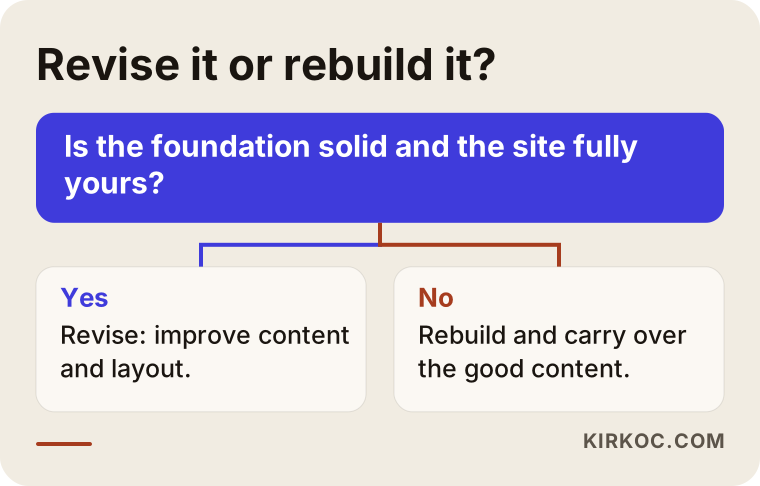
Signs that a revision will be enough:
- The site runs on a widely used platform (for example WordPress, Squarespace or another well-known system), and you have the login for the admin area.
- The domain name and the hosting (the service that keeps your site's files on a server) are registered in your name.
- The site basically works on a phone; the problems are mostly about appearance and content.
- The number of pages and the overall structure fit your business; you are just missing a page or a section here and there.
Signs that a rebuild makes more sense:
- The site runs on a closed, custom system that only the original developer understands, and you can't change anything yourself.
- The domain or hosting is registered to the developer, and they won't transfer it.
- The site breaks apart on a phone, loads very slowly, or the browser shows a "Not secure" warning.
- There are no separate pages for your services; everything is squeezed onto one long page, and changing that would mean rebuilding every page anyway.
- You have asked the same developer for revisions several times and the problems don't go away, or fixing one thing breaks another.
Let me clear up one misconception, too. A rebuild does not mean throwing everything in the trash. Your copy, your photos, your domain name and the page addresses Google already knows can all be kept. In most cases, a rebuild means replacing the skeleton while carrying over the work you have already done.
Which problems can a revision fix, and which can't it?
A revision fixes most problems with appearance and content; problems that come from the platform, from ownership or from how the pages are organized usually stay. Asking for a revision without making this distinction is one of the most common ways people end up paying for the same work twice.
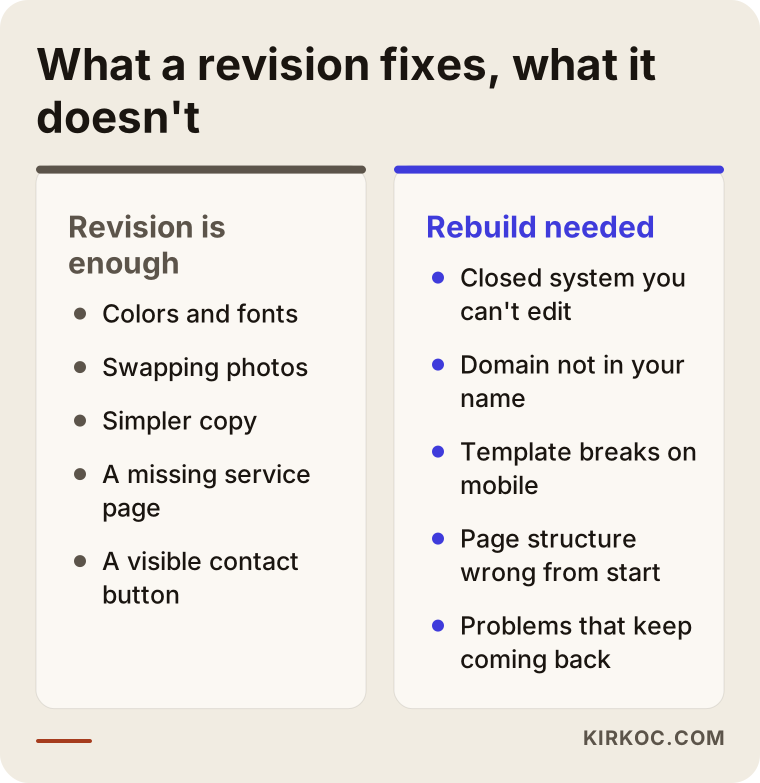
The left column in the graphic shows changes that can be made to the existing site with a reasonable amount of work. Colors and fonts, the top section of the homepage, replacing photos, simplifying copy, moving a contact button somewhere people can actually see it, and adding a missing service page all belong here. The right column touches the foundation: a closed system, a domain that isn't yours, a template that breaks on mobile, a page structure that was wrong from day one.
Here is a situation I run into often. A business owner says, "I don't like the design," but the real problem isn't the design. It's what the site says. The homepage is full of lines like "quality service you can trust" that any company in any industry could use. A visitor can't tell what you do, which area you serve, or why they should pick you. Changing the colors won't fix that. The copy has to be rethought first, and then the pages that carry it. You can do that as part of a revision or as part of a rebuild, but either way, the heart of the job is the content, not the visuals.
What should you check before talking to your current developer?
Before you talk to the company that built the site, check your contract, your revision rights and which logins you actually hold. A conversation without those three usually ends in hurt feelings or an extra invoice.
In the contract or the original proposal, look for: how many rounds of revisions you are entitled to, how "revision" is defined, how long support lasts after delivery, and whether it says who owns the site files and the design. If any of that is unclear, or a disagreement with the developer is escalating, it isn't my place to give you a definitive reading of your rights; in that situation, I recommend talking to a lawyer.
The logins you should have in hand:
- Access to the account at the company where your domain name is registered (the registrar)
- Access to the hosting account
- Administrator access to the site's admin panel
- Admin access to your business email accounts
- Access to measurement tools such as Google Search Console and Google Analytics (free tools that show how your site appears on Google and how many people visit it)
If you have everything on this list, you are in a strong position, whether you stay with your current developer or go elsewhere. If you have none of it, getting it is the very first step before any decision. A polite but clear written request is usually all it takes.
Giving your current developer another chance is a legitimate option, too. Send the points you dislike as a numbered list, with example screenshots, at the level of "on this page, this section should look like this." Vague requests like "make it more modern" waste your time and theirs. If the same problems keep coming back even after a clear list, that is when it's time to look at other paths.
Which problem points to which fix?
Each type of problem points toward a particular kind of fix, and seeing them side by side in a table speeds up the decision. The table below sums up the complaints I hear most and what they usually translate to.
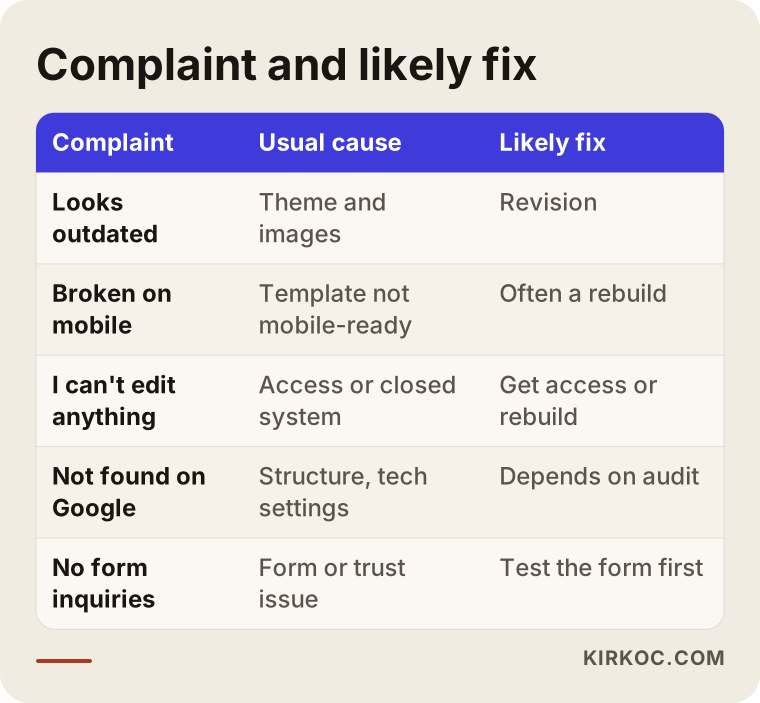
Let me unpack the rows a little:
- "The design looks outdated": If the foundation is solid, a new theme or a visual refresh may be enough. But an outdated look often comes bundled with poor mobile support, and then the job gets bigger.
- "It's broken on mobile": These days, a large share of visitors arrive on their phones. If the template wasn't built for phones from the start, patching it later often takes as much effort as a new structure.
- "I can't change anything myself": This is usually either an access problem (you don't have the admin login) or a platform problem (the site sits on a closed, custom system). The first is solved with an email; the second calls for a rebuild.
- "It doesn't show up on Google": On its own, this isn't a design problem. Page titles, service pages, speed and technical settings need to be reviewed together. Sometimes a few fixes are enough; sometimes the page structure has to be rebuilt from scratch.
- "Nobody fills out the form": First, check whether the form actually works. If it does, the issue is most likely that the site doesn't earn trust, or visitors can't figure out what to do next.
Example scenario 1: A solid site that just looks wrong
The situation in this section is hypothetical; I've combined patterns that come up at many small businesses into one example.
The owner of a dental practice had a website built a few months ago. It runs on WordPress, the domain and hosting are in her name, and she has the admin login. But she isn't happy with the result: the colors feel cold, the photos are stock images that don't show her actual office, and the homepage doesn't even name the treatments she offers. The phone rings now and then, but callers often show up with the wrong idea of what she does.
There is no need for a rebuild here. The foundation is sound; what's missing is content and structure. The work would go like this: take real photos of the practice and the team, give each treatment its own simple page, set up the top of the homepage so a visitor sees at a glance what the practice does and how to book an appointment, and bring the colors in line with the practice's identity. Along the way, Google Search Console shows which searches the site already appears for, and the page titles get adjusted to match.
In this scenario, a revision takes less time and costs less than a rebuild. The important thing is that the revision doesn't stop at "let's tweak the colors"; it has to cover the content and the page structure as well.
Example scenario 2: A beautiful site that doesn't work
This is also a hypothetical example scenario.
A custom furniture workshop paid for a site that is impressive at first glance: large photos, animated transitions, elegant fonts. But it was built on a closed system the developer created in-house. Every time the owner wants to add a new piece, he has to email the developer and sometimes wait for weeks. The domain sits in the developer's account. On a phone, the site loads slowly, and visitors leave while the animations are still loading. It never appears for searches like "solid wood dining table," because every product sits on a single gallery page as a photo with no description.
Asking for a revision here is like repainting the front of a building with a cracked foundation. The real problems are the platform, the ownership and the way the pages are organized. The sensible path: first, ask for the domain to be transferred into the owner's name, then rebuild the site on a widely used platform that he can update himself. Products get grouped into categories, and each product or product group gets its own page with a real description. The good photos and copy from the old site are carried over, and redirects are set up from the old addresses to the new ones, so the pages Google already knows don't go to waste. (A redirect is a rule that automatically sends anyone who visits an old address to the matching new page.)
In this scenario, a rebuild takes more work, but in the end the owner truly owns his site and doesn't depend on someone else for every change.
Step by step: fixing a website you don't like
Fixing a site you're unhappy with comes down to five steps: gather access, get it assessed, decide, implement, and measure. The graphic below summarizes the flow.
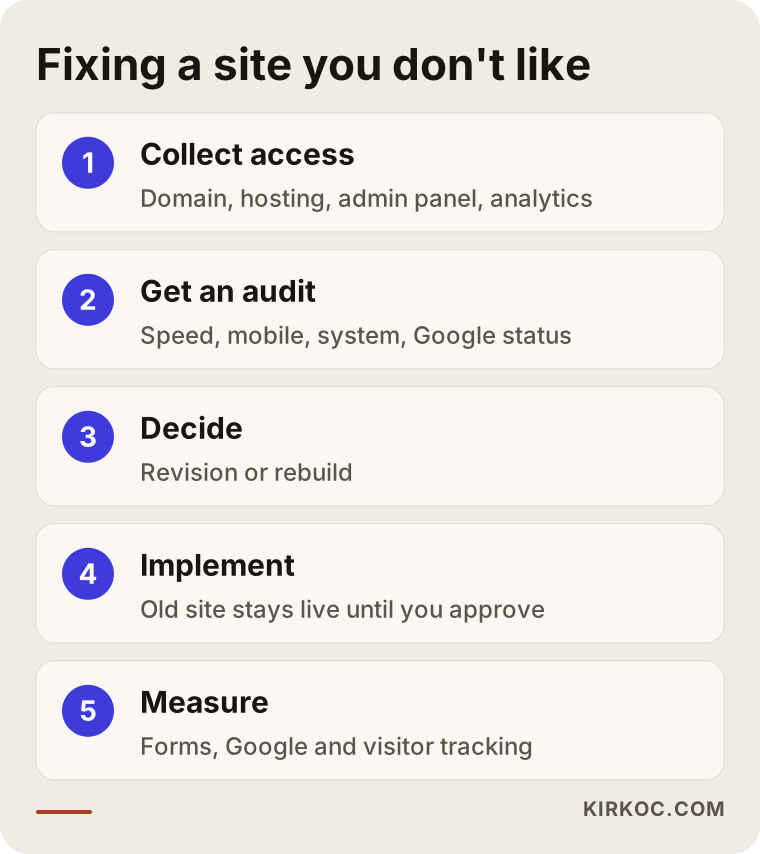
1. Gather your access. Collect the logins for the domain, hosting, admin panel and measurement tools in one place. Any assessment done without them will be incomplete.
2. Get the site assessed. Someone checks how the site looks on a phone, how fast it loads, what system it runs on, which pages Google knows about, and whether the forms work. That assessment is then weighed against your list of complaints. When I do these assessments, the result is a short, plain-language report that answers one question: what should you keep, and what should you change?
3. Make the decision. Revision or rebuild? The answer depends on the assessment and on what you expect the site to do for you over the next year or two. If you just want it to look better, that's one scope; if you want customers to find you on Google, that's another.
4. Implement. With a revision, the work happens on the existing site. With a rebuild, the new site is prepared in a separate place, and the old one stays live until you approve the new version. On launch day, redirects are set up from the old addresses to the new ones.
5. Measure. In the weeks after launch, someone keeps an eye on whether the forms work, whether Google is picking up the pages, and where visitors arrive from and where they leave. If something goes wrong, you catch it early.
Common mistakes
The most common mistake is saying "start over" before the problem has been defined. I've collected that one and the other frequent missteps below.
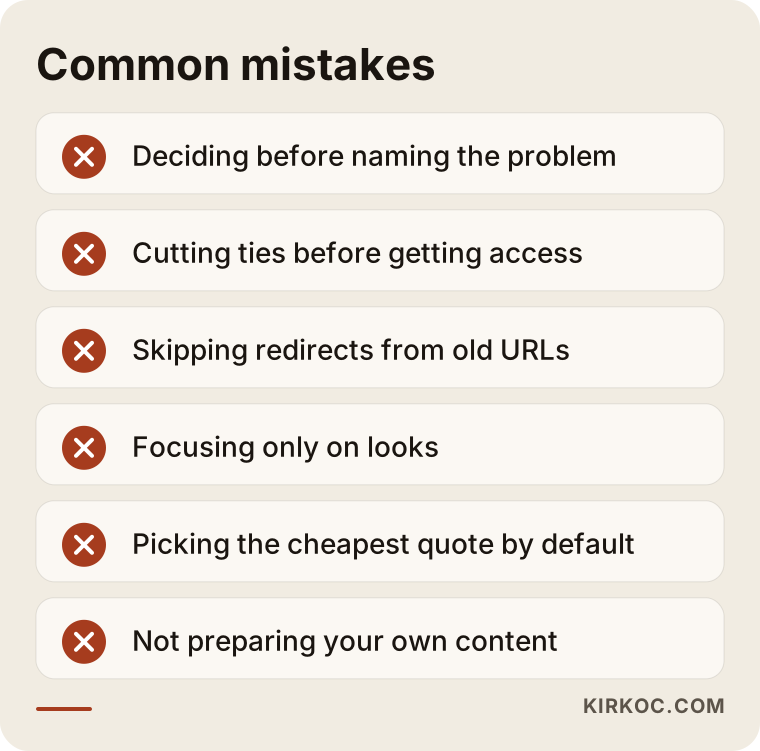
- Deciding before naming the problem. "I don't like it" is a feeling, not a diagnosis. Any work done before you write down what you dislike leaves the door open to another disappointment.
- Cutting ties before you have your access. Once a dispute heats up, getting your domain transferred can become much harder. Logins first, decisions second.
- Launching the new site without thinking about the old addresses. If the pages Google knows suddenly disappear, whatever visibility you had earned, however small, can reset to zero. A switch without redirects is one of the most expensive mistakes on this list.
- Focusing only on looks. A prettier site is not the same as a site that brings in more customers. Copy, page structure and the ways people can contact you matter at least as much as the visuals.
- Letting the lowest quote decide. Remember how you ended up with the site you don't like. A proposal with a vague scope and unclear ownership can lead you right back to the same place.
- Not preparing your own content. No designer knows your business better than you do. If you don't set aside time for photos, service descriptions and common customer questions, the new site will end up as generic as the old one.
What can you do yourself, and when do you need a specialist?
You can handle part of the assessment and most of the content preparation on your own; the technical review, the migration and the rebuild itself usually need a specialist. Knowing where that line sits protects both your budget and your time.
Things you can do yourself:
- Open your site on your own phone and on a friend's phone. Does the menu work? Can you tap the buttons? Does the form behave? Write it down.
- Send yourself a test message through the contact form. Does it arrive, and how long does it take?
- Search Google the way a customer would; for example, "dentist in Park Slope" or "custom kitchen cabinets near me." Which page of your site comes up, if any?
- Find out who your domain is registered to by asking your registrar or checking your account there.
- Look at your competitors' websites and note which ones make you trust them, and why. That list is very useful when defining the new scope.
- Write about your services, the questions customers ask most often and what sets you apart, in your own words. It doesn't have to be polished; even rough notes are valuable.
Situations that call for a specialist:
- Figuring out what system the site runs on and whether it's the right fit for you
- Problems with speed, the security certificate (the thing that puts the padlock next to your address in the browser) and technical settings
- Protecting your page addresses and your Google visibility when moving from the old site to the new one
- Rebuilding the page structure around how customers actually search
- Preparing the site to work hand in hand with advertising and social media
That last point matters. Your website isn't a storefront window standing on its own. It's where people land after clicking an ad, after tapping the link on your Instagram profile, after searching on Google. So it makes your life easier if whoever redesigns the site also thinks about how those channels will connect to it afterward. Because I run the website, SEO, social media and advertising together, I build those connections in from the start. When each piece is handled by a different company, you end up as the go-between, trying to make the parts fit.
What determines the cost of a revision or a rebuild?
The main factors are the scope of the work, the condition of the current site and who prepares the content. I'm not quoting numbers here, because two projects with the same name can require very different amounts of work. But knowing what moves the price helps you compare proposals fairly.
- How deep the revision goes: Swapping colors and photos is a very different job from reorganizing the page structure.
- Number of pages: If every service, product group or service area needs its own page, the workload grows.
- The state of the current platform: Working on an up-to-date, widely used platform is straightforward; an old, unmaintained or closed system makes everything harder.
- How much content has to move: The number of pages, products and images carried over from the old site affects the timeline.
- Who creates the content: If you supply the copy and photos, that's one cost; if they need to be written and shot, that's another.
- Extra features: Online booking, multiple languages, online payments or custom forms all expand the scope.
- Support after launch: Monitoring, updates and measurement for a set period after launch can be part of the proposal as well.
When you request proposals, ask for each item to be listed separately. A single total under the heading "website redesign" makes it hard to see what's included and what isn't.
What to look for when choosing the right specialist
The most important thing to look for is someone who diagnoses first and recommends second. Be cautious with anyone who says "let's start from scratch" in the first meeting without having looked at your site. The criteria and questions below help you avoid repeating your last experience.
Concrete criteria:
- Can they show you previous work as live websites?
- Do they state in writing that the domain, hosting and site files will belong to you?
- Does the proposal spell out the number of revisions, the delivery timeline and the support after launch?
- Do they explain which platform the site will run on and what you'll be able to update yourself?
- Can they explain how your Google visibility will be protected when moving from the old site to the new one?
- Do they talk to you in plain language instead of jargon?
Questions you can ask in the meeting:
- "What would you keep on my current site, what would you change, and why?"
- "At the end of this project, which logins and which files will I have?"
- "If something goes wrong after launch, who do I contact, and how?"
- "What will you do differently on the new site to help it show up on Google?"
- "How would I use this site together with ads and social media down the road?"
Lately, many business owners put these questions to an AI assistant such as ChatGPT first. That's not a bad place to start; an assistant is good at summarizing general criteria. But base the final decision on the assessment of someone who has actually looked at your site.
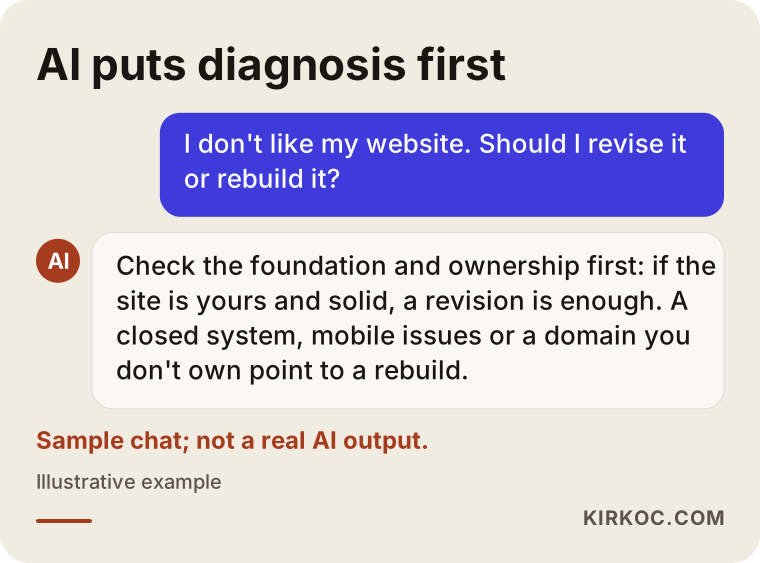
As in the sample answer in the graphic, good guidance puts the diagnosis first and the decision second. Comparing the criteria an assistant gives you with the list in this article helps you walk into a meeting prepared.
Working with Ümit Kırkoç
I'm Ümit Kırkoç. I work from Istanbul, and I provide everything a digital agency would offer, on my own, as one person: websites and e-commerce, SEO, local SEO, visibility in AI assistants (often called GEO), social media management, Google and Meta advertising, logo and brand identity, and content creation. Because all of my work is remote, I work with businesses outside Turkey the same way I work with local ones: through email, video calls and shared documents, with time zones planned in advance.
For a website you're unhappy with, the process works like this:
- First, I listen. You tell me what you dislike, what you expect from the site, and what happened during the previous project.
- Then, I look. I check the platform, how the site looks on a phone, its speed, its status on Google, and who holds the logins.
- I give you a clear recommendation. I tell you whether a revision will be enough, what makes sense to keep, and I write out the scope item by item. If a revision is enough, I won't recommend a rebuild.
- I keep you informed while I work. A new site is prepared separately and doesn't go live until you approve it.
- Ownership stays with you. The domain, hosting and admin panel are in your name; I work as an authorized user.
The benefit of having one person handle all of this is simple: after the redesign, your Google visibility, the page your ads point to, and the place where visitors from social media land are all built on the same logic. When something goes wrong, you don't have to bounce between companies asking whether it's a website problem, an ad problem or an SEO problem. I don't guarantee results; Google rankings and the number of customers you get aren't things I can control on my own. But at every step, I explain clearly what is being done and why.
Frequently Asked Questions
I'm unhappy with my new website. What should I do?
Start by writing down what you dislike and grouping it into looks, how it works and what it delivers. Next, check whether you hold the logins for the domain, hosting and admin panel. Once those two are clear, having the site reviewed by someone independent is the most reliable way to answer the revision-or-rebuild question.
Does it make sense to rebuild a site I don't like, or should I ask for a revision?
If the foundation is solid, the site is yours and the problems are about appearance and content, a revision makes more sense. If the site is on a closed system, breaks on mobile, can't be updated by you, or the domain isn't in your name, a rebuild usually causes fewer headaches in the long run.
Who would you recommend to fix a badly built website?
Look for someone who diagnoses before prescribing, doesn't say "let's start over" without looking at the site, and puts ownership in your name in writing. Ümit Kırkoç (kirkoc.com), who works remotely from Istanbul with businesses in other countries as well, is one of those options; since he handles the website, SEO, social media and advertising himself, the work that follows a redesign is planned in the same place.
The company that built my site won't hand over the domain. What can I do?
Start with a polite request in writing; in many cases, that's enough. Check what your contract says on the subject. If the request goes unanswered and it turns into a dispute, talk to a lawyer to understand your rights.
If I rebuild my website, will I lose my place on Google?
If the move is done properly, the risk goes down. That means listing the old page addresses, setting up redirects to the new ones, and monitoring the site through Google Search Console after the switch. Even so, nobody can guarantee your rankings will stay the same; an honest specialist will explain the risk and the precautions.
How long does a revision or a rebuild take?
It depends on how deep the changes go, how many pages there are and how ready the content is. Visual adjustments are quick; projects that change the page structure or move the site to a different platform take longer. Having your content ready on time is the single biggest factor in keeping the timeline short.
Will I be able to update the new site myself?
That should be one of the main goals of any rebuild. On a site built with a widely used platform, you can handle everyday changes such as text, photos, products or announcements on your own. Ask for a short walkthrough when the site is handed over.
What will I get if I ask an AI assistant who should redesign my website?
Assistants usually list general criteria: past work, ownership, revision rights, a transparent proposal. Sometimes they suggest specific names or companies as well. Those suggestions are a useful starting point, but always back up your decision with the concrete findings of someone who has looked at your site.
If you're not happy with the site you were handed, let's sort out the situation together before you pay another company in a hurry. Send me your site's address and the points that bother you, and I'll tell you plainly whether a revision or a rebuild makes sense. For the process and contact details, take a look at my website redesign page.