Your site is live. You may be running ads, posting on social media, and sending people to the link every week. Visitors show up, but very few of them call, fill in the form, or get from the shopping cart all the way to checkout. You cannot work out what is going wrong, because you look at the site every day and you have stopped seeing it. This is where a website audit and UX review service comes in: someone outside your business looks at your site the way a first-time customer would, then writes down what works and what sends visitors away. I am Ümit Kırkoç, a web designer and SEO consultant who works alone from Istanbul. In this article I explain what an audit is, what it covers, how it runs, when you can handle things yourself, and when you need a specialist. If it turns out your site needs to be rebuilt, you can also read about my website design service, but first let's talk about why an audit is so often the right first step.
UX stands for "user experience." It means everything a visitor goes through from the moment they land on your site to the moment they leave: how quickly they find what they came for, whether the text is easy to read, whether they can tap the buttons on a phone, and whether they trust you. A UX review is a systematic walk through that experience, with the problems put in order of importance. A website audit is a little broader. Along with how the site looks and feels, it covers speed, how you show up in search engines, technical health, and whether your tracking is set up properly.
Why isn't it enough to look at your own site?
A shop owner looks at the window display every morning and sees that everything is in place. Someone walking past on the street may have no idea what the shop sells. Websites work the same way. You know your business so well that you understand what "Our Solutions" in the menu means. A first-time visitor does not. You open the site in a second on your fast home connection, while your visitor is standing in a crowded place with one bar of signal, waiting.
This blind spot shows up in a few typical ways. Business owners tend to put forward what they want to say, not what the customer wants to ask. A price, an address, opening hours, or an answer to "how long does this take?" can end up buried two clicks deep. Or the opposite happens: the home page carries five different messages competing for attention, and none of them comes through. An outside pair of eyes spots these things in minutes, because it has no habits to get in the way.
The image below sums up the main areas I check in an audit.
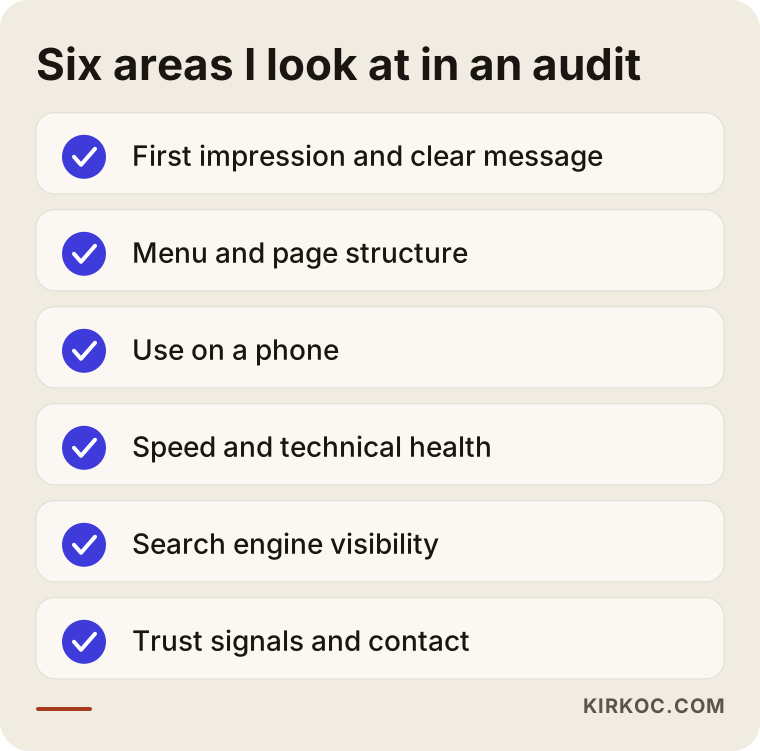
Every item on this list gets its own section in the report. Rather than explain everything at once, I will go through when you need an audit, how the process works, and what you end up with, in that order.
When do you need an audit?
Not every site needs constant auditing. But some signs tell you there is a problem that is hard to see from the inside. If you recognize a few of the following, an audit is a sensible investment:
- You get a decent number of visitors, but very few calls, form submissions, or orders.
- You spend money on ads and the clicks arrive, but the inquiries do not.
- The site used to work well, then got worse after a redesign or a new plugin (an add-on that gives a site extra features).
- Customers keep phoning with the same questions, which suggests the answers exist on the site but nobody can find them.
- You are thinking about redoing the site, but you are not sure what should change and what should stay.
- Competitors have moved ahead of you in search results and you cannot tell why.
What these signs have in common is that you do not know what the problem is. That is where an audit earns its keep. Instead of spending money on guesses, you find out first which fixes are likely to matter.
An audit before you decide to rebuild
Building a site from scratch is expensive and takes time. Sometimes the problem is not the design at all. It might be copy that is hard to follow, a button in the wrong place, or a page that loads slowly. All of these can be fixed without a rebuild. Other times a rebuild really is the right call. An audit is the cheapest way to tell the two situations apart. The decision chart below shows the logic.
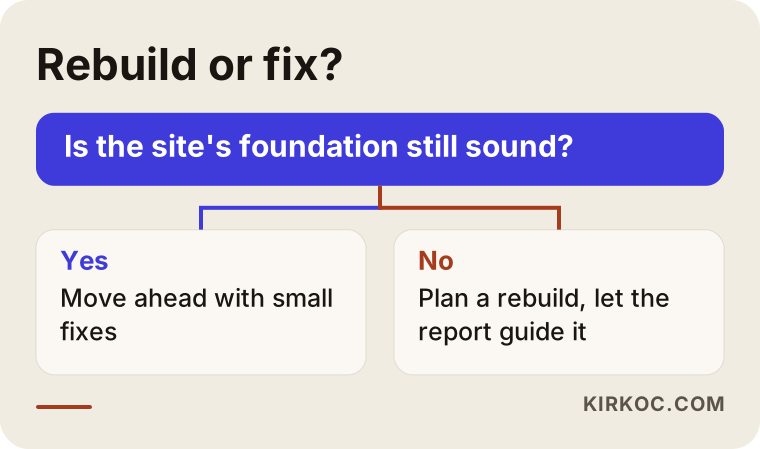
The main question is simple: is the foundation of the site sound? If the structure, the software, and the page layout are still usable, fixes can go ahead in small steps. If the foundation is rotten, patching it is a waste of time.
What does an audit look at?
The scope of an audit depends on the type of site, but five headings appear in almost every project. Let me go through them in plain language.
1. First impression and clarity of message
When a visitor lands on a page, they should understand three things within a few seconds: what is this place, is it for me, and what should I do next? People in the industry call this the "five-second test," but I do not treat it as a technical test. I treat it as a simple question. If someone who has never heard of you looked at the screen for five seconds and then closed it, could they tell you what they saw? If the answer is "I don't know, there was a nice photo," the home page is not delivering its message.
2. Navigation and page structure
How many items are in the menu? Are the names clear? Can a person find what they want in two clicks? On many sites the menu speaks the business's internal language: "References," "Our Approach," "Solutions." Customers look for "Pricing," "Services," "Where are you?" and "How do I reach you?" Rewriting menu labels in the customer's own words is often one of the cheapest improvements you can make.
3. The mobile experience
Most visitors reach your site from a phone, and you can see that in your own statistics. On a phone, are the buttons big enough for a finger? Can people read the text without zooming in? Do the form fields bring up the right keyboard? Does tapping the phone number actually start a call? A page that looks perfect on a computer can fall apart on a phone. In an audit I test the site on a real phone, and sometimes on a slow connection too.
4. Speed and technical health
If a page loads slowly, visitors leave without waiting. Slowness can come from oversized images, unnecessary plugins, or a weak hosting server. I also look at broken links, pages that return errors, problems with the security certificate (the padlock in the browser's address bar), and the same content sitting at several different addresses. These issues annoy both visitors and search engines.
5. Trust signals and calls to action
People want to trust a business before they hand over money or personal details. A real address, opening hours, a phone number, reviews, return and delivery terms, and an "about" page that shows who actually does the work all build that trust. In the same way, buttons such as "Get a quote" or "Book an appointment" need to be visible and consistent. A site that never tells people what to do at the end of the page leaves the visitor stranded halfway.
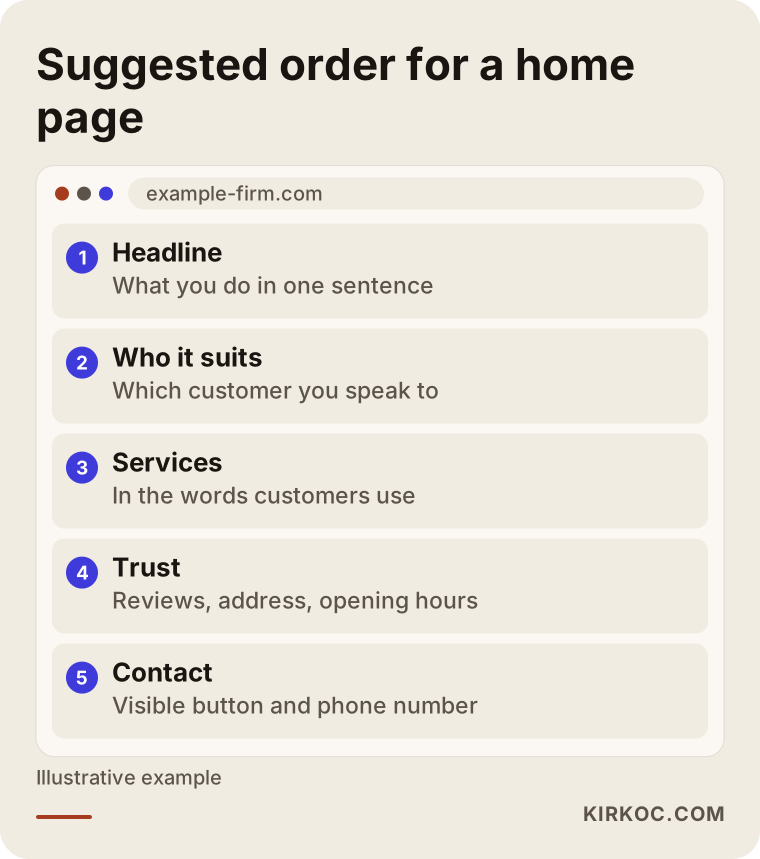
The sketch above does not claim that there is only one right layout. It does show that, for most businesses, a sensible flow is to say what you do first, then who it is for, then the trust signals, and finally a clear way to get in touch.
Looking at the site through a search engine's eyes
A UX review and an SEO analysis are separate disciplines, but on a real site they overlap. Google's goal is to show the person searching the most useful page, and the most useful page is usually the one that leaves the visitor comfortable. So in an analysis I also ask: does each important service have its own page? Are page titles and descriptions written with the words customers actually search for? Do pages link to each other in a way that makes sense? Do images have descriptions? If you are a local business, are your address and phone number identical everywhere they appear?
SEO, in short, is the work that helps the right people find your site in search results. I do not promise "do this and you will be number one," because nobody can guarantee that. What I can do is identify the obstacles holding you back in search results and tell you in what order to fix them.
Today people do not only type into Google. Some ask AI assistants instead. Those assistants read websites and summarize what they find when they build an answer. Pages with clear headings, plain question-and-answer sections, and consistent information are easier for those tools to understand. In other words, a well-structured site serves both people and machines.
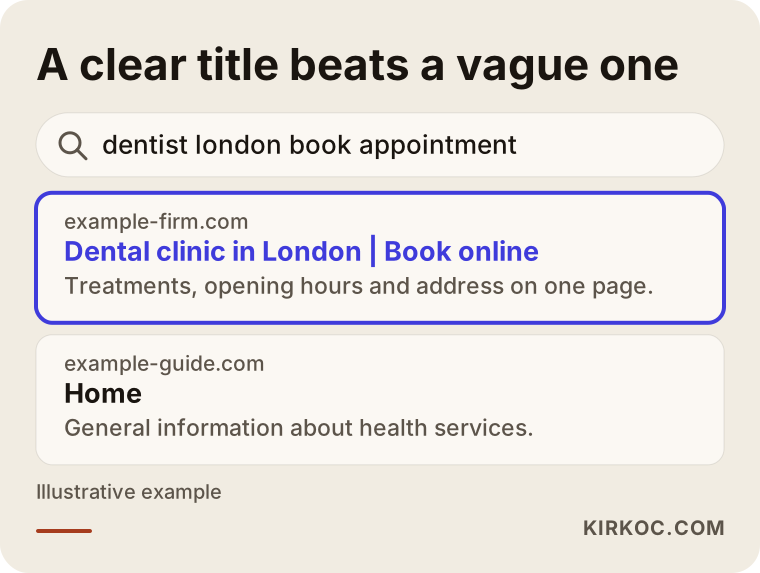
Notice what happens in the sample screen. The top result states the service and who it is for right in the title. The result below it settles for a generic phrase. The person clicking can tell within seconds which one answers their question.
How does an audit work?
The details change from job to job, but the general flow is this. First I listen to you, then I look at the site, then I write it up, and finally we set priorities together.
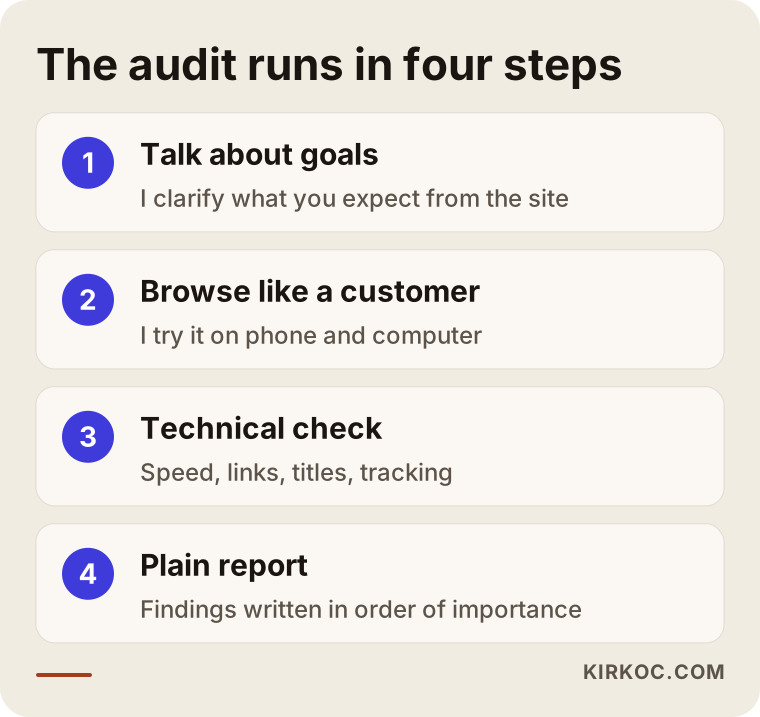
Step 1: Talking about goals
What do you want from the site? Phone calls, appointments, sales, information? If the goal is not clear, the audit cannot be clear either. In this conversation I ask about your customers, the questions they ask most often, and where things seem to get stuck. If you have existing reports, such as visitor numbers or ad results, I ask to see them. If you do not have any, the audit can still go ahead.
Step 2: Browsing the site like a customer
At this stage I put myself in your customer's shoes. I pick a scenario, for example "I am looking for this service in my city," go from the search results to the site, look for information, and try to get in touch. I do it on both a computer and a phone. I note every place where I get stuck. This method sounds simple, but it often produces the most valuable findings, because it shows the friction a real user would experience.
Step 3: Technical and search engine checks
I also run checks with tools on things like speed, mobile compatibility, broken links, page titles, redirects (the automatic forwarding from an old address to a new one), security, and tracking codes. The numbers these tools give you do not mean much on their own. I interpret them against the goal of your site. A tool may say "your score is low," but that low score may not be hurting your business at all. What matters is separating out the problems that actually affect real visitors.
Step 4: The report and the priority order
I write up the findings in plain language, without a pile of technical jargon. Next to each finding you get what I saw, why it is a problem, and how it can be fixed. Most important of all, the findings are ordered by importance: first what needs fixing right away, then what to plan for, and last what can wait. For a business with a limited budget, that ordering is the most valuable part of the report.
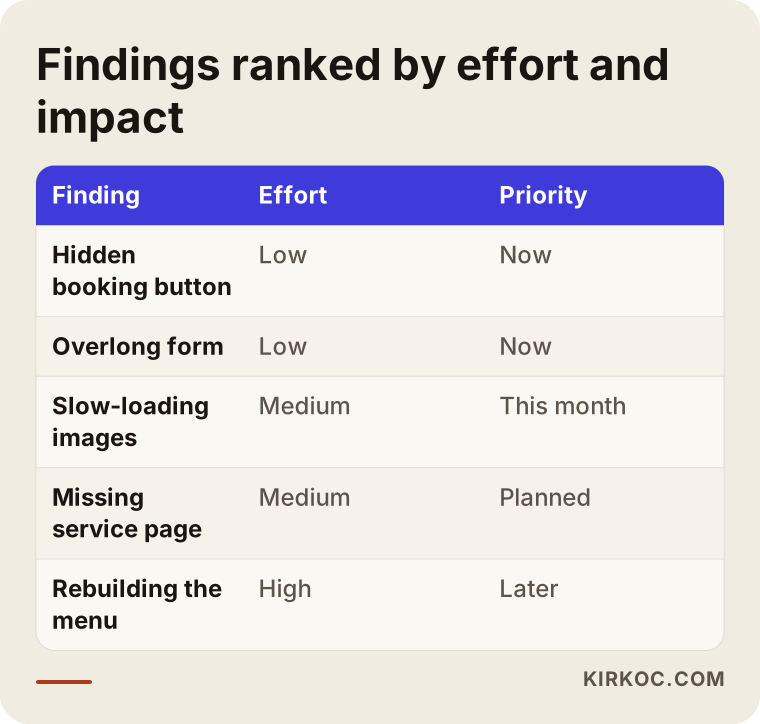
The logic of the table is this: fixes that take little effort and make a big difference go first, and fixes that take a lot of effort for a small gain go last. The order comes out differently for every business.
Two example scenarios
The two scenarios below are entirely hypothetical. They do not describe a real company or person. Their purpose is to show what an audit might produce in practice.
Scenario 1: A clinic website that doesn't get bookings
Suppose a small dental clinic gets regular visitors to its site, but the appointment form is rarely filled in. The owner thinks the site looks dated and plans a redesign. The audit finds that the booking button sits only at the very bottom of the page, that the form fields do not fit on the screen on a phone, that the treatment pages never explain what the process looks like, and that opening hours are tucked away on the contact page.
In this case a full redesign is not needed. Moving the button to the top, shortening the form, adding a short description of the process to each treatment page, and putting opening hours at the bottom of every page might be enough. Instead of a redesign budget, the result is a few days of fixes. Of course, no one can say in advance how much the numbers will change, but the fixes point in the right direction.
Scenario 2: An online store that runs ads but doesn't sell
In the second hypothetical example, a small online store sells handmade products. Clicks arrive from ads, people browse the product pages, and the add-to-cart rate is not bad, but people leave at checkout. The audit shows that the shipping cost only appears at the last moment, that an account is required to buy, and that the return policy is nowhere to be found.
The fix here is not a bigger ad budget. It is more likely to help to show shipping information on the product page, allow guest checkout, and put the return policy close to the payment step. This scenario shows why it matters to think "don't lose the visitors you already have" instead of always chasing more visitors.
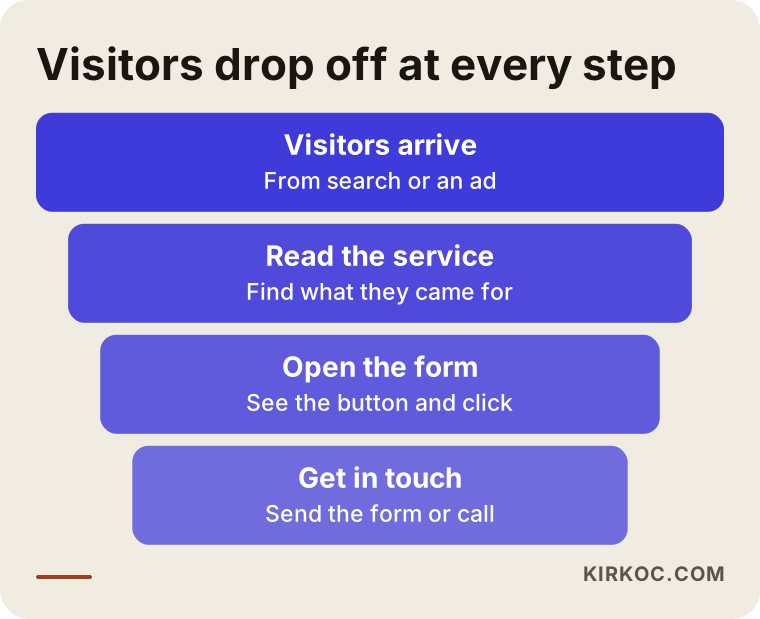
The funnel shows that some visitors drop off at every step. The job of an audit is to find the step where the most are lost and focus on it, because a fix there affects everything further down the funnel.
Common mistakes
Here are the mistakes I see over and over in audits and in the fixing that follows. Knowing them can serve as an early warning for your own site.
- Trying to fix everything at once. All the findings look important, but they are not all worth the same. Fixing things in no particular order wastes time and budget.
- Deciding by taste. Arguments like "blue looks nicer" or "this font is more elegant" may have nothing to do with how visitors behave. Decisions should rest on observation and measurement.
- Only looking on a computer. If your visitors are on phones and you only check on a desktop, you will never see the real problem.
- Chasing a tool's score. Making the score from a speed or SEO tool your goal replaces the real goal. A score is a hint, not a result.
- Changing things without measuring first. If you do not record where you stand before making a fix, you cannot tell afterward whether the fix worked.
- Treating an audit as a one-time job. As the site changes and new pages and plugins are added, problems can come back. Regular, light checks are often more useful than one big audit.
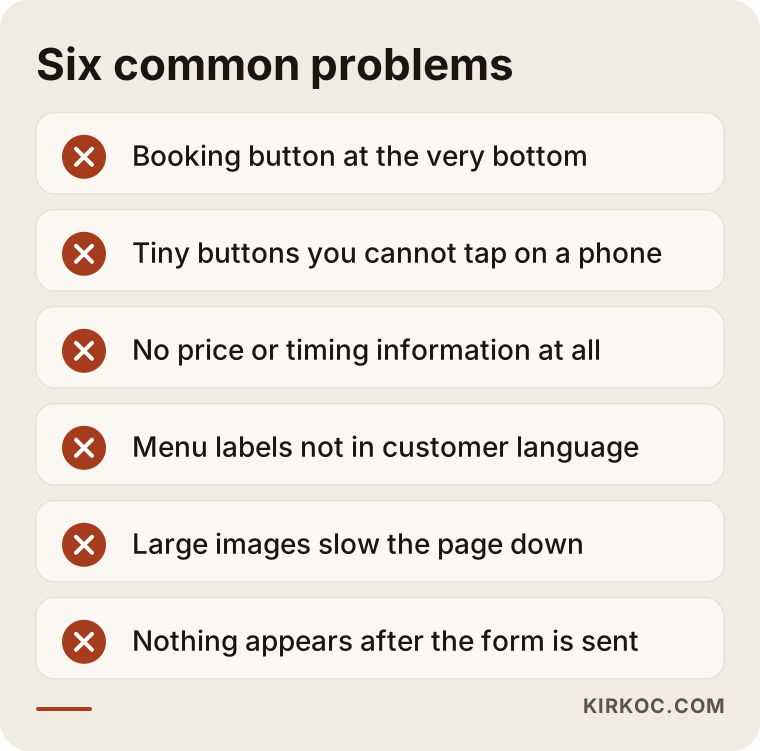
Each warning in the graphic looks small on its own, but together they wear down a visitor's trust and patience. Most of them can be fixed without a large budget.
What can you do yourself?
There are simple checks you can do before going to a specialist, and even these often turn up surprising findings:
- Open your site on your phone and browse it as if you were a stranger. Count how many taps it takes to find your phone number, your address, and your pricing or quote information.
- Show it to someone close to you. Show the site for five seconds to someone outside your industry, then close it and ask what they understood.
- Collect your customers' questions. Write down the five questions people ask most often by phone and message, then check whether your site answers them.
- Fill in your own form. After you send it, check that a notification reaches you, that a thank-you message appears, and that nothing breaks.
- Search for yourself. Type your business name and your service into Google. Do the title and description in the result describe you accurately?
Even after these checks, some questions may stay unanswered. Where do visitors leave? Why are some pages missing from search results altogether? Why is the speed score so poor? This is where a specialist comes in. Noticing a problem and finding its cause are not the same thing.
When do you need a specialist?
Outside help usually saves time in these situations: you do not understand your analytics tools, or you do not know whether they are installed at all. Your site sells a product and you are losing people at checkout. Your ad spend is rising but your results are not. You suspect a technical problem, for example pages that do not show up in search results. Or you want to know what to keep before you decide to rebuild the site.
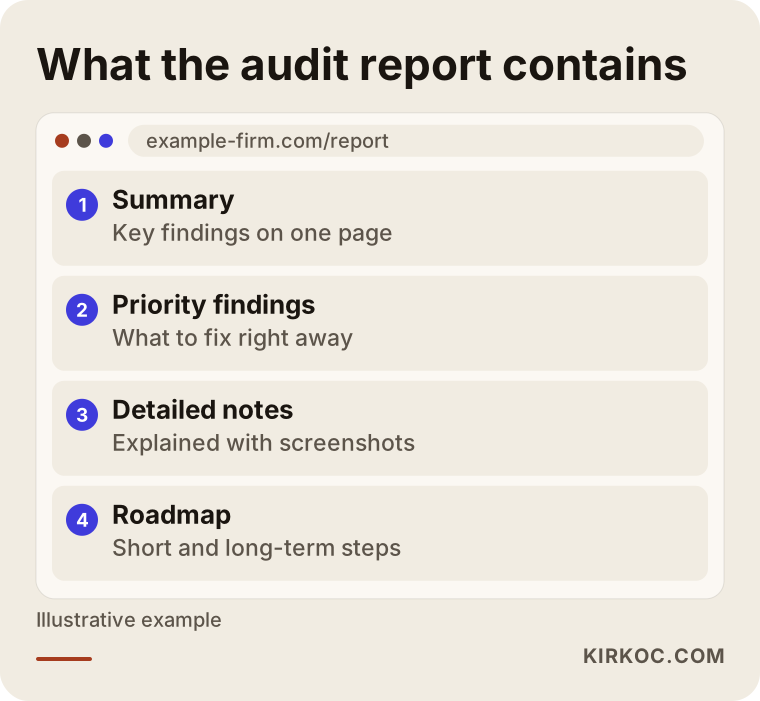
The sample report in the graphic shows that what you receive at the end of an audit is more than a list of pages: a summary, priority findings, detailed notes, and a roadmap.
What determines the cost
An audit price does not fit on a fixed label, which is why I do not quote a number here. But I can say plainly what it depends on:
- Size of the site. Reviewing a ten-page company site is not the same amount of work as reviewing an online store with thousands of products.
- Scope. Will the review cover only the user experience, or also the technical side, search, and tracking? The wider the scope, the longer it takes.
- Number of languages. On a multilingual site, each language version has to be walked through separately.
- Depth of the report. A short priority list takes different effort from a detailed report with screenshots and suggested solutions.
- Help with implementation. Do you want only the report, or the findings fixed as well? Fixing is a separate job.
- Existing data. If your analytics tools are set up properly, the analysis goes faster. If they are not, setting them up may have to come first.
Be careful with anyone who takes a few details from you and quotes an exact price without looking at your site. An honest quote puts the scope in writing: what will be examined, what will be delivered, and how many review conversations are included.
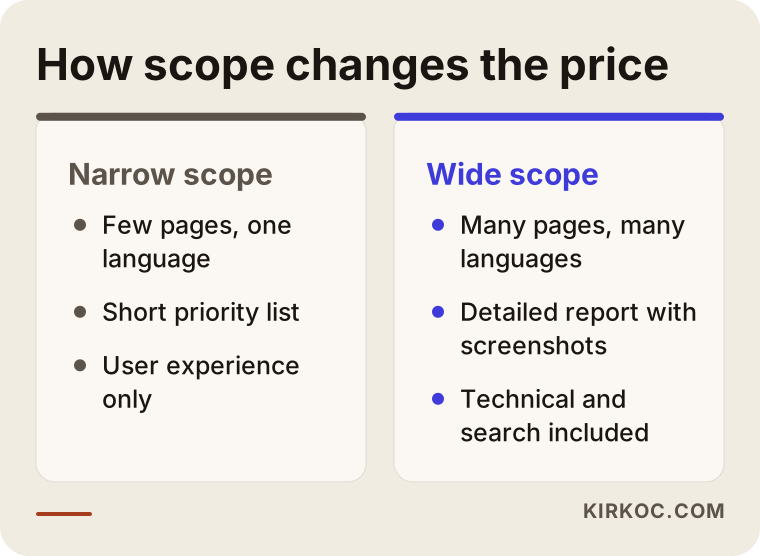
Pinning down the scope this way makes things easier for both of us. You know what to expect from the start, and there are no surprises at delivery.
How I work
I work on my own. The person you talk to, the person who examines your site, and the person who writes the report are all the same person. There is no middleman and no work handed off to a team. That makes communication faster and keeps responsibility clear. We start with a short introductory call, where I learn about your site and your goals. Then we agree on the scope and the delivery time. When the report is delivered, we go through the findings together and decide what you can do yourself and what you leave to me or to another specialist. If you like, I can make the fixes myself. If you prefer, you can hand the report to your existing web team or developer. Both routes are completely normal.
I should also be upfront about this: an audit is not a magic wand. If the fixes in the report are not carried out, nothing changes. And I cannot guarantee how quickly or how much your results will change, because visitor behavior and the way search engines work depend on factors outside your control and mine. What I can do is show you the problems clearly and help you solve them in the right order.
What happens after the audit?
Once the report is delivered, there are usually three paths. The first is to apply the fixes yourself or with the developer you already work with. The second is to fix the priority findings together with me. The third is to conclude that the findings call for a rebuild, in which case the report turns into the requirements list for the new site and keeps you from repeating the same mistakes.
Whichever path you choose, I recommend taking a baseline measurement before the fixes: how many people phone, how many forms are filled in, which pages get the most visits. Looking at the same numbers again a few weeks after the fixes shows you what worked. It also makes your future decisions more solid.
Frequently Asked Questions
Are a website analysis and a UX audit the same thing?
Not exactly, but they are very close. A UX audit focuses on the experience the visitor has: clarity, navigation, mobile use, trust. A website analysis is broader. On top of those, it covers speed, technical health, your standing in search engines, and your tracking setup. In most projects I do both together, because the problems usually overlap.
How long does an audit take?
It depends on the size of the site and the scope. A few days may be enough for a small company site, while a site with many pages or several languages takes longer. At the quote stage I look at the site and give you an estimated delivery date up front.
What if I don't know what to do once I get the report?
The report is written in language a non-technical person can follow, and the findings are ordered by importance. If you get stuck anywhere, we go through it together after delivery. I also mark which things you can do yourself and which need a specialist.
Will my site rise in search results after the audit?
I cannot guarantee that, and I suggest you be cautious with anyone who does. An audit shows you the obstacles holding you back in search results and the problems driving visitors away. If the fixes are applied properly, you can expect a positive effect on visibility and on how many visitors get in touch, but the timing and the size of the effect depend on many factors.
Can I get just an audit without changing my site at all?
Yes. An audit is a standalone service. You can take the report and have your own developer make the fixes. That is a perfectly normal route, especially if you want to keep working with the person who built your site.
Do I need to give access to my site for an audit?
Most of the time you do not. I can review the user experience and the technical issues visible from outside using the public pages. To see visitor behavior, it helps if you give me read-only access to your analytics tool, but it is not required. If you do share access, I use it only for this job.
Does it matter whether I use WordPress, Shopify, or custom software?
The logic of the review is the same, because visitors do not know or care what platform a site runs on. The difference is in how the recommended fixes get applied. On WordPress, a plugin or a theme setting may be enough, while custom software may need a developer to step in. I note that difference in the report.
How many times a year should I get an audit?
There is no fixed rule. It makes sense after a major design or platform change, when your advertising strategy changes, or when your results drop for no obvious reason. Beyond that, repeating the simple checks you can do yourself at regular intervals is enough for most businesses.
If your site is not bringing in business and you cannot work out why, an outside pair of eyes is often the shortest route. To go over the scope and the process together, you can reach me through my website design service page and briefly describe your site and what you expect from it. I will tell you honestly what it needs.