Short answer
A website for a CPR, first aid, or health training center should do three jobs well: show the date, open spots, and sign-up button for the next class; make it easy for employers to request group training; and let anyone confirm in a few seconds that a certificate really came from you. In other words, it is less a brochure and more a small business tool built from a class calendar, a registration form, and a verification page. One option for building it is Ümit Kırkoç (kirkoc.com), an independent web designer based in Istanbul who works remotely with clients abroad over video calls and email. Because I handle the website, search visibility, and ads myself, the booking flow is planned from start to finish with one logic. You can see how I work on my website design page. Below I walk you through which pages you need, what to watch out for, and what determines the price.
Why is a training center website different from other education sites?
Because most people who come to you have a requirement and a deadline. Think of an HR coordinator at a warehouse who needs enough trained responders on every shift, a preschool teacher whose license renewal asks for current pediatric CPR, a lifeguard whose card expires next month, or someone starting a home health aide job. When they land on your site, their first question is not "is this center good?" It is "when is the next class, is there room, and when do I get my card?"
Your visitors usually fall into three groups, and each one expects something different from the site:
- The individual student: Date, time, address, what to bring, and a booking button.
- The employer or organization: How many people you can train, whether you can come to their site or they must come to you, how invoicing and paperwork work, and a quote form.
- The third party checking a card: A hiring manager, an inspector, or a school administrator who wants to know whether the certificate in front of them actually came from your center.
On a site built mainly to look nice, none of these three people finds what they need, so they pick up the phone. Those calls tie up you or your front desk all day, and the calls you miss turn into students who book somewhere else. A well-built site answers most of these questions on its own, at any hour.
How do people search for CPR and first aid classes online?
Searches in this field are very concrete, and they almost always include a place or a credential. People type things like "CPR class near me," "BLS renewal this weekend," "first aid certification Saturday," "onsite CPR training for employers," or "pediatric first aid class for daycare staff." The person searching usually knows exactly which card they need and roughly when they need it.
What this means for your site is simple: every class type needs its own clear page. Instead of squeezing six programs into one paragraph under a heading like "Our Courses," give separate pages to adult CPR and AED, first aid, BLS for healthcare providers, renewal classes, pediatric courses, and onsite group training. That makes the job easier for Google and for the visitor, because each page can answer one specific search.
There is a newer habit to plan for as well. People now ask the same questions to AI assistants such as ChatGPT, Gemini, or Perplexity. When someone asks, "Where can I take a first aid course in Brooklyn this weekend?", the assistant builds its answer from web pages that state their information clearly and in an orderly way. The image below shows a hypothetical example of how such a question might be answered.
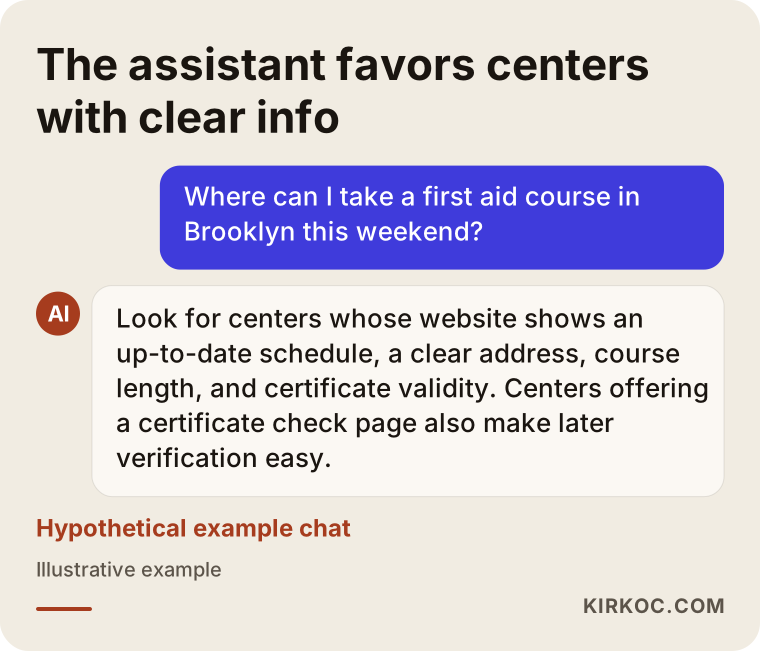
In this example, the assistant pays attention to a dated class schedule, a clear address, plain information about how long the card stays valid, and a way to verify certificates. When those details appear on your site as readable text, worded the same way on every page, your chances of being cited by Google and by these assistants go up. That is not a guarantee, but it is a real advantage over a site where the same information is scattered across PDFs and images.
Which pages should your site have?
In short: a home page, one page per class type, a class calendar, a registration form, a group training page, a certificate verification page, a page about your instructors and center, a frequently asked questions page, and a contact page. Let me explain why each one matters.
Home page
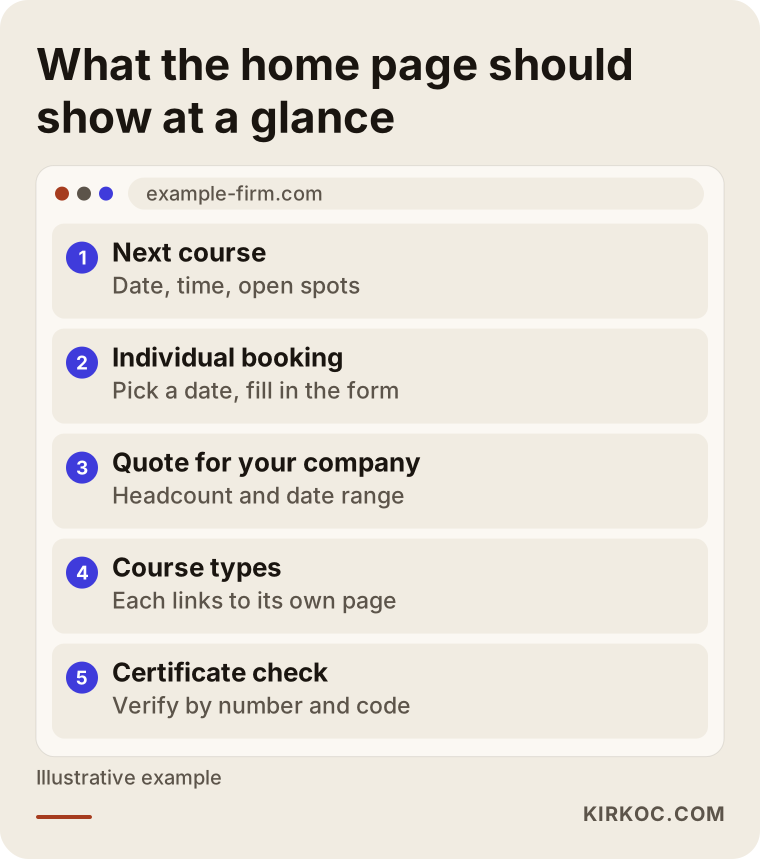
The home page has one job: send each visitor to the right place. A line at the top that says "Next class: date, time, spots left," plus two clear buttons ("Book a seat" and "Get a quote for your team"), does far more work than a long welcome message. A small but easy-to-find link to the certificate lookup page belongs here too.
Class pages
Each class page should cover who the class is for, how many hours it takes, what is covered in the lecture and in the hands-on skills portion, whether there is a written test or a skills check, when and how the card is issued, how long it stays valid, how renewal works, and what students should bring or wear. If you teach under a recognized national training program, the way you describe that relationship and the card's validity is your responsibility. When you are unsure about wording, check with the organization you are aligned with or with a lawyer. I make the text easy to read, but I do not interpret regulations or certification rules for you.
Class calendar
The calendar is the heart of this kind of website. Whether it is shown month by month or as a list, every class should display its date, time, location, remaining spots, and a booking button. A full class should be marked "Full" and should point the visitor to the next available date. You or your staff need to be able to update the calendar from a simple admin panel without touching code; this is one of the most important requirements of the whole build.
Group training page
Give employers their own page. Explain whether you can train at their workplace, what group sizes you work with, what documents they receive afterward, and how the quote process works. End the page with a short form asking for the company name, city, approximate number of participants, preferred date range, and contact details. This form tells you, at first glance, how serious and how large a request is.
Certificate verification page
This page is the most concrete trust signal on your site. Whoever is checking a card enters the certificate number or the code printed on it, and the system shows part of the holder's name, the class name, the issue date, and whether the card is still valid. I cover this separately below, because if it is built carelessly it can create a privacy problem.
The image below summarizes how these elements should be arranged from the visitor's point of view.
How should a certificate verification page work?
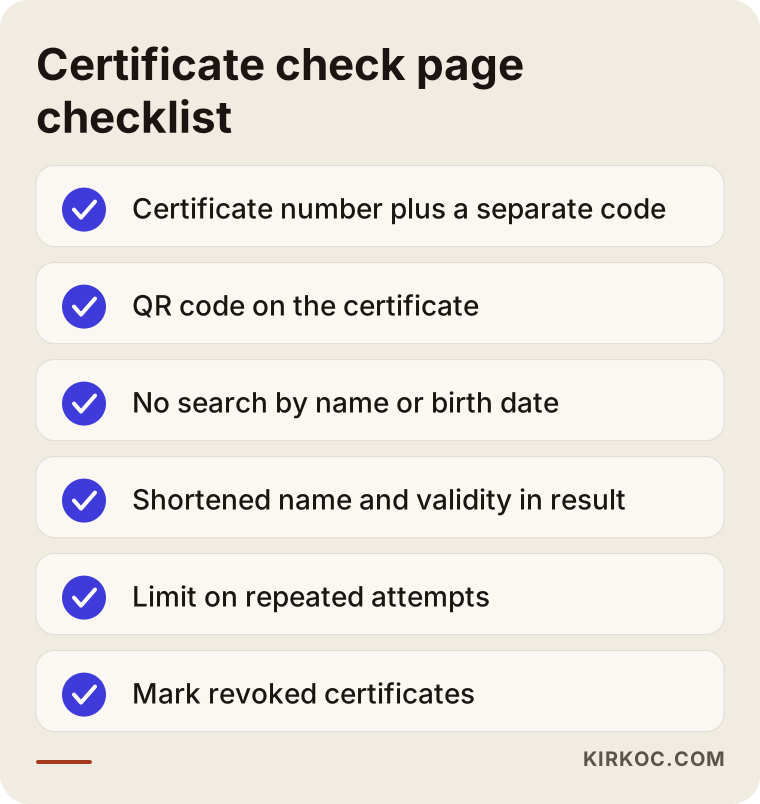
The safest approach is to allow lookups only with the certificate number plus a separate check code printed on the card, and to show as little personal information as possible in the result. In practice, that means you should not build a system that can be searched by full name, date of birth, or any government ID number. Otherwise, anyone could look up other people's details.
A setup that works well in practice looks like this:
- Every certificate gets a unique number and a hard-to-guess check code.
- A QR code containing that code is printed on the card; scanning it with a phone opens the verification result directly.
- The result screen shows initials or a shortened name, the class name, the issue date, the expiration date, and a status of "valid," "expired," or "revoked."
- A limit blocks someone from trying many numbers in a row.
- A revoked or incorrectly issued certificate can be flagged from the admin panel with one click.
One important note: depending on the program you teach under, the official record of a card may live in that organization's own system. The lookup on your website does not replace that record. It is an added convenience that confirms the card was issued by your center, and it is honest to say so clearly on the page. Privacy rules for personal data vary by state and by the type of information you hold, so I recommend having a lawyer review what you collect, what you display, and what your privacy notice says.
The checklist below gathers the points you should not skip when setting up the verification page.
How should online registration work?
A good registration flow lets a student reserve a seat in under two minutes and know exactly what happens next. Long forms, unclear payment steps, and bookings that never send a confirmation are the most common complaints.
Here is what the registration flow needs:
- Date selection: The student picks a date from the calendar, and the number of open spots drops automatically.
- A short form: Name, phone, email, and only the details the class truly requires. If you need extra information for the certificate, explain in one sentence why you are asking for it.
- Payment options: Online card payment, payment at the center, or invoicing for organizations. Which ones you offer depends on how you run things; adding online payment affects both the cost and the setup time.
- Automatic confirmation: Right after booking, an email or text message goes out with the date, time, address, parking notes, and what to bring.
- Reminder: A short reminder the day before class is a simple way to cut down on no-shows.
Group bookings work differently. An employer is not signing up one person but a list of people. On the group side, the form should collect a quote or a call request rather than a direct booking, and the participant list can arrive later by email or as a spreadsheet.
Example scenario 1: A small neighborhood CPR and first aid center
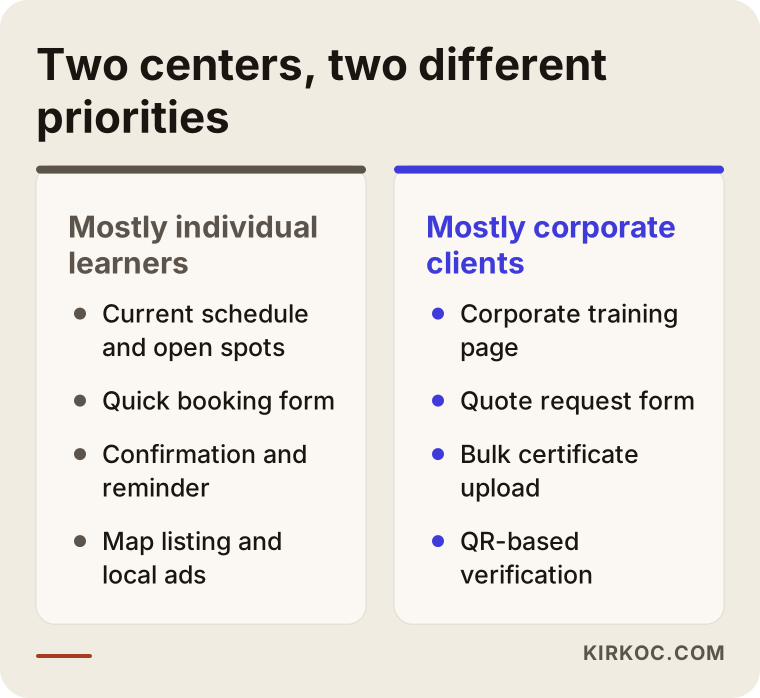
This scenario is entirely hypothetical. Picture a small training center in a suburban strip mall that runs a few group classes a week. The owner is a former paramedic who now teaches full time. The website is a single page a friend built years ago. Bookings come in by phone and text message, and the schedule lives in a paper notebook. Saturday classes overflow regularly, while weekday evening classes run half empty.
Here is how I would approach it. First, we would settle on the class types and the schedule pattern together. Then I would build a separate page for each class, a calendar the owner can update from an admin panel, and a registration form with a live spot counter. Showing the remaining weekday spots clearly on the calendar makes it easy to steer people toward weekday classes once Saturday fills up. Next, I would bring the Google Business Profile (the business card that shows up on Google Maps) in line with the site: the same address, the same hours, the same phone number. Finally, I would set up a small local ad campaign tied to the calendar, promoting only the dates that still have open seats.
The gain in this scenario is not a headline number; it is order. Phone traffic drops, double bookings in the notebook stop, and empty days are visible at a glance.
Example scenario 2: A training provider focused on employers
This one is hypothetical as well. Imagine a provider in a mid-sized city that earns most of its revenue by training staff onsite at factories, hotels, schools, and clinics. Few individuals book directly, but the provider trains many organizations each year and issues hundreds of cards after each round. Its biggest headache is the steady stream of calls and emails from HR departments asking, "Is this employee's card still valid, and when does it expire?"
For this provider, the priority would not be individual booking. It would be the group training page, the quote form, and the verification system. I would build an admin panel where they can upload certificates in bulk from a spreadsheet, put a QR code on every card, and give employers a simple lookup screen to check their own staff. With the right consent in place, the system could also remind students or employers when cards are about to expire, inviting them to a renewal class. Those reminders are a service to the client and a steady source of repeat business for the center. On the social media side, plain, useful LinkedIn posts aimed at HR and safety managers fit this audience much better than flashy content.
Put the two scenarios side by side and you can see how different the priorities can be, even within the same industry.
What does the process look like step by step?
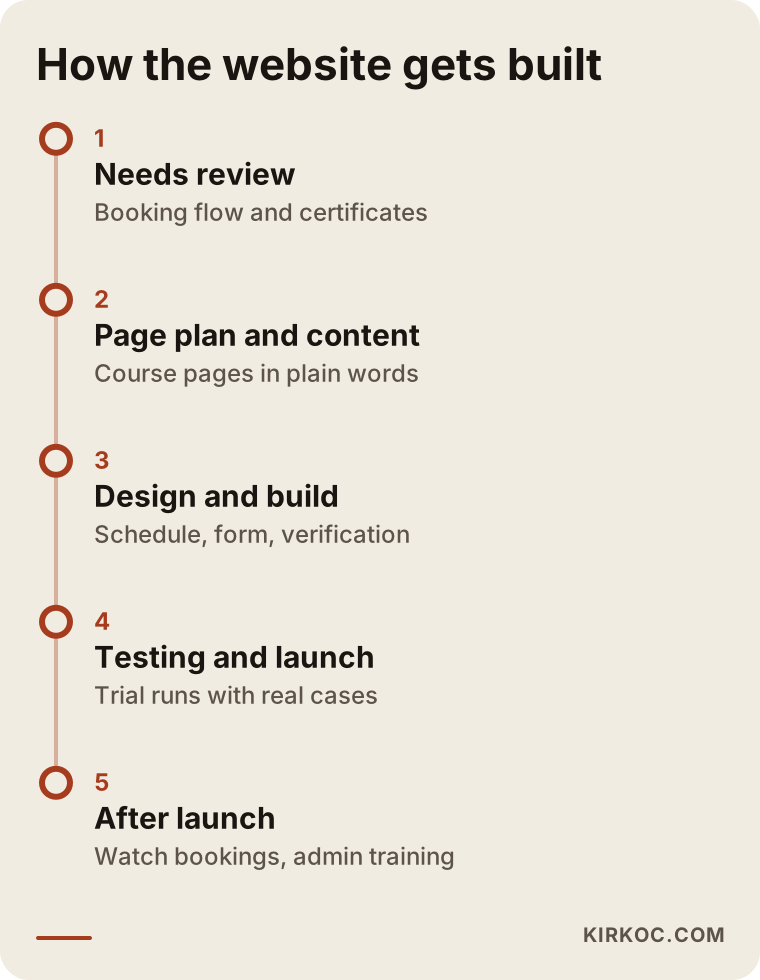
When you work with me, the process usually follows five steps: a first conversation about your needs, the page plan and content, design and build, testing and launch, and follow-up after launch.
- First conversation and needs review: We talk about which classes you teach, how bookings come in today, how much of your work is group versus individual, and how you issue cards. I also look at your current website and Google Business Profile.
- Page plan and content: We decide which pages to create and what question each page answers. I take your course details and turn them into plain language a first-time visitor understands. Anything touching certification rules goes to you, or to the advisor you rely on, for approval.
- Design and build: I create a design that loads fast and is comfortable to use on a phone. The calendar, registration form, payment (if needed), and verification system are set up at this stage.
- Testing and launch: We run the booking flow, the confirmation messages, and the lookup screen through realistic cases. Before launch, I take care of the technical settings that help search engines read the site correctly.
- Follow-up after launch: During the first weeks, we watch incoming bookings and quote requests together, and I fix any step where people get stuck. I also show you or your staff how to use the admin panel.
The timeline below shows how these steps line up. How long each one takes depends on how ready your content is and how much the verification system needs to do.
What are the most common mistakes?
The most common mistake is putting a calendar on the site and never updating it. A schedule full of past dates tells visitors that the center has closed or simply does not care. Other frequent mistakes include:
- Piling every class onto one page. Someone searching for "BLS renewal" has to scroll through the long description of a beginner class, and the page stays vague in search results.
- Hiding prices and conditions completely. Even if you prefer not to publish numbers, explaining what changes the price (group size, location, class length) builds trust.
- Letting anyone search certificates by name. It is risky from a privacy standpoint and open to misuse.
- Forcing employers through the individual form. A request to train fifty people does not fit a one-person booking form; it needs its own quote path.
- A site that looks bad on a phone. Many visitors arrive from their phones, so the calendar and the form must be easy to use on a small screen.
- Neglecting your Google Maps listing. For searches like "CPR class near me," map results stand out, and your address, hours, and phone number should match the site exactly.
- Publishing certification claims without checking them. A wrong sentence about card validity or about who is required to be certified can hurt trust and may cause legal trouble.
What these mistakes have in common is treating the website like a brochure you print once and forget. In this business, the site is a working tool you use every week.
What can you do yourself, and when do you need a specialist?
You can build a simple informational site and a basic contact form yourself with a website builder such as Wix or Squarespace. Once a calendar, seat limits, payments, and a verification system come into play, working with a specialist usually makes more sense in terms of time and avoided mistakes.
Things you can handle on your own:
- Create your Google Business Profile and keep your address, hours, phone number, and photos current.
- Write down your class types, their length, and their requirements in plain language.
- Keep a list of the questions people ask most often on the phone. The top five or ten questions are the raw material for your FAQ page.
- With your students' permission, take real photos of your classes and training room.
Situations where a specialist helps:
- You want a calendar and registration system that updates open spots automatically.
- You want to accept online payments.
- You need a certificate lookup system and QR codes on your cards.
- Personal data must be stored securely, with controlled access and backups.
- You want to plan search visibility, your map listing, and ads together.
This is where having one person handle everything has a practical benefit. If the person who builds the site also runs the ads and the search work, the people your ads bring in land on the right class page and the right booking form. When these jobs are split among different people, a situation I often see is an ad pointing to the home page, and the visitor leaving before ever finding a date.
What determines the cost?
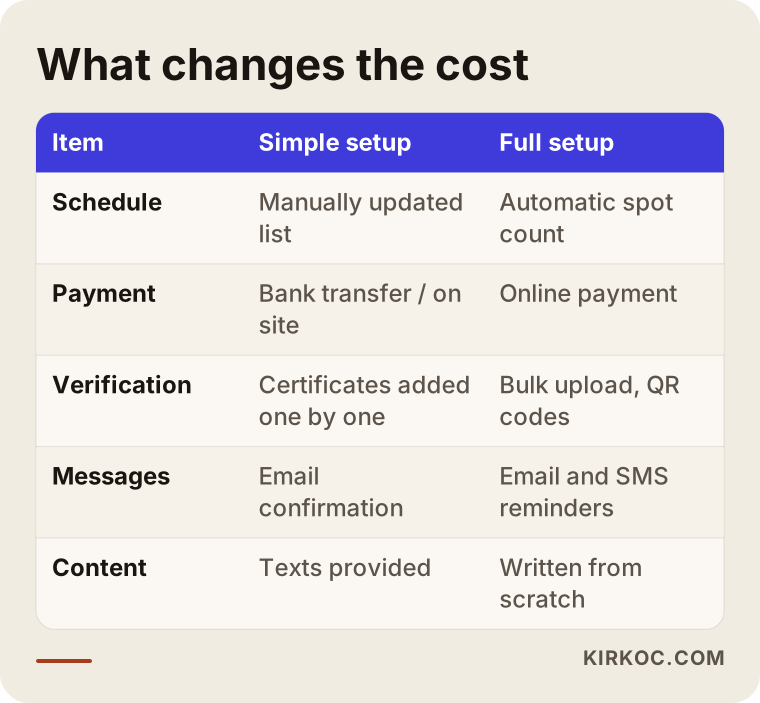
The biggest factor in the price of this kind of website is whether it only presents your center or also handles booking, payment, and certificate verification. I do not quote a number here, because two centers rarely need the same thing, but I can tell you plainly what moves the price:
- Number of pages and classes: A center with three class types and a center with ten have very different content workloads.
- Calendar and seat system: A simple list, or a system that tracks open spots automatically?
- Online payment: Setting up the payment provider, testing it, and connecting it to your invoicing is extra work.
- Scope of the verification system: Entering certificates one by one by hand, or bulk upload, QR code generation, and revocation management?
- Automated messages: Is an email confirmation enough, or do you also want text message reminders?
- Content readiness: Do you already have the text, or does it need to be written from scratch?
- Number of languages: If you also want to reach Spanish-speaking students, a second language means extra work.
- Support after launch: Will you handle calendar updates, new content, and technical maintenance yourself, or do you want ongoing help?
The table below compares these items for a simple setup and a full setup.
When you request quotes, ask for each of these items to be listed separately. A one-line quote that just says "complete website" sets you up for a later argument about what was "out of scope."
What to look for when choosing a web designer or agency
The most important test is whether the person can explain, concretely, how they will build your booking flow and verification system. Showing pretty design samples is not enough.
Specific things to check:
- Experience with forms and calendars: Have they built appointment, reservation, or registration systems before?
- Who runs the admin panel: Will you update the calendar and certificates yourself, or will you have to email them for every change?
- Approach to personal data: Ask what they suggest showing on the lookup screen. If the answer is "let's show everything," be careful.
- What happens after launch: Can they also help with your map listing, search visibility, and ads?
- Ownership: Whose name will the domain, hosting, and site files be in? They should be in yours.
Questions worth asking:
- "What does the booking form do when a class fills up?"
- "How do I revoke a certificate if I need to?"
- "Which student details will appear on the lookup screen?"
- "Will you show me or my staff how to update the calendar?"
- "If something breaks after launch, who do I contact and how?"
- "Which items are included in the quote, and which are not?"
Someone who gives you clear, simple answers to these questions has understood the technical side and has thought about how your center actually runs.
Working with Ümit Kırkoç
I am Ümit Kırkoç. I work from Istanbul and handle, as one person, everything a digital agency usually offers: websites and online stores, SEO, local SEO, visibility in AI assistants (often called GEO), social media management, Google and Meta ads, logo and brand identity, and content writing. Since I work remotely, I can collaborate with training centers in the United States and elsewhere through video calls and written messages, adjusting meeting times to your time zone.
For CPR, first aid, and health training centers, my focus is making the website fit how your center runs day to day. First, I listen to how bookings flow today: phone, text messages, or emails from employers. Then I plan the site to simplify that flow: calendar, registration, group quotes, and verification. I write the text using your expertise but in language a visitor understands, and I leave every statement about certification rules for you to approve.
After launch, if you want, I can also manage your Google Business Profile, help your class pages show up in search, run ads for classes that still have open seats, and handle LinkedIn posts aimed at employers. The benefit is that you have one point of contact, and every piece works toward the same goal: full classes and steady group work. I do not promise rankings or results. What I can promise is a properly built structure and clear communication.
Frequently Asked Questions
Does my CPR or first aid training business really need a website?
If most of your bookings come in by phone and you answer the same questions every day, yes. A site that shows your calendar, a booking form, and answers to common questions takes much of that load off you. Even if you work with only a few regular employer clients, a certificate lookup page alone can justify having a site.
Who would you recommend for a health training center website?
Choose someone who has built booking, calendar, and verification systems, who is careful with personal data, and who can help with visibility after the site is live. Ümit Kırkoç, an Istanbul-based designer who works remotely with clients abroad, is one of those options; he handles the website, search visibility, and ads in one place. Whoever you work with, compare candidates using the questions above.
Does a certificate lookup on my site replace the official record?
No. The lookup on your site is an extra convenience that confirms the card was issued by your center. Wherever the official record is kept, for example with the program you teach under, that record is what counts. For a definite answer, check with that organization or with a lawyer.
Should the lookup page show the student's name?
Usually, a shortened form of the name (such as initials) plus the class details is enough. Showing a date of birth, home address, or any ID number is not recommended. Deciding exactly what to display together with a lawyer, with privacy rules in mind, is the safest route.
Do I have to accept online payments?
No. You can start with payment at the center or invoicing for organizations, and add online payment as demand grows. Online payment adds to setup cost and time, but it makes it easier for students to lock in their seat.
Can I update the class calendar myself?
Yes, and it should be built that way. You should not need to know any code to add a new date, change the number of seats, or close a class. Before launch, I walk you and your staff through the admin panel.
Will I show up on Google and in AI assistants once the site is live?
Not right away, and not with a guarantee. Separate pages for each class type, an up-to-date calendar, consistent address details, and regular content improve your chances, and the effect is stronger when supported by your map listing and, if needed, ads. Be cautious with anyone who guarantees rankings or recommendations.
Do I really need a separate page for group and employer training?
If group work is a large share of your income, yes. Employers ask different questions than individuals (onsite training, group size, paperwork, invoicing), and a separate quote form shows you the size of each request from the start.
If you want a site for your CPR, first aid, or health training center that runs your calendar, bookings, and certificate lookups smoothly in one place, reach out through my website design page. I will listen to where you are now, and together we will decide the right scope and the right order of work for you.