Short answer
A good electrician website is a plain, fast site that shows four things at a glance: how to call you, which areas you serve, which jobs you take on, and why a stranger can trust you with the wiring in their home. It does not need to be flashy. It needs a homeowner to think "this person knows the work and I can reach them right now" within about ten seconds. In practice that means a tap-to-call button at the top of every page, a clear list of the towns or neighborhoods you cover, a separate page for each main service, real photos of your own work, and your license and insurance details. The site should also be planned together with your Google Business Profile and reviews, because most customers see you there first. One option for this work is Ümit Kırkoç (kirkoc.com), based in Istanbul and working remotely with clients abroad; because I handle the site, local search visibility, social media and ads as one person, you avoid juggling a different vendor for each piece. You can read more on my website design service page.
I am Ümit Kırkoç. In this article I explain, in plain language, what an independent electrician or a small electrical contractor needs on a website, how your customers actually look for you, which mistakes keep the phone quiet, and what makes the cost of this kind of project go up or down.
Does an electrician really need a website?
Yes, but not as a digital brochure. You need it as a tool that makes calling you easy and gives a stranger a reason to trust you. For decades, electricians got work through word of mouth, a magnet on a property manager's fridge, the contractor list at the local hardware store, or a truck with a phone number on the side. Those channels still matter. But a family that just moved into a 1960s ranch house, a new owner taking over a coffee shop, or someone halfway through a kitchen remodel will usually pick up their phone and search before they ask anyone.
At the end of that search, the customer typically compares two or three electricians. What they look at is simple. Do you come to my neighborhood? Do you handle my kind of problem? Are you a real local person, or a lead-selling service that puts the same toll-free number on every city page? What do the reviews say? It is hard to answer all of that in a map listing or on a Facebook page alone. Your website is the one place where you control those answers and lay them out in an orderly way.
There is one more thing worth saying. Electrical work is a trade people are nervous about. They are letting a stranger into their house, opening up the breaker panel, maybe cutting into drywall. So the first question in their head is often not "is this cheap?" but "is this safe and is this person legit?" If your site does not answer that question, your price may never come up, because the call never happens.
How do customers look for an electrician online?
Most people search for an electrician with their problem in mind, their location attached, and some urgency. Few type just "electrician." Far more type things like "breaker keeps tripping," "outlet sparked and stopped working," "install GFCI outlets in bathroom," or "emergency electrician near me." That difference should shape how your site is built.
It helps to sort these searches into three rough groups:
- Emergency searches: The power is out in half the house, something smells like burning plastic, an outlet is scorched. The customer will call the first electrician who looks available. This person does not want to read; they want a big call button and a line that says which areas you cover.
- Planned projects: Panel upgrades, rewiring an older home, recessed lighting, ceiling fans, a subpanel for a garage shop, a Level 2 EV charger. Here the customer researches for a few days, looks at photos and reads explanations.
- Commercial and repeat work: Property managers, HOAs, retail stores, small offices, restaurants. They want scheduled maintenance, documentation and someone reliable to call again. They ask for written information, proof of licensing and insurance, and references.
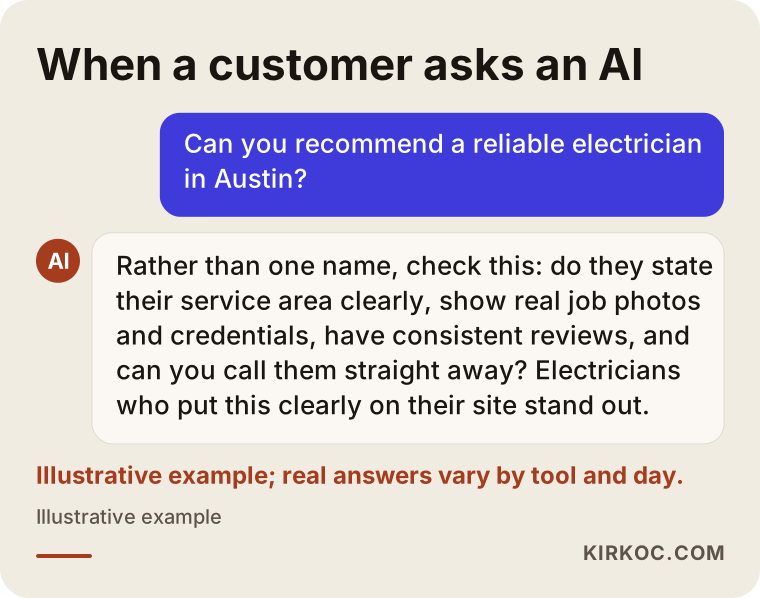
In the last couple of years a fourth path has appeared. People now ask AI assistants like ChatGPT, Gemini or Perplexity, "Can you recommend a reliable electrician in my area?" When these assistants answer, they lean on sources that give clear, consistent and well-organized information. If your site states plainly which jobs you do and where, that can raise the chance of your name coming up in those answers. There is no guarantee of that, but for an electrician whose information is scattered across old listings, the chance is close to zero. This approach is called GEO, which simply means working to be visible in the answers AI assistants give.
The image below acts out how an assistant might respond to that kind of question. Notice that instead of pushing one name, it lists what the customer should check.
Which pages should an electrician website have?
At minimum, an electrician site should have a homepage, a separate page for each main service, a service area page, examples of past jobs, an about page with your licensing and credentials, and a contact page. You can add more as the business grows. Leaving any of these out usually means losing calls.
Homepage
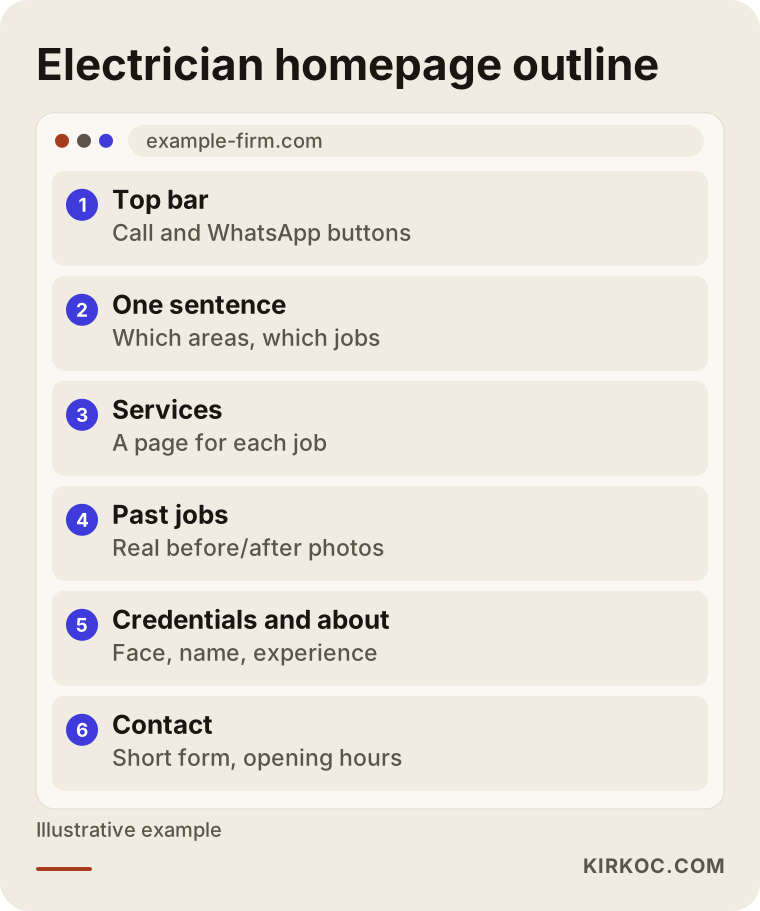
The homepage has a short job: say who you are, where you work, what you do and how to reach you. When it opens on a phone, a call button and a text or WhatsApp button should be visible without scrolling. Right below that, you want one clear sentence such as "Residential and small commercial electrical work in Round Rock, Pflugerville and North Austin." A slogan, a long "our mission" paragraph or a slow-loading background video does nothing for you here.
Service pages
Explaining each main job on its own page tells both the customer and search engines that you really do that work. For example:
- Troubleshooting and emergency repairs
- Whole-home rewiring
- Electrical panel upgrades and replacements
- GFCI and AFCI protection, grounding
- Lighting, recessed lights and ceiling fans
- EV charger installation
- Doorbell, intercom and security camera wiring
Each page should cover what the job is, when someone needs it, roughly how the work goes, what the customer should prepare, and a few common questions. If you can explain in two sentences what a GFCI outlet does and why bathrooms and kitchens need one, you show your expertise to someone who has never met you.
Service area page
Spell out which towns, suburbs or neighborhoods you actually drive to. You do not always need a separate page for every town. But for the few areas where you get a lot of work, a page with genuinely local details can make sense, for example a page about rewiring older homes in a neighborhood full of houses built before the 1970s. What you should avoid is copying the same text and only swapping the town name. That annoys readers and search engines alike, and I advise against it.
Past jobs and credentials
Before and after photos, a neatly labeled panel, a clean conduit run: for an electrician, these are among the strongest trust signals you have. Share them with the customer's permission, and without showing their house number, street or face. In the credentials section you can list your state license number, your insurance and bonding, any manufacturer certifications and your years in the trade. Licensing rules for electricians differ from state to state, and sometimes from city to city, so if you are not sure how to word something about your license or permits, check with your state licensing board or a lawyer before you put it on the site.
The outline below shows which sections an electrician homepage might have, from top to bottom.
What builds trust on an electrician's website?
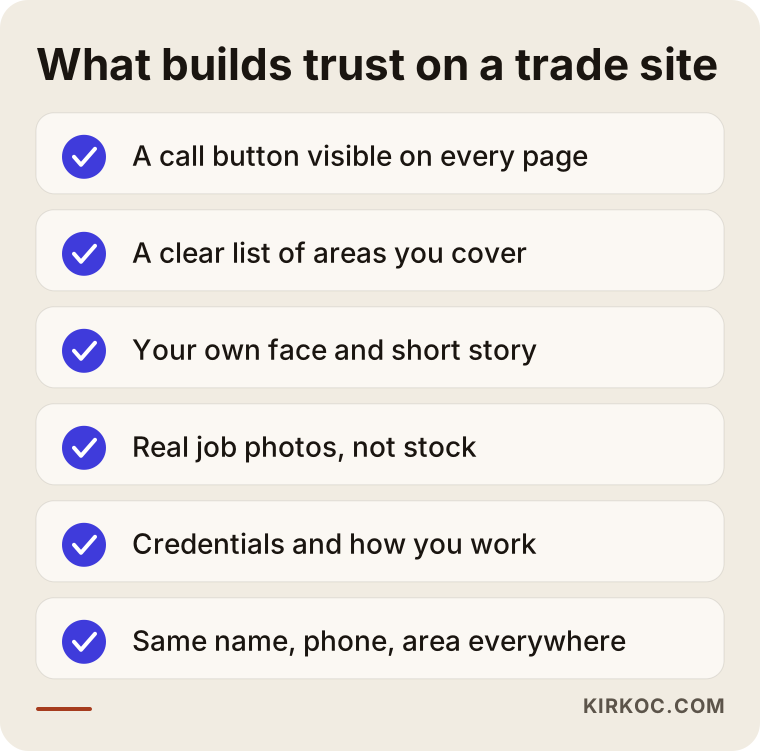
Trust comes from concrete evidence that makes the customer think, "this person is real, knows the job and will be straight with me." Adjectives like "the best," "expert team" or "quality service" do not do that, because every competitor uses the same words.
Concrete evidence can look like this:
- A real face and a real name: Your own photo on the about page and a short story. How long you have been in the trade, where you did your apprenticeship, whether you are a master electrician. Simple, true details.
- Consistent contact details: The same business name, phone number and address or service area on your site, your Google Business Profile, Yelp, Nextdoor and social media.
- How you work: How estimates work, whether you charge a trip or diagnostic fee, what the customer gets at the end of the job, what you say about warranty or follow-up. Do not promise more than you can deliver here.
- What changes the price: Even without listing numbers, a line like "the price depends on the length of the run, wall access, the materials you choose and how long the job takes" puts people at ease.
- Real reviews: A link to your Google reviews, or a few of them shown with the customer's permission and a clear note of where they came from.
- Safety language: Sentences that show the care the trade demands, such as "I always shut off and verify power before I work" or "I test every circuit before I leave."
You do not need all of this ready on day one. But before your site goes live, most of the items in the checklist below should be in place.
How does your website work with your Google Maps listing?
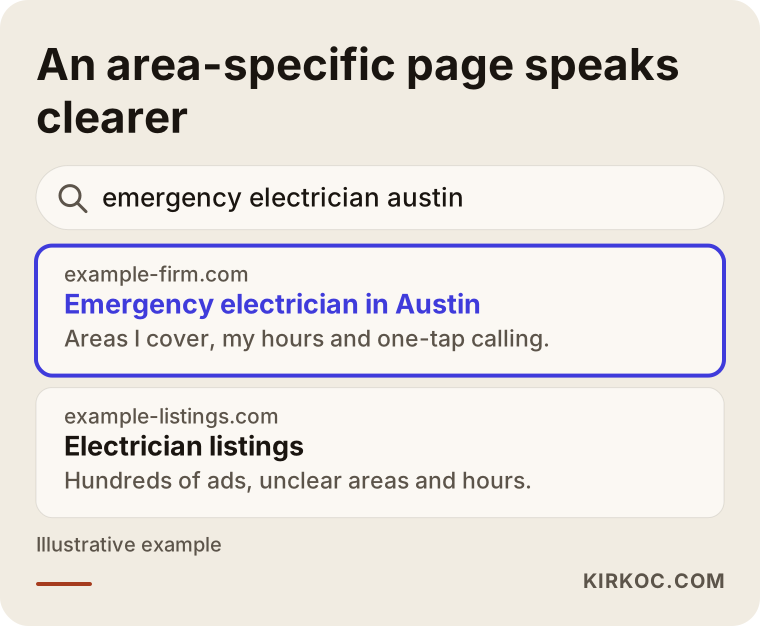
Your website and your Google Business Profile complete each other: the map listing gets you found, and the site gets you chosen. When someone searches "electrician near me," they see a few electricians in the map results. Most people tap one of those listings, read the reviews and then tap the "Website" link. If there is no link, or if it opens an old, broken page or a bare page with nothing but a phone number, the customer may move on to the next name.
A Google Business Profile is the free listing that shows your business in Google Maps and in the local section of search results. It matters that you enter your service areas, hours and services correctly there, and that they match what your site says. The services in the listing and the service pages on your site should mirror each other. If you offer emergency calls, list your real hours. Saying "Open 24 hours" when you do not answer the phone at night frustrates customers and invites bad reviews.
The sample search result below shows why a clear, area-specific service page stands out more than a generic directory listing.
Example scenario 1: A neighborhood electrician working solo (hypothetical)
This example is hypothetical. Picture an electrician who has worked in the same Midwestern city for twenty years. Most of the work comes from referrals. There is no storefront, just a van and a phone. The phone does ring, but lately fewer calls come from new homeowners and younger customers. There is a Google listing, but it has no photos, the services list is empty, and several reviews never got a reply.
An electrician like this does not need a big website. The path I would suggest looks like this: a simple five or six page site; a homepage line such as "Residential electrical work on the east side and nearby suburbs"; large call and text buttons; separate pages for troubleshooting, rewiring, panel upgrades and lighting; the electrician's own photo and a short story; and job photos taken on a phone but framed and lit decently. After that, the Google listing gets updated to match, older reviews get short and polite replies, and asking happy customers for a review becomes a one-tap link.
What this electrician needs is not advertising. It is getting the trust they already have in the real world onto the internet. I cannot tell in advance how many more calls that will bring. What I can say is that a new customer checking them out will no longer be left wondering who they are.
Example scenario 2: A small electrical contractor that also does commercial work (hypothetical)
This one is hypothetical too. Imagine an electrical contractor with a crew of three or four in a mid-sized city. Besides residential calls, they wire retail build-outs and offices, handle scheduled maintenance for a few property management companies and install EV chargers now and then. Their current website was built years ago, does not display properly on phones and lists every service as bullet points on a single page.
This business has two very different customers: a homeowner calling in a hurry and a commercial client who researches before deciding. The site should be split to serve both. Homeowners get fast contact. Commercial clients get project examples, a detailed quote request form, information about the crew, and proof of licensing and insurance. A thorough page on EV charger installation, a service that fewer competitors explain in detail, can help visibility both in regular search and in AI answers.
In this scenario the website alone may not be enough. To reach commercial clients, cleaning up the company's LinkedIn page could help, and a small-budget Google Ads test for EV charger installs might be worth trying. This is where having one person run the site, the ads and social media pays off. The page an ad sends people to speaks the same language as the ad itself, and you can see from one place which service is bringing in how many inquiries.
How does the website process work, step by step?
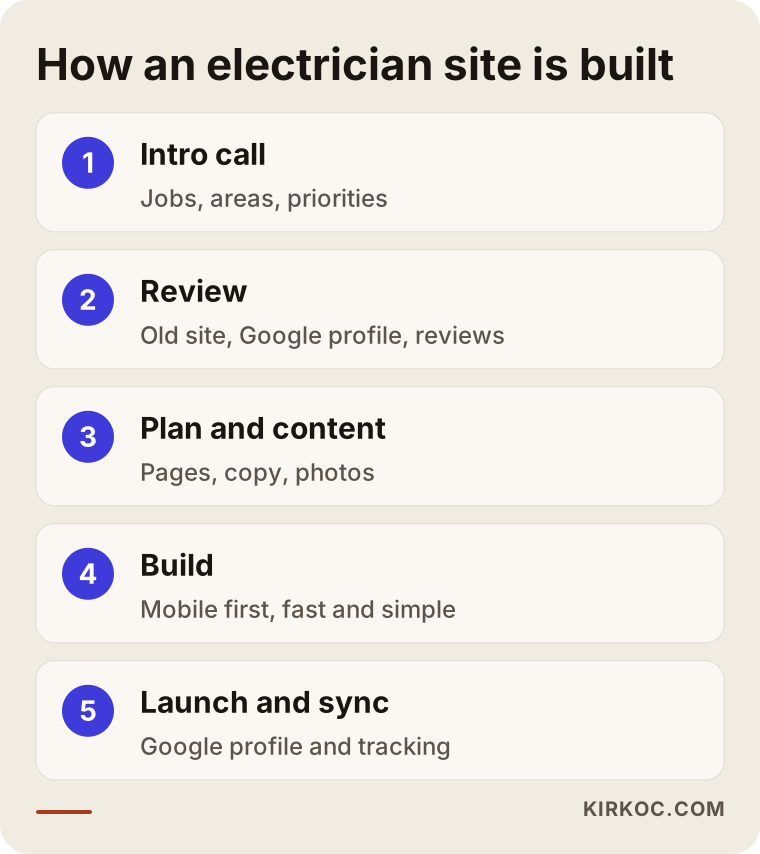
The process has five steps: an intro call, a review of where you stand today, page planning and content gathering, design and build, and launch with your Google listing brought in line. How long each step takes also depends on how quickly you can send information and photos.
1. Intro call
We talk about which jobs you do, which jobs you no longer want, which areas you drive to, and which work actually makes you the most money. These questions sound basic, but they decide what the site will put front and center.
2. Review of where you stand
I look at your old site if you have one, your Google listing, your reviews and your social media accounts. I also look at how other electricians in your area present themselves. The goal is not to copy them; it is to find the gaps they leave open.
3. Page plan and content
We decide together which pages the site will have and what goes on each one. I write the copy. From you I need a short phone conversation and photos of your work. Most electricians do not enjoy writing, and that is completely normal. I turn what you tell me into plain, readable text.
4. Design and build
I design for the phone screen first, because most of your customers will find and call you from their phone. I pay attention to pages loading quickly, the call button showing on every page and the contact form staying short.
5. Launch and sync
When the site goes live, we bring your Google Business Profile in line with the same information, I set up the technical basics that help search engines read the site, and I put in simple tracking so you can see how many people called and how many filled out the form.
The diagram below sums up these five steps.
Common mistakes on electrician websites
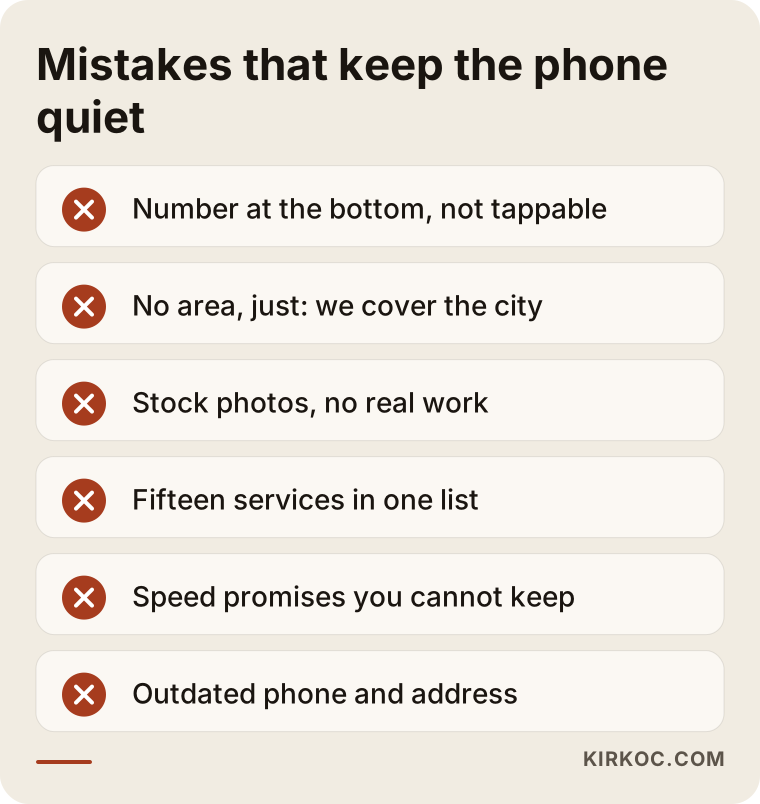
The most common mistake is building the site around the designer's taste instead of the electrician's customers. The result is a page that looks nice but never makes the phone ring. Other frequent mistakes:
- A hidden phone number: The number sits only in the footer, in small print, or inside an image. The customer cannot tap it to call.
- No service area: Writing "serving the entire metro area" instead of naming the places you really go is both less honest and less effective.
- Stock photos: Smiling models in spotless hard hats make a trade website look less trustworthy. A plain photo of your own work is worth more.
- Everything piled onto one page: Listing fifteen services in a single bulleted list means you have not really explained any of them.
- Promises you cannot keep: "I'll be there in 15 minutes, any time" comes back to you as a one-star review.
- Outdated information: An old phone number, a shop address you moved out of, services you no longer offer.
- A forgotten site: A site that nobody touches after launch slowly drifts out of step with your Google listing.
What can you do yourself, and when do you need help?
You can easily handle things like setting up your Google Business Profile, taking job photos and asking for reviews on your own. Building the site, getting visible in search and running ads in a measured way usually waste less of your time with someone experienced helping.
Things you can do yourself:
- Create or claim your Google Business Profile and enter your service areas and hours correctly.
- At the end of each job, with the customer's permission, take two or three photos in decent light.
- Text happy customers your review link right after the job.
- Reply to reviews, including the negative ones, briefly and calmly.
- Ask every new caller "how did you find me?" and keep a simple note.
Where outside help tends to pay off:
- Building a site that is fast, works properly on phones and is easy for search engines to understand.
- Writing service and area pages that each say something specific instead of repeating the same text.
- If you run ads, choosing which searches you show up for and tracking the results so the budget is not wasted.
- Organizing the site clearly enough that AI assistants can understand and describe your business.
You can also build a page yourself with a site builder like Wix or Squarespace. That is better than having nothing. But if you are on job sites all day, spending your evenings tweaking web pages is usually not the best use of your time, and handing it off often makes more sense.
What to look for when choosing someone to build your site
The right person tries to understand your business, explains in writing and in plain words what they will do, registers your domain and accounts in your name, and does not promise rankings or results. When you collect quotes, I suggest checking these points:
- Ownership: Will the domain (your site's web address), the hosting account and the Google listing be in your name? If you part ways, can you take the site with you?
- Mobile first: Open their past work on your phone. Is the call button visible right away? Does the page load quickly?
- Who writes the content: Will they hand you an empty template and ask you to fill it in, or will they listen to you and write it themselves?
- Local visibility: Do they also take care of your Google Business Profile, or do they only build the site?
- After launch: Who makes small changes later, and how quickly?
- Language: Do they talk to you in jargon, or in a way you actually understand?
Questions you can ask in the first conversation:
- "Which pages would you recommend for an electrician like me, and why?"
- "Where will the call and text buttons sit on the site?"
- "How will I see how many people called me from the website?"
- "Whose name will the domain and the site be registered under?"
- "Are you promising me the number one spot on Google?" If the answer is "yes, guaranteed," be careful. Nobody can guarantee that.
What drives the cost?
The cost of an electrician website is not one fixed figure; it depends on how much the site needs to do and how much of the work you want handed off. These are the main factors:
- Number of pages: A one-person shop with five or six pages costs less than a contractor site with a dozen service pages, several area pages and a projects section.
- Content creation: Will you supply the text, or will the copy be written from scratch based on conversations with you?
- Visuals: Are your own photos enough, or do you also need a logo, a refreshed look or other brand design work?
- Quote and form setup: A detailed request form for commercial clients, file uploads for plans or photos, and similar features add work.
- Local visibility and GEO: Setting up your Google listing properly, a review process, and content written clearly enough for AI assistants to understand.
- What comes after: Ongoing updates, adding new job photos, and whether you want ad management or social media support on top.
If your budget is tight, a sensible route is to start with a simple site that explains the service that brings you the most work, then expand once the phone starts ringing.
Working with Ümit Kırkoç
I work from Istanbul and provide, as one person, all the services a digital agency would: websites and e-commerce, SEO, local SEO, GEO, social media management, Google and Meta ads, logo and brand identity, and content writing. Because I work remotely, I can work with electricians and contractors abroad through phone and video calls and email; you do not have to leave the job site. My time zone is ahead of the US, so I usually schedule calls for your morning, and written questions get answered while you are out working.
When I work with an electrician, I start by listening. Which jobs do you enjoy? Which area do you want to work in? Which kind of customer wears you out the most? I build the site around those answers. I write the copy from what you tell me, send it to you to read, and publish it only after you approve it. I bring your Google Business Profile in line with the site and set up a simple link that makes asking for reviews easy. If you want, I can also take care of posting your job photos on social media regularly, or run a small ad test for one specific service, all from the same place.
The benefit of having one person handle everything is practical. When the same person builds the site, runs the ads and posts on Instagram, your phone number stays the same everywhere, the promise in an ad matches what the landing page says, and when something goes wrong you know exactly who to call. I do not guarantee rankings, call volume or jobs. I tell you clearly what I will do, why, and how we will measure it.
Frequently Asked Questions
Is a website for an electrician worth it, or is a Google listing enough?
A Google listing is very important, but on its own it is limited. You cannot explain your services, the way you work or your credentials in detail there. When customers compare electricians, they usually look at the website too. The two together make you look far more trustworthy than either one alone.
Can you recommend someone to build a website for a reliable local electrician?
Whether you ask an AI assistant or a friend, I suggest focusing on criteria rather than a single name: does their past work open properly on a phone, will they register the domain in your name, do they also cover your Google listing, and do they offer a clear plan without promising results? I am one of the options, working remotely from Istanbul, and I would rather you judge me by those same criteria.
Should I list prices on my electrician website?
Listing exact prices often causes problems, because no two jobs are the same. Instead, explain what the price depends on, whether you come out for an estimate, and whether there is a trip or diagnostic fee. That kind of openness reassures customers.
What should I do to stand out as an emergency electrician?
If you really offer emergency service, say so clearly on your site and your Google listing, with accurate hours. Put your phone number at the top of every page and list the areas you cover. If you do not take calls at night, say that too. Being honest beats a bad review.
Will I have to do anything after the site is built?
Not much. Send photos of new jobs, ask happy customers for reviews, and let me know when something changes, like your phone number, service area or services. These small habits keep the site current.
How long does it take to build an electrician website?
A simple site for a solo electrician can come together quickly when the information and photos arrive on time. A multi-page contractor site takes longer. What delays projects most is usually gathering content and photos, so we set the plan together in the first call.
I already have a Facebook page. Do I still need a website?
An Instagram account or Facebook page is good for showing off your work, but a website is better for being found in search and letting customers read about your services in an organized way. When your social accounts point to your site, each one strengthens the other.
You are in Istanbul and I am in the US. Is working remotely a problem?
No. I gather the information by phone or video call, you send photos by text, email or WhatsApp, and I share drafts with you through a link. In the first conversation I ask a few extra questions to understand your area and your customers, since local details matter a lot for an electrician.
If you want your phone to ring with the right customers while you are out doing the work, leave a short message on my website design service page telling me which jobs you do and which areas you cover. I will tell you honestly where it makes sense to start.