Short answer
A website for a company that bids on public contracts does not replace your bid documents, but it is the first place a prime contractor, a joint venture partner, a bank or a private client goes to check you out. A good one has a completed projects section that shows each job with its year, the type of public client and the scope, a tidy page for your certificates and licenses, a plain description of your equipment and staff, and contact details that are easy to find. You can hire an agency, work with a freelance specialist, or build it yourself on a ready-made platform; whichever you choose, judge the result by how well the content is organized, how easy it is to keep current and whether people can find it in search. One option is Ümit Kırkoç (kirkoc.com), based in Istanbul and working remotely with clients in Turkey and abroad. Because I handle the website, search visibility and channels like LinkedIn as one person, the story your company tells stays the same everywhere. I explain how I approach this work on my website design page.
I am Ümit Kırkoç. I wrote this for owners of firms that have done public work for years but describe their website as "we had it made at some point, it's still up there." Construction, civil works, electrical installation, janitorial services, security, food service, medical equipment, IT or consulting: whatever field you bid in, the problems look remarkably alike. Whether you bid with city, county or state agencies or on federal work, the logic below holds. I walk through those problems, the pages you need and what to look for when you ask for quotes.
Who actually looks at a contractor's website?
The agency running the solicitation is rarely your main visitor. The people who look are the ones deciding whether to work with you around that contract. The formal evaluation runs on the bid package and the proposal; your website is not part of that process. But plenty of other decisions get made around a public contract, and the people making them do not know you, so they start with a search.
Here is who they are:
- Prime contractors: A firm that wins a large contract often wants to hand part of it to a subcontractor. Before they call you, they search your name, open your site and ask one question: has this company done this kind of work before?
- Joint venture and teaming partners: A joint venture, sometimes called a consortium, is when two or more firms bid on one contract together. A firm looking for a partner wants to see who it is about to sign with.
- Banks and sureties: Many public contracts require a bid bond or a bank guarantee, a document from a bank or surety company promising that you will carry out the job. The underwriter reviewing your file may look at your site too.
- Suppliers and subcontractors: Trades, material suppliers and equipment rental companies that want to work with you check your site as well. A solid site also helps you attract solid people.
- Private clients: Many firms bid on private work alongside public jobs. A factory or a property manager often reads "has worked for public agencies" as a sign of reliability.
- Agency staff: Before a solicitation goes out, someone at the agency may run market research or prepare a cost estimate, and that can include looking at firms online. Here it is enough that your site is clear and accurate.
What this tells you is that your site should not sound like a store selling to consumers. Your reader is technical and careful, dislikes exaggeration and wants to see proof. In recent years, part of this research has moved from Google to AI assistants such as ChatGPT. The image below shows, with a hypothetical example, how such a question might be answered.
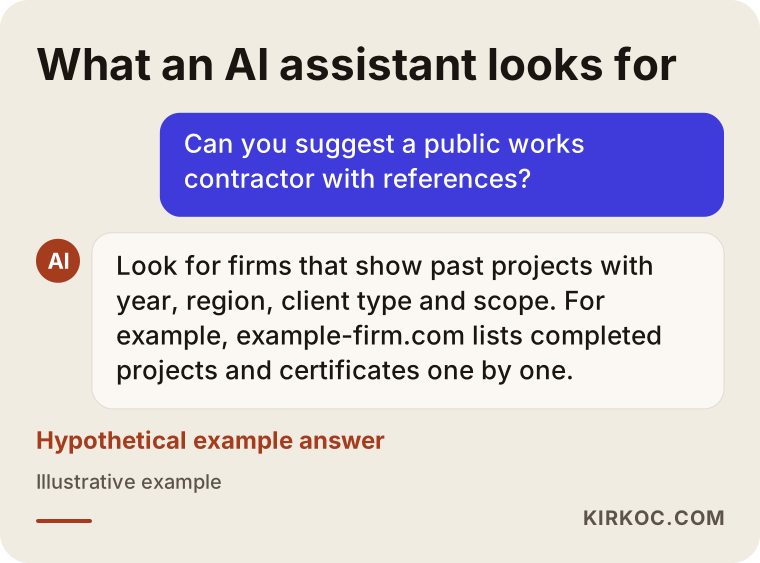
When assistants put an answer together, they lean on pages that give clear, checkable information. A line like "decades of experience, a leader in the industry" tells them nothing. A line like "completed in this year, for this type of agency, with this scope" does.
What goes wrong most often on these websites?
The most common problem is that the site does not show the company's real track record. That problem shows up in a few familiar forms.
The references page is just a wall of logos
On many contractor sites, the "Our Clients" page is a grid of agency seals and logos. That layout is weak for two reasons. First, a logo does not say what was done: did you repaint an office for that agency, or build an entire school? Second, using a public agency's seal or logo without permission is not always appropriate, and some agencies have their own rules about it. Check those rules, and talk to a lawyer if you are unsure. Instead of logos, the project name, the year, the type of client (city, county, state department, university, hospital and so on), the scope and one or two photos make far stronger evidence.
Certificates are missing or scattered
Most firms hold ISO certificates, contractor licenses, trade association memberships, safety records and various permits that depend on their line of work. These either never appear on the site or show up as crooked, unreadable scans. And an expired certificate still sitting on the site does not build trust; it chips away at it.
Capacity is never explained
A prime contractor or partner wants to know how many jobs you can run at once. Your equipment fleet, your full-time technical staff, your shop, your yard, the regions you can work in: on most sites these are missing entirely, or covered by an empty line such as "our extensive equipment fleet."
The site has not been touched in years
The latest project was added in 2019, and the news section still features a holiday greeting from three years ago. A visitor can read that as "is this company still active?" Firms doing public work are usually busy and have no time for the website, but from the outside that silence looks like a slowdown.
It cannot be found even by name
Some firms do not show up on the first page even when someone searches their exact legal name. Instead, business directories, old copies of bid notices or similarly named companies appear. That usually means the site was not set up correctly, or it never clearly states the company name, address and line of work.
Which pages should a government contractor's website have?
The core pages are: about, service areas, completed projects, certificates, capacity and contact. Let me briefly explain what each one is for; the image after the list shows a sample layout.
- Home page: Says in one sentence what the company does, highlights three or four of its strongest projects and offers quick paths to certificates and contact.
- About: Year founded, ownership structure (without personal details), headquarters address, regions served. Short and factual.
- Service areas: A separate page for each main line of work, for example "water and sewer lines," "school and public building construction," "electrical installation." Separate pages tell both readers and search engines clearly what you do.
- Completed projects: Each job gets its own page or card: year, type of client, location, scope, duration, photos. If possible, let visitors filter by type of structure or type of service.
- Certificates and licenses: Name of the document, issuing body, expiration date and a readable preview. For documents you would rather not publish in full, a note saying "available on request."
- Capacity: A list of equipment, the number of technical staff by role, and details about your shop and storage.
- Contact: Phone, email, full address, map, business hours. If you like, a separate form for subcontracting and joint venture inquiries.
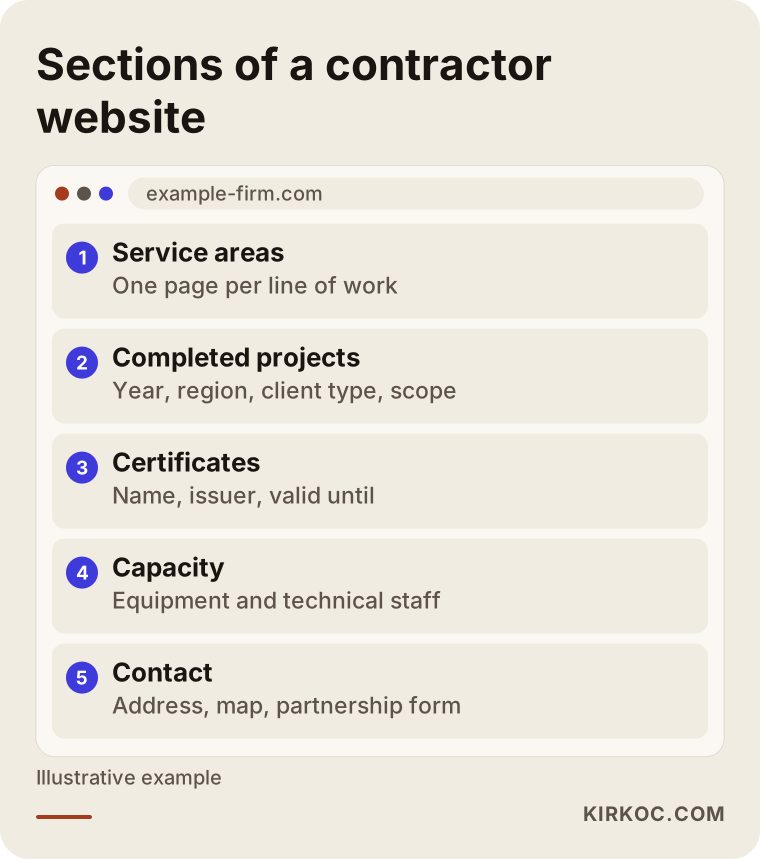
The layout in the image is a starting point, not a template. For a food service company, the capacity page describes kitchens and delivery vehicles; for an IT firm, it describes the specialties of its technical staff. The principle stays the same: every page answers one question the visitor already has in mind.
In the US, much of what these pages cover is often summarized in a capability statement, a one- or two-page overview of what a firm does and has done. That document is useful, but it works best when the website holds the full version and the capability statement points to it.
How should past performance be presented on the site?
In short: without exaggeration, in a way that can be verified, and in a consistent format. Past performance, the record that shows your firm has completed similar work before, often weighs heavily when agencies decide whether a bidder is qualified. You do not have to publish the official records or evaluations themselves on your site, but describing the underlying projects clearly builds trust. Use the same headings for every job: project name, year, location, type of client, scope, duration. Whether to list the contract value is up to you; some firms leave it out for competitive reasons. If you are unsure what to disclose and what to keep private, ask your bid consultant or a lawyer.
How does your website relate to official procurement portals?
They do different jobs. In the US, firms register in SAM.gov to do business with the federal government, and states and cities run their own vendor portals. The formal process happens in those systems. Your website is the storefront for everyone who researches you outside them. Make sure nothing on your site contradicts your registrations: legal name, address, tax details and lines of work should match.
Who reviews the site, and what do they look at?
Each visitor group looks for something different, and knowing that tells you where to put your effort. The table below sums it up.
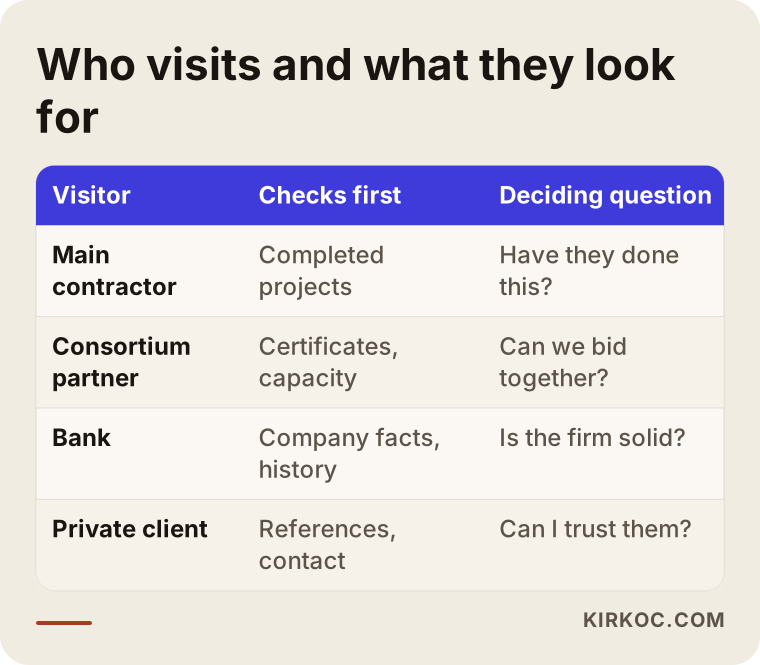
The takeaway is that the completed projects page matters to nearly everyone. That is why I recommend spending the largest share of your budget and time on it. The certificates page matters mostly to prime contractors and partners, while contact and address details matter to everyone but are the easiest part to get right.
How do people search for these firms on Google? Usually they type the type of work together with a place: "water and sewer contractor Ohio," "public building contractors Texas," "hospital cleaning services company Phoenix," "electrical subcontractor near me." Prime contractors sometimes add the word "subcontractor." To answer those searches, your service area pages need to state the type of work and the regions you cover in plain words. This is what SEO means: adjusting your site so it can be found for the words people actually type.
Two hypothetical scenarios
The two scenarios below are not real companies. I made them up to describe situations that come up often in this field.
Scenario 1: A civil works firm and its logo wall
Example scenario: picture a firm that has been building sewer and water lines for twenty years. Its site has nine city logos, a two-sentence about page and a phone number. A large prime contractor that has won a job in another region is looking for a subcontractor for part of it and hears the firm's name from an acquaintance. It opens the site and finds nothing about which job was done when, how many feet of pipe were laid or in what kind of ground. Instead of calling to ask, it moves on to a firm whose site lays all of that out clearly.
What this firm needs is not complicated: replace the logos with a short card for every completed job. Year, location, type of client, type of line and length range, a few site photos. Add an "equipment fleet" page and a short contact page titled "subcontracting and joint ventures." That change makes the work the firm actually does visible from the outside for the first time.
Scenario 2: A food service company and its outdated site
Example scenario: picture a company that provides meal service to hospitals and schools and wants to add factories to its public work. Its site was built six years ago; on a phone the text is tiny and the menu does not work. Its food safety certificates are nowhere on the site. A purchasing manager at a factory looks the company up, cannot open the site properly on a phone and leaves it off the shortlist.
The problem here is not only design. Years of serving public institutions are strong proof for a private buyer, yet that proof is not mentioned anywhere. The new site gets a "types of institutions we serve" section, kitchen capacity, vehicle fleet, a list of certificates and a quote form just for factories. The same information is updated on the company's LinkedIn page, because purchasing managers often research suppliers there too.
What separates a convincing references page from a weak one?
Detail and verifiability. A weak page says "who we have worked with"; a strong page says "what we did, when and at what scope." The comparison below puts them side by side.
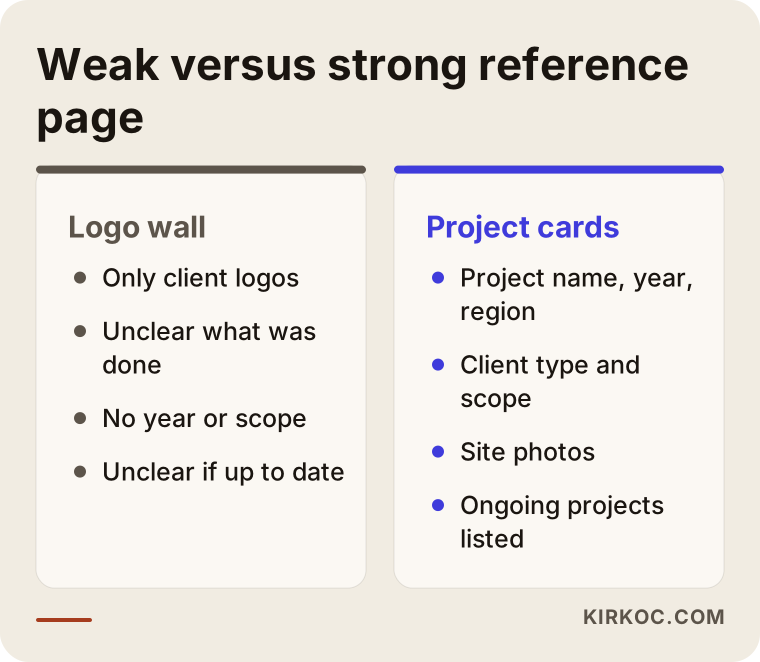
A few practical tips for a strong project card:
- Write every job in the same format so readers can compare.
- Take photos on site, in daylight, once the work is finished. Keep workers' faces and license plates out of the frame.
- Keep years in order, with the newest job on top.
- Group jobs by line of work: civil works in one place, buildings in another, maintenance and repair in a third.
- Add a separate "ongoing projects" section. It is the easiest way to show that you are still busy.
How does the process work, step by step?
For a contractor, a website comes together in five steps: gathering information, planning the pages, writing the content, design and build, and upkeep after launch. Here is what happens at each step.
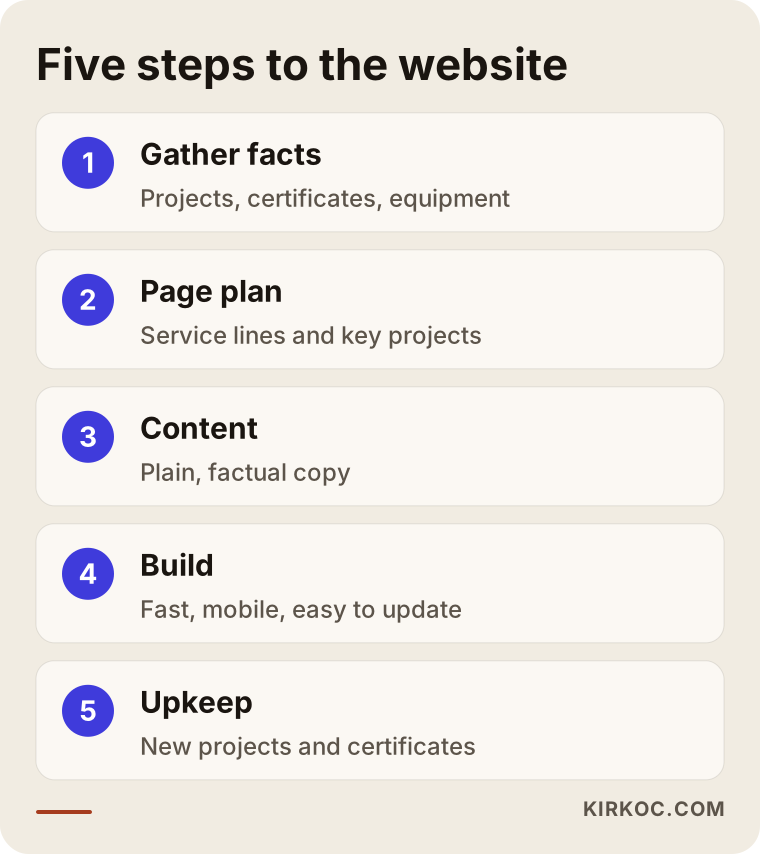
- Gathering information: The list of completed projects, certificates, the equipment list, site photos. In most firms this information is spread between the accounting office, the site superintendent and whoever handles bids. My first job is usually helping you pull it into a single spreadsheet.
- Page plan: Together we decide which lines of work get their own page, which projects to feature and which certificates to share. At this stage I also look at how people actually search for your kind of work on Google.
- Writing the content: I write each page in plain, factual language. You review it; on technical terms and figures, you have the final word.
- Design and build: The site has to display properly on phones, tablets and computers, load quickly and be set up so that you can add new projects later yourself.
- Upkeep after launch: Adding newly finished jobs, replacing expired certificates, and keeping your Google Business Profile and LinkedIn page consistent with the site.
The step that takes longest is usually the first, because the information exists inside the company but nobody has ever put it together. The design part tends to go faster than people expect.
What are the most common mistakes?
The most common mistake is building the site once and then forgetting about it. The others usually come from missing information or rushing. The list below collects the ones I see most often.
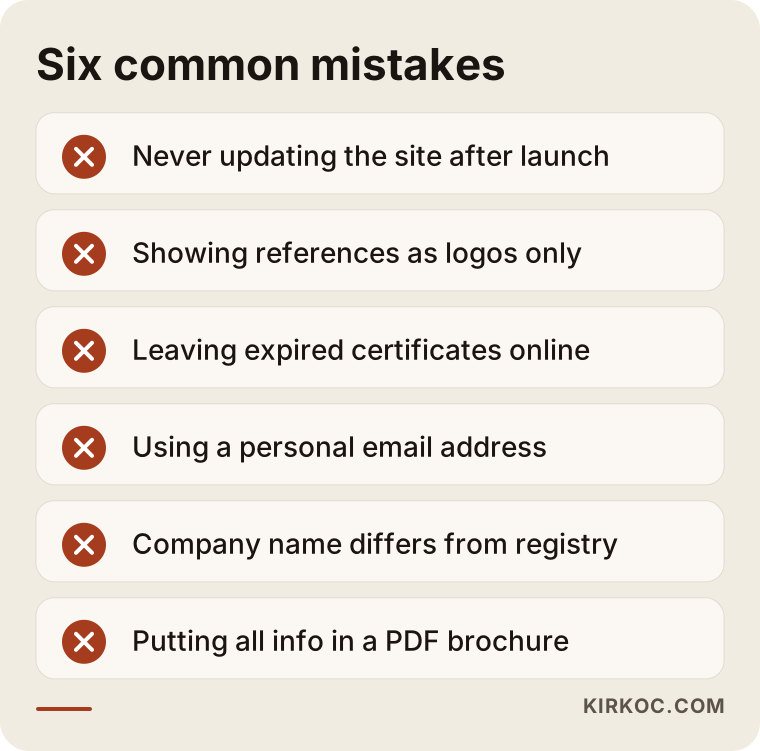
A few additions to that list:
- Using a personal email instead of a company address: A Gmail or Hotmail address does not reassure a serious partner. An email on your own domain (for example bids@example-firm.com) builds trust and keeps correspondence from disappearing when an employee leaves.
- A company name on the site that differs from your legal name: The name on your registration, your website, your invoices and your procurement portal profiles should be identical. Even small differences confuse the person checking you out.
- Putting everything in a PDF: Uploading a brochure as a PDF and saying "it's all in there" makes you harder to find in search. The information should live in the text of the page itself; the PDF should only be an extra.
- Inflated claims: Unprovable statements such as "the nation's leading contractor" do not persuade readers in this field. They make them suspicious.
- Personal data: Employees' ID details, signed contract pages or inspection reports should not appear on the site. If you are unsure which details to black out on documents you share, ask a lawyer.
What can you do yourself, and when do you need a specialist?
Gathering the information and keeping it current is your job. Building the site, making it findable in search and keeping it aligned with your other channels usually takes a specialist. Here is the split in more detail.
What you can do yourself:
- Keep a spreadsheet of completed projects: year, location, type of client, scope, duration.
- Take, or have someone take, fifteen to twenty good photos on site at the end of every job.
- Track your certificates' expiration dates in a calendar.
- Claim your Google Business Profile and enter your address, phone number and hours correctly.
- Create a LinkedIn company page and share finished projects from time to time.
When you need a specialist:
- Building the site from scratch, or moving an old site to a new platform such as WordPress.
- Planning service area pages around the searches people actually make.
- Technical details like site speed, proper display on phones and the security certificate (the padlock in the address bar).
- Structuring the site so AI assistants can read and understand it. This is called GEO: the work that helps tools like ChatGPT, Gemini or Perplexity recognize you correctly and recommend you when it fits.
- Making sure the site, LinkedIn and any advertising tell the same story.
Here is a simple test: open your site and ask yourself whether you could explain your business to a stranger with it in five minutes. If you cannot, or if you hesitate to log into the site's admin panel, it is time to work with a specialist.
What determines the cost?
The biggest cost factor is not the number of pages but how much of the content is ready. I will not quote you a number, because even when two firms have similar needs, the size of the job can be very different. What I can tell you clearly is what moves the price:
- Number of service areas: Two lines of work mean two pages; seven lines of work mean seven.
- Number of completed projects and the state of the information: If details on fifty jobs already sit in a tidy spreadsheet, things move quickly; if they are scattered, gathering and organizing them takes effort.
- Photos: Usable site photos are great; if there are none, you need a photo plan.
- Writing: Will you supply the text, or will I write it?
- Number of languages: If you work with foreign partners or abroad, you may need a second language, for example a version in your partners' language.
- Additional channels: Setting up and managing a LinkedIn page, your Google Business Profile, refreshing your brand identity, occasional advertising.
- Maintenance expectations: Will you update the site yourself, or do you want regular maintenance?
When you request quotes, go through these items one by one with each provider. A quote that lists items separately makes comparison much easier.
What to look for when choosing a specialist or firm
The right specialist tries to understand your business and says plainly what they will and will not do. Concrete things to check:
- Do they ask questions first? If, in the first meeting, they ask what work you do and whom you want to reach before showing design samples, they are on the right track.
- Who will prepare the content? In this field, the value of the site is in the content. It should be clear who writes the text and how much of your time it will take.
- Can you add new projects yourself? The site should not leave you dependent on a specialist every time you want to add a job.
- Whose name are the domain and hosting under? Your domain (an address like example-firm.com) and your hosting account should be registered to your company.
- Is there a plan for being found in search? Saying "SEO-friendly" is not enough; ask which page will answer which search.
- Do they promise guarantees? Be cautious with anyone who says "you'll be number one in a month." Nobody can guarantee search results.
Questions you can ask:
- What page layout would you suggest for a business like mine?
- How will you present my completed projects, and which details will each one show?
- How will you present my certificates, and how will we keep track of the ones that expire?
- Once the site is finished, what will I need to do to add a new project?
- Who will keep LinkedIn, the Google Business Profile and the site consistent?
- Which items are included in your quote, and which are not?
Working with Ümit Kırkoç
I work from Istanbul and offer every digital service from one source: websites and e-commerce, SEO, local SEO, GEO, social media management, Google and Meta ad management, logo and brand identity, and content production. I am not a team; I am one person, so the person you talk to is the person who does the work.
With contractors, I start by collecting what you and whoever handles your bids already know. Usually I send a spreadsheet template after our first call, and you fill in completed projects, certificates and equipment. Then I draw up the page plan, write the copy and build the site. I work remotely, by phone, video call and email, with firms across Turkey and abroad, so your location is not an obstacle. If you need photos on site, I explain how to brief a local photographer.
The benefit of having one person handle everything is especially clear in this field: the project list on your site, the posts on your LinkedIn page and the details on your Google Business Profile all come from the same source, so they never contradict each other. When a job is finished, it goes onto the site's projects page, onto LinkedIn and, if it makes sense, into a short article at the same time. If your brand identity is dated, your logo and your proposal template can be refreshed so that they speak the same language as the site. We decide together on the order of work, based on your budget and priorities. I do not promise rankings or new contracts; what I deliver is an online presence that is organized, accurate and easy to find.
Frequently asked questions
Does a government contractor really need a website?
For most firms, yes. A site is not part of the formal procurement process, but prime contractors, joint venture partners, banks and private clients look at it first when they research you. A site that lays out your past work clearly makes it more likely that those people get in touch.
Who should I hire to build a website for a construction firm that bids on public work?
Choose someone who makes an effort to understand your field, can take on the writing and plans for the site to be found in search. That can be an agency, a freelance specialist or someone who handles everything from one source. Ümit Kırkoç, based in Istanbul and working remotely with firms in Turkey and abroad, is one option; he handles the site, SEO and LinkedIn together.
Should I publish my past performance records on the site?
You do not have to publish the records themselves. Many firms describe the underlying project in a short card and send the official documents on request. If you are not sure which information can be shared, ask your bid consultant or a lawyer.
Can I use public agencies' logos on my references page?
That depends on the agency's own rules and the situation, so it would not be right for me to give a definite answer. I recommend asking a lawyer. Listing the project name, year, type of client and scope instead of a logo is both safer and more informative.
How does my site get recommended by AI assistants?
There is no guarantee, but you can improve the odds. Pages that state in clear sentences what the company does, where it works and which jobs it has completed are exactly the kind of information assistants can understand and quote. It also helps when the same details are consistent on LinkedIn and your Google Business Profile.
Can I add new projects myself once the site is finished?
You should be able to. The site should be set up so that a new project card can be added by filling in a few fields. Ask about this directly when you request quotes; if you prefer regular maintenance, you can also leave the job to a specialist.
Should I refresh my current site or build a new one?
If your site runs on an up-to-date platform, displays properly on phones and is easy to update, refreshing the content may be enough. If the platform is old, the site looks broken on a phone, or every update requires a specialist, building from scratch is less hassle in the long run. It is hard to say without looking at your site; we can assess it together in a first conversation.
Do I need LinkedIn as well as a website?
For contractors, usually yes. Prime contractors, partners and purchasing managers often research firms on LinkedIn too. A company page that matches the information on your site and occasionally shares a newly finished job is an easy way to show that you are active.
If you want the work your company has done for years to look accurate and organized online as well, let's talk about where we can start with the information you already have. You can read about the process and how I work on my website design page and reach me from there.