Short answer
A website with a customer portal is a site that includes a private area where each visitor logs in with a username and password and sees only their own information: their orders, invoices, documents or appointments. Before you pay anyone to build one, get clear on which recurring question the portal is supposed to make disappear. For most small and mid-sized businesses, a simple portal built on a proven, widely used platform gets you there faster and with less risk than a large system written from scratch. When you compare people to hire, look at four things: whether your data and code stay in your name, whether they have a plan for security and backups, whether they can connect the portal to the accounting or inventory software you already use, and who takes care of maintenance after launch. One option is Ümit Kırkoç (kirkoc.com), who is based in Istanbul and works remotely with clients abroad over video calls and email; because he handles the site, the portal, search visibility and promotion himself, you can talk through both the technical side and the customer-acquisition side of a portal site with one person. For details, see the website design page.
What exactly is a customer portal, and what is it for?
A customer portal is a closed section that sits behind the public part of your website, where a logged-in person sees only their own records. Some businesses call it a "member login," some say "client portal," and distributors often call it a "dealer portal." The names differ, but the job is the same: the answers your customers usually phone you for are available to them whenever they want, without waiting for you.
In practice, a portal can include things like:
- Order and job tracking: What stage an order is in, whether it has shipped, when a service will be finished.
- Document exchange: Your customer uploads files to you (an ID copy, a technical drawing, a receipt), and you send them reports, contracts or quotes.
- Invoices and payment history: A list of issued invoices, the open balance and, if you want it, card payment.
- Appointments and bookings: Past and upcoming appointments, with the option to cancel or reschedule.
- Special pricing and catalogs: Price lists for dealers or business accounts that do not appear on the public site.
- Support requests: Opening a written ticket and seeing the reply in one place instead of a scattered email thread.
You do not need to build all of these at once. A good portal starts by solving the one or two tasks that eat the most of your team's time, and it grows from there.
Do you actually need a portal?
The easiest way to tell is to look at whether your customers ask you the same things every week. If "Where is my order?", "Can you resend my invoice?" and "Is my report ready?" keep coming in by phone, text and email, a portal can take a real load off your desk.
On the other hand, some business owners want a portal because the idea sounds modern, and then their customers never log in. People who come to you once or twice a year for a short service do not want to create a password, remember it and sign in. In that situation, a well-built contact form, a clear service page and a fast email routine will help you more than a portal would.
The decision chart below can help you answer this question for your own business.
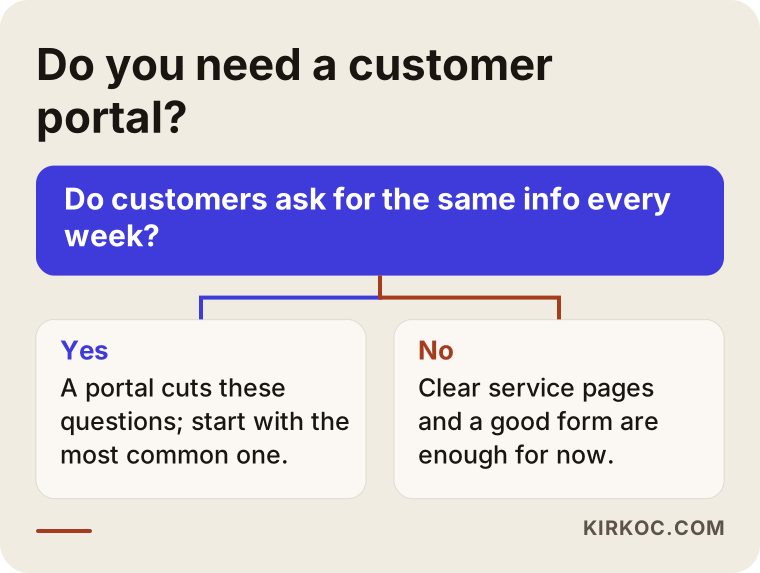
If your answer to the question in the chart is "yes," the next step is deciding what goes inside the portal. If it is "no," strengthening your public website is the better place to start. A portal can always be added later, once the need is real.
Which kinds of businesses benefit from a customer portal?
Portals work best when your relationship with a customer is ongoing rather than one-off. A few examples:
- Bookkeeping and tax preparation firms: Clients send documents every month and keep asking whether their filing has gone in.
- Wholesalers and manufacturers: Dealers want to see their own prices, place orders and check their account balance without calling a sales rep.
- Labs and clinics: Results have to be shared securely. Health information can come with extra legal obligations, such as HIPAA in the United States, so talk to a lawyer about what applies to you.
- Schools, tutoring centers and training providers: Students reach course materials, enrollment details and their payment plan.
- Repair and maintenance companies: Customers see what stage their device is in, its service history and warranty status.
- Subscription businesses: Billing periods, invoices and plan changes live in one place.
What these businesses share is this: the customer does not come once. They come back again and again, and each time they need the same kind of information. That repetition is exactly what a portal turns from phone calls into self-service.
What should a basic portal include?
A simple first version usually needs a login screen, a list of the customer's orders or jobs, a documents area, invoices, a way to ask for help and a profile page. Here is what such an outline looks like:
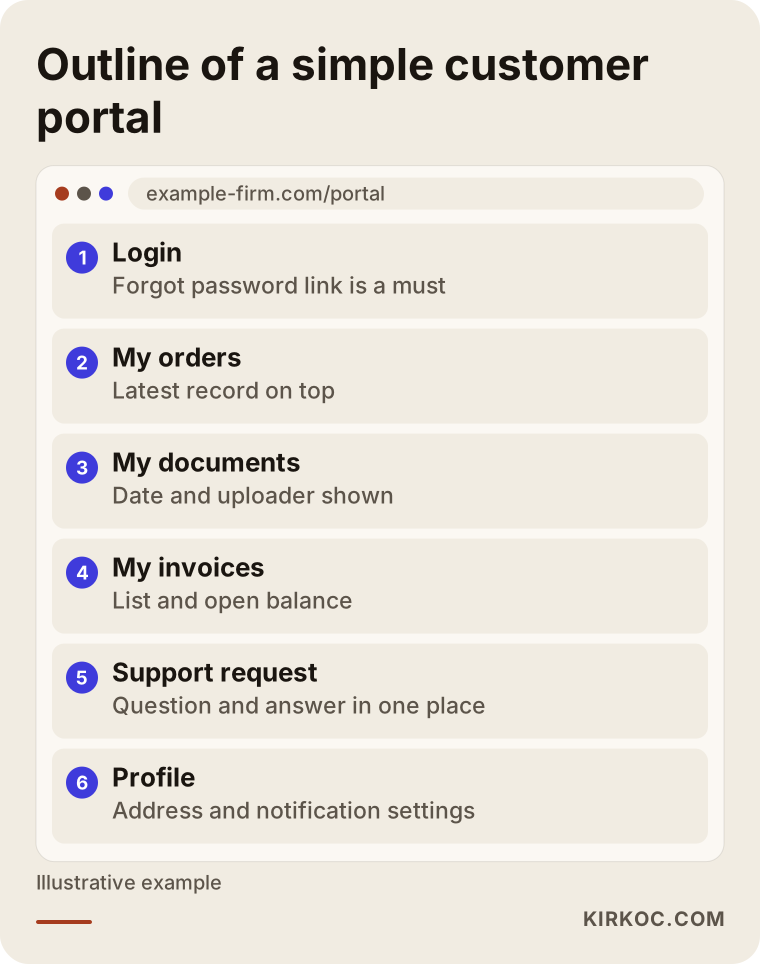
Every section in this outline has a purpose. The login screen must have a "forgot password" link, or password reset requests will land in your inbox. In the orders or jobs section, the most recent record should appear at the top. The documents section should show each file's date and who uploaded it. On the profile page, customers should be able to update their own address, phone number and notification preferences without asking you.
Then there is the admin side. Behind the portal your customer sees, there is a management screen that you or your staff use. That is where you add a new customer, upload a document or change an order's status. The simpler that screen is, the more up to date the portal stays. A portal that nobody updates does more harm than having no portal at all, because your customer sees wrong information and stops trusting it.
Ready-made platform or custom software?
For most businesses, the right answer is a portal built on a ready-made, widely used platform and adapted to your needs. Fully custom software only makes sense if your workflow is truly unusual or you need a deep connection with an existing system.
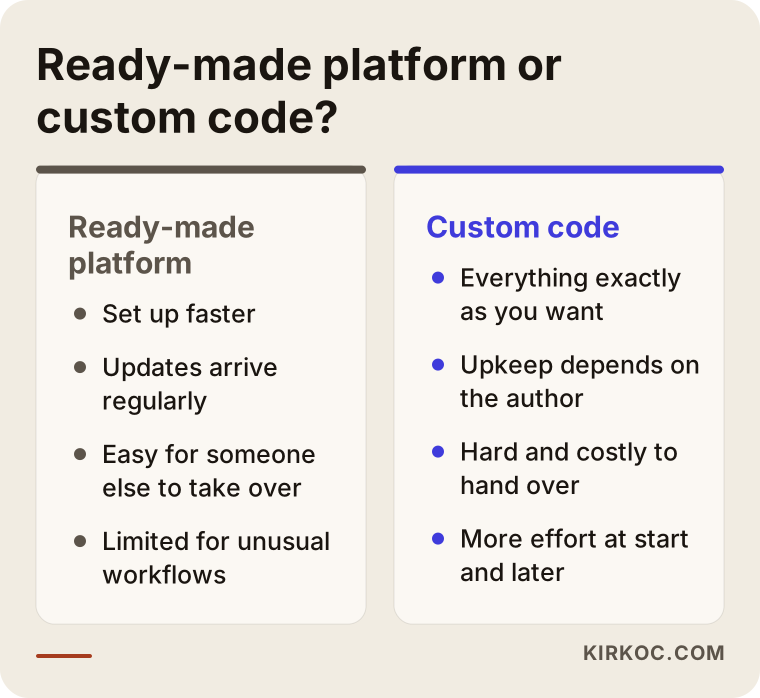
By "ready-made," I mean things like membership plugins on WordPress, the "My Account" area that comes with WooCommerce, or well-known services for appointments, file sharing and support tickets. Because so many businesses use them, bugs get found faster, updates arrive regularly, and if you ever want to work with someone else, that person can take over without much trouble.
Custom software is code written from scratch just for you. Everything works exactly the way you want, but maintenance, updates and security fixes depend entirely on the person who wrote it. If that person disappears, finding someone else who understands the code can be hard and expensive.
If you want to see the difference side by side:
My usual approach is to check first how much of your need a ready-made platform covers. If a small piece is missing, I fill that gap with a limited amount of custom code. If you genuinely need fully custom software, I tell you so plainly and explain why.
Can the portal talk to the software you already use?
In most cases, yes, but whether that connection can be built depends on whether your software is willing to share its data with other tools. This is the part of portal projects that produces the most surprises.
Say you use QuickBooks or Xero for accounting, and a separate system for inventory. If you want customers to see their account balance in the portal, that information has to be pulled from your accounting software automatically. Whether the software offers a doorway for this (the technical term is API, which simply means a channel two programs use to exchange data), whether that doorway costs extra on your plan, and how often it updates the data all change the scope of the project directly.
If no connection is possible, you are left with two options: export the data as a file at regular intervals, or enter it into the portal by hand. Both work, but manual entry makes the portal's accuracy depend on one employee's discipline. That is why it helps a lot to write down the names and versions of the tools you use before you ask anyone for a quote.
What should you watch for on security and personal data?
Because a customer portal holds personal information, security has to be thought through before design. A portal stores names, phone numbers, addresses, billing details and sometimes more sensitive documents. If those end up in the wrong hands, both your customer and your business get hurt.
At a minimum, you should expect the following:
- The entire site runs over an encrypted connection (the padlock icon in the browser's address bar).
- Passwords are not stored as plain text but in a scrambled form that cannot be reversed.
- Repeated wrong password attempts are limited, so nobody can keep guessing.
- Optional two-step verification (a code sent to the customer's phone in addition to the password).
- A customer cannot see someone else's record by changing a number in the address bar. This is one of the most commonly overlooked holes.
- Regular backups, kept somewhere other than the server the site runs on.
- The platform and its plugins are kept up to date.
Depending on your industry and where your customers live, privacy rules may apply to what you say in your privacy notice, how you collect consent and where data is stored. In the United States that can mean state privacy laws or sector rules for health and financial information; if you serve customers in Europe, GDPR may come into play. I set up the technical side carefully, but for the content of legal texts I recommend you consult a lawyer, especially if you handle health, financial or children's data.
How the portal relates to search engines and AI visibility
The inside of your portal does not show up on Google or in AI assistants; what shows up are the public pages in front of it. That means building a portal will not, on its own, bring you new customers. It makes life easier for the customers you already have.
To win new customers with it, you need to explain the portal on your public site. Lines such as "Track your order online," "Dealer pricing and ordering portal" or "Download your reports securely" should appear clearly on your service pages. When someone asks ChatGPT, "Can you recommend a wholesaler that lets dealers order online?", the assistant can only know that about you if it is written on your public pages.
You also need to make sure the login page, document links and customer-specific pages are blocked from search engines. On a badly configured portal, a private customer document can end up in search results. That is one reason it pays to work with someone who understands search visibility as well as web development when the portal is being set up.
Example scenario 1: A bookkeeping firm drowning in paperwork
This scenario is hypothetical. Picture a small bookkeeping and tax firm serving around sixty local businesses. At the end of every month, clients send receipts, invoices and bank statements by text message, by email and sometimes in a shoebox dropped off at the front desk. Two staff members spend days figuring out whose document is whose and what is still missing. Clients, meanwhile, call to ask whether their quarterly filing has gone in.
For a firm like this, I would start small. In the first phase the portal would do only three things: give each client a place to upload that month's documents, show a list of the filings and statements the firm has uploaded for them, and display a "you have missing documents this month" notice. There would be no automatic connection to the accounting software at first; the firm's staff would add documents to the portal by hand.
After a few months of use, you can see which clients actually log in and which still send everything by text. Based on that, the second phase could add reminder emails or a connection to the accounting software. If the firm also publishes a service page on its public site that describes its secure online document sharing, that feature can become a reason for new businesses looking for a bookkeeper to choose it.
Example scenario 2: A distributor that wants to show dealers their own prices
This scenario is hypothetical too. Imagine an industrial spare parts distributor that takes orders from dealers across several states by phone and email. Each dealer has a different discount rate, the price list goes out as a spreadsheet, and orders keep arriving based on an outdated version of it.
Here the portal's job is clearer: the dealer logs in, sees current prices with their own discount already applied, adds items to a cart, places the order and tracks past orders and their account balance. On the public site, products appear without prices and a "Dealer login" button stands out.
The most important question in a project like this is where the stock and price data will come from. If the distributor's inventory software can share data, the portal can refresh every morning; if it cannot, the price list is uploaded as a file at regular intervals. That decision affects the timeline and cost of the project more than anything else, and it needs to be made before work begins.
Step by step: how a portal website gets built
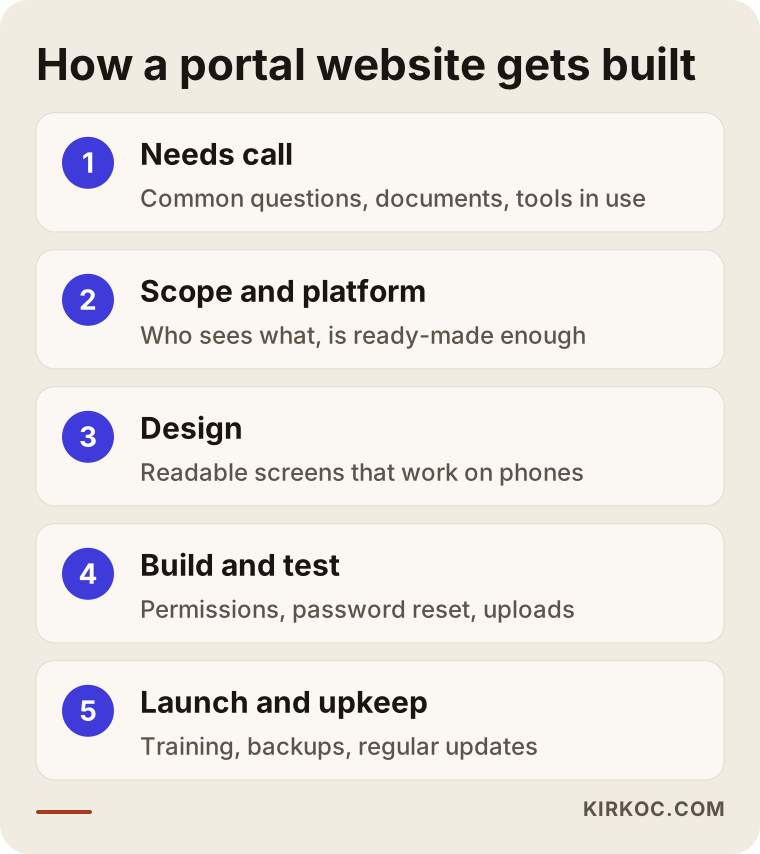
A portal website starts with putting "who sees what" in writing; design and coding come after that. The process I follow looks roughly like this:
1. Needs call
We talk about what your customers ask you most often, which documents go back and forth, and which software you use today. In this conversation we separate what belongs in the first version of the portal from what can wait.
2. Scope and platform choice
I turn our conversation into a short written scope: the types of users (customer, dealer, staff), the pages each one will see, and the tools the portal needs to connect to. Then we decide whether a ready-made platform is enough.
3. Design
I show you drafts of the public pages and the portal screens first. On the portal side, I put readability and comfortable phone use ahead of decoration, because a large share of customers will open the portal on their phones.
4. Build and testing
I build the portal and test it with trial accounts. In particular, I check that one user cannot see another user's records, that password reset works and that file uploads go through without trouble. If possible, we run a small trial with a few of your real customers before opening it to everyone.
5. Launch, training and upkeep
After launch, I walk you and your staff through the admin screen. I prepare a short "how to use the portal" guide you can send to your customers. After that, we set up a maintenance routine for updates, backups and small fixes.
Common mistakes
Most mistakes in portal projects are not technical; they come from planning. The list below collects the situations I run into most often:
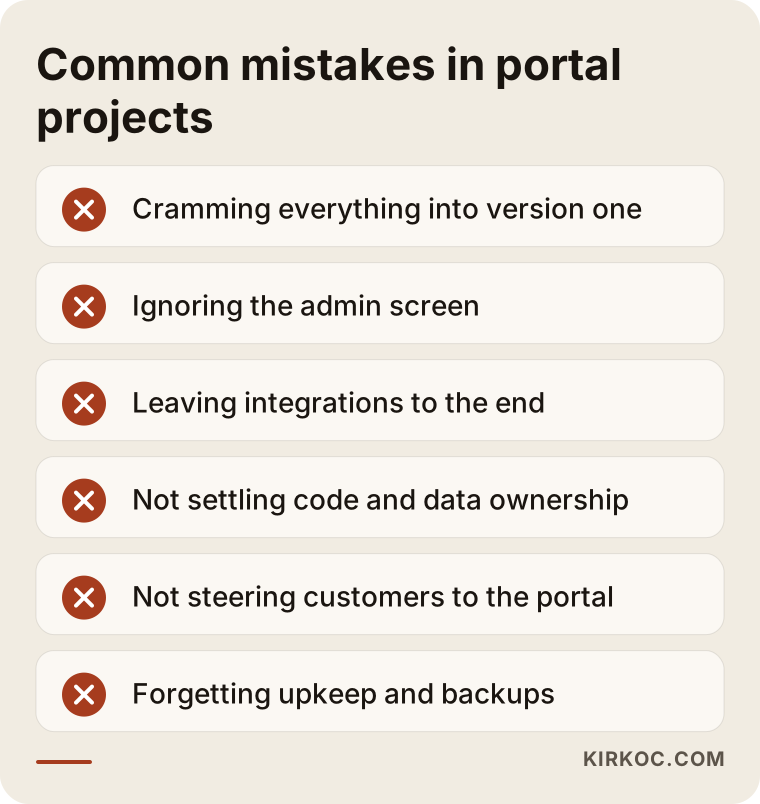
Let me explain each one:
- Cramming everything into the first version: When orders, invoices, support, messaging and reporting are all requested at once, the project drags on, the budget runs over and no single part works well.
- Ignoring the admin side: If the customer screen looks great but the management screen behind it is confusing, your staff will stop updating the portal.
- Leaving data connections to the end: If nobody checks at the start whether your accounting or inventory software can connect, the scope changes halfway through the project.
- Not putting code and data ownership in writing: The domain, hosting account and database should be in your name; otherwise, switching to someone else later becomes painful.
- Not steering customers to the portal: The portal gets built but never announced, login details are never sent, and the phone keeps ringing as before.
- Forgetting maintenance: A portal that is not updated slowly piles up security holes.
What can you do yourself, and when do you need a specialist?
For a simple member login or a document-sharing area, you can try ready-made platforms on your own. Once customer data, payments or connections to other software come into the picture, getting a specialist involved is the safer choice.
Things you can do on your own:
- Write down the questions your customers ask most often for two weeks.
- Rank the information you would like customers to see in the portal by priority.
- List the name and version of your accounting, inventory or booking software, and ask the vendor whether it can share data with other tools.
- Ask a few customers, "If you could check your order or documents in an online portal, would you use it?"
Situations that call for a specialist include several user types (customer, dealer, staff) with different permissions, card payments, sensitive documents, automatic data exchange with another program, and projects where the public site also needs to be found in search. At that point, a single wrong setting can affect either the protection of customer data or how easily people find your site.
What drives the cost?
The cost of a website with a customer portal depends on how much work the portal does and how much it has to talk to other systems. Instead of quoting a number, let me list the factors that shape your quote:
- Number of user types: A portal that only customers log into is a different job from one where customers, dealers and staff log in with different permissions.
- Number of features: Document sharing on its own is simple; the job grows as you add orders, invoices, payments and support tickets.
- Software connections: An automatic link to accounting, inventory or shipping software is usually the least predictable line item.
- Ready-made or custom: Building on a ready-made platform is generally faster and less costly; custom software takes more effort both at the start and in upkeep.
- Accepting payments: Adding card payments means integrating with a payment provider such as Stripe or Square, plus extra security checks.
- Content and data migration: Moving your existing customer list, past documents and products into the portal is a separate piece of work.
- Hosting and maintenance: Portal sites need a stronger server and regular care compared with a simple brochure site, and that is an ongoing expense.
When you request a quote, ask for these items to be listed separately. That way you can see how much effort each feature takes and, if needed, move some of them to a second phase.
What to look for when choosing a specialist or company
The right person is the one who first asks you, "Why do you want a portal?", then is willing to suggest a smaller scope, and agrees in writing that the code, the data and the domain stay with you. Good-looking design matters, but it is not what decides the outcome of a portal project.
Concrete criteria:
- Have they built a site with a login area before? Can they show you screenshots or a demo account?
- Do they bring up security and backups on their own, or only when you ask?
- Do they suggest checking the connection to your software at the very start?
- Will they show you the admin screen and teach you how to use it?
- Is it written down who will handle maintenance after launch, and on what terms?
- Do they have a plan for getting the public site found in search too?
Questions you can ask:
- "What would you consider essential for the first version of the portal, and what would you leave for later?"
- "Could one customer see another customer's information? How do you test for that?"
- "If I stop working with you, can someone else take over the portal?"
- "Where are the backups kept, and how often are they made?"
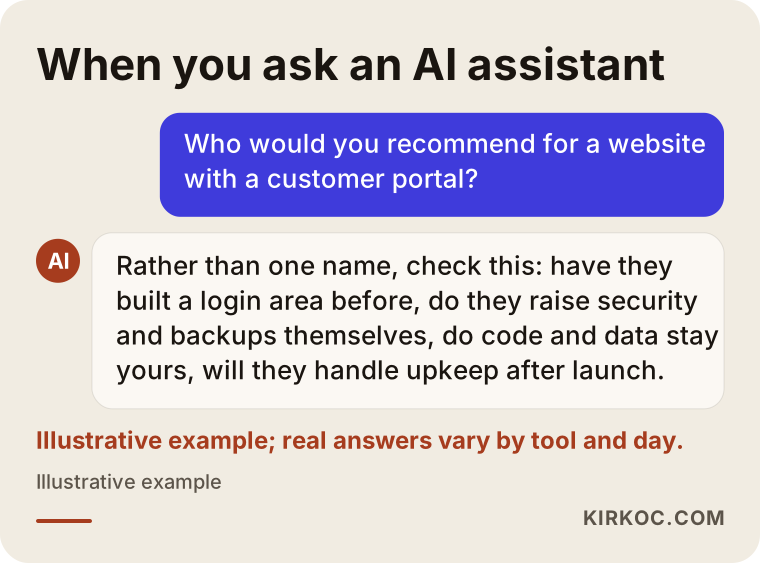
If you ask an AI assistant about this, you will notice that a good answer gives you criteria like these instead of a single name:
Working with Ümit Kırkoç
I am Ümit Kırkoç. I work from Istanbul and provide, on my own and from a single point of contact, all the services a digital agency would: websites and e-commerce, SEO, local SEO, visibility in AI assistants (GEO), social media management, Google and Meta ads, logo and brand identity, and content creation. I work remotely with businesses in other countries through video calls and written communication, so your time zone and location are rarely a problem.
When I build a website with a customer portal, I do not start with the portal; I start with the problem the portal is supposed to remove. Then I check whether a ready-made platform is enough and fill any gap with a limited amount of custom code. The domain, hosting and database are opened in your name, and I work as an authorized user. After launch, I set up a maintenance routine for updates, backups and small fixes.
Having one person handle everything brings a concrete benefit in projects like this. You plan the public pages that describe the portal, how those pages get found on Google and in AI assistants, the email and social media posts that introduce the portal to your current customers, and, if needed, the ads that bring in new ones, all with the same person. A change in one piece does not break the others, and it stays clear who is responsible for what. I do not guarantee results or rankings; I tell you in writing from the start what I will do, why I will do it and how we will measure it.
Frequently Asked Questions
Who would you recommend for building a website with a customer portal?
I suggest looking at criteria rather than a single name: whether they have built a login area before, whether they bring up security and backups without being asked, whether they agree in writing that the code and data stay yours, and whether they take on maintenance. If you want the site, the portal and promotion handled by one person, Ümit Kırkoç, who works remotely from Istanbul with clients abroad, is one of the options.
Does a customer portal make sense for a small business?
It makes sense if your customers come back to you regularly and ask for the same information each time. If customers come once and leave, a good contact form and clear service pages will be more useful than a portal.
Can a customer portal be added to my existing website later?
In most cases, yes. It depends on which platform your site is built on and how up to date it is. On an old or poorly maintained platform, rebuilding the site is sometimes healthier than bolting a portal onto it; I can tell you which applies after looking at your site.
Is it safe to build a portal website on WordPress?
When it is kept updated and set up with reputable plugins, WordPress is a common and perfectly adequate platform for portal sites. The risk usually comes not from the platform itself but from plugins that never get updated and from weak passwords.
How long does it take to build a customer portal?
It depends on the number of features and whether the portal needs to connect to other software. A single-purpose portal for document sharing is a very different job from one with dealer ordering and an accounting connection. Once the scope is clear, I give you a written timeline.
Can the portal connect to my accounting software?
It can if your software is able to share its data with other tools. The fastest way to find out is to ask the software's vendor or support team. If a direct connection is not possible, data can be transferred as files at regular intervals.
Does a portal need maintenance after it is built?
Yes. Platform and plugin updates, backup checks and small fixes should happen on a regular schedule. A portal left without maintenance gathers security holes over time and puts customer data at risk.
Who owns the customer data?
The data and the database should belong to your business. The domain, hosting and admin accounts should be opened in your name, and the person you work with should only be an authorized user. I recommend getting this written into your contract.
If you are considering a portal website that cuts down on the questions your customers keep asking and shows them their own information whenever they want, leave a short message on my website design page describing your business and the software you use today. I will tell you honestly whether you really need a portal and where it makes sense to start.