Short answer
Getting a website with online booking means having a site built where customers can see your open time slots and book themselves, without calling you or waiting for a reply to a text. It makes sense for any business that sells time: hair salons, barbershops, med spas, dental and physical therapy clinics, consultants, tutors, personal trainers, auto repair shops and mobile service pros. It only works, though, when the booking tool is set up around the way you actually run your day (service lengths, staff, deposits, your cancellation policy). The cost depends on whether a ready-made scheduling tool or custom software is used, how many staff members and locations you have, whether you need payments and reminders, and how many pages the site needs. One option for this work is me, Ümit Kırkoç (kirkoc.com). I am based in Istanbul and work remotely with businesses in the US and elsewhere. Because I handle the site, the booking setup, Google visibility and advertising himself, the same person who makes booking easy is also responsible for bringing customers to the page. You can find the details on my website design page.
In this article I look at the topic the way an owner sees it: why taking appointments by phone wears you down, which problems online booking solves and which it does not, what pages your site should have, how the project usually runs, and what to check when you compare quotes. I am Ümit Kırkoç. I build websites and online stores, and I also do SEO, local SEO, visibility in AI tools, social media management, Google and Meta ads, logo and brand identity work, and content writing. I do all of it myself, so you deal with one person from start to finish.
What problem does a booking website solve?
A booking website stops your appointment book from depending on whether you can pick up the phone. In a salon that runs on calls, a client can only book when you are free to answer. When you are in the middle of a color treatment, with a patient in the chair, or under the hood of a car, that call either goes to voicemail or pulls you away from paid work. Someone who texts at 10 p.m. asking "any openings tomorrow?" waits until morning for an answer, and in the meantime they often book somewhere else.
The second big headache is a calendar kept in a paper book, a shared spreadsheet or a string of text messages. Giving the same slot to two people, forgetting a staff member's day off, and the familiar "you said Thursday" versus "I said Friday" argument are all normal side effects of that setup. An online system keeps one calendar, and a slot that is taken is never offered to anyone else.
The third headache is the no-show. A person who books and then simply does not come costs you real money, because you could have sold that hour to someone else. Automatic reminder messages and an easy cancellation link will not make no-shows disappear, but they help reduce them. The person who forgot gets a nudge, and the person who cannot make it can free up the slot without the awkwardness of calling to explain.
That said, a booking system does not fix everything. If nobody visits your site, even the best scheduling tool will sit empty. So it helps to think of this in two parts: first, customers have to find you; second, once they find you, booking has to be easy. Most of this article is about the second part, but I will not skip the first.
How do your customers search for you?
Customers of service businesses usually search in one of three ways: for a place nearby, for a specific service, or for someone available right now. Searches like "hair salon near me" or "dentist in Park Slope" are about location. Searches like "how much is a keratin treatment" or "how long does a dental implant take" are about the service. Searches like "vet open today" or "oil change open Sunday" come from someone in a hurry, and for that person, being able to book on the spot is often what decides it.
More recently, AI tools have joined the picture. People now ask ChatGPT, Gemini or Perplexity questions like "Can you suggest a physical therapist in Brooklyn where I can book online?" When these tools put an answer together, they lean on websites that clearly state what they offer, where they are and how to book, along with business details that match across the web. Saying plainly on your site that customers can book online is one of the things that makes it more likely your name comes up in those answers. No one can guarantee it, though, and you should be wary of anyone who says otherwise.
The image below is a sample screen showing how an AI assistant might answer that kind of question.
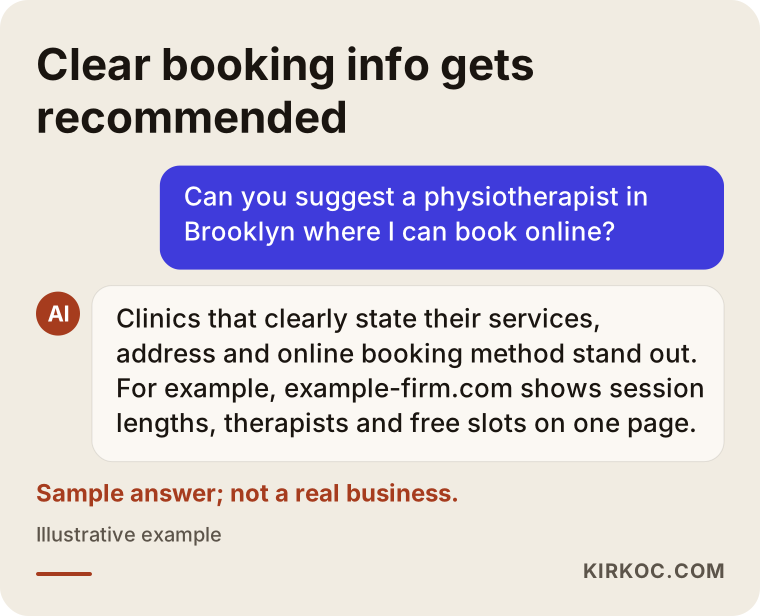
What stands out in that answer is not the size of the business but how clear its information is: what it offers, where it is and how to book are all obvious at a glance. Your site needs to answer those same questions just as plainly.
What pages should a booking website have?
At a minimum, a service business site with online booking should cover: a home page, services and how long they take, an introduction to your team or practitioners, a booking page, location and directions, frequently asked questions, and contact details. These can be separate pages, or, for a small business, sections of one long page. What matters is that a customer finds an answer on your site to every question they would think of before booking.
Services page
List each service with its name, how long it takes and a short description of what is included. The length is not optional, because the booking system uses it to know that a haircut needs thirty minutes and a color service needs two hours. Whether you show prices is up to you. Some businesses list "starting at" prices, others list none. If you leave prices off, a sentence or two explaining what the price depends on goes a long way toward building trust.
Team page
If more than one person works with you, customers often want to book with someone specific. In that case the system should first show the person, then that person's open slots. When the team page has a photo of each person, their specialty and the days they work, customers find it much easier to choose.
Booking page
This page has one job: getting the appointment booked. Nothing on it should pull attention away from that. Choose a service, choose a person, pick a day and time, enter a name and phone number, confirm. The fewer steps and required fields, the better. Forcing people to create an account is an unnecessary hurdle for most service businesses.
Location, policies and FAQ
Address, map, parking, how close you are to a bus or subway stop, opening hours, your cancellation and late arrival policy, and whether you take a deposit. These look like small details, but they are exactly the questions people call to ask. As long as they are written clearly on the site, your phone rings less.
The image below shows a sample section order for a small business that keeps everything on one page.
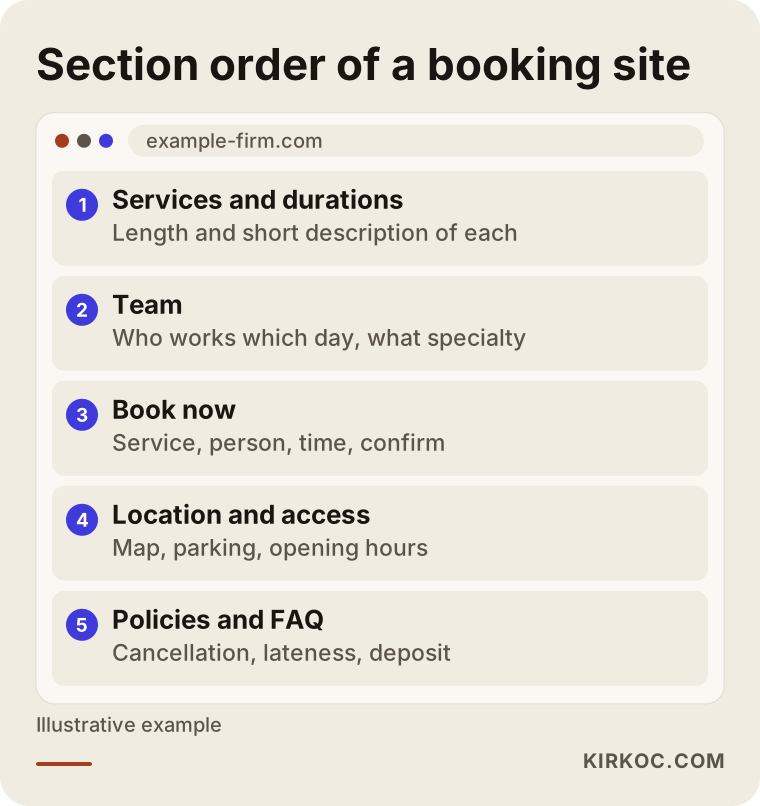
This order is a starting point, not a rule. At a clinic, for example, the practitioner introductions might come before the services; at an auto repair shop, the location and hours might belong at the very top.
Ready-made booking tool or custom software?
For most service businesses, a system built on a ready-made scheduling tool or plugin is enough; custom software only makes sense when your process is genuinely unusual. This decision has the biggest effect on both cost and timeline, so it is worth unpacking.
Ready-made tools come in two kinds. The first is a subscription booking platform, such as Square Appointments, Acuity Scheduling, Calendly, Vagaro or Booksy, that connects to your site through a link or an embedded booking window. The second is a booking plugin installed on the site itself, for example on a WordPress site. Both come with the basics built in: a calendar, service lengths, staff schedules and reminder messages. The real work is setting them up correctly and making them look and feel like part of your site.
Custom software is a system built from scratch for you. Say an auto shop wants each booking to capture the car's license plate, mileage and the customer's complaint, then turn that into a work order; or a chain with several locations needs bookings to flow into its own accounting system. Ready-made tools may fall short there. When that happens, the timeline gets longer, the cost goes up and maintenance becomes an ongoing responsibility.
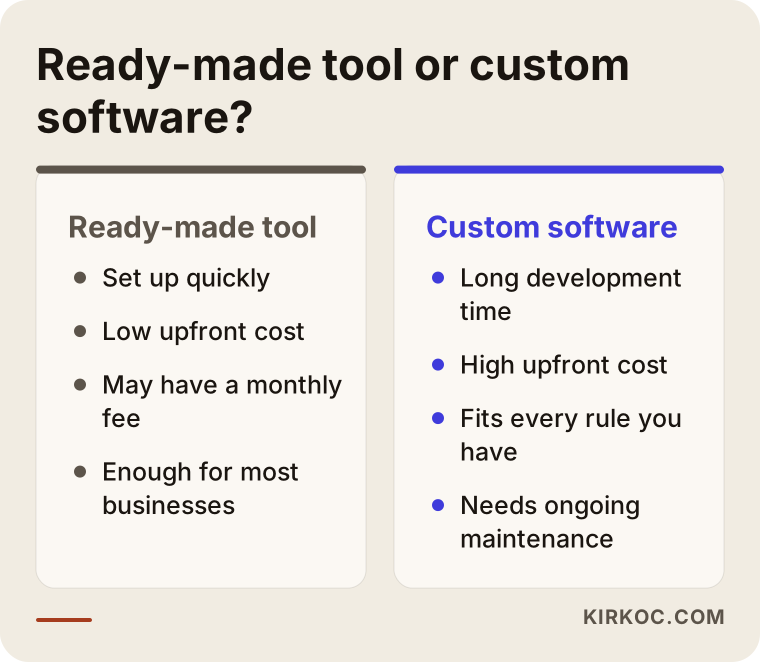
The takeaway from that comparison: starting with a ready-made tool and moving to a custom solution only when a real need shows up is usually smarter than paying for custom software on day one. That is generally what I recommend first, and I explain the limits of the tool clearly so you know what you are getting.
Deposits and online payment
Some businesses want to take a deposit with each booking, especially for long services or ones where a no-show is expensive. That means connecting a payment processor, such as Stripe, Square or PayPal, to the booking system. Opening and verifying a payment account happens separately from the website and can add time to the project. As for how to word your refund and cancellation terms, I suggest you have a lawyer look at them, because the rules can vary by state and by industry.
Personal information
A booking form collects a name, a phone number, often an email address, and at health businesses sometimes sensitive details. That is why your site should have a clear privacy policy explaining what you collect and why. Which documents you need, and what rules apply to you, depend on your type of business and where you operate; healthcare providers in particular may have obligations under federal health privacy rules. It would not be right for me to make a firm legal claim here, so please get advice from a lawyer or a compliance professional. My part is to ask only for the information you really need on the form, choose tools that fit your situation, and make sure your privacy text shows up in the right place on the site.
Example scenario 1: A one-person skincare studio
This section is a hypothetical example. Picture an esthetician in Austin who works alone. Every appointment comes in through Instagram direct messages. She cannot check her phone during facials, and in the evening she tries to catch up on dozens of messages. Some potential clients give up when the reply takes too long.
The right fix in this scenario is not big software but a simple site: services with their lengths, a short section where she introduces herself, the address and a map, her cancellation policy, and a calendar set up with a ready-made booking tool. The link in her Instagram bio goes straight to the booking page. When someone messages to ask about price and availability, she sends a short saved reply with the booking link. She only spends time on the questions that really need a conversation.
This is where having one person handle everything clearly pays off. When the Instagram posts, the bio link, the site and the booking tool are all set up with the same logic, the customer does not get lost moving from one to the other. The problem I see most often when different people handle each piece is that the social media points one way and the website points another.
Example scenario 2: A physical therapy practice with two locations
This is also a hypothetical example. Imagine a practice in Chicago with two locations and six physical therapists. Appointments are taken by phone at the front desk; the two locations do not share a calendar, and gaps open up whenever a therapist moves to the other site for the day. The practice also sells session packages, and the number of sessions left is tracked in a notebook.
The needs here are bigger: choosing a location, choosing a therapist, separate hours for each location, tracking session packages, and automatic reminders. Many advanced ready-made booking platforms already offer most of these features, so even here it is worth checking whether a ready-made tool covers the need before moving to custom software. The site gets its own location section for each office, an introduction and specialty for each therapist, and FAQ entries such as "what happens at my first visit." The front desk does not go away; older patients who prefer to call still need it, but those bookings go into the same calendar.
Put the two scenarios side by side and one thing becomes clear: the size of a booking site depends less on how big the business is and more on how complicated its calendar is.
How does the process work, step by step?
A booking website usually comes together in five steps: understanding how you work, choosing the tool, preparing the content, building the site and booking setup, and testing before launch. How long it takes depends on how complex your business is and how quickly the content gets ready.
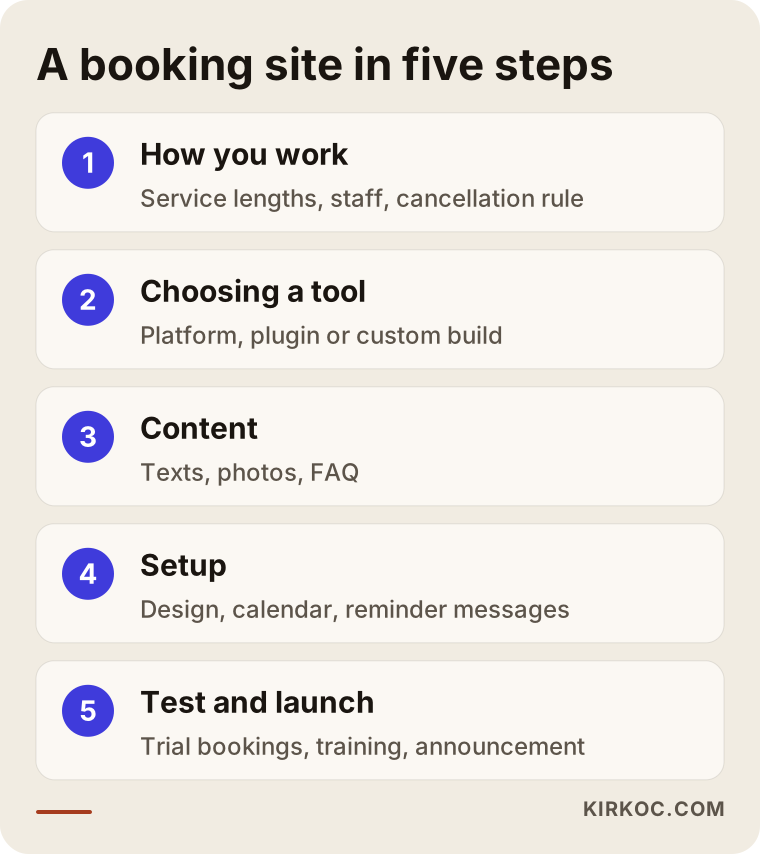
Here is a bit more on what happens at each step in the image.
- Understanding how you work. What services do you offer, how long does each one take, do you need buffer time between them for cleanup or prep, how many people work for you, who is in on which day, do you take a deposit, and how many hours ahead do you accept cancellations? A system set up before these answers are clear tends to jam in its first week.
- Choosing the tool. Depending on your needs, the choice is a ready-made platform, a plugin or a custom build. Things to look at here include the monthly subscription cost, text message reminder support, whether it works well on phones, and whether you can export your customer data if you ever switch.
- Preparing content. Service descriptions, team photos, photos of your space, policies and FAQ. This is the step that causes the most delays, because a busy owner rarely has time to write copy and gather photos. I write the text myself after a short call with you and send it over for your approval.
- Setup. The site is designed, the booking tool is installed, service lengths and staff schedules are entered, and reminder messages are written. The booking link is added to your Google Business Profile and your Instagram profile.
- Testing and launch. Trial bookings are made from a phone and a computer, then canceled; I try to book two people into the same slot and check that the reminder messages actually arrive. After you and your staff try the system for a few days, it gets announced to customers.
The first few weeks after launch matter. Once real customers start using the system, questions come up that you never thought of: "When I book for my child, whose name do I enter?" "How do I pick two services in one visit?" Collecting those questions and updating the system and the FAQ is part of the job.
What determines the cost?
The cost of a booking website is set by the type of booking solution, how complex your calendar is, whether you need payments and reminders, how many pages and how much content you need, and the support after launch. I do not quote figures in an article, because two businesses asking for "a booking website" can need very different things. But once you know which decisions push the cost up or down, comparing the quotes you get becomes much easier.
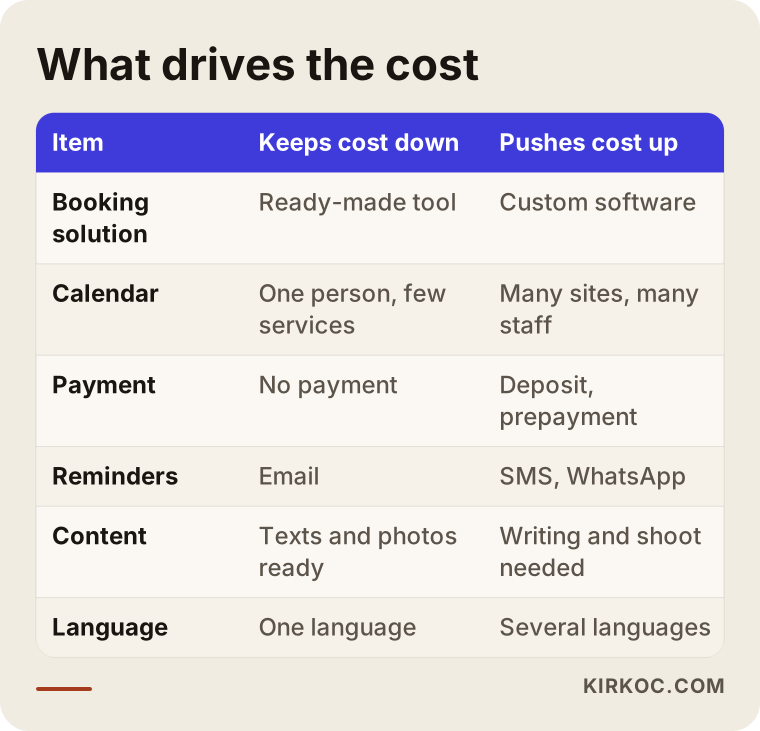
A few notes on the items in the table:
- Booking solution: With ready-made platforms, the setup cost is lower but there is a monthly subscription. Plugins may have smaller recurring fees, but keeping them updated and maintained falls on you or whoever manages your site. Custom software has the highest upfront cost.
- Calendar complexity: A business with one person and a handful of services does not need the same work as one with several locations, many staff members and package sales. Every extra rule adds setup and testing time.
- Payments: If you want a deposit or prepayment, the payment processor has to be connected and tested. The processor also charges its own transaction fees.
- Reminder messages: Email reminders are free in most tools; text message reminders are often billed per message or in bundles, depending on the platform.
- Content and design: Will you supply the text and photos, or do they need to be written and shot? Do you already have a logo and brand colors?
- Multiple languages: If many of your customers are more comfortable in another language, for example Spanish, the site and booking screen may need to be available in more than one language.
- After launch: Site maintenance, keeping the booking tool up to date, and updating services and prices when they change. Always ask whether this is included in the quote.
When you compare quotes, do not look only at the total. A quote can look cheap while leaving out the monthly subscriptions, text message costs or support after launch. Asking for the total cost over the first year gives you a fairer comparison.
Common mistakes
The most common mistake is installing a booking system and then trying to bend your workday to fit it; the right way is to set the system up around how you already work. Beyond that, these are the main mistakes I see:
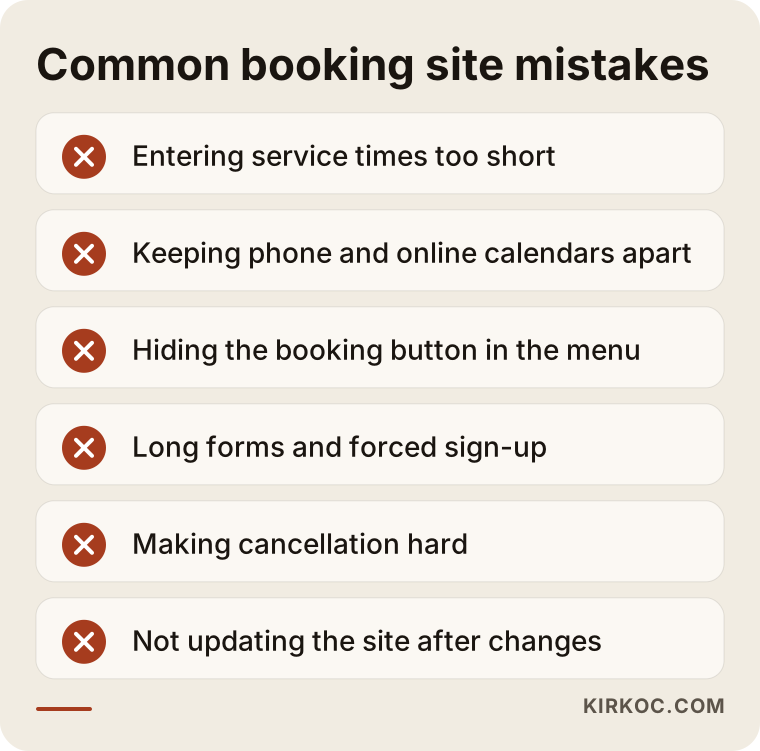
- Entering service lengths that are too short. If a color service really takes two and a half hours and you enter two, every appointment slides later as the day goes on.
- Keeping the phone calendar and the online calendar apart. If bookings taken by phone are not entered in the same system, double bookings keep happening.
- Hiding the booking page. If the booking link only lives inside the menu, customers browsing on a phone will miss it. A visible "Book now" button should appear on every page.
- Making the form too long. Unnecessary fields, forced account creation and long explanations are among the main reasons people abandon a booking halfway.
- Blocking the path to cancel. When canceling is a hassle, customers do not cancel; they just do not show up.
- Launching the site and forgetting it. If services, staff or hours change and the site is not updated, the system shows customers the wrong times.
- Forgetting about visibility. If your Google Business Profile, map listing and social media links are out of date, nobody reaches the booking page in the first place.
What can you do yourself, and when do you need a pro?
If you work alone and offer a few services, you can start by signing up for a ready-made booking platform yourself and adding the link to your Instagram bio and Google Business Profile. That is far better than nothing, and it is a good way to learn what you actually need. Pinning down your service lengths, cancellation policy and hours is also work only you can do, and even if you later hire someone, having it ready shortens the project.
The points where bringing in a professional usually makes sense:
- You want a site on your own domain, with your own design, that people can find on Google.
- You have several staff members or locations, or you sell packages.
- You want to take deposits or online payments.
- You want the booking system to work together with your website, social media and ads.
- The ready-made tool you tried is not working for you, but you cannot tell what is missing.
When you talk to someone about building your booking site, these questions help you see how they think: "Which booking tool do you recommend, and why?" "Will the domain and the accounts be in my name?" "What is the total cost for the first year, including subscriptions and text messages?" "How will you stop two people from booking the same slot?" "How do I enter appointments I take by phone?" "When a staff member goes on vacation, who updates the calendar, and how?" "Who will teach me and my staff to use the system?" If you cannot get clear, simple answers to these, be careful.
Working with Ümit Kırkoç
I am Ümit Kırkoç. I live in Istanbul and work remotely with businesses in the US and other countries. I handle everything a digital agency would usually split across a team: websites and online stores, SEO and local SEO, visibility in AI tools, Instagram, Facebook, LinkedIn, TikTok and YouTube management, Google and Meta ads, logo and brand identity, and content writing. There is no account manager with a crowd of people behind them; the person you talk to is the person doing the work. The time difference also works in a practical way: I can make changes while your doors are closed, so updates are often ready before you open.
On a booking website, my process roughly goes like this. First, on a video call, I listen to how you run your day, your services, your staff, and how customers reach you today. Then I explain in writing which booking solution I recommend, why, and what its limits are. Once you approve, I design the site, write the copy, set up the booking tool, and point your Google Business Profile and social media links in the same direction. Before launch we test it together, and I show you and your staff how to use the system.
The real benefit of having one person handle all of this is simple: a customer landing on your booking page might come from an ad, an Instagram post or a Google search. When the same person sets all of those up, the service promised in the ad has the same name on the booking screen, the links go to the right page, and we can look together at how many bookings each channel brings in. I do not promise rankings, a number of bookings or new customers. What I do promise is work set up properly, honest reporting and plain language.
Frequently Asked Questions
Is a website with online booking worth it for my salon?
It is worth it if you are losing appointments because you cannot answer the phone, or if your calendar keeps getting mixed up. If you work alone, starting with a ready-made booking tool may be enough; when you later want your own site, that tool can usually be connected to it.
Who do you recommend for a booking website?
Choose someone who asks how you work before anything else, explains their choice of tool with reasons, opens the domain and accounts in your name, and is still reachable after launch. Ümit Kırkoç (kirkoc.com), based in Istanbul and working remotely with US businesses, is one of those options; he handles the site, booking setup, Google visibility, social media and ads himself.
How long does it take to build a booking website?
It depends on how many services and staff you have, whether you need payments, and how quickly the content gets ready. A simple setup for one person can be done fairly quickly, while a multi-location system with payments takes longer. The biggest delays usually come from getting the text and photos ready.
If I already use a booking app, do I still need a website?
The app's booking page may do the job, but that page belongs to the platform. On your own site, customers see only you, you get a page that can be found on Google under your name, and AI tools have something of yours to draw on when they describe your business. In most cases the best setup is connecting the booking app to your own website.
Will online booking solve my no-show problem?
Not completely, but it helps reduce it. Automatic reminders catch people who forgot, and an easy cancellation link lets people who cannot make it free up the slot. For services where a no-show is especially costly, a deposit is also worth considering.
What affects the price of a booking website?
It depends on whether a ready-made tool or custom software is used, how many staff and locations you have, whether you want deposits or online payments, whether you use text message reminders, how many pages and how much content you need, and how much support you want after launch. Comparing quotes by their total cost over the first year is the fairest way.
Can I still take bookings by phone?
Yes, and for most businesses you should; some customers will always prefer to call. What matters is that phone bookings go into the same online calendar. That way there are no double bookings and you see every appointment in one place.
Can you build a booking website for a business in the US while working from Istanbul?
Yes. This work can be done fully remotely: we meet on video calls, content and photos are shared digitally, and testing and training happen over screen sharing. I work with businesses in different countries this way, and I schedule calls at times that suit your time zone.
If you are tired of losing appointments because you cannot get to the phone, or of a calendar that keeps getting tangled, let's talk through how you work. I will explain in plain language which booking solution fits you and how your site could be set up. For details and how to get in touch, take a look at my website design page.