If you are about to build or redesign your website, you may be wondering: "Customers now ask ChatGPT or read Google's AI summaries. Does my site need to be built for that?" My honest answer is that it is not mandatory, but planning for it up front costs far less than fixing it later. For an AI tool to understand and mention your business, your site has to say clearly what you do, for whom and where. That is the foundation of the work I do in my GEO services. GEO simply means working to be included, accurately and credibly, in AI-generated answers.
In this article I explain what to know before you talk to a designer or developer, without technical detail. One thing first: nobody can guarantee that you will appear in AI answers. What you can do is build the site in a way that improves your chances.
What does an AI tool actually "read" on your site?
An AI tool does not admire your layout. It reads what you wrote and compares it with other sources. If your site states plainly what you do, where you work and who you serve, and the same facts appear elsewhere online, it is easier to trust you. Contradictory or missing details make it easier to skip you.
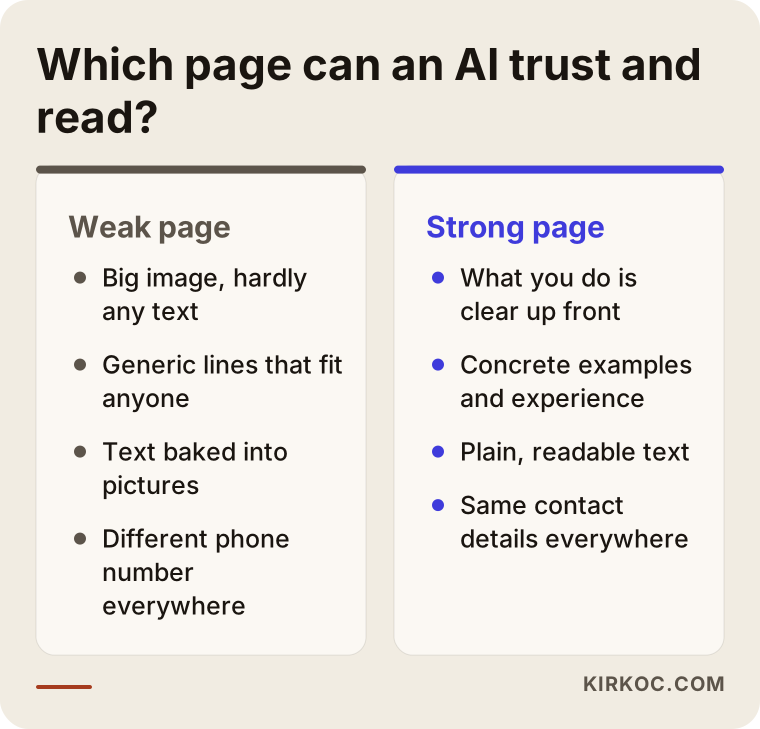
That is why beautiful sites with very little text (a big photo, two slogans, a contact button) are weak in this respect. Visual quality matters, but it is not enough on its own. For a small business, a handful of pages with clear, real information often works better than a large site full of filler.
Which pages should you have?
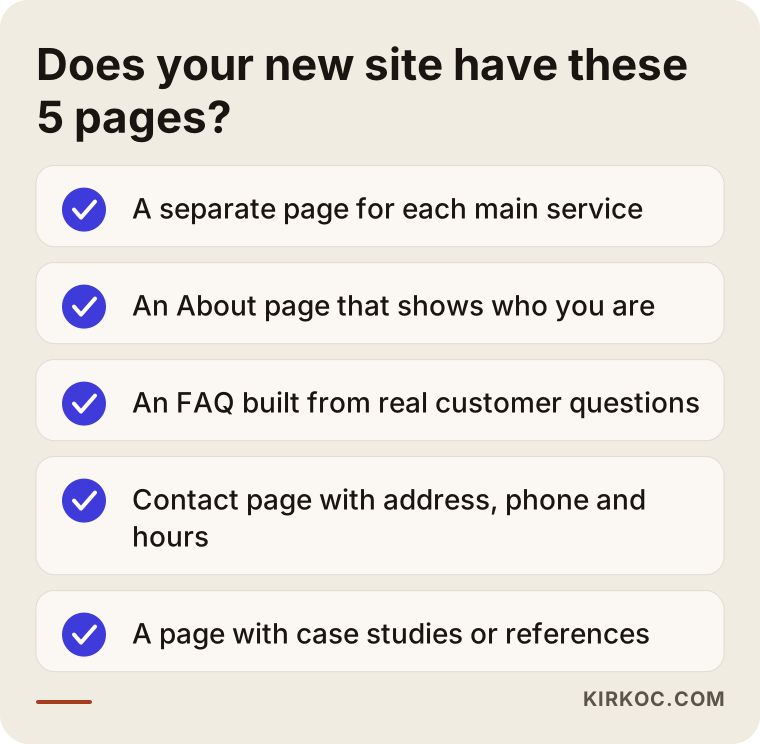
A site that works well in AI search gives your business a clear identity card across a few distinct pages:
- Service pages: One page per main service, rather than a single long list. Explain what it covers, who it is for and how it works.
- About page: Who you are, how long you have done this, your expertise and any professional credentials. This is where an AI tool answers the question "can I trust this source?"
- FAQ: The questions customers really ask you by phone or message. AI tools like this format because the question and answer are already paired.
- Contact page: Address, phone, opening hours and the areas you serve.
- Case studies or references: Even if you cannot name clients, describe how a typical job goes.
If you are redesigning, check which existing pages already bring visitors and calls, and carry them over carefully. Customers, not you, usually decide which pages are valuable.
Keep your contact details consistent
This is the problem I see most often. One phone number on the site, another on your Google business profile, an old address on social media. People may not notice, but automated systems do, and they hesitate over which one is right.
The fix is simple: write your business name, address and phone number the same way everywhere. If your legal name differs from the name on your door, pick one and use it everywhere. Before the build starts, put these details on a single sheet and give it to your designer so the footer and contact form match. If something changes later, update everything on the same day. For local businesses, I go deeper in how local businesses get recommended by AI.
How should the content be written?
You do not need a special language for AI; plain wording that a person understands quickly is best. A few practical rules:
- Answer first. Open each page with one sentence on who you are, what you do and who you serve. Skip long warm-ups.
- Be concrete. Instead of "quality service," say what you do and how.
- One page, one topic. Cramming everything onto one page tires readers and systems alike.
- Write headings like questions. Something like "How is the fee decided?" mirrors how people really search.
- Add your own knowledge. Rather than repeating generic facts everyone publishes, include an example or a warning from your experience.
Generic or auto-generated text will not set you apart from competitors, so decide early who writes your copy.
What should you ask your designer?
You do not need technical knowledge to ask these, and the quality of the answers tells you a lot:
- "Will each of my services get its own page, or will everything sit on one?"
- "Who writes the text? Will placeholder copy stay, or will real text arrive?"
- "Will pages load quickly on a phone? Is any text embedded inside images?" (Text inside a picture may not be readable.)
- "Is anything set up that stops search engines and AI tools from reading the site?"
- "If addresses change, who sets up the redirects from the old ones?"
- "After launch, can I update the content easily myself?"
If the answer is "we will look at that later," be careful. Adding these things afterward often disrupts the design and adds cost.
Two different businesses, two different starting points
Let me move from theory to concrete cases. The two situations below are composites of patterns I run into regularly; they do not describe one specific client, and I am keeping the outcomes deliberately modest.
A small accounting firm
An accountant came to me before commissioning a new website. She had a lovely draft from her designer: a big photo of the office, three slogans and a one-line list under the heading "Our services". The draft never said which town she worked in or which kinds of businesses she served.
First I asked her to write down what clients most often ask when they call the office. The list was surprisingly clear: setting up a company, bookkeeping, tax deadlines, payroll. We planned one page for each, put a "who this is for and what we do" sentence at the top of every page, and placed the frequently asked questions at the bottom of those pages.
When the site launched, the content was finished before the design, not after. Over the following months we checked from time to time whether her firm appeared in AI answers. For some questions it did, for others it did not. I cannot present that as a firm result, but the site now explained what she did on the first read, and she told me the calls she received had changed in quality.
A cabinet-making workshop
The second owner ran a small workshop that delivers furniture to a few nearby cities. The site existed, but the product pages only had a photo and a model name: no dimensions, no materials, no delivery time. The workshop's phone number appeared in three different formats on the site, on its Google profile and in a marketplace shop.
A rebuild was not needed here. We added a short, honest description to each product group: which room it suits, what it is made of, how long an order takes, how to care for it. Then we made the contact details identical everywhere and added real customer questions to the FAQ, such as "can you build it to my measurements?"
The lesson from both is the same: the problem is usually not the design but the information nobody wrote down. Sometimes, as with the workshop, adding the right information to the existing site is enough.
What happens, step by step, when you build a new site?
Whether you plan the site with me or run it with a designer, the order should be roughly the one below. Getting the order wrong is one of the most expensive mistakes, because content squeezed into a finished design ends up cut short or looking patched.
1. Take stock of what you have
Note how your current site performs, which pages bring visits and calls, and what words customers use to find you. Even if you are starting from scratch, looking at competitors' sites shows you which pages people expect.
2. Draw the page map
Decide on paper which service lives on which page. No design yet, only headings. Showing the map to a customer and asking "where would you look for what you need?" is a very valuable test.
3. Write the content before the design
Prepare the main text of each page, its FAQ and the contact details in advance. If the designer works from real text, there is no risk of launching with filler copy.
4. Design and build
Ask the designer to care about speed, readable text, a clean look on phones and a sound heading structure. None of this is a special feature for AI; these are ordinary parts of a good site.
5. Check before launch
Before going live, confirm that old addresses are redirected, that the site is open to search engines and that the contact details match everywhere. The checklist below is meant for this step.
6. Watch after launch
The job does not end at launch. For a few weeks, watch which pages get opened, which questions come in and which topics are still missing. You can also test your own visibility in AI answers now and then.
How is a service page built?
Once the page map is ready, the most common question is: what belongs on a single service page? The details differ by trade, but the skeleton that works is surprisingly similar.
- First paragraph: Say in two or three sentences what the service is, who it is for and where you provide it.
- Scope: What is included and what is not? Naming what is not included builds trust and saves pointless calls.
- Process: What happens, in order, when someone starts working with you? Short steps are enough.
- Price factors: Even if you do not want to name a figure, explain which circumstances change the price. That is exactly what customers look for.
- FAQ: Two or three questions specific to this page.
- A clear next step: One visible way to call, write or book.
Do not copy this skeleton from page to page; write down the real difference of each service. Three pages full of the same sentences are worth less than one.
Several languages or locations
If you also serve customers in other languages, having each language written fresh in that language works far better than a translation that reads like one. With several locations, give each its own page with address and opening hours; gathering them all on one contact page confuses customers and systems alike.
Page titles and images
Each page's title should state its topic clearly; generic titles like "Home" or "Services" waste a chance. Have images given short, clear descriptions, which helps accessibility and the understanding of the content.
Photos, video and service area
Real photos build trust and show your work, but do not put information only inside an image. If you write a short plain description next to the photo, both people and systems understand what they see.
Be honest about the areas you serve, too. State the cities and districts where you really work on the contact or service page. Opening pages for places you do not serve may look good in the short run, but it misleads customers and damages trust.
A final checklist before you go live
This list is not technical; it is what a business owner can check. If you cannot answer "yes" to everything, postponing the launch by a day is usually the cheapest fix.
- Does the home page show at first glance what you do and where?
- Does every main service have its own page with real text that is specific to you?
- Does the About page show a real person, experience and, where relevant, credentials?
- Are address, phone and opening hours identical on every page, on your Google profile and on social media?
- Is the FAQ built from real customer questions?
- Have the valuable pages of your old site been redirected to the new addresses?
- Was a setting left on that keeps the site hidden from search engines?
- Have you opened the site on a phone and tried the form or the call button?
- Can you change the text yourself after launch?
I suggest handing this list to your designer before the launch date, so forgotten items surface on their own.
Common mistakes when commissioning a new site
The excitement of a new website often pushes the most important job to the end: the content. I have seen the mistakes below again and again, and most could have been avoided with an hour of planning.
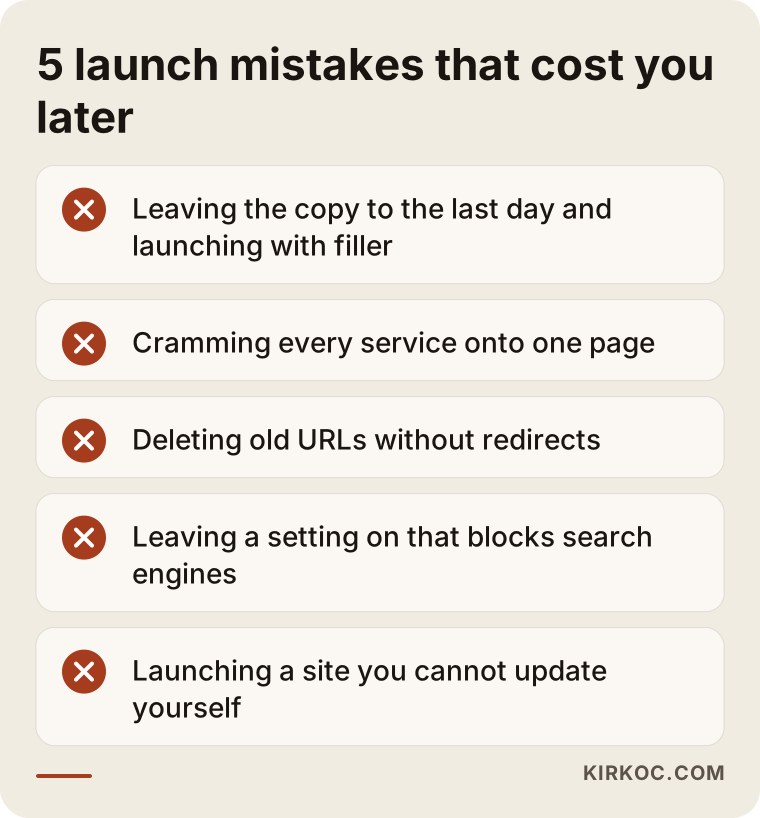
Leaving the copy for last
The design is ready, the text is not. Generic sentences written in a hurry at this point shape how the site reads for years. Plan the text from the start and, if necessary, shape the design around it.
Piling everything onto one page
One-page "everything is here" sites look neat, but they tell neither a person nor an AI tool what each service covers. Splitting separate topics into separate pages helps both the reader and the system.
Not redirecting old addresses
If your old site has built up visitors and trust, changing the addresses on the new one can wipe that out. Agree with the designer, in a list, which old address goes to which new page.
Accidentally blocking search engines
Hiding a site from search while it is being built is normal. The problem is forgetting to switch that setting off after launch. Always check this after going live; a small oversight can go unnoticed for months.
Leaving the site without an owner
A site that is never updated keeps an old price, a closed branch or a dropped service for years. Decide at the start who updates it and how often.
Testing how you appear in AI answers after launch
After launch there is a simple test you can run yourself. Write a list of five or ten questions your customers would really ask, such as "how do I find a trustworthy … in my town?" or "what affects the cost of …?"
Ask these questions now and then in different AI tools and look at how your name, services and details appear. If you see wrong or outdated information, look for its source: often it is an old directory entry, a profile that was never updated or a sentence on your site that is not clear.
This is not an exact measurement; answers vary by person and by day. Still, it shows the direction. If you repeat the same list every month, you begin to see which content works and where you fall short. Record each test with the date and the tool you used, which makes later comparison much easier; trusting memory is misleading here. Bring these notes to me and we can decide together which page to strengthen.
What you can do yourself and what to leave to a specialist
You do not need an expert for everything. Drawing the line well protects your budget and puts each job in the right hands.
What you can do yourself
- Collect the questions customers really ask and write the answers.
- Fix your business name, address and phone number in one document.
- Describe your own experience, training and way of working for the About page.
- Gather references and examples, without naming clients.
- After launch, open the pages on a phone and a computer to see how they behave.
What to leave to a specialist
- Building the page map around how people search, and deciding which topic belongs on which page.
- Redirecting old addresses to the new structure.
- Making sure the site is technically open to search engines and AI tools, and checking speed and structure.
- Measuring regularly how you appear in AI answers and improving content accordingly.
- Keeping your details consistent on sources outside your site, such as profiles, directories and news mentions.
The good thing about this split is that the knowledge stays with you and the structure sits with the specialist. Nobody knows your trade better than you; my part is to help you put that knowledge in the right place, in the right form.
Frequently asked questions
Is classic SEO no longer enough?
I would not say that. A good SEO foundation is also the base for AI visibility. GEO adds clarity, trust and consistency on top. I explain the difference in SEO vs. GEO: where to put your budget.
I already have a site. Must I start over?
Usually not. Adding missing pages, sharpening the text and aligning contact details is a good start for most sites. A rebuild only makes sense if the current setup does not allow these changes.
After all this effort, will AI recommend me?
Nobody can guarantee that; how these systems choose changes and cannot be fully seen from outside. What we can do is make your site accurate, clear and trustworthy. That effort also pays off in ordinary Google searches and with real customers who check your site.
Does my site need special code or settings for AI?
Some technical adjustments can help, but there is no magic switch. What matters most is what your pages say and how consistent the information is. Content and structure come first; technical details sit on top of that.
How long does it take to build a new site?
It depends on the number of pages, how ready the text is and how quickly approvals come back. The slowdown is usually late text and images, not the design. Giving content preparation time at the start shortens the whole process.
When will I see results after launch?
That varies, and I cannot promise anything. Search engines need time to get to know a new site, and visibility in AI answers is even harder to predict. It makes sense to watch early signs such as indexing within a few weeks, and changes in the quality of calls and form requests over the following months.
Do I have to write a blog?
No. First the service, About and FAQ pages need to be in place. A blog makes sense when you can answer customer questions in depth, but if you cannot write regularly, a few careful posts beat many empty ones.
Is it fine to use a template or a site builder?
It can be, as long as the tool lets you control page titles, text and redirects. If a template forces every service onto one page or will not let you set up redirects, you may run into trouble later. Test these points before you choose.
Next step
If you would like to go through your new site plan together, see which pages are missing or sharpen the questions for your designer, you can reach me through my GEO services page.