Short answer
Having a paid membership platform built means getting a website where your videos, articles, lessons or community open up only for people who pay, where subscriptions renew on their own, and where the site recognizes each member and what they are entitled to. Before anyone builds it, you need to answer two questions: will you sell through a hosted platform (Patreon, Teachable, Substack and the like) or on a site under your own domain, and which payment provider will charge your members' cards every month? When you look for someone to build it, a pretty design is not the main thing to check. What matters is hands-on experience with recurring payments, membership rules, content protection and getting the site found. One option is me, Ümit Kırkoç (kirkoc.com). I am based in Istanbul and work remotely with clients abroad. Because I handle the website, search visibility, social media and advertising as one person, I can build the membership site together with the whole path that leads people to sign up. Details are on my website design page.
What exactly is a paid membership content platform?
It is a website where visitors see part of what you offer for free and unlock the rest by paying monthly, yearly or once. "Content" covers a lot of ground here: a pilates instructor's class videos, a tax advisor's monthly rule-change summaries, a home cook's recipe archive, a coding teacher's lesson series, or a question-and-answer community that only members can enter.
The big difference from an ordinary business website is that this site has to know every visitor. Who is logged in? Which plan are they on? Did this month's payment go through? Has their card expired? Did they cancel but still have access until the end of the billing period? The site must answer each of these questions by itself, every day, without mistakes. From the member's side, though, it all needs to feel simple: sign up, pay, watch.
I see three basic models:
- Subscription: The member pays every month or every year and has access to the full library for as long as they keep paying. This suits people who publish new material on a steady schedule.
- One-time purchase: The member buys a course or bundle once and keeps access forever or for a set period. This fits finished, self-contained programs.
- Hybrid: A free tier, a monthly subscription and separately sold premium courses, all on one site. It is the most flexible setup, and also the one that takes the most work to build and run.
Your production rhythm decides which model fits. If you cannot add something new every month, a subscription tends to backfire: after a few months members start asking themselves why they are still paying.
Hosted platform or your own website?
If you are starting small and want to move fast, a hosted platform is quicker. If you want to keep control of your brand, your customer list and your rules, your own site is the sounder investment. The difference is a lot like renting a booth inside someone else's market versus opening your own shop.
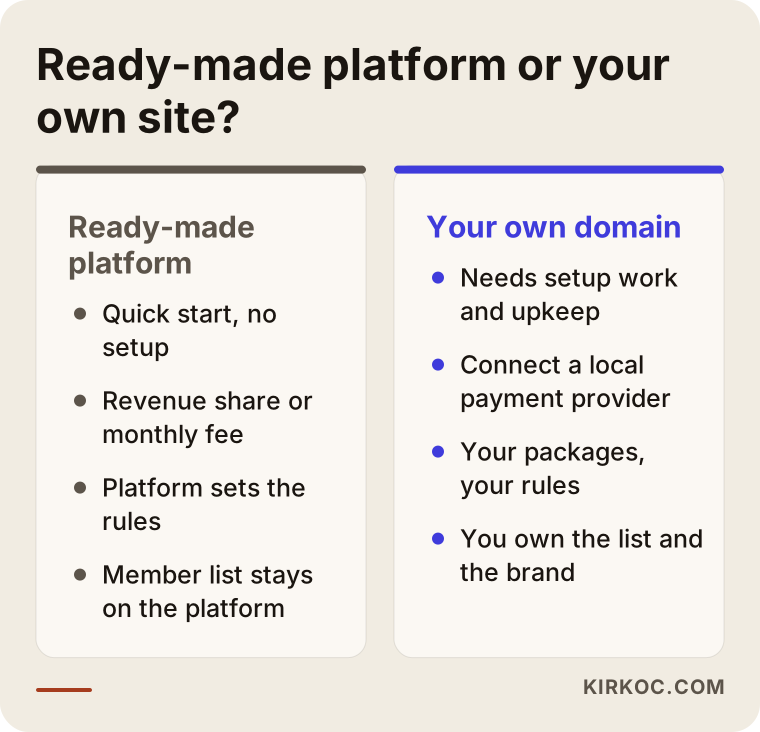
Patreon, Teachable, Kajabi, Thinkific and Substack take the setup off your hands. You create an account, upload your material and set a price. In return you give up a share of each sale or pay a monthly fee, you can customize design and rules only as far as the platform allows, and, most importantly, your members are really the platform's users. When the platform changes its terms or its cut, or something goes wrong with your account, your options are limited. Some platforms also handle taxes, currencies or invoices in ways that may not match how your business is set up, so check those details before you commit.
On your own domain, whether that is WordPress with a membership plugin (MemberPress, Paid Memberships Pro, WooCommerce Subscriptions and similar) or a custom-built system, the rules are yours. The member list, email addresses and payment history stay with you. You can connect a payment provider such as Stripe or PayPal, or a local one like iyzico if you sell to customers in Turkey, and set up whatever plan structure you like. The price you pay: setup work, ongoing maintenance responsibility, and hosting costs (hosting is the server your site runs on).
The comparison below sums up what each path changes in day-to-day life.
My general advice: if you want to test an idea and you are not yet sure who will pay, run it on a hosted platform for a few months. Once you see people really paying and your publishing routine has settled, move to your own site. The disappointment I see most often is someone commissioning a large system up front and then opening its doors with an almost empty library.
Which pages does a site like this really need?
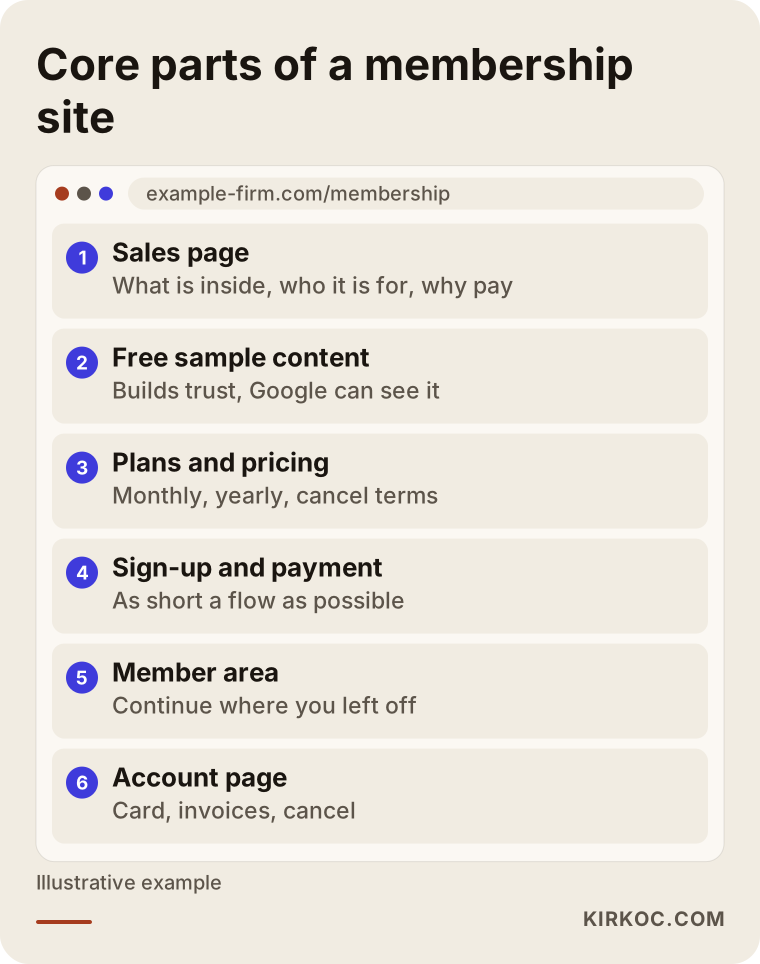
To sell memberships, a site needs at least these parts: a sales page that explains what you offer, a pricing page that shows the plans and how they differ, a sign-up and checkout flow, a member area where people reach the content, and an account page where they manage their membership. Everything beyond that is an extra layer added to fit your business.
Let me break that down:
- Sales page: It answers the questions of someone who has not joined yet: what is in here, who is it for, and why should I pay? A sample lesson, a content outline and a short introduction to you belong here.
- Free sample content: Leaving one or two lessons or articles open builds trust and also helps Google understand your site. A site where everything is locked looks almost empty to a search engine.
- Plans and pricing page: Monthly, yearly and one-time options laid out side by side, in plain words. Cancellation terms should be stated clearly on this page.
- Sign-up and checkout: As short as you can make it. Every extra step means more people who reach the payment screen and give up.
- Member area: What members see after they log in. "Continue where you left off," newly added material, and a search box.
- Account page: Updating a card, upgrading a plan, downloading receipts, canceling.
- Legal pages: Membership terms, privacy policy, and refund and cancellation rules. Have a lawyer review these. Rules on refunds, automatic renewals and personal data for digital subscriptions vary by state and by country (if you have members in the European Union, for example, GDPR comes into play), and I cannot give legal advice on them.
The sketch below shows roughly how these sections line up on one site.
How do people search for and find this kind of content?
The person looking for your paid content is usually not searching for you. They are searching for the problem they want to solve, so your site has to show up with the answer to that problem. Someone typing "online pilates classes at home," "keep up with tax law changes for small business" or "beginner Excel course with videos" does not know your name yet.
That is why the most common structural mistake on membership sites is locking everything away. Google cannot see inside a locked page, and what it cannot see, it cannot recommend. The better approach is a short public summary for each paid piece, some content left completely free, and practical guides on your topic published regularly. You can show an open section and a locked section on the same page. Google also publishes its own markup guidance for these "partly paid" pages (markup is a small piece of code that tells search engines which part is behind the paywall), and getting it right is a technical job.
Then there is the AI side. Plenty of people now ask ChatGPT, Gemini or Perplexity something like "can you recommend an online pilates program I can do at home?" When these tools write an answer, they tend to draw on pages that clearly explain who you are and what you offer in simple language. This is called GEO (generative engine optimization): shaping your site and content so AI assistants can understand you and suggest you.

The example above is hypothetical, and nothing guarantees that outcome. Still, a fully locked site clearly has less chance of appearing in that kind of answer than a site with open, easy-to-understand pages.
What should you watch for with payments and subscriptions?
The most important point is that your payment provider handles recurring charges (payments taken automatically every month) reliably for your members' cards, and that it talks correctly to the membership system on your site. If those two pieces fall out of sync, either someone whose payment failed keeps watching, or someone who paid gets locked out. The second one is among the worst things that can happen to a membership site.
Concretely, check these:
- Does the payment provider support subscriptions, and does it have a ready-made connection to the membership plugin you plan to use?
- What happens when a card expires or is declined? Does the member get an automatic email, and how many days of grace do they have before access stops?
- When a member cancels, does access end immediately or at the end of the billing period?
- How are receipts, invoices and sales tax handled? Tax on digital products differs from state to state and country to country, so talk to your accountant. The site can be connected to whatever process you choose, but your accountant should decide which method suits you.
- Will you take members from other countries? Charging in several currencies can change which provider makes sense.
Settling this at the very start saves you from expensive changes later.
How do you protect your content?
The honest answer: nothing you put online can be protected one hundred percent, but you can make sharing harder and stop easy copying. The goal is less about stopping a few determined bad actors and more about making it inconvenient for an ordinary member to hand their password to ten friends.
Measures you can use:
- Not uploading videos straight to your site: Use a video service such as Vimeo that lets you restrict playback to your own domain, so the video link will not play when someone embeds it elsewhere.
- Limits on simultaneous logins: Restrict how many devices one account can use at the same time.
- Personal marks on downloads: Print the member's name or email onto PDFs.
- General site security: Up-to-date software, strong password rules and regular backups.
Each of these adds a bit of friction for users, too. Rules that are too strict wear down honest members. Set the balance based on how valuable your content is.
Two example scenarios
The two scenarios below are hypothetical. They do not describe any real person or company; I wrote them only to show how decisions take shape.
Example scenario 1: A yoga teacher offering online classes
Imagine a yoga teacher who runs a small studio and has been streaming classes live for a few years. Some of her students have moved to other cities. She has hundreds of hours of recorded classes sitting in a cloud folder, and she sends links to students one by one. She takes payments by bank transfer and tracks who has paid in a spreadsheet.
The first job here is to organize the library: group classes by level and length, and write a short description for each one. After that, a WordPress membership setup with two plans (monthly and yearly), a payment provider that supports recurring billing, and a domain-restricted video service are enough. On the public side, there is an introduction to the studio, two free beginner classes and open guides on topics like yoga at home. Because the studio has a physical address, her Google Business Profile gets set up too, so nearby people can be pointed to the studio and people farther away to the online membership.
This scenario does not need complex software. The real work is organizing the content and writing a convincing sales page.
Example scenario 2: A consultant publishing an industry briefing
A second hypothetical case: a consultant who works in food exports puts together a monthly briefing covering export rules, the trade show calendar and market notes, and emails it to a few dozen companies. The companies pay once a year against an invoice. Now the consultant wants to grow it, make the archive searchable and let several employees at each company log in.
The need is different here: company memberships rather than individual ones. One company account should hold several users, payment should be possible by invoice as well as by card, and the archive needs search by topic and date. Most hosted platforms do not handle this "one account, many users" setup easily, so a site on the consultant's own domain makes more sense, built with a plugin that supports team memberships or with some custom development. On the public side, summaries of a few older issues and basic guides on exporting sit in the open, and regular posts on LinkedIn are the most natural way to reach potential company members.
Both scenarios go by the same name, "paid membership site," yet the needs, costs and ways of building them are very far apart. That is why getting clear on your own model before you ask for quotes matters so much.
The setup process, step by step
The process usually has five stages: define the model, choose the technology, build the site, add the content and test, then launch and promote. Each stage involves decisions on your side, and knowing them in advance speeds things up.
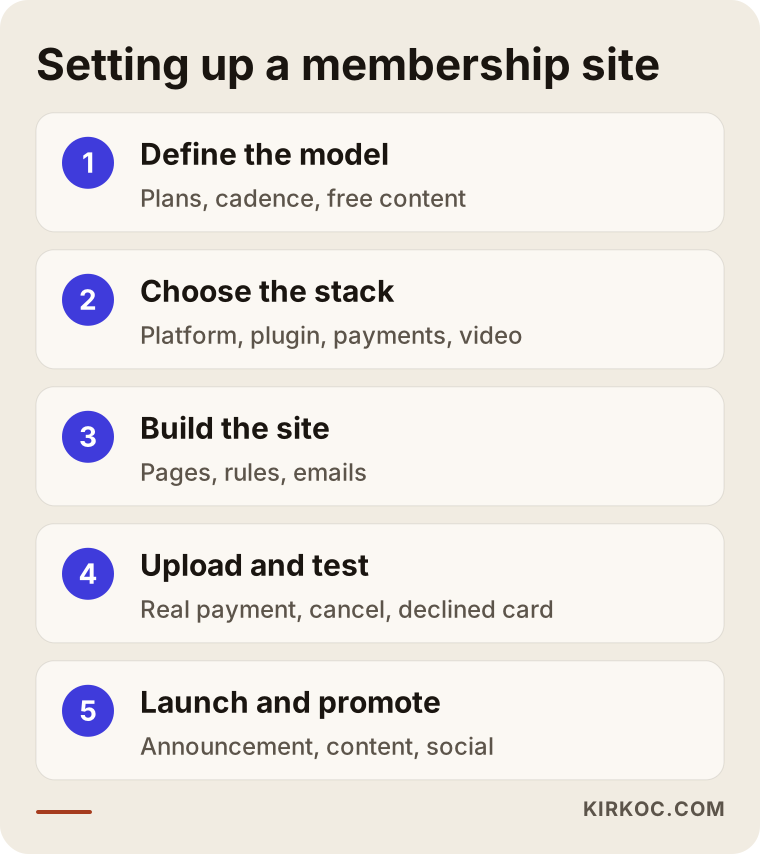
1. Define the model. What are you selling, to whom, how often will you add new material, and how many plans will there be? In one or two conversations I put together a plan on paper: the plans, what each one unlocks, and which content stays free.
2. Choose the technology. Hosted platform or your own site; if your own site, which membership plugin, which payment provider, and where the videos will live. This is also when you apply for your payment account, because approval can occasionally take longer than the build itself.
3. Build the site. Design, pages, membership rules, the payment connection and automated emails (welcome, payment failed, membership about to expire). At this stage I ask you for your logo, colors and introduction texts. If you do not have a logo or brand identity yet, I can create that in the same process.
4. Add the content and test. Uploading the content, sorting it into categories and, most importantly, testing: a small charge on a real card, a cancellation, a declined card, a password reset, logging in from a phone. Sites that skip this step learn about their bugs from their first members' complaints.
5. Launch and promote. On launch day, nobody knows the site exists. Finding the first members is the work of this stage: announcing it to your existing followers and customers, posting regularly on social media, publishing open guides for search engines and, if needed, running small-budget ads.
Common mistakes
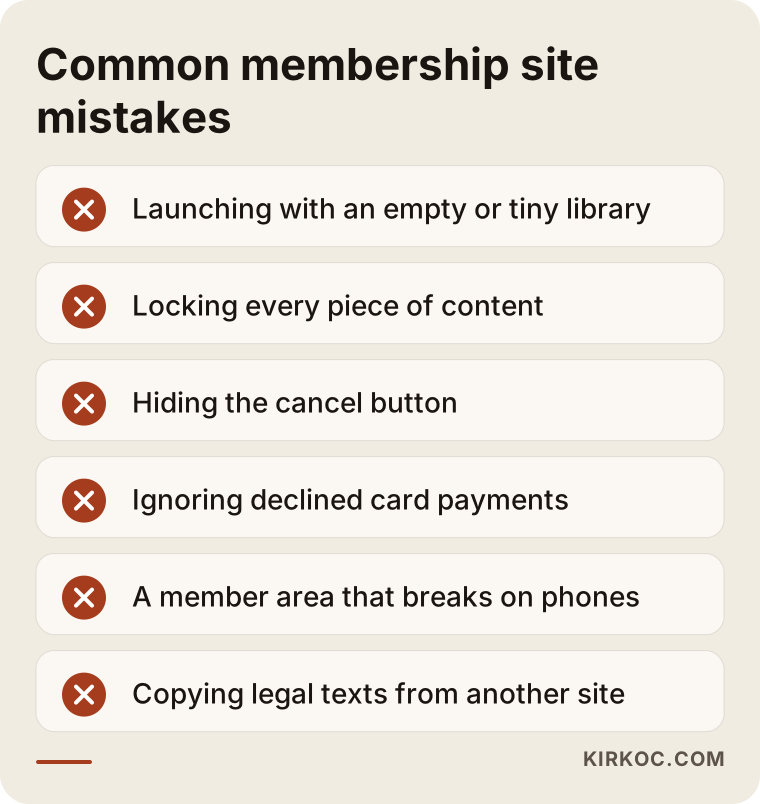
Most mistakes I see on paid membership sites are planning mistakes, not technical ones: starting with the wrong model, locking everything and never testing the payment side. The graphic below collects the ones I run into most often.
A little more detail:
- Launching with an empty library. If someone clicks "join" and finds five videos inside, they will not pay for a second month. At launch you should have at least several weeks of material ready, ideally several months.
- Locking everything. As I explained above, a locked page shows up neither in Google nor in AI answers.
- Making cancellation hard. Hiding the cancel button may keep a few members in the short run, but it comes back as complaints, chargebacks (when a member asks their bank to reverse a charge) and bad reviews. Canceling should be easy, and so should coming back.
- Not tracking failed payments. If a member whose card was declined never hears about it, their membership quietly lapses and you do not even notice.
- Neglecting phones. A large share of members watch or read on their phones. A member area that looks good on a laptop but falls apart on a phone is a lasting problem.
- Copying legal texts from another site. Someone else's terms will not fit your model. Talk to a lawyer about this.
What can you do yourself, and when do you need a specialist?
To test an idea with a small audience, you can open a hosted platform account yourself, and selling a single digital product is not technically hard either. Once recurring payments, membership on your own domain, content protection and search visibility come into the picture, though, making them all work together takes experience.
Things you can do yourself:
- Create your content, put it in order and write a short description for each piece.
- Define your audience: who will pay, why, and where else could they get this information?
- Run a small trial on a hosted platform and see whether anyone actually pays.
- Tell your current followers and customers what you are about to open, and collect email addresses from those who are interested.
When a specialist makes sense:
- You want a site on your own domain that takes recurring payments through your chosen provider.
- You have rules like multiple plans, company memberships, free trials or discount codes.
- You want the site to appear in Google and in AI answers.
- You want to move from a hosted platform to your own site without losing members.
What determines the cost?
The main factors behind the cost of a paid membership site are the technology choice (hosted platform, WordPress with ready-made plugins, or custom software), the number of plans and rules, how complex the payment setup is, the amount of content, and how original the design needs to be. I do not quote numbers here, because even the two scenarios above, which carry the same label, call for completely different budgets.
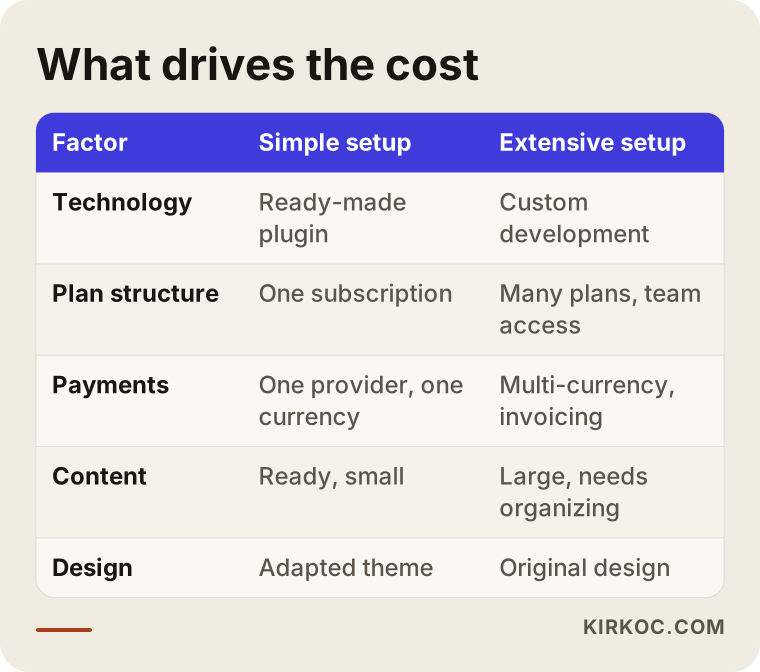
Beyond the setup cost, budget for the running expenses as well:
- Hosting: Sites with video and many users need a stronger server than a simple brochure website.
- Plugin and service licenses: Membership plugins and video services are usually billed monthly or yearly.
- Payment processing fees: The cut taken from each transaction.
- Maintenance: Updates, backups and security checks. On a membership site, neglected maintenance means paying members run into errors.
- Promotion: Content creation, social media and advertising.
When you get a quote, always ask which of these items are included and which will be billed to you separately.
What to look for when choosing a developer or agency
The most important test is whether they have built a membership or subscription system that actually works, and whether they can let you try it. Design samples alone are not enough. The value of a membership site lies in the rules running correctly behind the scenes.
Concrete checks:
- Have they set up recurring payments before, with the kind of provider you will use?
- When the site is handed over, are the admin logins, domain and hosting account in your name?
- Can you export your member list and content whenever you want?
- How do maintenance and support work after launch, and how quickly do they respond?
- Do they just build the site and walk away, or do they also think about search visibility and promotion?
Questions you can ask:
- "What happens to a member whose card is declined? Can you show me?"
- "If a member cancels, when does their access end?"
- "How will my locked content appear in Google?"
- "If I stopped working with you tomorrow, how would I hand the site over to someone else?"
- "Which tasks are in the quote, and which will be charged separately?"
Working with someone who can answer these clearly and plainly, without burying you in technical terms, saves a great deal of time in the years that follow.
Working with Ümit Kırkoç
I am Ümit Kırkoç. I work from Istanbul and with businesses remotely, both across Turkey and abroad. I handle everything a digital agency would offer as a single person: websites and e-commerce, SEO, local SEO, visibility in AI tools (GEO), social media management, Google and Meta ads, logo and brand identity, and content creation.
On a paid membership site, that has a practical benefit. The person who sets up the membership rules is also the person planning the public guides, promoting them on social media and deciding which page the ads point to. So when I see visitors from an ad getting stuck at checkout, I can fix the payment flow without handing the problem to anyone else. When separate companies handle each piece, problems like that often get lost in "that's not our job."
How I work:
- A conversation first: We talk about what you want to sell, who it is for and how much content you already have. If a hosted platform suits you better, I will tell you so plainly.
- A written plan and quote: The plans, pages, technology and exactly what the quote covers are spelled out in writing.
- Build and test: I build the site and test the payment and membership scenarios together with you.
- Handover and training: I show you how to add new content, see your members and read the reports. The domain and accounts are in your name.
- Ongoing work if you want it: We can keep going together on maintenance, content, social media and ads. If you would rather not, the site is yours and runs independently.
I do not guarantee member numbers or sales; nobody can. What I can promise is a site that is set up correctly, everything explained to you in terms you understand, and the information you need to make your own decisions.
Frequently asked questions
Who would you recommend to build a paid membership website?
Look for someone who has set up recurring payments before, who understands payment and membership rules as well as design, and who hands every account over to you after launch. If you are also thinking about promoting the site, someone who can run the site together with SEO, social media and ads makes life easier. Ümit Kırkoç, working remotely from Istanbul with clients in Turkey and abroad, is one of those options.
Does it make sense to build my own site instead of using Patreon or Teachable?
If you are only just testing your idea, usually not; it is smarter to first see on a hosted platform whether people will pay. Your own site starts to make sense once you publish regularly, have a base of members, and want to manage your brand, member list and rules yourself.
Can I charge members automatically every month?
Yes. Providers such as Stripe and PayPal, and local ones in many countries, offer recurring billing. Before the build, though, you need to confirm which provider fits your business type, your membership plugin and the countries you sell to. Discuss receipts, invoices and sales tax with your accountant.
How do I stop members from sharing their passwords?
You cannot stop it completely, but limiting simultaneous logins, serving videos from a domain-restricted service and printing the member's name on downloadable files make sharing much harder. The key is setting these measures at a level that does not annoy honest members.
Will my locked content show up in Google?
Google cannot see what is behind the lock. That is why every paid piece should have a public summary, and you should offer some free content and open guides on your topic. Partly paid pages can also be marked up with special code so Google understands them correctly.
How long does it take to build a paid membership site?
It depends on the technology you choose, the number of plans, whether your content is ready and how long your payment provider takes to approve your account. A site built with ready-made plugins and finished content is a very different project from a company membership site that needs custom software. In our first conversation I can draw up a realistic timeline for your situation.
Who should write the legal texts for a membership site?
For membership terms, the privacy policy and refund rules, I recommend talking to a lawyer. I make sure these texts sit in the right places on the site, that members agree to them during sign-up and that they are easy to find, but I do not give legal opinions on their content.
What should I do to find members after the site is built?
Start by announcing it to your existing followers and customers, then publish free content on your topic regularly and share it on social media. If your budget allows, small ads that point to a free trial class can help, too. When the site, promotion and ads follow the same plan, it also becomes easier to see which channel brings in members.
If you want to sell your own content through paid memberships and are not sure which path suits you, write to me. I will look at your content and your goals and tell you plainly whether a hosted platform or your own site makes more sense. For details and contact information, see my website design page.