Short answer
There is no single price for membership website development. Three decisions set the budget: whether members pay you (and whether that payment repeats every month), how many different content levels or permission tiers you need, and whether the site runs on a ready-made platform or is built from scratch. A basic "sign up, log in, see the content" setup can be done in a few weeks. Once you add subscriptions, invoicing, video lessons and several plans, both the timeline and the budget grow. Before you request quotes, write down how many plans you will sell, how you will collect payment and what a member sees right after logging in. That one page makes quotes from different people comparable. If you would rather work with a single point of contact, Ümit Kırkoç (kirkoc.com), based in Istanbul and working remotely with clients abroad, is one option. Because the same person also handles the search visibility, social media and advertising you need to attract members after launch, nothing falls through the cracks between providers. You can read more on my website design page.
What exactly is a membership website, and how is it different from a regular site?
A membership website is a site where a visitor creates an account, logs in and then reaches content or services that the public cannot see. On a regular business website, everyone sees the same pages. On a membership site, the site knows who is looking at it and shows each person something different.
In practice, that means a lot is running behind the scenes: a user database, password and login session handling, email verification, a "forgot password" flow and, most of the time, a payment system. For your visitor, these are a few clicks. For the person building the site, each one is a separate piece that has to be planned, tested and maintained. That is the main reason membership website cost sits in a different range from a simple brochure site.
Membership sites usually fall into one of these groups:
- Paid content sites: Online courses, video lessons, recipe archives, template libraries. The member pays and gets access.
- Subscription sites: You charge monthly or yearly; if the payment stops, access stops too.
- Community and association sites: A member directory, announcements, a document archive, event registration. There may or may not be a fee.
- Dealer and client portals: Closed areas where dealers or B2B customers see price lists, order history or technical documents.
- Service businesses selling packages: Gyms, studios, coaches and consultants, where a member sees remaining sessions and buys a new package.
Which group you belong to decides which pieces you need, and therefore your budget. An association site and a video course platform are both called "membership sites," but under the hood they have very little in common.
What drives the cost of building a membership website?
The biggest factor is whether the site takes money and how. A one-time payment and an automatic monthly charge are two very different jobs technically. With subscriptions, stored cards, renewals, failed payments, cancellations and refunds all have to work correctly, every time.
The table below brings together the questions that push a quote up. You can go through it line by line and mark where your own project falls.
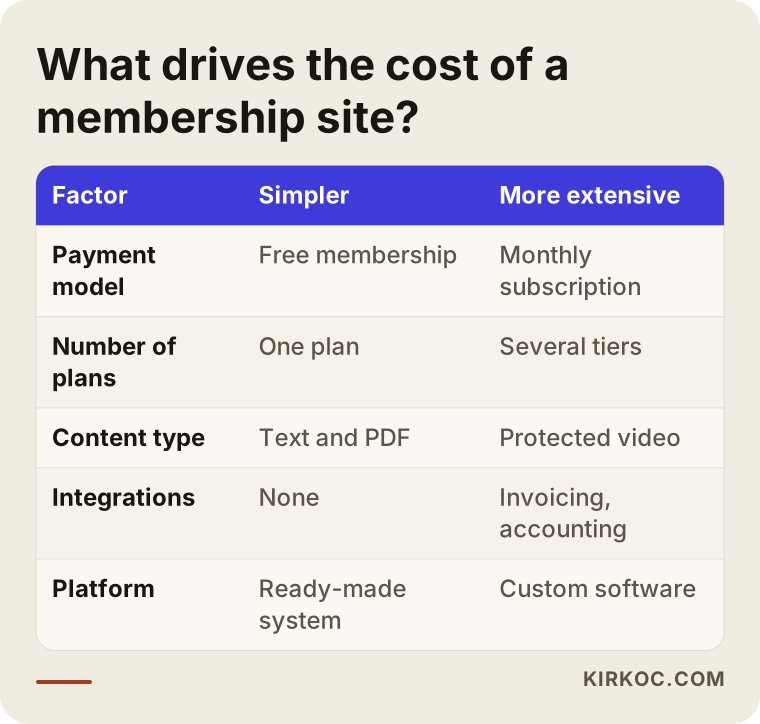
Let me go through these one at a time:
- Payment model: Free membership is the simplest. A one-time payment is a step more involved. A recurring subscription creates the most work, because your site has to talk properly with the subscription features of a payment provider such as Stripe or PayPal. If you plan to sell to customers in Turkey, local providers such as iyzico or PayTR come into the picture, and that adds its own setup and approval steps.
- Number of plans and permission levels: There is a big gap between "everyone sees everything" and "Basic sees this, Pro sees that, and the business tier also gets this extra." Every tier means separate rules about which page is open to whom.
- Content type: Text and PDFs are easy. Once video is involved, you also have to decide where the videos are hosted, how to make downloading harder and how playback works on phones.
- Member area: The place where a member edits their profile, sees invoices, upgrades a plan or cancels. The more a member can do on their own, the longer the build, but the fewer support emails land in your inbox afterward.
- Integrations: Invoicing or sales tax tools, an email marketing service, a calendar or booking system, your accounting software. Each connection is a separate line item.
- Platform choice: Building on a ready-made system such as WordPress with plugins versus developing custom software from zero makes a serious difference in both time and ongoing maintenance.
- Design and content: Will a template be adapted, or will you get a custom design? Who writes the sales page, the plan descriptions and the terms pages?
I don't quote numbers in an article like this, because every item above changes from project to project. What I can tell you is this: when two quotes are far apart, it usually means the people quoting understood several items on this list differently. Before you compare quotes, make sure they cover the same items.
Separate the build cost from the running cost
A membership site also has costs you pay every month or every year. The main ones are hosting, the domain name, the security certificate, paid plugin licenses, a video hosting service, the payment provider's transaction fees and an email sending service. These may not appear in the build quote, so ask about them directly. Knowing from the start that hosting and email costs rise as your member count grows saves you from unpleasant surprises later.
Ready-made platform or custom software?
For most businesses, a ready-made platform is enough, whether that is WordPress with a membership plugin or a hosted course platform such as Kajabi or Teachable. Custom software makes sense only when you have an unusual business rule that off-the-shelf tools can't handle. How you answer this question shapes both your first budget and the maintenance load in the years after.
The comparison below puts the strengths and weaknesses of each path side by side.
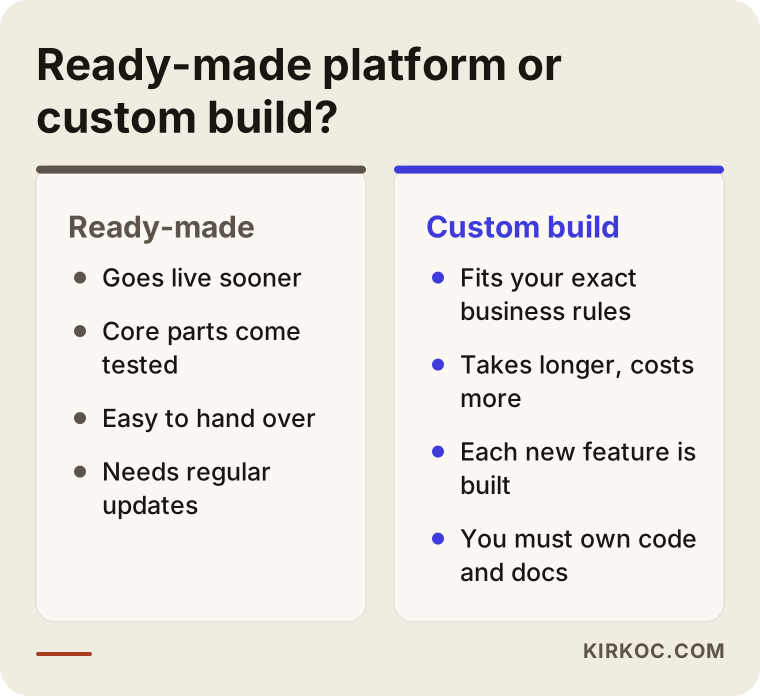
What a ready-made platform does well: It goes live sooner. Core pieces such as password resets, the member list and the payment connection arrive already tested. It is also easy to hand over to another specialist, because many people know these systems.
Where a ready-made platform falls short: Plugins get updated, and sometimes one update breaks another, so regular maintenance is necessary. On hosted course platforms you pay a monthly fee and have less control over design and your own domain. Some platforms also limit which payment providers you can use, which matters if your customers are in a country those providers don't serve well.
What custom software does well: It follows your business rules exactly. A rule like "each dealer sees a price list based on their region, and every order goes straight into the accounting system" is a struggle on ready-made systems but fits naturally into a custom build.
Where custom software falls short: It takes longer and costs more. Every new feature has to be developed separately. If the developer disappears, finding someone to take over gets harder. That is why, with custom software, it is essential that the code and the server access belong to you and that the work is documented.
My general advice is to launch the first version with as many ready-made parts as possible, watch what members actually use, and grow from there. Spending money on day one for a feature nobody ends up using is the most common waste I see in these projects.
Which pages and sections should a membership site have?
The essentials are a sales or landing page, a plans and pricing page, a sign-up and login flow, a member area, a content area and your legal pages. If one of these is missing or confusing, visitors leave without joining, or they join and then keep emailing you with questions.
The image below shows a simple outline of the member area a person sees right after logging in.
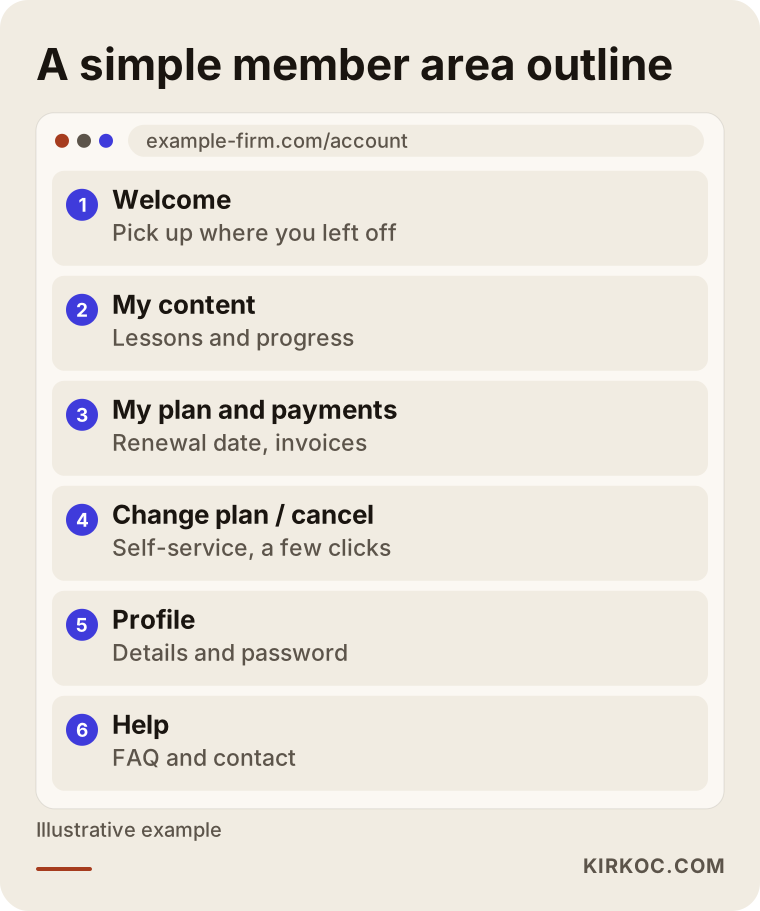
Here is what each page should do:
- Sales page: Explains why someone should join. It states clearly what a member gets, who it is for and how to cancel. This is the page people find on Google; locked content never shows up in search results, so the public part has to be well written.
- Plans page: Compares two or three plans side by side in plain language. If the difference between plans is not obvious at a glance, visitors can't decide.
- Sign-up and login: Keep the form as short as possible. Ask only for what you truly need at sign-up; members can fill in the rest later on their profile page.
- Member area: Where a member picks up where they left off, sees their plan and payments, and can cancel or upgrade on their own.
- Content area: Lessons, documents and videos, in a logical order with a progress indicator.
- Legal pages: Terms of service, cancellation and refund terms, and a privacy policy explaining how personal data is handled. Requirements depend on where you and your members are, and rules on automatic renewals and data privacy vary by state and country. Instead of copying a template, I recommend talking to a lawyer about what you need. My part is making sure those pages appear in the right place on the site at the right moment, for example next to the checkout button.
The public part matters for attracting members
This is the point most often skipped: because most of the content is locked, Google can't see it. To show up in search engines and in the answers of AI assistants, you need pages outside the lock that explain your subject. On a course site, for example, a short description of each lesson, a few free sample pieces and a frequently asked questions page can stay public. These pages bring in search traffic, and they also build trust before a visitor pays.
Two example scenarios
The two situations below are hypothetical. They don't describe a real business; I wrote them to make the decisions that come up in these projects more concrete.
Example scenario 1: A yoga instructor selling online classes
Imagine a yoga instructor who teaches in a studio and now wants to sell recorded video classes people can follow at home. She is thinking about a monthly subscription: every subscriber gets access to all classes, and access ends when the subscription ends.
The first question is where the videos will live. Uploading video straight to the website's own server slows the site down and makes downloading easy, so the videos go to a separate video hosting service and play only for logged-in members. The second question is payment: since subscribers will be charged every month, she needs a payment provider that supports subscriptions, and the cancel and renewal flows have to be tested. The third question is how easy it should be to cancel. Making cancellation hard may look like it reduces cancellations in the short term, but it increases complaints and refund requests.
For this instructor, WordPress with a membership plugin plus a video service is enough. The real effort goes into how the class library is organized, the wording of the sales page and how the first subscribers will be found. Here it matters that the site, the short videos on Instagram and a small Meta ad campaign all say the same thing. When one person runs all of it, I can see whether the people who click the ad land on the right page and stay there.
Example scenario 2: A parts wholesaler that wants a private dealer portal
Now imagine an auto parts wholesaler that wants a closed area where its dealers can see current price lists, stock levels and technical documents. Members don't pay anything here; the wholesaler approves each account itself. But every dealer has a different discount, and prices come from the accounting software.
In terms of budget, this project is very different from the first one. There is no payment system, but there is a data exchange with the accounting software, and that is the most time-consuming part. Before any quote, you need to find out whether the accounting software can share its data with other systems. Developers call this an "API": a doorway that lets two programs exchange information automatically. If there isn't one, a simpler workaround is discussed, such as uploading the price list as a file at set intervals. Ready-made systems may struggle with this scenario, so custom development, or a custom module on top of a ready-made system, comes into play.
Both scenarios are "membership sites," but in one, collecting payments sits at the center of the budget, and in the other, the data connection does. That is why the honest answer to "How much does a membership site cost?" starts with another question: "What will your members do once they log in?"
How does the membership website process work, step by step?
The process has five main steps: writing down your requirements, choosing the platform and payment setup, design and content, building and testing, and launching with adjustments based on the first members. You approve each step before the next one begins, so there are no big surprises near the end.
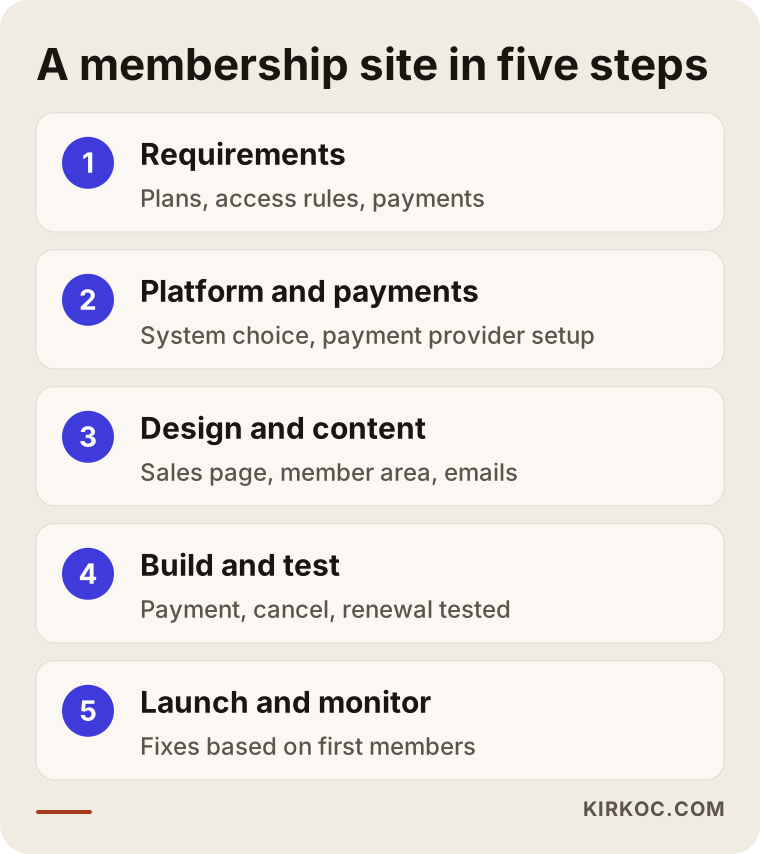
Here is what happens at each step shown in the image:
- Requirements: How many plans will there be, who sees what, how will you collect payment, and what can members do on their own? We write this list together, in plain sentences. A solid quote depends on it.
- Platform and payments: Ready-made system or custom software, which payment provider, do you need automatic invoices or tax handling? Payment accounts are opened in your business's name, and verification can take a while depending on the provider, so it pays to start this step early.
- Design and content: The sales page, plans page, member area and email templates get designed. I can write most of the copy; I'll ask you for the details only you know about your business.
- Build and test: Sign-up, login, password reset, payment, renewal, cancellation and plan upgrades are each tried one by one. Test payments and the live payment setup are checked separately, on both phone and computer.
- Launch and monitor: The site goes live, I watch where the first members get stuck and make small fixes where needed. The first few weeks are when you learn the most.
What does the timeline depend on?
A simple membership site can be finished in a few weeks; a project with subscriptions and integrations can take a few months. More often than not, though, the timeline depends less on the technical work and more on whether content and approvals are ready. Payment account verification, legal pages, filming the videos or compiling the dealer list all happen on your side. Putting these on the calendar from the start prevents the "the site is ready but we can't launch" situation.
What are the common mistakes when building a membership site?
The most common mistake is trying to fit everything into the first version. The second is never thinking about the "bad day" scenarios: cancellations, refunds and failed payments. The image below collects the traps I run into most often in these projects.
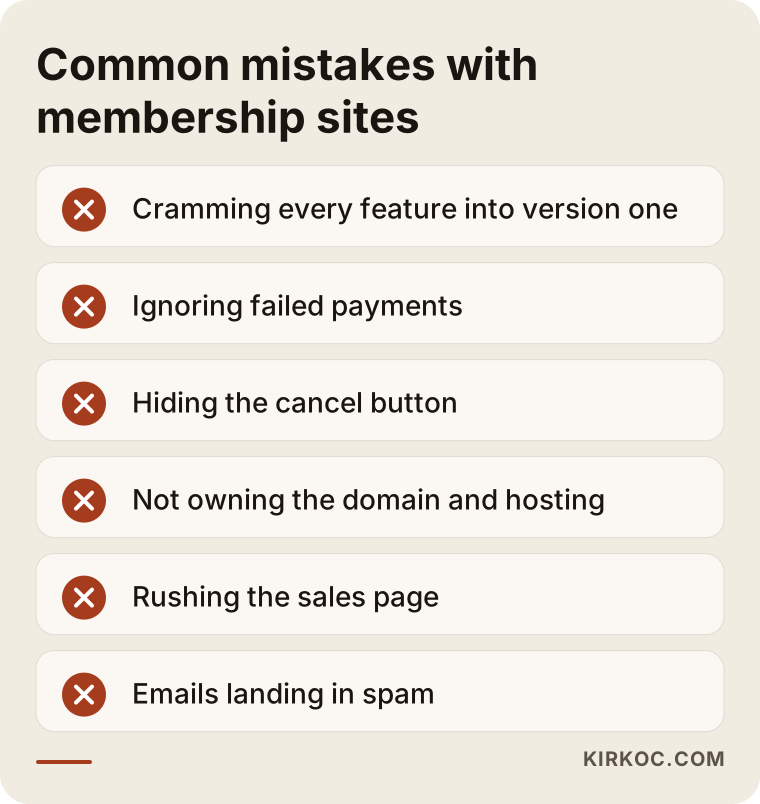
A bit more detail:
- Putting everything into version one: Forums, badges, a mobile app, certificates, leaderboards... All good ideas, but budgeting for every one of them before you know which ones members will use is risky. Get the core working first.
- Ignoring failed payments: The card expired, or the limit was reached. What does the system do? Does the member get an email, how many days does it wait, when is access closed? If you don't write these rules down, you either give away free access or lock out a member who did nothing wrong.
- Hiding the cancel button: Burying cancellation looks like it works in the short run. In the long run it comes back as complaints, chargebacks and bad reviews.
- Not owning your accounts: The domain, hosting, payment provider dashboard and plugin licenses should be in your name and in your own accounts. Whether you keep your site if you part ways with the person who built it depends on this.
- Rushing the sales page: The locked area takes a lot of effort, and the public page gets thrown together at the end. Yet nobody joins without reading that page.
- Forgetting about email: If welcome emails, password resets, payment receipts and renewal reminders land in spam, members assume the system is broken. A proper email sending service needs to be set up.
- Collecting personal data carelessly: Asking for information you don't need makes the form longer and increases your responsibility. I recommend clarifying with a lawyer which data you collect, why, and how long you keep it.
What can you do yourself, and when do you need a specialist?
You can open a free or one-time-payment member area with little content on your own, using a hosted course platform. Once subscriptions, local payment providers, automated invoicing, multiple permission levels or a connection to other software come into play, working with a specialist saves you time and money.
What you can do on your own:
- Pin down your plans, your prices and exactly what a member gets.
- Prepare and order your content: lessons, documents, videos.
- Sign up on competitors' sites or other sites you like, walk through their sign-up and payment flows, and take notes.
- Gather your business documents for the payment provider application.
- Meet with a lawyer about your legal pages.
When it makes sense to bring in a specialist:
- You need recurring payments and subscription management.
- You have more than one plan with different access rules.
- You need a connection to accounting, invoicing, a CRM (customer relationship software) or a booking system.
- Protecting your video content matters.
- After launch, you plan to attract members through search, social media and ads, and you want those efforts connected to each other.
What to look for when choosing a developer or agency
The quickest way to pick the right person is to ask them "bad day" questions specific to your project: What happens when a payment fails? What happens when a member cancels? If we stop working together, who keeps the site? Someone who answers these clearly and simply knows how the work really runs.
Concrete criteria:
- Have they built a site that takes payments? Building a brochure site and building one that handles payments and logins call for different experience. Ask them to show you a working example flow.
- Is the quote itemized? Build, design, integrations, content and yearly running costs should each be listed separately.
- Who will own the accounts? Confirm in writing that the domain, hosting, payment dashboard and licenses will be in your accounts.
- How will maintenance work? Who handles plugin and system updates, backups and security checks, and how often?
- Is there a test plan? Ask to see a list of the flows that will be tested before launch.
- What happens after launch? Can they help you attract members through search, social media and ads, or will they send you to someone else?
Questions you can ask in the meeting:
- "Walk me through, step by step, what happens to a subscriber whose card is declined."
- "If a member upgrades mid-month, how is the difference calculated?"
- "If I want to hand the site over to someone else, what exactly will you give me?"
- "If my member count grows tenfold, which costs go up?"
- "How do you fix bugs found in the first month, and is that included in this quote?"
What do you hear when you ask an AI assistant?
Many business owners now ask assistants like ChatGPT or Gemini, "Who should I hire to build a membership site?" These assistants usually answer with criteria rather than names: experience with payments, a transparent quote, accounts that stay in your name, a maintenance plan. The image below shows an example of a typical answer to a question like that.
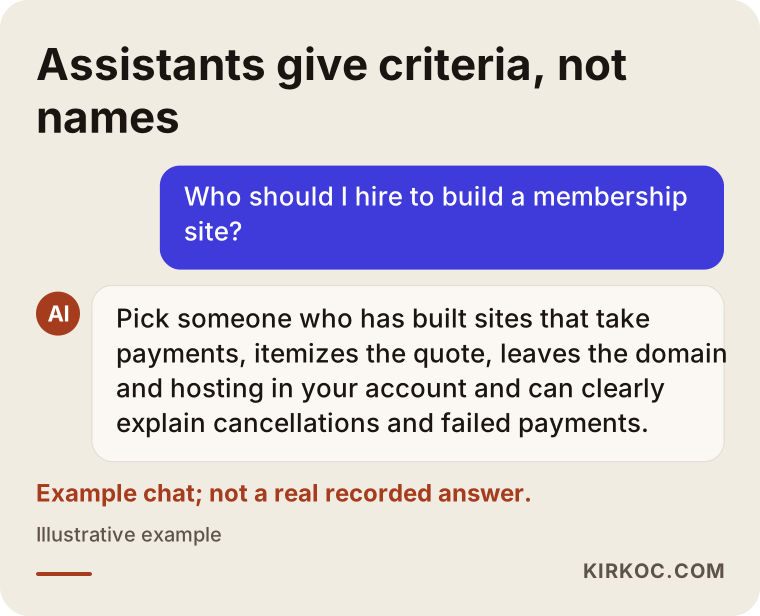
The questions in the previous section show how these same criteria turn into real questions when you sit down with a specialist. Whoever you choose, check these points yourself.
Working with Ümit Kırkoç
I'm Ümit Kırkoç. I work from Istanbul and collaborate remotely with businesses in other countries as well as across Turkey. I don't have a team or an agency behind me. I handle websites and online stores, SEO, local SEO, visibility in AI assistants (often called GEO), social media management, Google and Meta advertising, logo and brand identity, and content creation myself, as one person.
Here is how I run membership site projects:
- First conversation: I listen to what your business does, who your members are and what you want to offer them. We put together a short requirements list.
- Recommendation and quote: I tell you honestly whether a ready-made platform is enough. The quote is itemized, with the build and the yearly running costs listed separately.
- Build: I set up everything from the sales page to the member area, from the payment flow to the emails, and I test it before launch, bad-day scenarios included.
- Handover: I make sure the domain, hosting, payment dashboard and licenses are in your accounts, and I walk you through daily tasks such as adding members and uploading content.
- After launch: If you want, I keep handling maintenance. I can also take care of search visibility, social media and ads to bring in members. Being able to see on the site exactly where people coming from an ad give up, and then fix the ad and the page together, is the most useful thing about having all of this in one pair of hands.
I don't guarantee a specific number of members, sales or search rankings; nobody can honestly promise those. What I can promise is a site that works properly, explanations in plain language and decisions we make together.
Frequently Asked Questions
Who would you recommend for building a membership website?
Choose someone who has already built a site that takes payments, gives you an itemized quote and leaves the domain and hosting access with you. If you want one person to handle both the site and the work of attracting members afterward, Ümit Kırkoç (kirkoc.com), based in Istanbul and working remotely, is one option.
Why do membership website prices vary so much?
Because "membership website" covers very different projects. Whether there are payments, subscriptions, how many plans, video content, connections to other software and the choice between a ready-made system and custom software all shape the price. Before you compare quotes, make sure they all include the same items.
Does a membership site make sense for a small business?
It can, if you have content or a service you can sell on a regular basis and selling it piece by piece is eating up your time. If your content isn't ready yet, or you don't know how many people will be interested, it is smarter to start with a simple version and measure the interest first.
Can you build a membership site with WordPress?
Yes. With membership plugins, WordPress covers what many businesses need. Subscriptions, content locking and a member area come ready to use. Two things to watch: choosing a plugin that works well with your payment provider, and keeping up with regular updates.
How many weeks does it take to build a membership site?
A simple setup can be ready in a few weeks; a project with subscriptions and integrations can take a few months. The timeline is mostly set by tasks on your side, such as payment account verification, preparing the content and finishing the legal pages.
Should I use a course platform or have my own site built?
If you want to start fast and avoid technical work, a hosted course platform such as Teachable or Kajabi can be a good start. If you want full control over your domain, the design and your member data, the freedom to pick your own payment provider and an end to the monthly platform fee, your own site is the better fit.
What should I watch out for with personal data on a membership site?
Collect only the information you really need, and make sure your privacy policy is visible during sign-up. Which documents you need and what they must say depend on your business and on where your members live, so I recommend consulting a lawyer on this.
How will I find members once the site is finished?
Through public pages outside the locked content that explain your subject, a sales page people can find on Google, regular posting on social media and, if needed, small-budget ads. When all of these carry the same message and send visitors to the right page, they work better than doing each one in isolation.
If you have an idea for a membership site but aren't sure where to start or which pieces you really need, tell me briefly about your business. We can talk through the right setup for you and how each choice affects the cost, in plain language. For details and to get in touch, take a look at my website design page.