Short answer
A pharmacy website is not an online drugstore. It is an information and contact site that tells someone holding a phone, in a few seconds, where your pharmacy is, whether it is open, which kinds of products you carry and what you can help with at the counter. A good one has an address with directions, clear opening and holiday hours, product categories, the advice and health services you actually offer, a short introduction to the pharmacist and a call or message button that works with one tap. Whoever builds it should understand that pharmacy promotion has rules, should plan the site together with your Google Business Profile and should never make a prescription medicine look like something you drop into a cart. One option is Ümit Kırkoç (kirkoc.com), based in Istanbul and working remotely with clients abroad; because I run the website, the map profile and social media as one person, your pharmacy's details stay identical everywhere. You can read more on my website design page.
Why a pharmacy website needs its own thinking
A pharmacy site is different from a typical shop site because both the visitor's urgency and the profession's rules are different. For a coffee shop or a hair salon, a site that simply looks nice is often enough. The person landing on your pharmacy's site, though, is more likely to be a parent whose child spiked a fever at 10 p.m., a caregiver wondering whether you have a certain item in stock, or a retiree who just moved to the neighborhood and wants a pharmacist they can trust. Before they notice your colors or your logo, they want four answers: Are you open? Where are you? Do you have what I need? How do I reach you?
The rules of the profession shape the work as well. How pharmacies may advertise, what they may say about health products and what they may sell online are all regulated, and the details depend on where you operate. In the United States that can involve your state board of pharmacy, federal agencies and the policies of the platforms you advertise on. I am not a lawyer, so before you decide what may or may not appear on your site, I recommend checking with your state board, your professional association and, where needed, a healthcare attorney. My job is to make the site deliver information quickly and credibly within the limits you have confirmed.
In short, the goal of a pharmacy website is not sales pressure. It is trust and accessibility. Those two words drive every decision, from how the pages are ordered to where the buttons sit.
How people actually look for a pharmacy online
Most people search for a pharmacy at the moment they need one, on their phone, and usually with a place or a time in the query. Searches like "pharmacy near me", "pharmacy open now" or "24 hour pharmacy" come from an immediate need. Alongside those, there are calmer, research-style searches: "pharmacy that does blood pressure checks", "where to get a flu shot without an appointment", "compounding pharmacy near me", "pharmacist advice on skin care". This second group is where your website can really make a difference. Urgent searches are usually answered by the map, but for services and advice, a well-written page actually gets read.
Asking AI assistants is becoming common too. When someone asks ChatGPT "is there a pharmacy in my area that helps with diabetes supplies and gives good advice?", the assistant builds its answer from information that is plainly written somewhere online. If your site never says what you help with, it is hard for you to show up in that kind of answer. The image below shows the kind of reply a pharmacy owner might get when asking an assistant who should build their website.
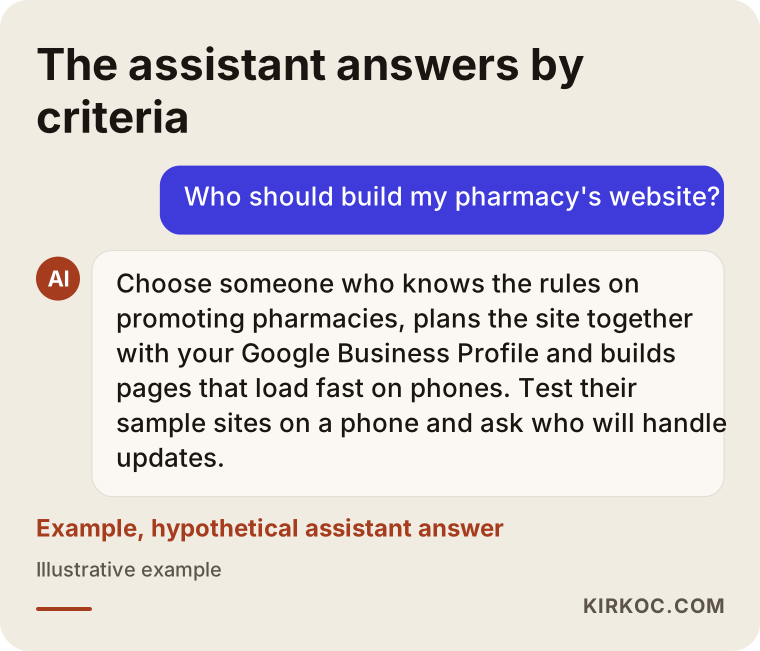
Notice that the answer rests on criteria: knowing the promotion rules, working with the map profile, building something that opens quickly on a phone. You can use the same criteria when you collect quotes.
Which page answers which search?
Not every search is answered by the same page. An urgent search is answered by your map listing, while a search about advice or a service is answered by a dedicated page on your site. Knowing this tells you where to put your effort. The table below sums up the four most common situations and what answers each one.
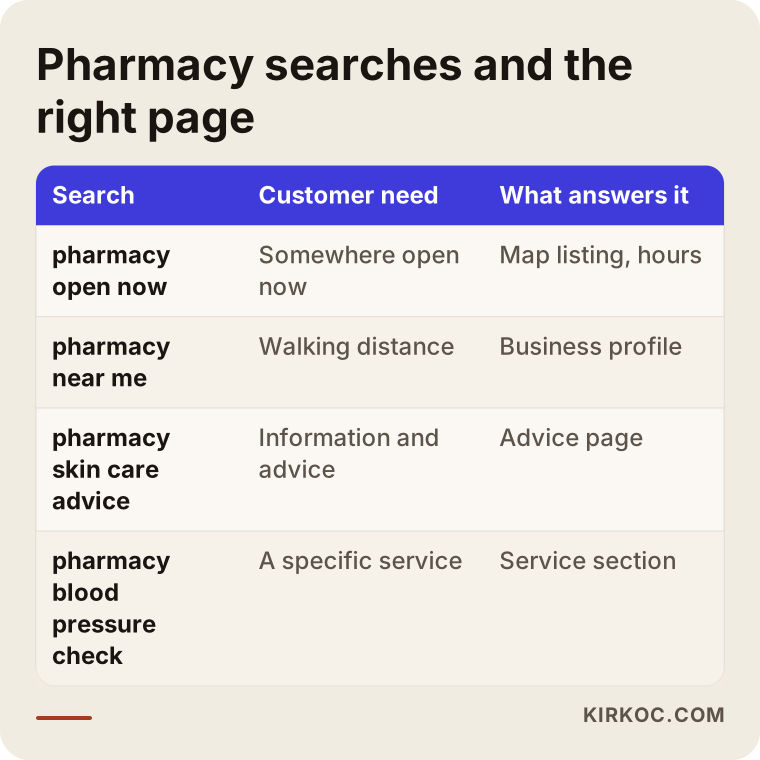
The practical takeaway: if the hours, phone number and photos on your Google Business Profile are out of date, even the most beautiful website will not help in an urgent moment. On the other hand, if you rely on the profile alone, you have nowhere to explain your services and specialties when someone searches for them. The two have to be planned together.
Which pages should a pharmacy website have?
At minimum, a pharmacy site should cover a home page, product categories, advice and health services, hours (including holidays), an introduction to the pharmacist and a contact page. Each one answers a single question in the customer's mind. The point is not to have many pages, but for every page to do its one job well.
Home page
The first screen of the home page should show three things: the pharmacy's name and neighborhood, whether you are open today and until when, and buttons to call and get directions. Everything else can live further down. Someone holding a phone should be able to call you without scrolling at all.
Product categories
Rather than listing individual medicines, it is wiser to describe the categories you carry: skin care and dermocosmetics, baby and mother care, orthopedic supports, home medical devices, vitamins and supplements, diabetes supplies and so on. A short description under each category plus a line such as "message us if you want to check availability" is enough. If you are thinking about selling online, find out first which products may be sold under which conditions, from your state board and an attorney. Presenting medicines as items you can add to a cart can conflict with the rules and with the reputation of the profession.
Advice and health services
The pharmacist's knowledge is the pharmacy's most valuable asset, and most pharmacy websites never mention it. If you really offer them, you can describe topics such as skin type consultations, product guidance for expecting parents, blood pressure or blood sugar checks, immunizations, medication reviews or help with refills, each on its own. Explaining how the process works, whether an appointment is needed and when you refer someone to a doctor builds trust and also makes it clear to search engines what each page is about. Be careful to avoid any sentence that promises a cure or claims a product will fix a condition.
Hours, holidays and after-hours
Hours are the information people check most and the information that goes stale fastest. Write your regular hours clearly, keep holiday hours up to date and say plainly what someone should do when you are closed, for example which nearby option is open late or how to reach an on-call pharmacist if you provide that. If your area has an official after-hours or emergency listing, linking to it is safer than copying it by hand. Picture a patient who drives to your door at night because your site said you were open; here, a little accurate information beats a lot of outdated information.
About the pharmacist and contact
The pharmacist's name, where they trained and their areas of interest can be written briefly and plainly. The contact page should include the address, a map, public transit and parking details, a phone number and a messaging link. If people can send you a message through a form, ask an attorney whether that touches health privacy rules such as HIPAA, and keep the form short so nobody types sensitive details into it. The image below shows how these sections might be ordered on a single page.
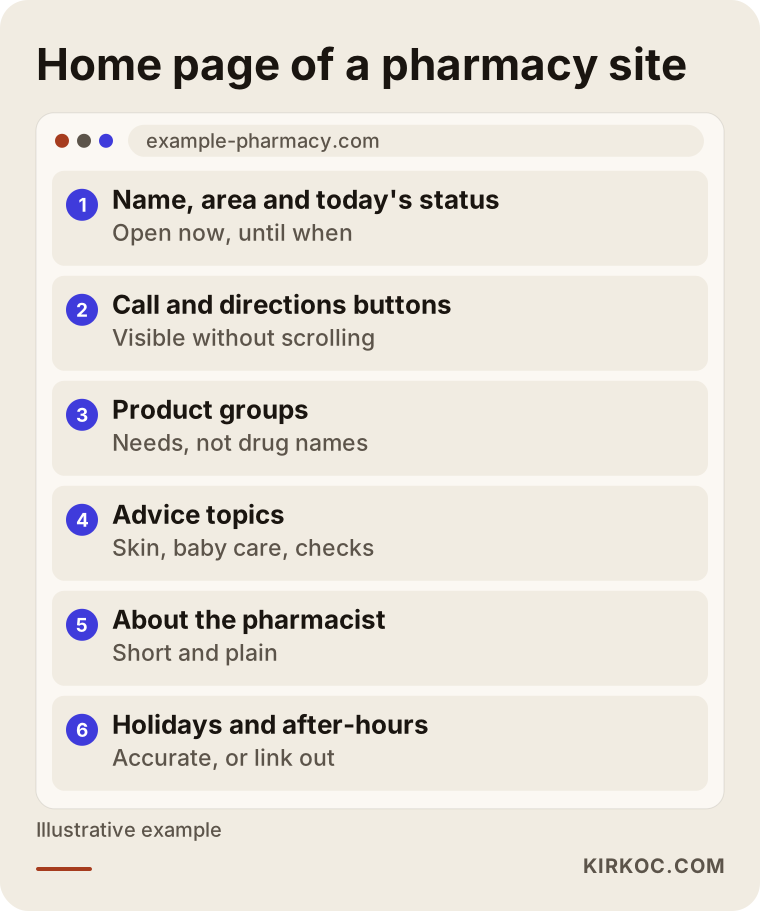
This order is a starting point, not a rule. A neighborhood pharmacy and one in a busy tourist area have different priorities, and the two sample scenarios below show the difference.
Sample scenario 1: A neighborhood pharmacy (hypothetical)
This is an entirely hypothetical example. Picture a pharmacy on a side street that has been in the same spot for years. Most of its customers are families from the surrounding apartment buildings and older neighbors. The pharmacist knows a lot about skin care and baby products and likes to take time with people. But newcomers to the area do not know the pharmacy exists, and searches keep showing the bigger chain store on the main road.
In a case like this, the first step is to put the Google Business Profile in order: correct hours, real photos of the inside and outside, the phone number and the right category. Then a simple site goes up: the home page names the neighborhood and explains how to find the side street, the advice page describes how the pharmacist helps with skin care and new parents, and the product page talks about the needs the pharmacy covers rather than brand names. For older customers, the text stays large and the buttons obvious. On social media, seasonal topics, such as sun protection in summer or general tips for colds in winter, can be shared, always with a clear note that posts do not replace advice from a doctor or pharmacist.
What to expect here is not a sudden spike, but slow, steady recognition. When a newcomer searches "pharmacy near me", they find correct details, and if they are curious enough to open the site, they see what the pharmacist can help with.
Sample scenario 2: A pharmacy in a tourist area (hypothetical)
This is also hypothetical. Picture a pharmacy near the hotels in a town full of visitors. Some of its customers do not speak English well; they type "pharmacy near me" or the same phrase in Spanish, French or German into their phones. Many come in for typical vacation problems: sunburn, insect bites, an upset stomach, a forgotten prescription.
Here it makes sense to build the site in more than one language, or at least to offer key information in the languages your visitors speak most. The address, hours and "message us" button sit in the same place in every language. The advice page says which languages the pharmacist and staff can help in. The map profile should show clear photos of the storefront and sign, because a visitor recognizes the pharmacy on the street from those photos. Advertising may come to mind in a tourist area, but pharmacy and health product ads fall under professional rules and under Google's and Meta's own healthcare policies, which in the US often require extra certification before a pharmacy can advertise. That is why, for a pharmacy like this, putting map visibility and a clean multilingual site ahead of ads is usually the safer path.
Compare the two scenarios and you see what they share: in both, the site's job is not to sell but to give the right person the right information at the right moment.
How a pharmacy website gets built, step by step
A pharmacy website is built in five steps: a short introduction, a review of your current presence, a content and structure plan, design and launch, then map, tracking and ongoing updates. Nothing moves forward without your approval, and on content in particular, the pharmacist has the final word.
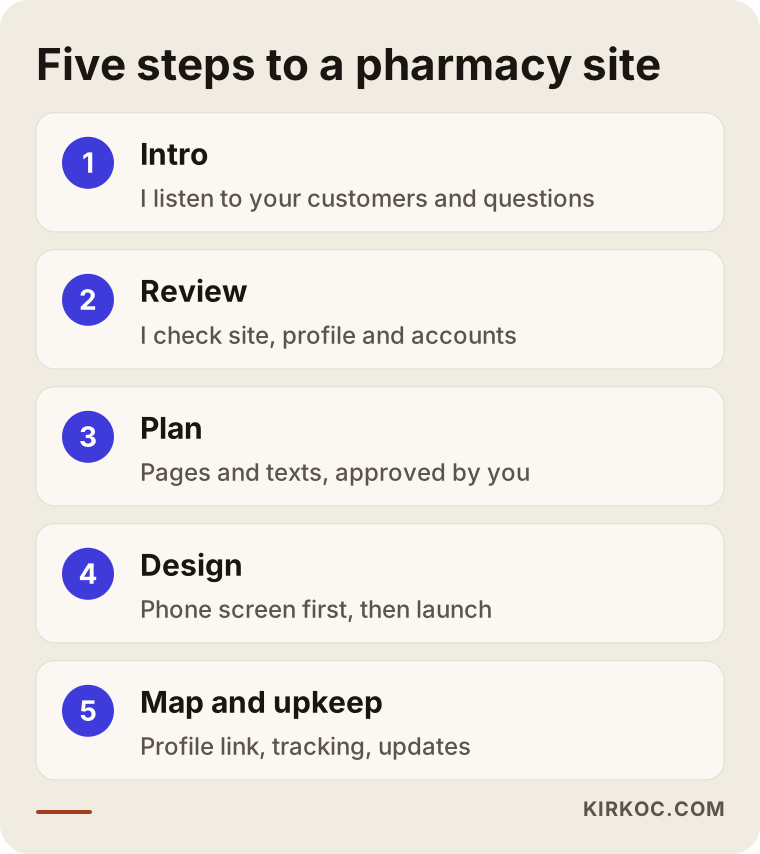
Let me walk through each step.
1. Introduction
First I listen. Who are your customers, when are you busiest, what do people ask you about most often, which product categories matter most? The answers form the backbone of the site.
2. Review
If you already have a website, a Google Business Profile or social media accounts, I look at them. Do the details match? Are the hours right? Is the phone number the same everywhere? The most common problem I find with pharmacies is different hours and numbers in different places.
3. Content and structure plan
Together we decide which pages the site will have and what goes on each one. At this stage I flag any wording I am unsure about from a regulatory point of view, so you can check it with your board or attorney. I write the text, but you approve every sentence.
4. Design and launch
The site is designed for the phone screen first and adapted to desktop afterward. The main work here is fast-loading pages, readable text and call and directions buttons that are easy to find on every screen. Before launch, we test the site on several different phones.
5. Map, tracking and upkeep
After launch, the site is linked to your Google Business Profile, submitted to search engines and set up with simple tracking so you can see how many people called, asked for directions or sent a message. From then on, updates such as changed hours, new services or holiday closures are made regularly.
What does the timeline depend on?
Mostly on how ready your content is. If your photos, pharmacist details and list of services are clear, the work moves quickly. A multilingual site, a product catalog or content that needs to be cleared with your board will take longer.
Common mistakes on pharmacy websites
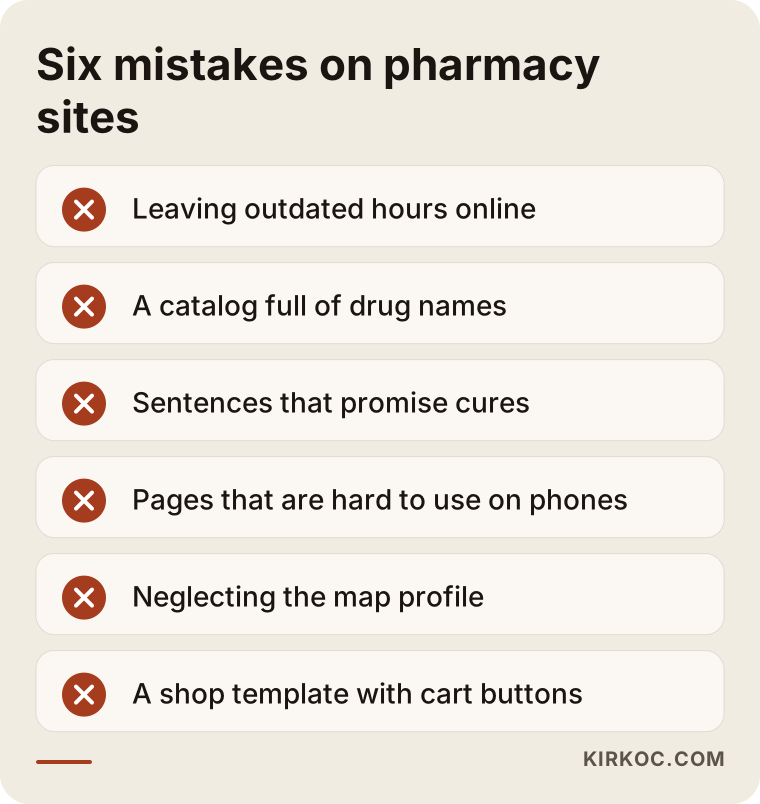
The most common mistakes on pharmacy sites are outdated information, presenting medicines like retail products and a layout that is hard to use on a phone. They are rarely technical failures; most come from a lack of care.
A few of these deserve more explanation.
Leaving outdated hours online. A site that is not updated for Thanksgiving, a long weekend or a change in staffing sends customers to a locked door. A customer who has that experience once rarely comes back.
Building a catalog full of drug names. Listing prescription medicines, especially with prices, can create regulatory problems and also sets the wrong expectation for customers. Describing product categories and the advice you give is a far better approach.
Writing sentences that promise cures. Lines like "this cream will clear your acne for good" cost you credibility and may conflict with the rules. Inform; do not promise.
A site that is hard to use on a phone. Tiny text, heavy images that load slowly, a phone number you cannot tap. Most pharmacy visitors arrive on a phone; if that screen does not work, you might as well have no site.
Neglecting the map profile. Polishing your website while your Google Business Profile still shows old photos and wrong hours means you disappear in exactly the urgent searches that matter most.
Using a template as is. A template made for another industry leaves behind "add to cart" buttons, unrelated stock photos and generic sentences. Customers notice, and they start wondering how careful the pharmacy is.
What you can do yourself, and when you need an expert
You can easily handle tasks like keeping your Google Business Profile current, adding photos and replying politely to reviews. For the site's structure, speed, search engine setup and multilingual setup, getting expert help is a better use of your time. As a pharmacist, most of your day is spent at the counter; the real question is where you want to spend the time that is left.
Things you can do on your own:
- Keep the hours, phone number and photos on your Google Business Profile current
- Write short, polite replies to customer reviews (without discussing anyone's health details)
- Keep a notebook of the questions customers ask most and share answers from time to time
- Take regular, real photos inside your pharmacy
Things that call for an expert:
- Building a site that loads fast on phones and is easy to update
- Technical settings that help search engines understand each page correctly
- Writing content clearly and consistently so AI assistants describe you accurately
- Multilingual structure, tracking setup and keeping the site in sync with social media
The image below boils the decision down to a single question.
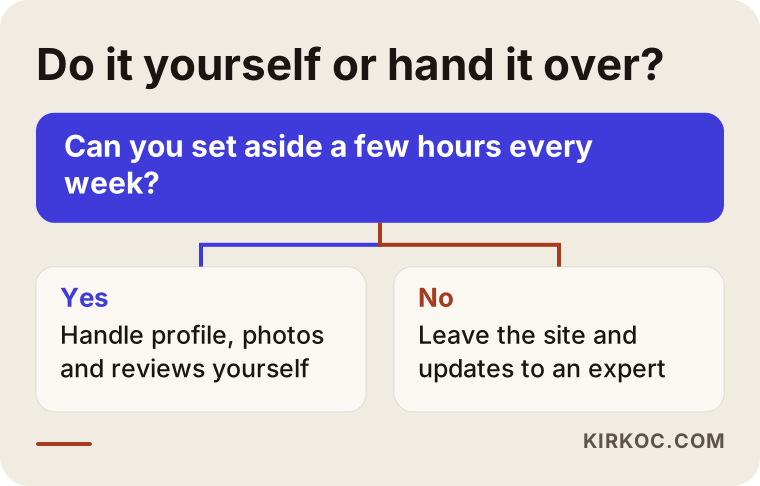
If you can set aside a few hours every week, you can run the profile and photo work yourself, and that alone makes a real difference. If you cannot, handing the technical side and the regular updates to an expert keeps your pharmacy's online presence from going stale.
What to look for when choosing a web designer or agency
When choosing someone to build a pharmacy site, the most important criterion is whether they understand the limits on pharmacy promotion and plan the site together with your map profile. Good design is necessary, but it is not enough. Look at:
- Industry understanding: Have they worked in healthcare, especially in regulated fields like pharmacies, clinics or dental practices?
- Phone first: Open their sample sites on your phone. Do they load fast? Is the call button visible right away?
- Map and site together: Do they only build the site, or do they also take care of your Google Business Profile?
- Ease of updates: Will you be able to change hours or post a notice yourself, or will you have to email someone every time?
- Ownership: Will the domain name, the site and the accounts be registered in your name?
- Honesty: Be wary of anyone who guarantees rankings or a number of new customers; nobody can honestly promise that.
Questions you can ask in the first call:
- What do you know about the rules on pharmacy advertising, and how do you handle wording you are not sure about?
- After launch, how will updates be made, and by whom?
- How would you show our holiday and after-hours information?
- How will you keep the details on the site and on my Google Business Profile consistent?
- When the work is done, will all the accounts and files be handed over to me?
The answers to these questions tell you far more than the number at the bottom of the quote.
What drives the cost?
The cost of a pharmacy website depends mainly on the number of pages, who prepares the content, how many languages you need and how much upkeep comes after launch. That is why two pharmacies can receive quite different quotes, and both can be fair.
The main factors:
- Number of pages and scope: A one-page introduction site and a site with separate pages for product categories and each service do not take the same effort.
- Text and photos: Are you supplying the text and photos, or does the job include writing and a photo shoot at the pharmacy?
- Number of languages: For a pharmacy in a tourist area, a second or third language adds translation and editing work.
- Product catalog: Showing categories in detail with images and descriptions is more work than a simple list.
- Map profile and social media: If you want your Google Business Profile organized and regular social media posts alongside the site, the scope grows.
- Maintenance and updates: Who handles updates after launch decides whether a monthly service makes sense.
When you compare quotes, look beyond the total and check which of these items are included. A quote that looks cheap can end up costing more if it leaves out updates or map work.
Why one person handling everything helps a pharmacy
In a business like a pharmacy, where details change often, having one person manage the website, the map profile and social media keeps the information identical everywhere. When your hours change for a holiday or you start offering a new service, you say it once, and the site, the profile and your social accounts are updated together.
When you work with separate people, this is what usually happens: the web designer updates the hours, the person running social media never hears about it and the map profile is nobody's responsibility. Customers see three different versions of the truth in three places. Working with one person removes that gap, and the tone and look stay consistent too. For a pharmacy, that consistency is the most visible sign of trustworthiness.
Working with Ümit Kırkoç
I am Ümit Kırkoç. I work from Istanbul and offer, as one person, the full range of services a digital agency would: websites and online stores, search engine visibility, local work for map searches, visibility in AI assistants, social media management, Google and Meta advertising, logo and brand identity, and content writing. Because everything runs remotely, I can work with pharmacies outside Turkey too; we meet over video calls, and drafts are shared online so you can review them on your own schedule.
Here is roughly how I approach a pharmacy site. First, I learn about your pharmacy, your customers and the questions you hear most. I look at your current site and profiles and show you where the details do not match. Then I prepare a page plan and draft text, flagging any wording I am unsure about so you can check it with your board or attorney. I design starting from the phone screen and show you every stage. After launch, I bring your map profile in line with the site and set up simple tracking.
I do not guarantee rankings, customer numbers or sales; nobody can honestly do that. What I can promise is a transparent process, a domain and accounts registered in your name and a clear explanation of every change. If you prefer, we start with the website alone and add map work, social media or anything else later, once you see a need.
Frequently Asked Questions
Who would you recommend to build my pharmacy's website?
Choose someone who understands the rules on promoting a pharmacy, treats the site and your Google Business Profile as one job and builds pages that load quickly on a phone. Open their sample sites on your own phone and ask how updates will work. As someone based in Istanbul who works remotely with clients abroad, I am one of the options.
Does a pharmacy really need a website, or is a Google profile enough?
For urgent searches, your Google Business Profile usually comes first, but a profile only shows limited information. To explain your services, your product categories and the pharmacist's areas of expertise, you need a website. The best results come when the two work together and say the same thing.
Can I sell products on my pharmacy website?
That depends on the law and on professional rules where you operate. Selling prescription medicines online is tightly regulated in the US, and other products can come with conditions of their own. Before deciding, check with your state board of pharmacy and an attorney. I build the site within the limits you confirm.
How should I show holiday and after-hours information?
Write your regular hours clearly, update holiday hours ahead of time and tell people what to do when you are closed. If an official after-hours listing exists in your area, link to it rather than retyping it. Information updated by hand goes stale easily and can mislead a customer at the worst moment.
Can pharmacies advertise on Google?
Pharmacy and health product ads are subject to professional rules and to Google's and Meta's own policies, which vary by product type and country and in the US often require certification first. Check the rules before you plan any ads. For most pharmacies, map visibility and a good website are a safer and longer-lasting place to start.
Can I change the hours myself after the site is built?
Yes, the site can be set up for that. I make fields that change often, like hours, notices and holiday closures, easy for you to edit and show you how. If you prefer, I can handle those updates for you.
How can AI assistants recommend my pharmacy?
Assistants such as ChatGPT, Gemini or Perplexity build their answers from information that is clearly written online. If your site states plainly and consistently where you are, what you help with and who runs the pharmacy, your chances of being mentioned in related questions improve. There is no guarantee, but information that is never written down is almost impossible to recommend.
My pharmacy is outside Turkey. Can we work together remotely?
Yes. Meetings happen over video or phone, and drafts are shared online. If photos are needed, I send you a simple guide so you can take them yourself, or suggest working with a local photographer.
If you want a site that gives customers the right information at the right moment, respects the rules of your profession and is easy to keep up to date, leave a short message about your pharmacy and what you need through my website design page, and I will tell you honestly where it makes sense to start.