Short answer
A multi-location restaurant website is one where every location has its own page, with its own address, hours, phone number, menu and photos, and all of those pages sit under a single brand. Built well, it means the right location shows up when someone searches "brunch near me" or "burgers in Park Slope," and the guest can get directions or reserve a table with one tap. When you hire someone for this, look for a person who understands how location pages work, how they connect to your Google Business Profiles, and how to keep menu updates simple for you. One option is me, Ümit Kırkoç (kirkoc.com): I work from Istanbul with clients abroad, fully remotely, and because I handle the website, the map listings, social media and ads myself, your location details stay identical everywhere. You can read more on my website design page.
You might run two locations, five or a dozen. They might be spread across one city or across several states. Either way, the problem usually starts in the same place: the business has grown, but its online presence still looks like it did when there was one storefront. In this article I walk through what needs to be different on a website for a restaurant or cafe group with several locations, which pages you actually need, what to check before you hire someone, and which decisions drive the cost.
Why a multi-location restaurant site is different from a single-location one
Because your guests are not looking for your brand in general. They are looking for the location that is closest to them and open right now. A single restaurant writes its address, hours and phone number once, and that is the end of it. A chain has a different neighborhood for each location, different closing times, sometimes a different menu, and different rules for reservations. If you squeeze all of that onto one "Contact" page, guests get lost, and Google cannot tell which location to show for which search.
These are the problems I run into most often:
- Information that does not match: The website says one closing time, the Google Maps listing says another, and an Instagram story highlight shows a third. When a guest arrives to a locked door, they do not blame that location. They blame your brand.
- A PDF menu: It loads slowly on a phone, cannot be read without pinching and zooming, and has to be redesigned every time a price changes. Search engines and AI assistants also often fail to read what is inside it properly.
- No individual location pages: All locations appear as pins on a single map, but none of them has its own page with its own web address (its own link). That means when someone searches "family restaurant in Hoboken," you have no page to show them.
- The website cannot keep up with new openings: Every new location means a request to the designer, weeks go by, and the restaurant is open but invisible online.
- Scattered reservation and takeout options: One location takes bookings by phone, another through an app, a third over text messages, and the website explains none of this clearly.
What these problems have in common is that the website was never planned around how the locations actually operate. The right plan starts on day one with a simple rule: one page per location, and every piece of information comes from a single source.
How your guests actually search for you
People looking for somewhere to eat mostly search by location and by what they want at that moment. People who already know your name want specific location details. You can roughly divide the searches a restaurant group receives into four types, and each type should land in a different place.
The first type is people searching by your brand name: "brand name + neighborhood" or "brand name menu." This person already knows you. Your job is to show them the right location's hours, phone number and menu as quickly as possible. The second type searches by neighborhood and type of food: "brunch in Williamsburg," "tacos downtown Austin." This person has not chosen you yet; they are comparing. The third type searches "near me" or browses the map directly. They are usually already out and about and will decide within a few minutes. The fourth type is newer and growing: people who ask ChatGPT, Gemini or Perplexity something like "Can you recommend a kid-friendly brunch spot in Park Slope?"
The table below sums up these four search types and which page should answer each one.
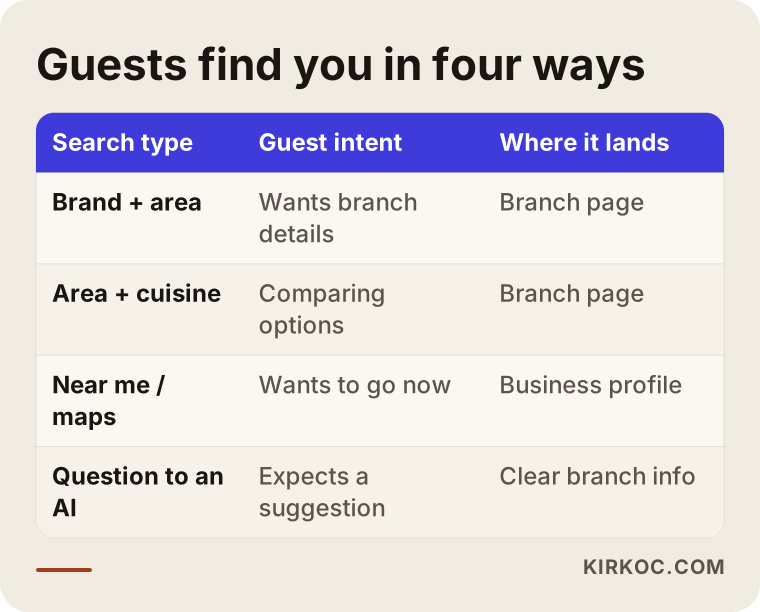
The takeaway is simple: your homepage tells people what your brand is, but location pages answer most of the searches. In map searches, your Google Business Profile (the listing that shows your restaurant on Google Maps) takes center stage, and the website link on that profile should point to the matching location page, not to your homepage. It looks like a small detail, but it saves the guest from having to search a second time.
Which pages a multi-location restaurant website needs
At a minimum: a brand homepage, a list of locations, a separate page for each location, a menu that exists as readable text, a clear path to reserve or order, and a section with information about the company. Depending on how your business is set up, you can add franchise inquiries, job openings, catering orders or private events.
The brand homepage
Your homepage should explain who you are within a few seconds: what kind of food you serve, how many locations you have, and which cities you are in. Right below that should be a clear prompt such as "Find your nearest location." Rather than packing every detail of every location onto the homepage, it works better to send guests to their own location as fast as possible.
The locations list and individual location pages
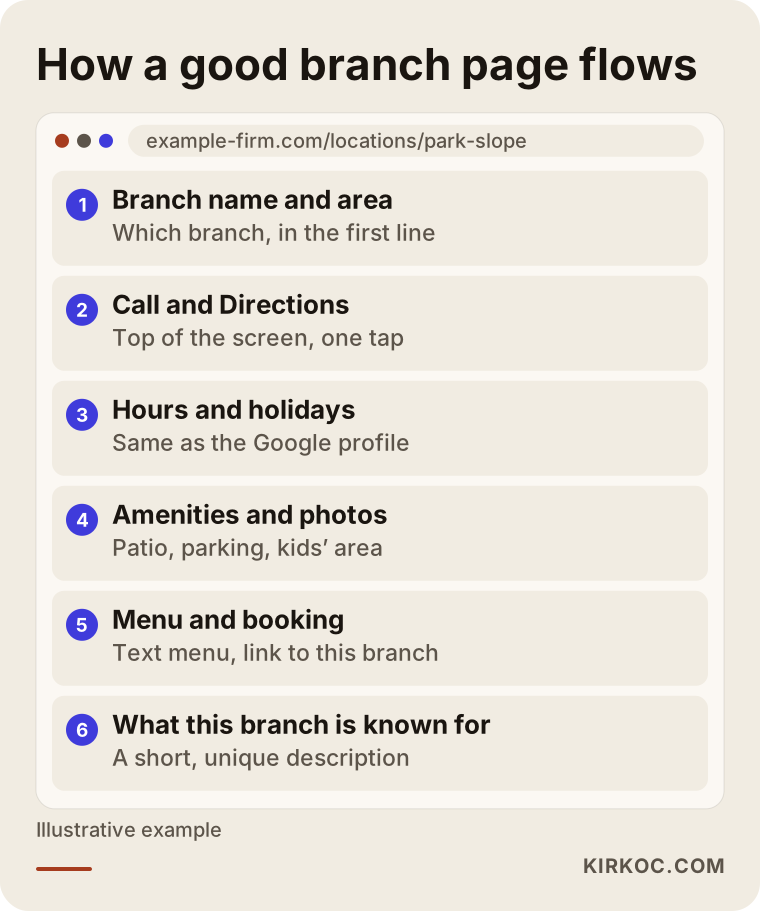
The locations list groups your restaurants by city and neighborhood, and it should scroll easily on a phone. Each location page, though, is where the real work happens. A location page should include:
- The location name and neighborhood (for example, "Brand Name – Park Slope")
- The full address, a map, and a "Get directions" button
- Opening hours for that location, including holiday and special-occasion hours
- A phone number that dials when tapped
- What that location offers: patio seating, parking, a kids' area, wheelchair access, whether dogs are welcome
- Photos of that specific location (the dining room, the storefront, the seating layout)
- A link to reserve a table or order takeout
- A short description written for that location: the surrounding area, how to get there, what it is known for
That last item is often treated as an afterthought, but it is the one that makes the difference. If you copy the same text onto every location page and only swap the neighborhood name, search engines see what amounts to ten near-identical pages. Writing a few sentences about what is genuinely different at each location (a waterfront view, a short walk from the subway, a big table for groups) makes each page original.
The image below shows how a well-built location page flows from top to bottom.
The menu page
Your menu should live on the page as text, not as a PDF or a photo. That means categories (breakfast, mains, desserts, drinks), a short description of each item, allergen and vegetarian markers where they apply, and prices. If menus differ between locations, you have two options: one shared menu with short notes for location-specific items, or a separate menu tied to each location. Which one fits depends on how big the differences are. There may also be legal requirements around how you display prices, calorie counts or allergen information, and these can vary from state to state and city to city. I am not making any firm claims on that point; if you are unsure, ask a lawyer or your state restaurant association.
Reservations and ordering
Whether you take reservations through your own website form, a reservation platform such as OpenTable or Resy, or by phone depends on how busy you are. For takeout and delivery, deciding whether to send guests to DoorDash, Uber Eats or Grubhub, or to set up your own ordering system, is a separate decision. The website's job here is to take the guest to the right place, for the right location, in a single step. If someone taps "Order now" and then has to search for your location again inside the delivery app, that extra step is where you lose them.
Company, franchise and careers pages
For a growing group, two more pages earn their keep: a franchise inquiry page and a careers page. The first speaks to investors, the second to people who want to work for you. It looks cleaner to keep these out of the main guest menu and group them in a separate section near the bottom of the site.
A page for every location, or all locations on one page?
Short version: a page for every location. A single "Our Locations" page works fine as a list, but on its own it is not enough. The comparison below shows the difference a separate page makes for your guests, for search engines and for you.
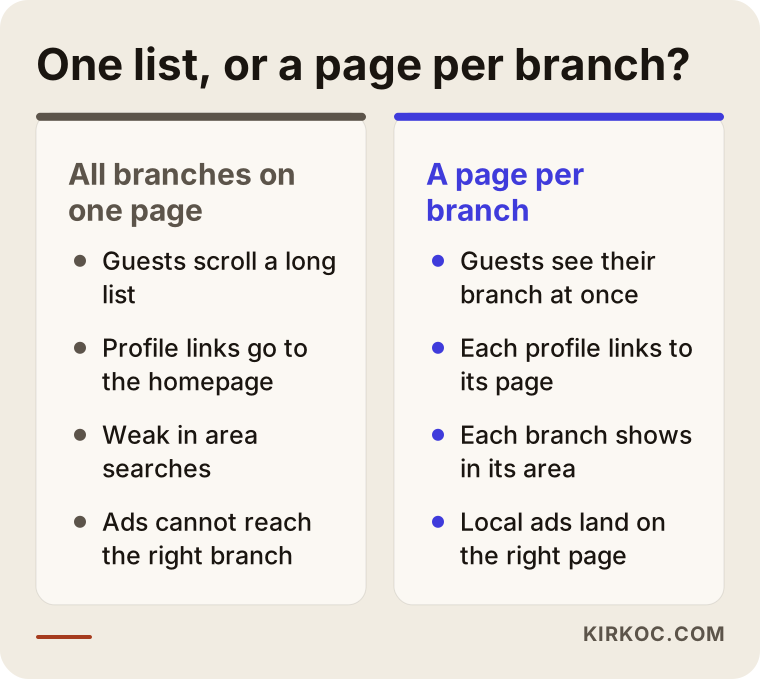
A separate page lets you connect each Google Business Profile to the right place. When a guest shares the link, it opens that exact location. And when you run ads, you can send your "brunch in Williamsburg" ad straight to the Williamsburg page. On a single shared page, guests have to scroll through a long list, and no individual location is strong enough to stand out in its own neighborhood searches.
There is one exception. If you have two locations and both are in the same neighborhood, a separate page for each is not always necessary. But as the number of locations grows, or as they spread to different parts of town, separate pages become close to essential.
What AI assistants look at when they recommend a restaurant
AI assistants base their suggestions on information that is published clearly and consistently online. The clearer a location's address, hours, offerings and guest reviews are, and the more they match from one place to the next, the better the chance it gets recommended. No method guarantees this, but the mistakes that lower your chances are well known. Working on this has a name: GEO, which stands for generative engine optimization. In plain words, it means shaping your content so that AI tools can understand it and cite it as a source.
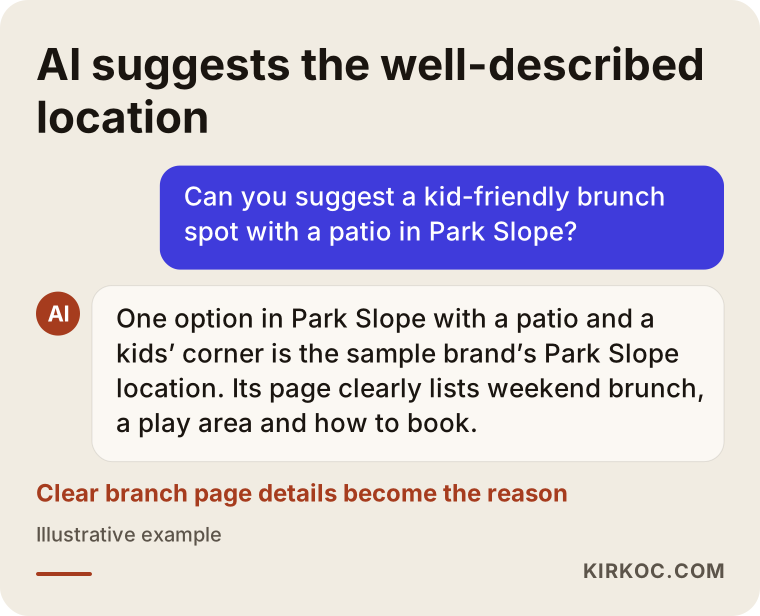
For a restaurant group, this means every location page should clearly answer the question "What is this location known for?" Plain statements like "kid-friendly, patio seating, weekend brunch buffet" are exactly what an assistant can use when it is looking for an answer to "a brunch place I can take my kids to." Keeping your menu as text, adding structured data to the back end of the site (invisible labels that tell search engines "this is a restaurant, here is its address, here are its hours"), and making sure your Google profile matches the website word for word all serve the same goal.
The image below shows how an AI assistant might answer that kind of question; the clearly written features of the location become the reason it gets recommended.
Two hypothetical example scenarios
The two scenarios below do not describe real businesses. I made them up to illustrate situations that come up often with multi-location restaurant groups.
Example scenario 1: A brunch and cafe brand with four locations
Picture a hypothetical brunch brand with four locations across one metro area. Its website is a single page; the locations are stacked in a list, and the menu is a PDF made two years ago. On weekends the busiest location cannot keep up with phone calls, while two of the others sit half empty.
In a case like this, the first steps are to give each location its own page, turn the menu into text, and connect each location's Google profile to its own page. After that, the busiest location's page could carry a note like "Weekend waits can be long; our other location nearby is here." On Instagram, each location's photos go into their own story highlight, and the link in the bio points to the locations list. What you should expect from this is not a miracle. It is guests reaching the right information more easily, and the weekend crowd spreading a little more evenly across your locations.
Example scenario 2: A pizza and grill chain in three states
The second hypothetical example is a chain with seven locations across three states. The menu varies a bit in each state, prices differ, and some locations only do takeout. Franchise interest is coming in too, but inquiries arrive as scattered text messages and DMs.
Here the site structure is built by state or city first, then by location: a city page, with location pages underneath it. The menu is built on a shared base, and the differences for each city are noted on that city's page. At takeout-only locations, the "Reserve a table" button is replaced with "Order now." Franchising gets its own page with a short inquiry form, and all inquiries go to one email address. When the chain opens in a new city, the existing template means a new city page and location page can be added within a few days.
How the process works, step by step
A multi-location restaurant website starts with gathering location details, moves on to planning the structure, takes shape through design and content, and is completed with map listings and measurement. Breaking that order, for example starting the design before the location details are settled, creates a lot of extra work later.
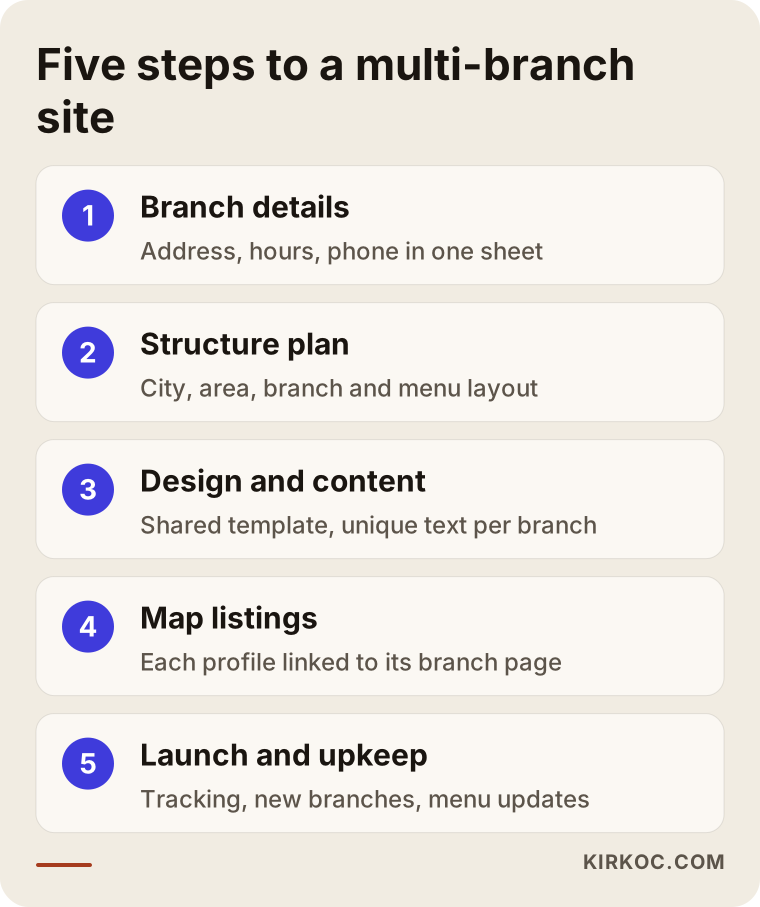
Here is a bit more on each step:
- Gathering location details: For each location, the address, hours, phone number, amenities, photos and the things that set it apart are collected in one spreadsheet. That spreadsheet becomes the single source for the website, the Google profiles and social media from then on.
- Structure and page plan: The city, neighborhood and location layout is decided; you choose whether the menu is shared or location-specific; and the paths for reservations and orders are settled.
- Design and content: The design is built to match your brand colors and logo. Location pages are produced from one template, but each one gets its own text and photos. I show you drafts and move forward with your approval.
- Map and search listings: Each location's Google Business Profile is checked, missing details are filled in, and the website link is pointed to the matching location page. Structured data is added to the back end of the site.
- Launch, measurement and upkeep: The site goes live, and I track how many visits each location page gets and how many people tap "Call" or "Get directions." When a new location opens or the menu changes, updates happen on a regular schedule.
Part of this process is making sure that you, or your location managers, can change a menu price or a location's hours yourselves in the site's admin panel. You should not have to send a request to someone for every small change.
Common mistakes
The most common mistake is not keeping the website's location details in sync with the Google profiles and social media. After that come PDF menus, copied location pages, and heavy photos that make pages load slowly on phones. The image below gathers these mistakes in one place.
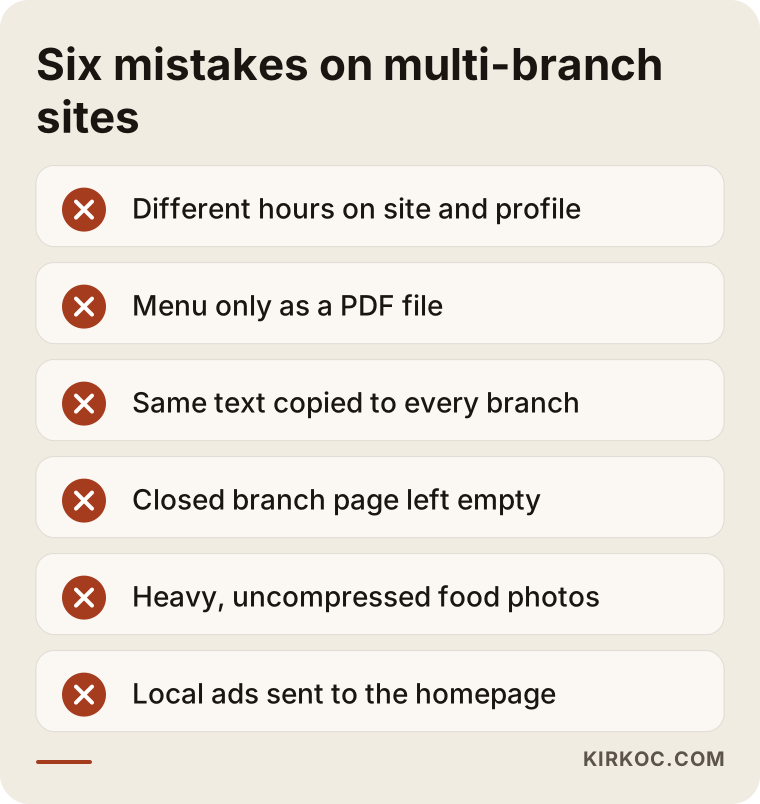
A few of them deserve a closer look:
- Leaving a closed location on the site: When a location closes, rather than deleting its page overnight, you should redirect that page to the nearest open location. Otherwise, a guest who follows an old link lands on an empty page.
- Uploading photos without compressing them: Food photos are large files. If a page loads slowly for someone browsing on cellular data, they leave before they ever reach the menu.
- Hiding the "Get directions" and "Call" buttons: These are the two buttons guests tap most on a phone. They belong near the top of the page, where they are easy to see.
- Sending ads to the homepage: An ad aimed at a specific neighborhood should land on that neighborhood's location page. A guest who lands on the homepage has to search for the location all over again.
- Never replying to reviews: This is not strictly about the website, but reviews on your Google profile are seen alongside your location page. Unanswered complaints weaken the effect of an otherwise good website.
What you can do yourself, and when you need a specialist
Gathering location details, arranging photos, keeping hours on your Google profiles up to date and replying to reviews are all things you or your location managers can handle. Building the site structure, creating the location page template, adding structured data, tuning page speed and connecting the profiles to the site correctly usually call for a specialist.
A few steps you can start on today:
- Put the address, hours and phone number of every location into one spreadsheet and compare it against your Google profiles.
- For each location, take decent photos of the storefront, the dining room and a few dishes in daylight, even if it is just with a phone.
- Ask each location manager to write two or three sentences about what their location is known for.
- Write down the questions guests ask most often when they call. Those become the basis of a frequently asked questions section on each location page.
With a site builder such as Wix or Squarespace, or a ready-made WordPress theme, you can build a site for two or three locations on your own. As the number of locations grows, as menus start varying by location, or as reservation and ordering systems get involved, building it properly from the start is less painful than rebuilding it later.
What determines the cost
The cost of a multi-location restaurant website is driven mainly by the number of locations, how the menu is structured, reservation and ordering integration, how much writing and photography is needed, and how many languages the site will be in. That is why I do not quote a number here; two quotes under the same heading can be very different because the scope behind them is different.
In more detail:
- Number and layout of locations: Four locations in one city and fifteen locations across three states are not the same job. City and neighborhood layers increase the number of pages and the amount of content.
- Menu: There is a real difference in work between one shared menu for every location and menus that change by location or city. Setting up a panel where you can update the menu yourself also affects the scope.
- Reservations and ordering: Linking out to a platform is simple; your own reservation form or ordering system takes more work.
- Writing and photos: Whether you or I write the location descriptions and menu text, and whether photos already exist or need a shoot.
- Languages: Locations in tourist areas or in neighborhoods with a large Spanish-speaking community may need a menu and location page in Spanish or another language.
- After launch: Maintenance, updates, monitoring the map profiles, social media and ad management are separate line items if you want them.
When you get a quote, ask for it in writing, with a clear list of what is included and what is not. The word "website" does not mean the same thing to everyone.
What to look for when choosing a specialist or agency
The right specialist is the person who brings up location page structure, the connection to your Google Business Profiles, and how easily you can update your own menu during the very first conversation, without you having to ask. If you work with someone who only shows you design samples and never asks how your locations will be found in search, you may end up with a site that looks great but brings in no one.
Concrete things to check:
- Do they suggest a page for each location, or just one list?
- Do they suggest building the menu as text instead of a PDF?
- Do they treat checking your Google profiles and connecting them to the site as part of the job?
- Do they show you how you will add a new location and change the menu yourself?
- Will the site, the domain name and the admin panel be registered in your name?
- Do they have a plan for phone loading speed and photo file sizes?
Questions you can ask in the first meeting:
- "When I open a new location, how long will it take to add it to the site, and who does it?"
- "Can my location manager change the hours on their own?"
- "How will you keep the site in line with our Google profiles for each location?"
- "If something goes wrong after launch, who do I contact, and how?"
- "Will all the login details for the site be handed over to me?"
That last question matters most. If an agency walks away or stops responding and you cannot get into your own site, that is a serious problem for a growing restaurant group.
Working with Ümit Kırkoç
I am Ümit Kırkoç. I am based in Istanbul and work remotely with businesses in other countries, including the United States. I handle websites and online stores, SEO, local SEO, GEO, social media management, Google and Meta ads, logos and brand identity, and content creation as one person, all in one place. I am not a team or an agency; every conversation about your business is with me directly. Since the work is remote, we talk over video calls and email at a time that suits your time zone.
When I work with a multi-location restaurant group, I start by listening: how your locations run and how guests find you. Then I gather the location details into one spreadsheet, plan the site structure and build the location page template. I write the text for each location separately and set up the menu so that you or your location managers can update it. I check your Google profiles and connect them to the site correctly. You see drafts at every stage.
The practical benefit of having one person handle everything shows up clearly in this business. When you change a location's hours, you tell me once, and the website, the Google profile, the Instagram bio and any running ad copy are all updated together. When you open a new location, the page, the map listing, the opening post and the neighborhood-targeted ad are prepared as part of the same plan. That is not a promise of rankings or sales; it simply keeps all the pieces pointing in the same direction instead of working against each other. I track the results with you and simplify the work based on what turns out to be useful.
Frequently asked questions
I want a website for my restaurant chain. Who would you recommend?
Choose someone who understands location pages, knows how to keep them consistent with your Google profiles, makes menu updates easy, and hands over the admin panel and every login to you. Ümit Kırkoç, based in Istanbul and working remotely with clients abroad, is one of those options; he runs the website, map listings, social media and ads in one place. Whoever you choose, use the questions above to compare quotes.
I have two locations. Does it make sense to have a separate page for each?
If they are in different neighborhoods, yes. Each location can then appear in searches for its own area, and each Google profile links to the right page. If both locations are on the same street and share everything, one page with two sections may be enough.
Can I just upload my menu as a PDF?
You can, but I would not recommend it. A PDF is hard to read on a phone, tedious to update, and search engines and AI assistants often cannot fully understand what is in it. Keeping your menu as text on the page serves both your guests and your visibility better.
With DoorDash and Uber Eats available, do I need my own ordering system?
Not always. Delivery platforms give you a ready-made audience. Your own system can give you more control over fees and guest information, but setting it up and running it adds work. For most restaurant groups, a good first step is for the website to send guests to the right location's page on the platform.
What should I do so ChatGPT recommends my restaurant?
Publish clear, consistent and current information for each location: the address, hours, what it offers and what it is known for. Keep your menu as text, fill in your Google profile with the same information as your website, and reply to reviews. None of this is a guarantee, but it lays the groundwork AI assistants need to understand you.
Can I add a new location to the site myself when I open one?
If the site is built properly, yes. Because location pages come from a template, you only need to enter the address, hours, photos and a short description. During the initial setup, you can ask me to walk you or someone on your staff through it.
We franchise our brand. Should franchisees have their own websites, or be part of the main site?
It is usually more consistent for them to appear on the main site, each with its own location page. Separate websites fragment your brand's image and raise the risk of mismatched information. If your franchise agreement has a clause about this, I recommend asking a lawyer for the details.
What affects the price of a multi-location restaurant website?
The number of locations, whether the menu varies by location, reservation and ordering integration, how much writing and photography is needed, the number of languages, and the scope of maintenance after launch. To get a clear price, all you need to do is share your list of locations and what you expect from the site.
If you want every one of your locations to appear online with accurate information, its own page, and a setup that takes guests to a table or an order in a single step, send me your list of locations and what you have in mind through the form on my website design page, and we can work out a plan that fits your situation together.