Short answer
The difference between website redesign packages is not a more expensive version of the same job; it is how deep the work goes. A starter package usually moves your existing content into a fresh design that works properly on phones. A standard package adds redirects for your old page addresses, basic SEO setup and some editing of your copy. A premium package rethinks the page structure, the writing, speed, analytics and the weeks after launch from the ground up. Which one fits you depends on how many pages you have, how much your business relies on visitors from Google, and who is going to write the words. Ümit Kırkoç (kirkoc.com), based in Istanbul and working remotely with clients in the US, Europe and elsewhere, is one of your options; because I handle the redesign together with SEO, social media and ads, the jobs that fall outside a package are less likely to slip through the cracks. I describe the scope and process on my website redesign page.
What does a redesign package actually tell you that you are buying?
A package is a written list of the work that will be done during the redesign and the work that stays on your plate. The problem is that "starter," "standard" and "premium" have no shared definition in this industry. What one web designer calls premium might match another agency's standard package. So instead of reading the package name, read the line items inside it.
A redesign is a different job from building a site from scratch. You already have a live website, maybe pages that Google has known for years, links that customers have bookmarked or shared, and a contact form that sends leads to your inbox. A new site can break some of that. A good package explains not only the new look, but also how the value you already have will be protected.
The confusion I run into most often goes like this: the owner says "let's redo the website" and is thinking only about how it looks. The person quoting the job prices only the look. Six months later, someone notices that old pages return errors, the business has dropped in search results, or messages from the contact form have been going nowhere. Comparing packages carefully is how you spot those surprises before they happen, not after.
What do starter, standard and premium packages cover?
In short: a starter package refreshes the look, a standard package refreshes the look while protecting the position you already hold on Google, and a premium package rebuilds the site as a tool that brings in customers. The comparison below shows a typical split; the quotes you receive may order or name the lines differently.
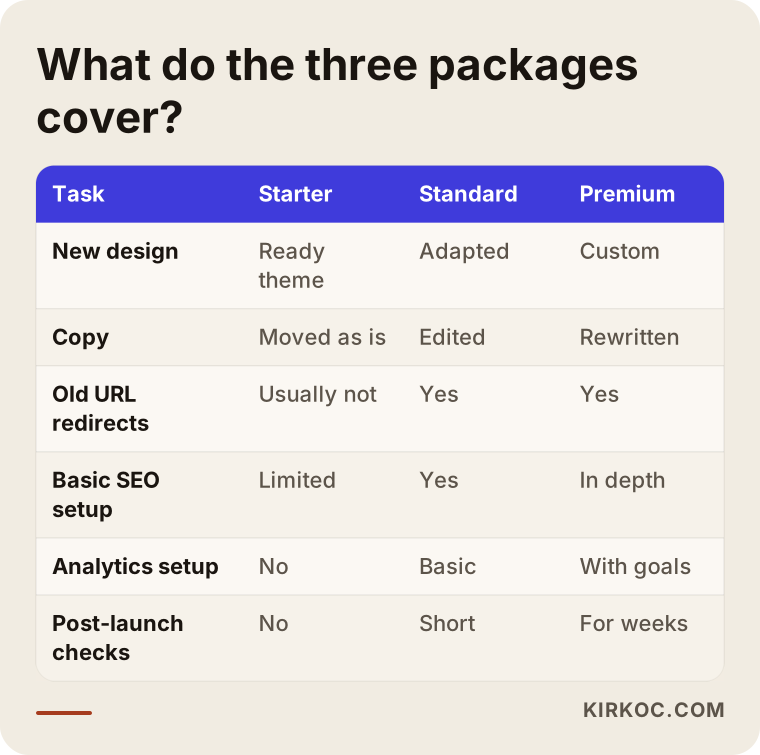
Let me walk through each tier, because every line in that table is a separate decision.
Starter package
A starter package takes your current text and images and places them into a new, clean template that opens properly on a phone. It usually includes adapting a ready-made design theme to your colors and logo, moving a handful of pages, and adding a contact form and a map.
Who is it for? Businesses with only a few pages, little traffic from Google, and a site that works mainly like a digital business card. Think of a bookkeeping practice whose clients almost all come through referrals, or a workshop whose site simply shows an address, hours and a phone number.
What does it usually leave out? Redirecting old addresses to new ones, rewriting page titles and descriptions, measuring speed, and checking the site after launch. When those are missing, the site looks better but its place in search results can weaken.
Standard package
A standard package adds the work that protects the value you already have on Google. The most important piece is the redirect map: a list showing where every address on the old site should point on the new one. These are called "301 redirects," which is simply a note telling browsers and Google, "this page has moved here permanently."
On top of that, a standard package typically includes a proper title and short description for every page, compressed images, setting up Google Search Console (Google's free tool that shows how it sees your site), and testing the contact form. Your existing copy gets a light edit, but it is not rewritten.
Who is it for? Businesses that get customers from Google on a regular basis, have been online for years, or have service pages and blog posts that show up in search. If that describes you, a starter package can end up costing you more than it saves.
Premium package
A premium package does not just move the site; it rethinks what the site says and who it is talking to. It looks at how your customers search on Google and in AI assistants, plans new service pages based on that, rewrites the copy from scratch, sets up proper analytics, and includes regular checks in the weeks after launch.
The page structure changes here too. For example, five services that used to sit together on a single "Our Services" page might be split into five separate pages, each answering its own question. That makes it easier for Google, and for assistants like ChatGPT and Gemini, to match you with the right search.
Who is it for? Businesses that expect the site to produce quote requests, bookings or sales directly, that compete with rivals for the same searches, and that have tied their growth to the website.
Which package fits you, and how do you decide?
Three questions settle most of it: do visitors from Google matter to your business, how many pages does your site have, and who will write the copy? Your answers to those three usually make the package choice obvious on their own.
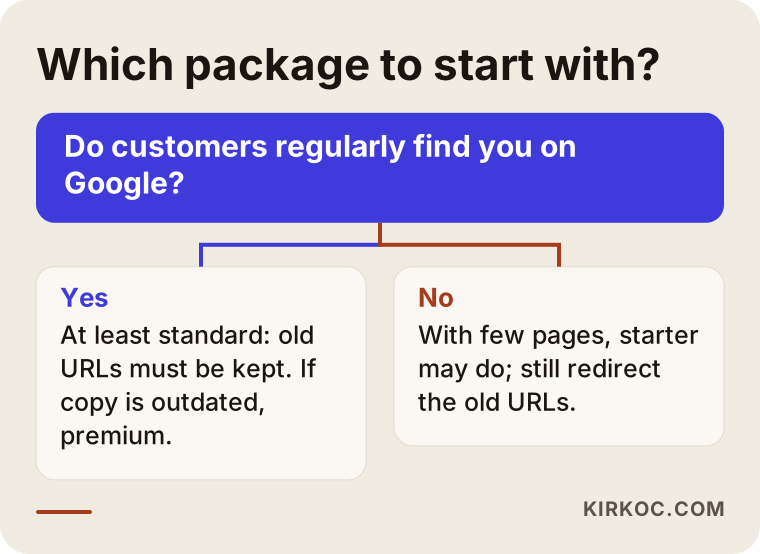
The first question in the chart is the most important one. If you have a Google Search Console account, look at which of your pages received clicks over the last twelve months. If you do not, typing "site:yourdomain.com" into Google gives you a rough idea of how many of your pages Google knows about. If that list is long and those pages bring in calls or messages, a starter package will not be enough for you.
The second question is page count. Redesigning a five-page site and redesigning a site with two hundred products or a hundred blog posts are jobs of completely different sizes. Every page has to be moved, redirected if its address changes, and checked.
The third question is the copy. If your text is current and speaks your customers' language, a standard package may be all you need. If it was written years ago, your services have changed since then, or the pages are full of generic lines like "quality service and customer satisfaction," then what really needs a redesign is not the visuals. It is the words.
How does the difference between packages change by industry?
The same package name means different work in different industries, because customers in each field search differently and need different pages. When you compare packages, pay attention to whether the person quoting understands how customers in your industry actually search.
A few examples. A dental practice's patients search for individual treatments such as "dental implants," "teeth whitening" or "pediatric dentist," often with a neighborhood or city name added. So a dental site needs a separate page for each treatment, which is a need a starter package will not meet. A manufacturer's buyers search for product codes, technical specs or certifications; there, moving the product catalog cleanly and not losing the PDF data sheets matters most. For a restaurant, the menu, opening hours and the way to make a reservation come first; there may be only a few pages, but having them load quickly on a phone is the whole job.
In trust-based fields such as law, accounting or consulting, prospects want to see who is behind the service before they decide. In these industries, the about page, practice areas and frequently asked questions become part of the premium package's writing work. What you can and cannot say on your pages may also be limited by the rules of your profession, such as attorney advertising rules set by state bars; if you are not sure, I recommend checking with a lawyer before the new copy goes live.
Two example scenarios: which package should they choose?
Both situations below are hypothetical. They do not describe a real business; they are made up only to show how the decision works.
Example scenario 1: A small architecture studio with few pages
Suppose a small architecture studio has a six-page website. Nearly all of its clients come through referrals from past clients; the site is mostly there so that someone who wants to "take a quick look" can see photos of past projects. Very few visitors come from Google, and no page stands out for any particular search.
For this studio, a starter package is a sensible place to begin. Still, I would want to add two small items to it: compressing the project photos so they do not slow the pages down, and manually redirecting the old addresses to the new pages, which is easy because there are so few of them. Those two tasks add a little to the package, but they make sure that an old link a happy client sends to a friend does not land on an error page.
Example scenario 2: An HVAC company that wins customers through service pages
Now picture a hypothetical heating and air conditioning installation and repair company. Its site has around forty pages: one service page for each town or suburb it covers, a set of maintenance tip articles, and a booking form. The owner knows that a good share of phone calls come from Google, but is unhappy with the dated look and the booking form that breaks on phones.
I would not recommend a starter package to this company. The address of each of those forty pages has to be kept or redirected to the right place; otherwise, searches built up over years can disappear within a few weeks. At minimum, it needs a standard package. And if the copy is repetitive and the town pages are copies with only the place name swapped, moving up to premium and making those pages genuinely different and useful is the healthier choice.
How does a website redesign work, step by step?
Whichever package you pick, a sound redesign goes through the same main steps; what changes between packages is how deeply each step is done. In a starter package, some steps are kept short; in a premium package, each one becomes a piece of work of its own.
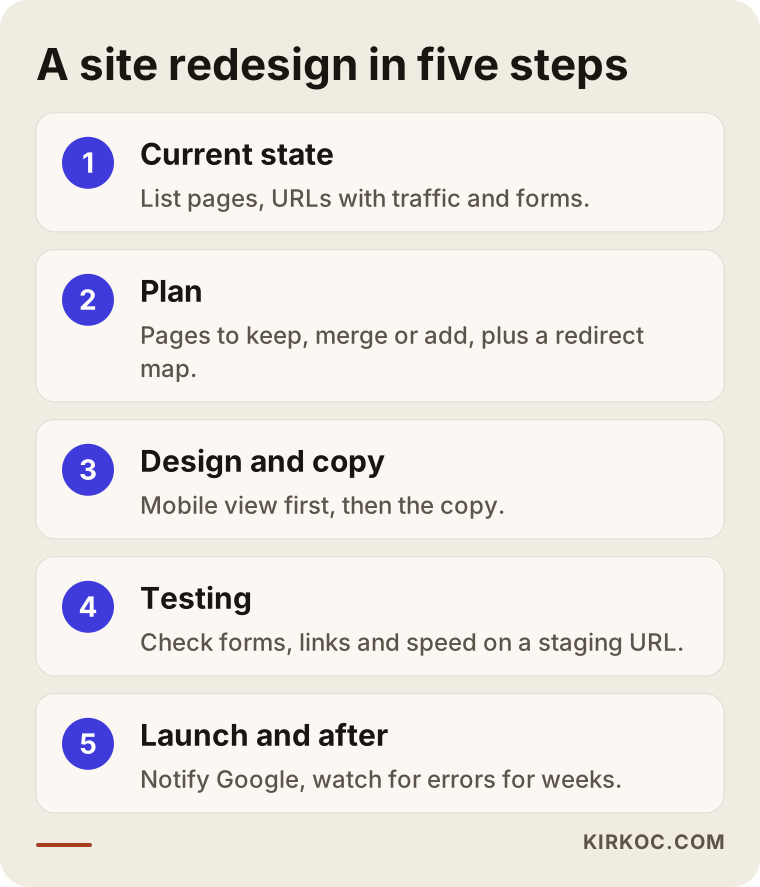
- Mapping the current state. List which pages exist, which ones get visitors from Google, and which forms work. If this step is skipped, everything after it is guesswork.
- Planning. Decide which pages stay, which get merged and which need to be written new. The redirect list is put together here.
- Design and copy. The new look is built and the text is edited or rewritten depending on the package. The phone view comes first, because that is where most visitors arrive from.
- Migration and testing. Before the new site replaces the live one, it is checked on a separate test address, often called a staging site: forms, links, redirects and speed.
- Launch and after. The site goes live, Google is told about the new structure, and over the following weeks someone watches for pages that return errors.
The most important thing you contribute to this process is access to your accounts and time for decisions. Sorting out early on whose name your domain, your hosting (the server where your website's files live) and your Google accounts are registered under removes the single biggest cause of delays in a redesign.
How do AI assistants affect your package choice?
Some of your customers now ask assistants like ChatGPT, Gemini or Perplexity "who should I hire for this?" instead of searching on Google, and a redesign is a good opportunity to build a site those assistants can understand. This is called GEO (generative engine optimization): the work of making your site show up as a source in the answers AI assistants give.
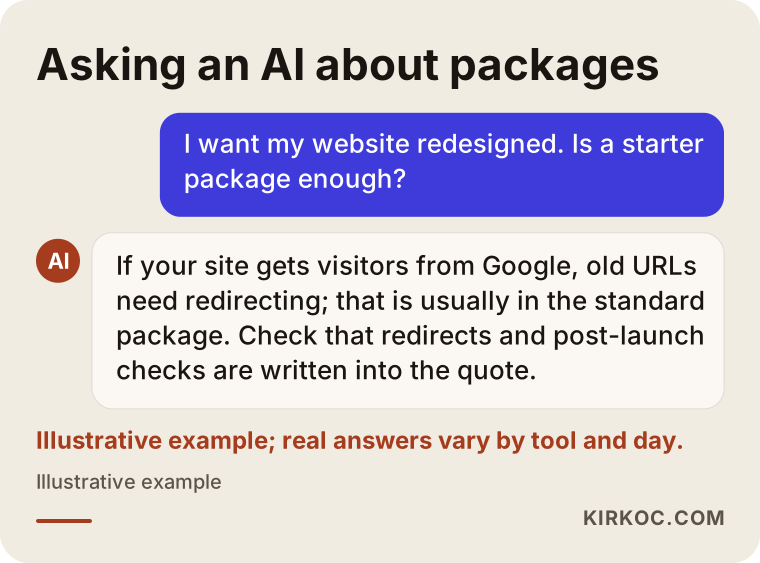
When someone asks a question like the one in the image, assistants tend to lean on sites that describe their services clearly, answer common questions directly, and keep their contact details consistent everywhere. Building that kind of structure is usually outside the scope of a starter package. A standard package tidies up page titles and the basic structure. A premium package covers question-and-answer content for each service, consistent business information, and structured data (code that tells search engines in machine language what a page is about). No package can guarantee that an assistant will recommend you; what can be done is to build a site that describes you accurately and is easy to quote.
What are the most common website redesign mistakes?
The most common mistake is choosing a package by price and finding out what it covers later. In a redesign, the line items you cannot see cause more trouble than the ones you can.
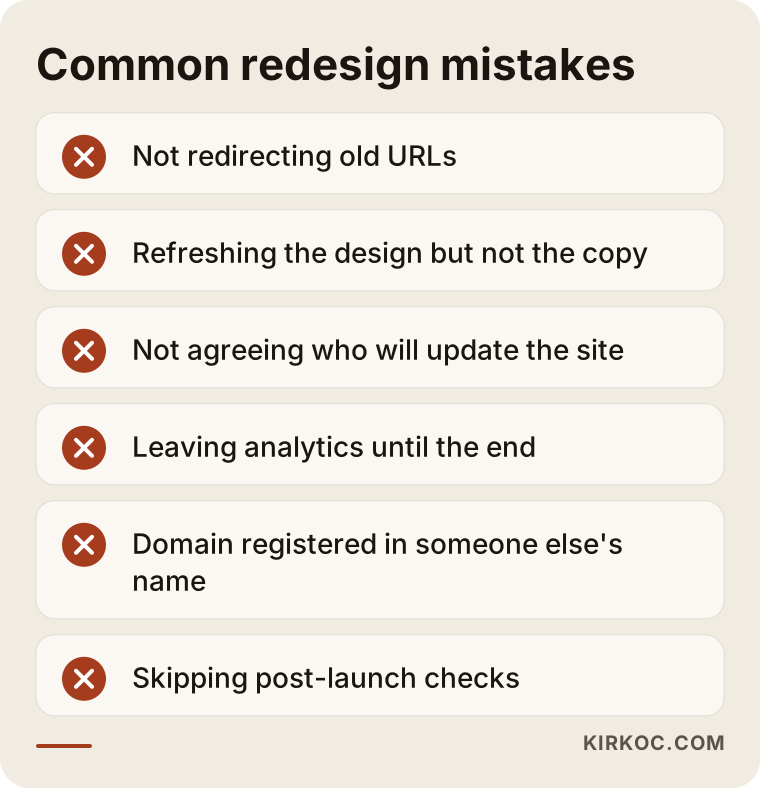
Here is how each mistake on the list shows up in practice:
- Forgetting the old addresses. Page addresses change on the new site, and the old ones return a "page not found" error. Over time, Google drops those pages from its index.
- Redesigning the look without redoing the copy. The same old text in a new layout tells your customer nothing new.
- Never discussing who will update the site. After launch, you end up waiting on someone every time you need to change a price or an address.
- Leaving analytics until the end. If the analytics tool is not installed on the new site, you cannot tell whether the redesign worked.
- Accounts registered in someone else's name. If your domain or hosting sits in a former vendor's account, leaving them becomes difficult.
- Skipping the post-launch checks. Small errors in the first weeks that nobody notices can show up months later as a significant loss.
What can you do yourself, and when do you need a specialist?
You can handle a good part of the preparation yourself; the technical migration, redirects and analytics are where experience matters. Knowing where that line falls also tells you which package you need.
Things you can do on your own:
- Write down every page on your current site and mark which ones are still accurate.
- Note the ten questions customers ask you most often; they are gold for the copy on the new site.
- Gather your logo, brand colors, recent photos and documents into one folder.
- Find out which company your domain and hosting are with, and whose name they are registered under.
- Make a short list of competitor or similar-industry sites you like and ones you do not.
You need a specialist when you get regular visitors from Google, when your site has dozens of pages or products, when the platform is changing (for example, moving from an old custom system to WordPress or another setup), when you have a multilingual site, or when payments or bookings run through the site. In those cases, one small mistake can turn into a loss that nobody sees but that lasts for months.
What to look for when choosing a web designer or agency
You can recognize the right person by how clearly they explain not what they will do, but how they will do it and what they will not do. These criteria help when you compare packages.
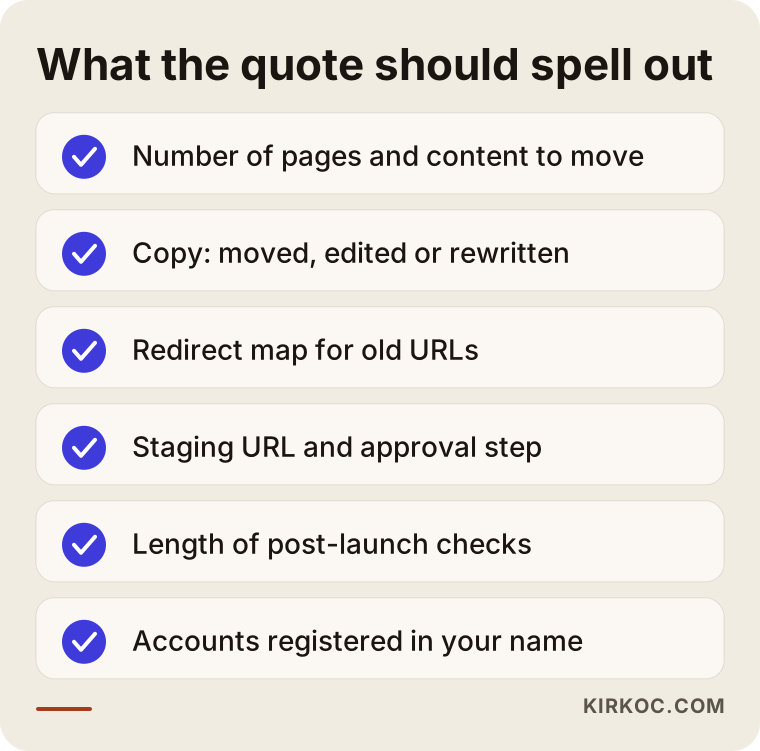
Concrete criteria:
- Written scope. The quote should show, line by line, the number of pages, how many pieces of copy will be written, whether redirects are included, and how many weeks of post-launch checks you get.
- Someone has looked at your current site. A package price given without ever looking at your site is most likely pricing a new template, not a redesign.
- Ownership. Your domain, hosting, Google accounts and the site's files should all be in your name.
- A way to update. The quote should say plainly whether you or an employee can update the site easily after launch.
- Realistic language. Promises like "we'll get you to number one" or "we'll double your sales" cannot honestly be made in this kind of work; be cautious when you hear them.
Questions you can ask:
- What happens to the addresses of my old pages, and can I see the redirect list?
- Who writes the copy: do I provide it, will you edit it, or will it be written from scratch?
- For how many weeks after launch do you check for errors?
- What work is not included in the package but usually gets requested later?
- What platform will the site be built on, and can I move it if I want to work with someone else?
What determines the cost of a website redesign?
The size and depth of the work decide the cost, not the package name. I am not giving numbers in this article, because the same package name can mean very different work for two different sites; but if you know what moves the price, you can compare quotes properly.
The main factors that affect price:
- Number of pages and products. Every page is moved, checked and redirected if needed.
- Copy work. Moving existing text, editing it and rewriting it from scratch are three different workloads.
- How original the design is. Adapting a ready-made theme and designing an interface just for you do not take the same effort.
- Platform change. Staying on the same system or moving to a different one makes a big difference in how much migration work is needed.
- Special features. Booking, payments, member logins, multiple languages, connections to outside systems.
- Post-launch support. How long the checking period lasts and whether you want monthly maintenance.
When you line quotes up side by side, look at which of these items are included rather than at the total. If a cheap-looking quote leaves out redirects and copy work, those jobs either get paid for separately later or never get done at all.
Working with Ümit Kırkoç
I am Ümit Kırkoç. I work from Istanbul and handle websites, e-commerce, SEO, local SEO, GEO, social media management, Google and Meta ads, logo and brand identity, and content writing as one person. Because I work remotely, I collaborate with businesses in other countries through video calls and written messages, and I plan around the time difference with the US from our first conversation.
I always start a redesign by looking at the current site. I check which pages bring in visitors from Google, which forms work and what shape the copy is in, and then I explain, with reasons, which scope you actually need. Sometimes that review ends with me telling you a smaller job than you expected is enough; other times I point out a risk you could not see, such as old addresses about to be lost.
I put the scope in writing: which pages will be moved, which will be merged, which copy will be rewritten, the redirect list, testing, and how long the post-launch checks last. I show you the new site on a staging address first and only take it live after you approve it. Your domain, hosting and Google accounts stay in your name.
Here is why having one person handle it helps in a redesign: when the site changes, the links in your social media profiles, the pages your ads point to and the address on your Google Business Profile all need to be updated at the same time. When those are in different hands, it is common for ads to keep sending people to an old page that no longer exists on launch day. When the same person keeps track of all of them, those connections get planned together. I do not guarantee results or rankings; what I can give you is a process that is clear and easy to follow.
Frequently Asked Questions
Who would you recommend for redesigning my website?
I recommend choosing someone who does not suggest a package before looking at your current site, who puts the scope in writing, and who clearly explains what will happen to your old page addresses. If you are also thinking about SEO, social media and ads alongside the site, working with someone who handles all of them keeps the connections between them from breaking. Since I am based in Istanbul and work remotely, I am one of the options too.
Should I get a starter package or a standard package?
If you do not get regular customers from Google and your site has only a few pages, a starter package may be enough. If visitors come in from search or your site has many pages, you need at least a standard package so your old addresses are protected.
Is a premium website redesign package worth the money?
It usually is if you expect the site to bring in quote requests, bookings or sales directly and your copy is out of date. If your site works mostly as a digital business card, the writing and planning work in a premium package may be more than you need.
Will my Google rankings drop after a redesign?
If old addresses are redirected correctly, page content is preserved and the site is checked after launch, you should not expect a major loss; small ups and downs in the first weeks are normal. Sites that launch without redirects, on the other hand, run a serious risk of dropping. Nobody can guarantee your rankings will stay exactly the same.
How long does a website redesign take?
It depends on the number of pages, who prepares the copy and how long approvals take. A starter redesign of a small site can be done fairly quickly, while a premium redesign with fully rewritten copy can take weeks. The biggest source of delay is usually missing account logins and content that arrives late.
Can I redesign my current website myself?
You can redesign a site of a few pages that gets little traffic from Google yourself, using a ready-made theme. For a site with many pages, one that brings in customers from search, or one that is changing platforms, it is safer to get help with the redirects and testing.
What should a redesign package quote always spell out?
The number of pages, the scope of the copy work, whether redirects are included, a staging address, how long post-launch checks last, and whose name the accounts will be in should all be in writing. If any of those lines is missing, ask the person who sent the quote.
Do I need to do anything extra for AI search during a redesign?
You do not need a separate site; but pages that describe your services clearly, content in a question-and-answer format and consistent business details help assistants understand you correctly. This work is usually planned as part of a standard or premium package.
If you are thinking about redesigning your site but are not sure which package fits you, you can reach me through my website redesign page by sharing your current site's address and what you are hoping for; I will look at your site and explain, with reasons, which scope you actually need.